
ZINUS FDPBU-K
ZINUS Shalini Upholstered Platform Bed Frame Instruction Manual
Model: FDPBU-K
Product Overview
The ZINUS Shalini Upholstered Platform Bed Frame is designed to provide both comfort and convenience. This bed frame features a sophisticated design with diamond pattern stitching and button tufting on the headboard. It includes integrated USB ports for charging devices and a sturdy wood slat platform that eliminates the need for a box spring. The reliable steel frame ensures durability for long-term use.

Image: The ZINUS Shalini Upholstered Platform Bed Frame in grey, showcasing its elegant design and integrated headboard.
Setup and Assembly
Your ZINUS Shalini Platform Bed Frame is designed for straightforward assembly. All necessary parts, tools, and instructions are conveniently located within the zippered compartment of the headboard. It is recommended that two people assemble the bed frame for ease and efficiency.
Included Components:
- Upholstered Headboard with integrated USB ports
- Side Rails
- Footboard
- Center Support Bar with Legs
- Wood Slats
- Assembly Hardware and Tools (located in headboard compartment)

Image: The bed frame components, including tools and hardware, are efficiently packed inside the headboard's zippered compartment for easy access.
Assembly Steps:
- Unpack all components from the headboard's zippered compartment and verify all parts are present against the parts list in your manual.
- Attach the side rails to the headboard and footboard using the provided hardware. Ensure all connections are secure.
- Install the center support bar and its legs for additional stability.
- Lay out the wood slats across the bed frame. The slats are designed to be spaced appropriately to support your mattress without a box spring.
- Ensure all connections are tightened before placing your mattress on the frame.

Image: Detail of the sturdy wood slats and steel frame, designed to provide robust mattress support.

Image: The wood slats are designed to be secured in place, minimizing movement and ensuring noise-free use.
Operating Instructions
Using the Integrated USB Ports:
The ZINUS Shalini Platform Bed Frame features four integrated USB ports, two on each side of the headboard. These ports allow you to conveniently charge your electronic devices while relaxing in bed.
- Ensure the bed frame's power cord is securely plugged into a functional wall outlet. The power cord for the USB ports is typically located at the back of the headboard.
- Locate the USB ports on either side of the headboard.
- Plug your device's USB charging cable into one of the available ports.
- Your device should begin charging automatically.

Image: A close-up view of the dual USB ports integrated into the side of the headboard, demonstrating a device being plugged in.

Image: A tablet conveniently charging via one of the integrated USB ports on the headboard, illustrating the practical functionality.

Image: A user comfortably using a laptop while in bed, with the device powered by the bed frame's integrated USB port.
Maintenance
- Upholstery Care: The upholstered fabric of the headboard and frame should be dry cleaned only. Avoid using liquid cleaners or harsh chemicals, as these may damage the fabric.
- Frame Cleaning: For the steel frame components, wipe with a soft, damp cloth. Avoid abrasive cleaners.
- Regular Checks: Periodically check all bolts and screws to ensure they remain tight. Loose connections can lead to instability and noise.
- Slat Inspection: Inspect the wood slats regularly for any signs of wear or damage. Replace any damaged slats to maintain proper mattress support.
Troubleshooting
| Problem | Possible Cause | Solution |
|---|---|---|
| Bed frame is squeaking or unstable. | Loose bolts or connections. | Tighten all bolts and screws on the frame, especially where the side rails connect to the headboard and footboard, and on the center support legs. |
| USB ports are not charging devices. | Power cord not plugged in; faulty outlet; damaged cable. | Ensure the bed frame's power cord is fully plugged into a working wall outlet. Test the outlet with another device. Try a different USB cable. If the issue persists, contact customer support. |
| Slats are moving or making noise. | Slats not properly secured or damaged. | Ensure all slats are correctly positioned and secured according to the assembly instructions. If any slats are damaged, they may need to be replaced. |
Specifications
| Feature | Detail |
|---|---|
| Model Number | FDPBU-K |
| Size | King |
| Color | Grey |
| Product Dimensions | 84"L x 78"W x 39.5"H |
| Upholstery Fabric Type | Knitted Polyester |
| Headboard Material | Fabric or Knitted Polyester |
| Finish Type | Steel |
| Weight Limit | 700 lbs (King size) |
| Item Weight | 84.8 Pounds |
| Included Components | Headboard, Foundation, Wood Slats, USB Ports |
| Assembly Required | Yes |
| Special Feature | No Box Spring Needed, Integrated USB Ports |
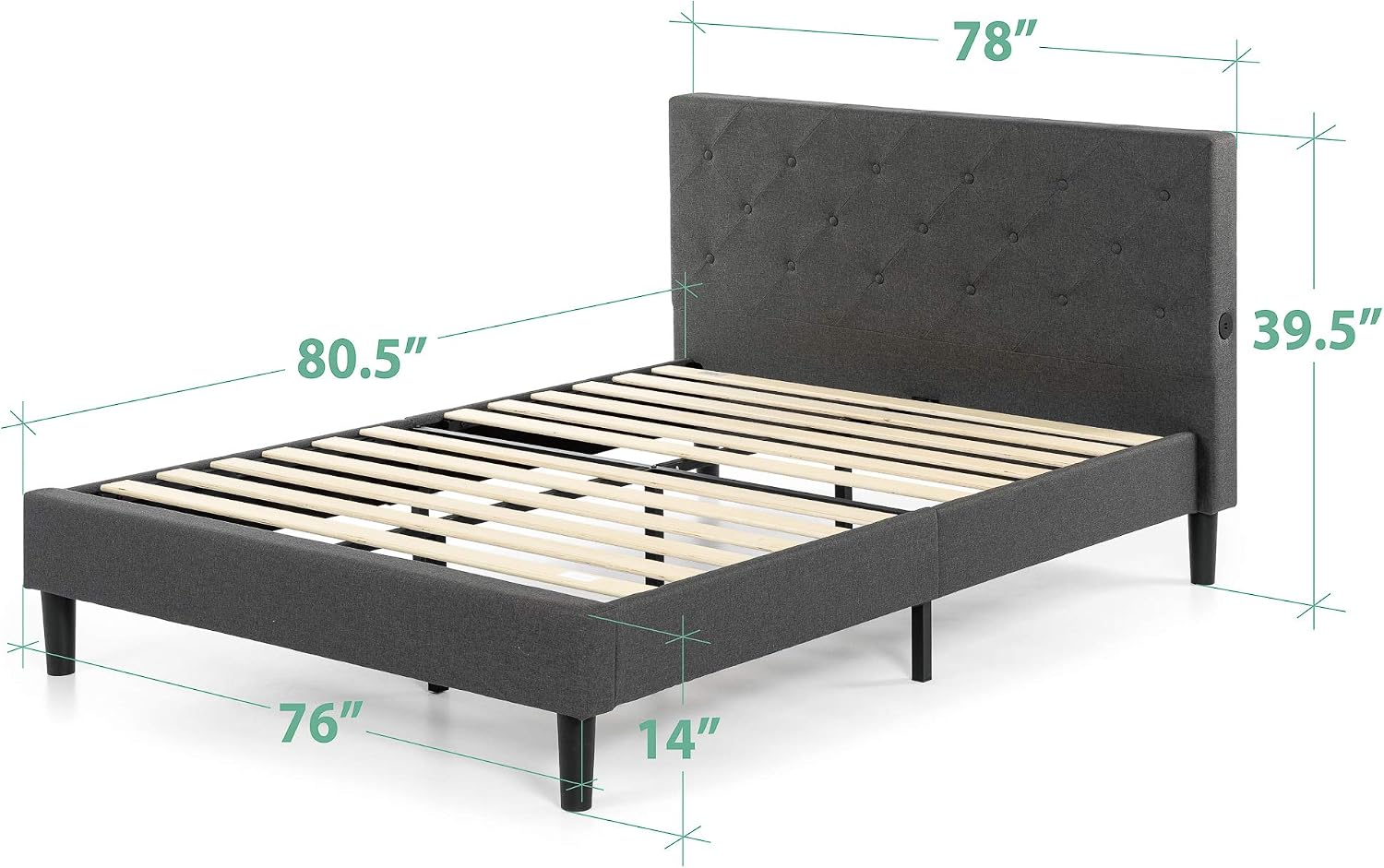
Image: A diagram illustrating the key dimensions of the ZINUS Shalini Platform Bed Frame.
Warranty Information
The ZINUS Shalini Upholstered Platform Bed Frame is backed by a 5-year limited warranty. This warranty covers manufacturing defects in materials and workmanship under normal use. Please retain your proof of purchase for warranty claims.
For full details regarding warranty coverage, terms, and conditions, please refer to the complete warranty document included with your product or visit the official ZINUS website.
Customer Support
Should you have any questions, require assistance with assembly, or need to report a missing or damaged part, please contact ZINUS Customer Support. Our team is available to help ensure your satisfaction.
For the most up-to-date contact information and support resources, please visit the ZINUS Store on Amazon or the official ZINUS website.
Related documentsFDPBU-K


Ask a question about this manual
Ask about setup, troubleshooting, compatibility, parts, safety, or missing instructions. Manuals+ will review the question and use this page’s manual context to help answer it.