
Mobicool MT35W
Mobicool MT35W Portable Thermoelectric Cooler User Manual
Model: MT35W
Introduction
Thank you for choosing the Mobicool MT35W Portable Thermoelectric Warming and Cooling Cooler. This versatile appliance is designed to provide convenient temperature control for your food and beverages, whether you need to keep them cool or warm. With its generous 34-liter capacity and dual power options (110V AC for home and 12V DC for vehicle), it's an ideal companion for travel, camping, picnics, and everyday use. Its built-in wheels and handle ensure easy portability.

Image: The Mobicool MT35W cooler in its closed state, showcasing its integrated wheels and extendable handle for easy transport.
Safety Information
Please read all safety instructions carefully before operating the appliance. Failure to follow these instructions may result in electric shock, fire, and/or serious injury.
- Ensure the power supply matches the voltage specified on the appliance.
- Do not immerse the cooler, cord, or plug in water or other liquids.
- Keep ventilation openings clear and unobstructed to prevent overheating.
- Do not use the appliance if the power cord or plug is damaged.
- Unplug the cooler from the power source before cleaning or maintenance.
- This appliance is not intended for use by persons (including children) with reduced physical, sensory, or mental capabilities, or lack of experience and knowledge, unless they have been given supervision or instruction concerning use of the appliance by a person responsible for their safety.
- Do not use abrasive cleaners or sharp objects inside the cooler.
Package Contents
Verify that all items are present in the package:
- Mobicool MT35W Thermoelectric Cooler
- AC Power Cable (for 110V household outlets)
- DC Power Cable (for 12V vehicle outlets)
- 2 x 5A Fuses (spare)
- 2 Removable Divider Grids
- User Manual (this document)
Setup
Unpacking and Initial Inspection
Carefully remove the cooler and all accessories from the packaging. Inspect the unit for any signs of damage during transit. If any damage is found, do not operate the unit and contact customer support immediately.
Positioning the Cooler
Place the cooler on a flat, stable surface. Ensure there is adequate ventilation around the unit, especially near the fan and vents on the lid, to allow for proper heat dissipation. Avoid placing the cooler in direct sunlight or near heat sources.
Using the Removable Divider Grids
The MT35W comes with two removable divider grids that allow you to organize the interior space according to your needs. Simply slide them into the designated slots inside the cooler to create separate compartments.

Image: The spacious interior of the Mobicool MT35W, showing the slots for the removable divider grids to customize storage.
Operating Instructions
Powering the Cooler
The MT35W offers two power options:
- AC Power (110V): For use with standard household electrical outlets. Connect the AC power cable to the cooler's AC input port and then plug it into a wall outlet.
- DC Power (12V): For use in vehicles via a cigarette lighter socket. Connect the DC power cable to the cooler's DC input port and then plug it into your vehicle's 12V outlet.
Ensure the power cable is securely connected before turning on the unit.
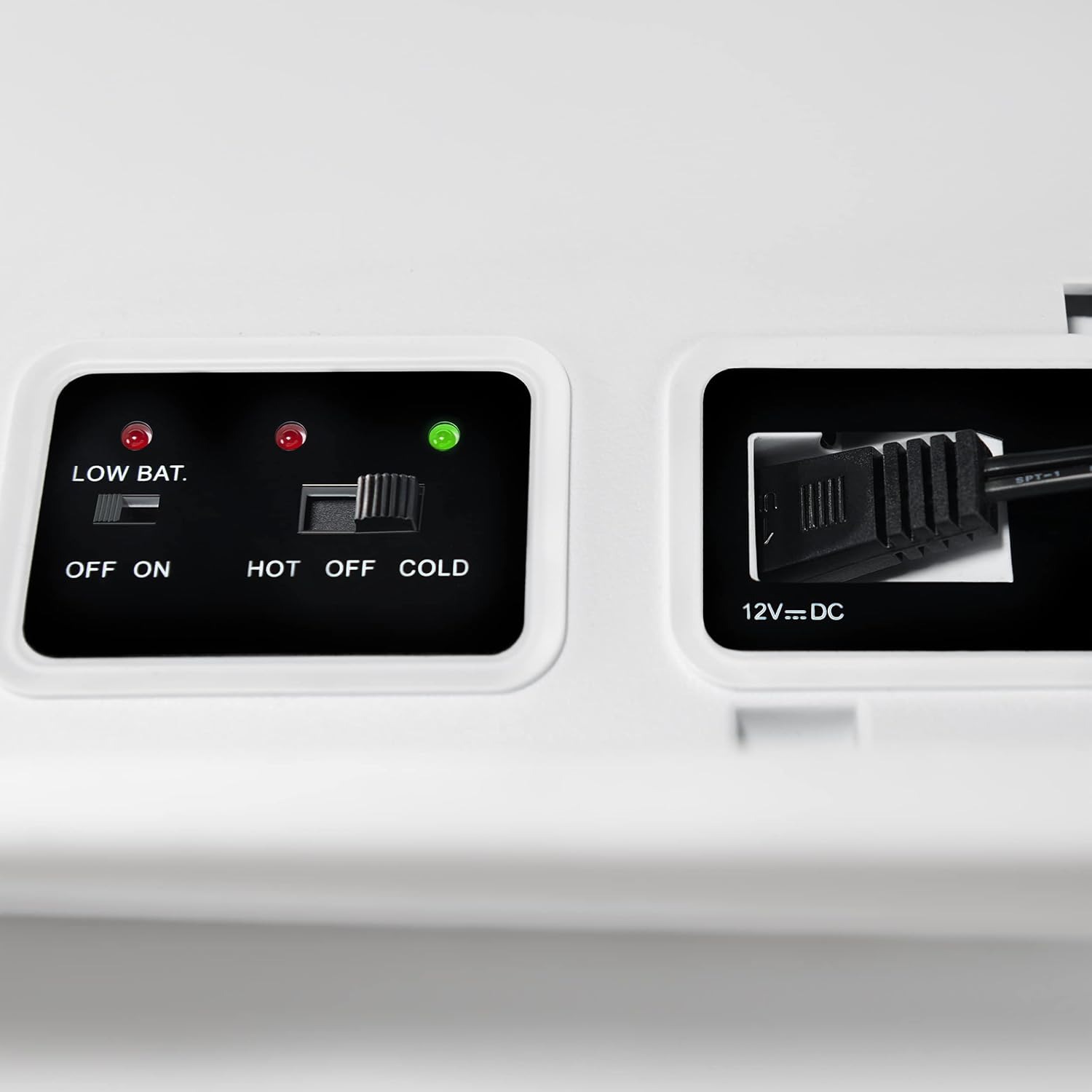
Image: A detailed view of the control panel, highlighting the 12V DC power input port and the control switches.
Selecting Cooling or Warming Mode
The control panel on the lid allows you to switch between cooling and warming modes:

Image: The control panel of the Mobicool MT35W, showing the "HOT", "OFF", "COLD" selector switch and the "ON", "OFF" power switch, along with the "LOW BAT" indicator.
- Power ON/OFF: Use the "ON/OFF" switch to turn the unit on or off. The green indicator light will illuminate when the unit is powered on.
- Cooling Mode: Slide the "HOT/OFF/COLD" switch to the "COLD" position. The cooler will begin to cool its contents to approximately 34°F (19°C) below ambient temperature. For best results, pre-chill items before placing them in the cooler.
- Warming Mode: Slide the "HOT/OFF/COLD" switch to the "HOT" position. The cooler will begin to warm its contents to approximately 43°F (24°C) above ambient temperature. This mode is ideal for keeping pre-heated food warm.
- Low Battery Indicator: A "LOW BAT." indicator light is present on the control panel. If this light illuminates, it indicates a low battery voltage when operating on 12V DC, and the unit may reduce performance or shut off to protect your vehicle's battery.
Note: Thermoelectric coolers are designed to maintain temperature, not rapidly change it. For optimal performance, place pre-chilled or pre-heated items inside.
Portability Features
The MT35W is designed for easy transport:
- Wheels: The integrated wheels allow you to easily roll the cooler, reducing the effort required to move it, especially when full.
- Dolly/Carry Handle: The extendable handle can be used to pull the cooler on its wheels or to carry it when needed.

Image: A close-up view of one of the durable, integrated wheels on the Mobicool MT35W, designed for smooth portability.
Maintenance
Cleaning the Cooler
Regular cleaning will help maintain the performance and longevity of your cooler:
- Always unplug the cooler from the power source before cleaning.
- Wipe the interior and exterior surfaces with a damp cloth and mild detergent.
- Do not use abrasive cleaners, solvents, or harsh chemicals, as these can damage the plastic surfaces.
- Ensure the cooler is completely dry before reconnecting it to power or storing it.
- Periodically check and clean the fan and ventilation grilles on the lid to ensure proper airflow. Use a soft brush or vacuum cleaner to remove dust and debris.
Fuse Replacement
The 12V DC plug contains a replaceable fuse. If the cooler stops working when connected to a 12V DC source, the fuse may need to be replaced.
- Unplug the 12V DC cable from both the cooler and the power source.
- Unscrew the tip of the 12V DC plug.
- Remove the old fuse and replace it with a new 5A fuse (two spares are included in your package).
- Screw the tip back onto the plug securely.
Troubleshooting
| Problem | Possible Cause | Solution |
|---|---|---|
| Cooler is not turning on. |
|
|
| Cooling/Warming performance is poor. |
|
|
| "LOW BAT." indicator is on (12V DC). |
|
|
If the problem persists after trying these solutions, please contact Mobicool customer support.
Specifications
| Feature | Detail |
|---|---|
| Model Name | MT35W |
| Brand | Mobicool |
| Capacity | 34 Liters (approx. 48 cans) |
| Power Options | 110V AC, 12V DC |
| Cooling Performance | Cools to approx. 34°F (19°C) below ambient temperature |
| Warming Performance | Warms to approx. 43°F (24°C) above ambient temperature |
| Product Dimensions (LxWxH) | 21.26" x 13.78" x 17.52" (54 cm x 35 cm x 44.5 cm) |
| Item Weight | 22.9 Pounds (10.4 kg) |
| Material | Plastic, Polyurethane Insulation |
| Special Features | Portable, Built-in Wheels, Dolly/Carry Handle, Removable Divider Grids |
| UPC | 190702000542 |

Image: The Mobicool MT35W cooler with its key dimensions (length, width, height) clearly indicated for reference.
Warranty and Support
Manufacturer's Warranty
Mobicool products are backed by a manufacturer's warranty. Please refer to the warranty card included with your purchase or visit the official Mobicool website for detailed warranty terms and conditions. Typically, a 1-year manufacturer warranty covers defects in materials and workmanship from the date of purchase.
Customer Support
For technical assistance, troubleshooting, or warranty claims, please contact Mobicool customer support:
- Website: www.mobicool.com (Check for regional support contacts)
- Email: Refer to the website for specific contact emails.
- Phone: Refer to the website for specific contact phone numbers.
When contacting support, please have your product model (MT35W) and proof of purchase readily available.
Related documentsMT35W


Ask a question about this manual
Ask about setup, troubleshooting, compatibility, parts, safety, or missing instructions. Manuals+ will review the question and use this page’s manual context to help answer it.