
1. Product Overview
This manual provides instructions for the Plantronics CS510-XD Wireless Headset System. This system is designed for business communication, offering wireless connectivity and a noise-canceling microphone.
Important Compatibility Note: The CS510-XD series is not cross-compatible with the standard CS510 or C052 models. Headsets from the XD series cannot be used with charging bases of non-XD variants, and vice-versa.
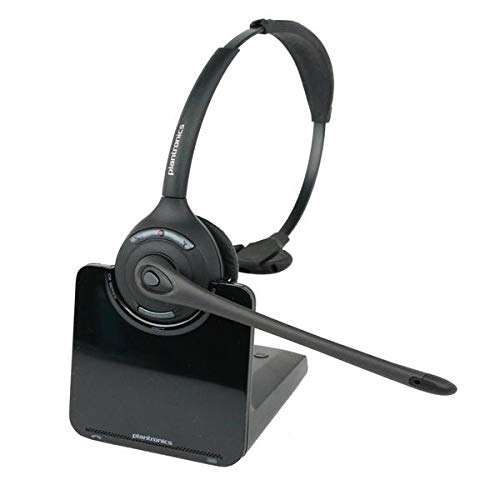
Figure 1: Plantronics CS510-XD Wireless Headset System. The image shows the over-ear headset docked in its charging base. Red text annotations point to "red XD here" on the headset and a "CS500XD EXTREME DENSITY" label on the base, indicating the specific XD series model.
Package Contents:
- Plantronics CS510-XD Headset
- Plantronics CS510-XD Charging Base
- Protective Case
- Headset Advisor Wipe (included in bundle)
- Power Adapter
- Telephone Interface Cable
2. Setup Instructions
2.1 Connecting the Base
- Connect the power adapter to the charging base and plug it into a power outlet.
- Connect the telephone interface cable from the charging base to your desk phone's headset port or handset port, depending on your phone model. Consult your phone's manual for specific port locations.
2.2 Charging the Headset
Place the headset into the charging cradle on the base. The charging indicator light on the base will illuminate to confirm proper connection and charging. Allow the headset to charge for at least 20 minutes before first use, or until fully charged for optimal battery life.
2.3 Initial Pairing (if required)
The headset and base are typically pre-paired. If pairing is required, place the headset in the charging cradle. Press and hold the pairing button on the base until the indicator light flashes. Then, press and hold the call control button on the headset until its indicator light flashes. Release both buttons. The lights will become solid when pairing is successful.
3. Operating the Headset
3.1 Basic Call Functions
- Answering/Ending a Call: Press the Call Control button on the headset.
- Volume Adjustment: Use the Volume Up (+) and Volume Down (-) buttons on the headset.
- Mute/Unmute: Press the Mute button on the headset.
3.2 Special Features
- Conference Calling: Up to four CS510-XD headsets can be conferenced on a single charging base. To add a guest headset, place the guest headset into the primary headset's charging cradle. The primary headset's indicator light will flash. Press the Call Control button on the primary headset to accept the guest.
- Noise-Canceling Microphone: The integrated microphone is designed to reduce background noise for clearer communication.
4. Maintenance
4.1 Cleaning
Regularly clean the headset and base with a soft, dry cloth. For hygienic cleaning of the headset, use the provided Headset Advisor Wipe or a similar non-abrasive, alcohol-free wipe. Avoid using harsh chemicals or submerging any part of the device in liquid.
4.2 Battery Care
To maximize battery life, fully charge the headset before initial use. Store the headset in its charging cradle when not in use to ensure it is always ready. Avoid exposing the battery to extreme temperatures.
5. Troubleshooting
| Problem | Possible Cause | Solution |
|---|---|---|
| No dial tone/No audio | Incorrect cable connection, headset not charged, headset not paired. |
|
| Poor audio quality | Low battery, interference, microphone position. |
|
| Headset not charging | Improper placement, power issue. |
|
| Cannot conference headsets | Incompatible models, incorrect procedure. |
|
6. Specifications
| Model Name | CS510-XD |
| Brand | Plantronics |
| Connectivity Technology | Wireless |
| Wireless Communication Technology | Bluetooth |
| Earpiece Shape | Over-ear |
| Form Factor | Over Ear |
| Control Method | Touch |
| Special Features | Conference up to 4 headsets on a single charging base, Noise canceling microphone |
| Compatible Devices | Telephones, Computers, Gaming Consoles |
| Material | Plastic |
| UPC | 811723032458 |
| ASIN | B08J2QPRVV |
7. Warranty and Support
This Plantronics CS510-XD Wireless Headset System is sold as a Renewed product. Warranty coverage for renewed products typically differs from new products. Please refer to the specific warranty terms provided by the seller (HBTphoneguy) or the Amazon Renewed program at the time of purchase for details regarding coverage, duration, and claims process.
For technical support or further assistance, please contact the seller or refer to the official Plantronics (now Poly) support resources online.


