
LIORQUE YGH5250
LIORQUE Digital Kitchen Timer Instruction Manual
Model: YGH5250
Brand: LIORQUE
Introduction
Thank you for purchasing the LIORQUE Digital Kitchen Timer. This versatile timer is designed for various applications, including cooking, studying, fitness, and classroom management. Featuring a large LED display, magnetic back, and adjustable volume and brightness, it offers convenience and efficiency for your daily timing needs.

Image: The LIORQUE Digital Kitchen Timer shown in various usage scenarios, highlighting its versatility for daily tasks.
Product Features
- Easy Twist Operation: Simply rotate the outer ring to adjust time in 5-second increments. Press the ST/SP button to start or stop.
- Magnetic Count Up/Down Timer: Functions as both a countdown timer (from 99m55s to 0) and a stopwatch (from 0 to 99m55s). Features a strong magnet for attachment to metal surfaces.
- Large LED Display & Oversize Digits: A 3-inch black screen with white numbers provides clear visibility.
- Adjustable Volume: Three alarm volume levels (0dB, 60-75dB, 80-90dB) to suit different environments. Mute mode offers screen flashing for silent alerts.
- Two Brightness Modes: Choose between Constant Light mode for continuous illumination or Energy Saving mode for battery conservation (display darkens after 5s, shuts down after another 5s of inactivity).
- Multifunctional Use: Ideal for kitchen, kids' routines, classroom, meetings, and exercise.

Image: The LIORQUE timer's aluminum alloy construction is compared to a plastic alternative, emphasizing its metal texture, good quality, ease of cleaning, no paint loss, and durability.
Package Contents
- 1 x LIORQUE Digital Kitchen Timer (Model YGH5250)
- 3 x AAA Batteries (pre-installed or included separately)
- 1 x User Manual (this document)
Product Overview
The LIORQUE Digital Kitchen Timer features a sleek, circular design with a large central LED display. The outer ring serves as the primary control for setting time. On the back, you will find the battery compartment, a volume switch, and a brightness mode switch, along with powerful magnets for convenient placement.

Image: Front view of the LIORQUE Digital Kitchen Timer, showcasing its large, clear LED display.

Image: The timer magnetically attached to a refrigerator, demonstrating its powerful magnetic back for easy placement.
Setup
Battery Installation
- Locate the battery compartment on the back of the timer.
- Open the battery cover.
- Insert 3 AAA batteries, ensuring correct polarity (+/-).
- Close the battery cover securely.
- The display should illuminate, indicating the timer is ready for use.
Operating Instructions
1. Setting the Timer (Countdown)
- To set the countdown time, simply rotate the outer ring clockwise to increase the time or counter-clockwise to decrease it.
- A slow rotation adjusts the time in 5-second increments.
- A fast rotation adjusts the time in 1-minute increments.
- The maximum countdown time is 99 minutes and 55 seconds.
- Once the desired time is set, press the ST/SP button (the small circle icon at the bottom of the display) to start the countdown.
- To pause the countdown, press the ST/SP button again. Press it once more to resume.
- When the timer reaches zero, it will alarm according to your volume settings.

Image: The timer demonstrating its count-up function for exercise and count-down function for a facial routine.
2. Using as a Stopwatch (Count-up)
- To use the timer as a stopwatch, ensure the display shows "00:00". If not, rotate the outer ring counter-clockwise until it resets to zero.
- Press the ST/SP button to start counting up.
- To pause the stopwatch, press the ST/SP button again. Press it once more to resume.
- The stopwatch can count up to 99 minutes and 55 seconds.
3. Adjusting Volume Levels
On the back of the timer, locate the volume switch. You can select from three levels:
- High (80-90dB): For noisy environments like a busy kitchen.
- Low (60-75dB): For general use.
- Mute (0dB): For quiet environments such as libraries or classrooms. In mute mode, the screen will flash to indicate the timer has finished.
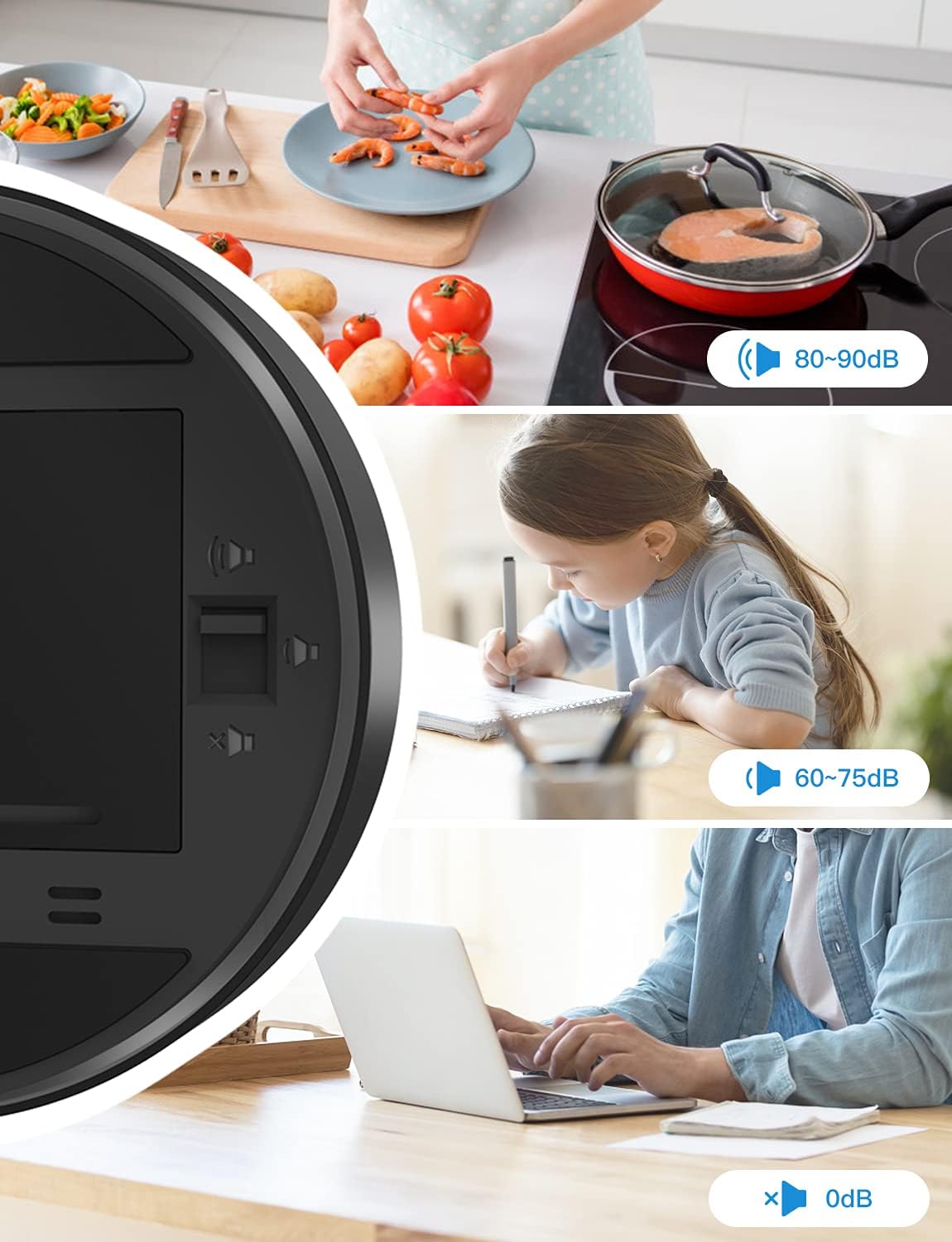
Image: Illustration of the three volume settings and their recommended uses, from loud for cooking to silent for quiet study or office work.
4. Selecting Brightness Modes
On the back of the timer, locate the brightness switch. There are two modes available:
- Constant Light Mode: The display remains continuously lit at a consistent brightness.
- Energy Saving Mode: To conserve battery life, the digits will dim after 5 seconds of no operation and the display will shut down completely after another 5 seconds. The display will reactivate with any interaction (e.g., rotating the ring or pressing the button).

Image: Visual representation of the Constant Light mode, where the display remains bright, and the Energy Efficient mode, where the display dims and turns off to save battery.
Maintenance
- Clean the timer with a soft, dry cloth. Do not use abrasive cleaners or immerse the device in water.
- If the timer will not be used for an extended period, it is recommended to remove the batteries to prevent leakage.
- Store the timer in a cool, dry place away from direct sunlight and extreme temperatures.
Troubleshooting
| Problem | Possible Cause | Solution |
|---|---|---|
| Timer not turning on / Display blank. | Batteries are dead or incorrectly installed. | Replace batteries with new AAA batteries, ensuring correct polarity. |
| Display is dim or flickering. | Low battery power; Energy Saving Mode is active. | Replace batteries. Check the brightness switch on the back and set it to Constant Light mode if desired. |
| Alarm is not sounding. | Volume is set to Mute (0dB). | Adjust the volume switch on the back to High or Low. In Mute mode, the screen will flash. |
| Timer not responding to rotation. | Device malfunction or temporary software glitch. | Remove and reinsert batteries to perform a soft reset. If the issue persists, contact customer support. |
Specifications
| Feature | Detail |
|---|---|
| Model Number | YGH5250 |
| Brand | LIORQUE |
| Color | Black |
| Material | Plastic |
| Product Dimensions | 3.74"D x 3.35"W x 1.46"H |
| Screen Size | 3.5 Inches |
| Volume Levels | 3 (High, Low, Mute) |
| Brightness Modes | 2 (Constant Light, Energy Saving) |
| Power Source | 3 x AAA Batteries (included) |
| Item Weight | 4.2 ounces |
Warranty and Support
LIORQUE products are manufactured with high-quality standards. For any questions, concerns, or technical support regarding your Digital Kitchen Timer, please refer to the contact information provided with your purchase or visit the official LIORQUE website. Please retain your proof of purchase for warranty claims.
Related documentsYGH5250


Ask a question about this manual
Ask about setup, troubleshooting, compatibility, parts, safety, or missing instructions. Manuals+ will review the question and use this page’s manual context to help answer it.