1. Introduction
The WORX WX394.6 Cordless Rotary Hammer is a 3-in-1 multifunction tool designed for drilling, hammer drilling, and screwdriving. It features a compact and ergonomic design, measuring 7.6 x 25.9 x 22.2 cm and weighing 1.6 kg. The tool is powered by two 20V lithium-ion batteries, providing a consistent 40W electrical power. It delivers 1.5 J of impact energy, 30 Newton-meters of torque, and a speed of 1100 RPM, enabling it to handle various tasks efficiently. Key features include an integrated LED light for enhanced visibility in low-light conditions and a lightweight construction to reduce user fatigue during prolonged operation.

Figure 1: WORX WX394.6 Cordless Rotary Hammer with included accessories.
2. Key Features
- Excellent Performance: With a powerful 1.5 J impact energy, this rotary hammer can easily drill into concrete up to 18 mm, wood up to 20 mm, and steel up to 13 mm.
- 3-in-1 Functionality: The WORX cordless rotary hammer combines three functions in one convenient tool: drilling, hammer drilling, and screwdriving.
- Variable Speed with Reverse: Variable speed control allows for optimal speed selection across different applications, providing flexibility for various tasks.
- PowerShare Battery System: The WORX PowerShare battery is compatible with all WORX 20V, 40V, and 80V tools, outdoor power equipment, and lifestyle products.
- Integrated LED Light: Enhances visibility in dimly lit work areas.
- Lightweight Design: Reduces user fatigue during extended operation.

Figure 2: The WORX PowerShare battery system, highlighting cross-compatibility.
3. Package Contents
The complete kit includes the following components:
- 1 x WORX WX394.6 Cordless Rotary Hammer
- 2 x WORX 2.0 Ah Lithium-ion Batteries
- 1 x 1-Hour Charger
- 1 x Carrying Case
- 2 x SDS Drill Bits (specific sizes may vary)
- 4 x Screwdriver Bits (various types)
- 2 x HSS Drill Bits (5 mm and 6 mm)
- 1 x Chuck
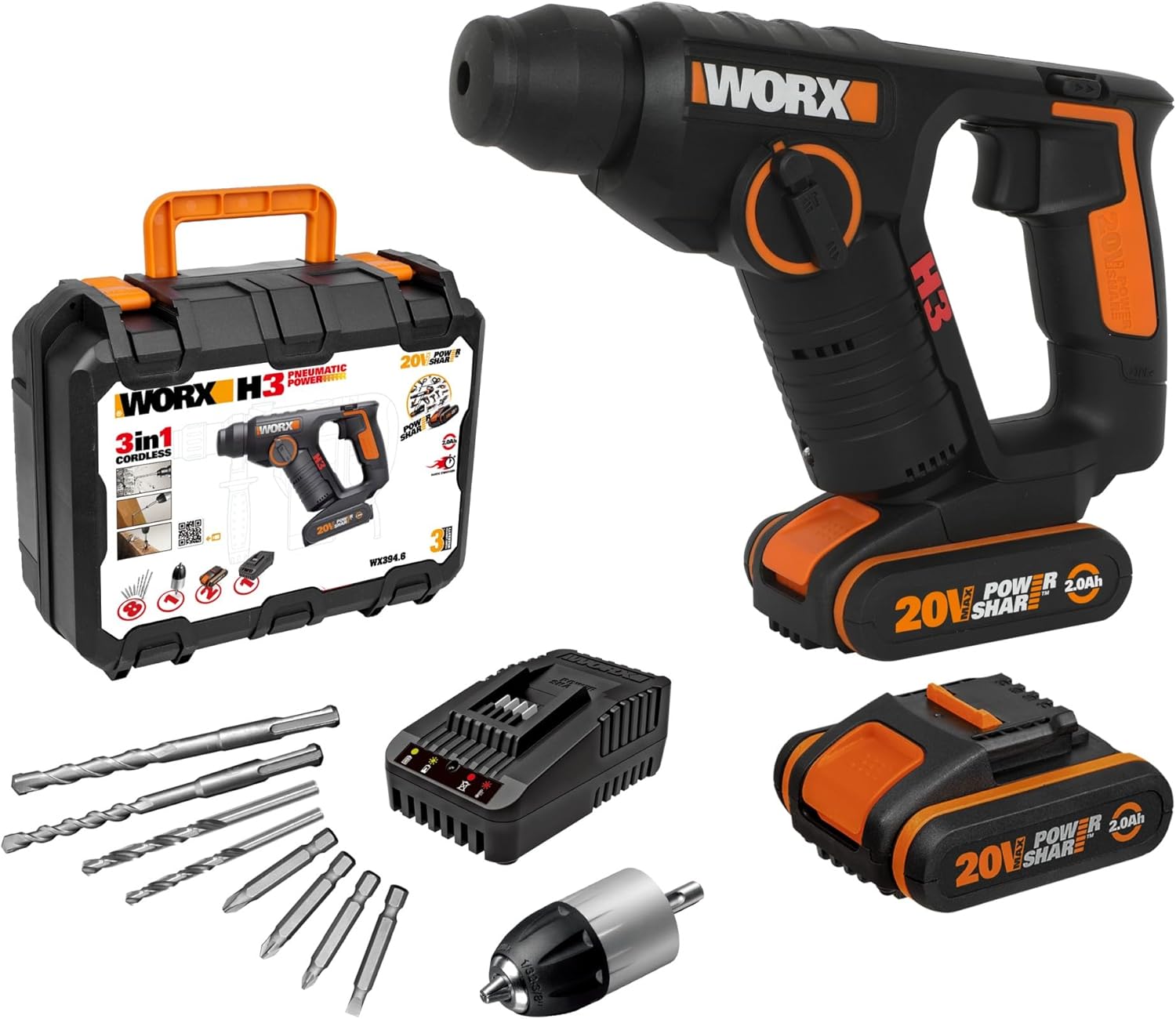
Figure 3: All components included in the WORX WX394.6 kit.
4. Setup
4.1 Battery Installation and Charging
- Charging the Battery: Connect the charger to a power outlet. Insert the battery into the charger. The indicator light on the charger will show the charging status. A full charge typically takes 1 hour for the included 2.0 Ah batteries.
- Installing the Battery: Align the battery with the base of the rotary hammer. Slide the battery into place until it clicks securely.
- Removing the Battery: Press the battery release button (if present) and slide the battery out.
4.2 Accessory Installation
- Installing SDS Bits: Pull back the chuck collar, insert the SDS bit into the chuck until it locks, then release the collar. Tug on the bit to ensure it is securely seated.
- Installing Standard Drill Bits/Screwdriver Bits with Chuck: Attach the provided chuck to the SDS chuck mechanism. Insert the desired standard drill bit or screwdriver bit into the chuck and tighten it securely.

Figure 4: Detail of the tool's chuck and mode selector.
5. Operating Instructions
5.1 Mode Selection
The WX394.6 offers three operating modes:
- Drilling Mode: For drilling into wood, metal, and plastics.
- Hammer Drilling Mode: For drilling into masonry, concrete, and stone.
- Screwdriving Mode: For driving and removing screws.
To select a mode, rotate the mode selector switch located on the side of the tool to the desired icon.
5.2 Variable Speed Control
The tool features a variable speed trigger. Pressing the trigger lightly will result in lower speed, while pressing it fully will achieve maximum speed. This allows for precise control depending on the material and application.
5.3 Safety Guidelines
- Always wear appropriate personal protective equipment (PPE) such as safety glasses, hearing protection, and gloves.
- Ensure the workpiece is securely clamped before operation.
- Keep hands and loose clothing away from rotating parts.
- Do not operate the tool in damp or wet conditions.
- Disconnect the battery before changing accessories or performing maintenance.
6. Maintenance
6.1 Cleaning
- Regularly clean the ventilation slots of the tool to prevent overheating.
- Wipe the tool housing with a soft, damp cloth. Do not use harsh chemicals or abrasive cleaners.
- Keep the chuck free from dust and debris.
6.2 Storage
- Store the tool and accessories in the provided carrying case in a dry, secure location.
- Keep out of reach of children.
- Store batteries in a cool, dry place, away from direct sunlight and extreme temperatures.
7. Troubleshooting
This section provides solutions to common issues. For problems not listed here, contact WORX customer support.
- Tool does not start: Ensure the battery is fully charged and correctly installed. Check if the mode selector is set to an active position.
- Reduced performance: The battery may be low on charge. Recharge the battery. Ensure the correct accessory is used for the material.
- Excessive vibration or noise: Check if the accessory is properly installed and not damaged. Ensure all fasteners on the tool are tight.
8. Specifications
| Specification | Value |
|---|---|
| Model Number | WX394.6 |
| Manufacturer | WORX |
| Voltage | 20 Volts |
| Power | 20 Watts |
| Maximum Power | 40 Watts |
| Impact Energy | 1.5 Joules |
| Torque | 30 Newton-meters |
| Speed | 1100 RPM |
| Battery Type | Lithium-ion |
| Battery Capacity | 2.0 Amp-hours (each) |
| Amperage | 2 A |
| Max Chuck Size | 6 Millimeters |
| Product Dimensions (L x W x H) | 7 x 25 x 19 cm |
| Weight | 1.6 Kilograms |
| Special Features | LED Light |

Figure 5: Dimensions of the WORX WX394.6 rotary hammer.
9. Warranty and Support
WORX products are designed for durability and performance. This product comes with a standard warranty, and an extended warranty may be available upon product registration.
- Standard Warranty: 3 years for tools and batteries.
- Extended Warranty: An additional 2 years of warranty is available upon registering the product on the official WORX website.

Figure 6: Standard 3-year warranty.

Figure 7: Extended 2-year warranty upon registration.
For further assistance, technical support, or warranty claims, please visit the official WORX website or contact their customer service department.


