
SHEHDS 30W
SHEHDS 30W COB RGB 3-in-1 LED Stage Par Light Instruction Manual
Model: 30W
1. Introduction and Overview
The SHEHDS 30W COB RGB 3-in-1 LED Stage Par Light is designed to provide versatile and vibrant lighting effects for various events. This compact and lightweight fixture features COB (Chip on Board) LED technology, offering low power consumption and an extended lifespan. It supports multiple control modes, including remote control, DMX512, sound activation, and auto-run, making it suitable for diverse applications.
This manual provides detailed instructions for the safe and efficient operation of your SHEHDS Stage Par Light. Please read it thoroughly before use and retain it for future reference.
2. Product Features
- COB LED Technology: Utilizes 30W COB LED for bright, smooth color mixing and extended lifespan up to 60,000 hours.
- RGB 3-in-1 Colors: Produces Red, Green, and Blue colors, allowing for a wide spectrum of mixed colors.
- Multiple Control Modes: Supports DMX512 (7 channels), Sound Activated, Auto-run, and Master-Slave modes.
- Remote Control: Includes an infrared remote for convenient operation, allowing control over colors, modes, and speed.
- Adjustable Bracket: Features a portable bracket for easy assembly, adjustment, and versatile mounting options (floor stand or hanging).
- Efficient Cooling: Equipped with a built-in quiet fan for effective heat dissipation, ensuring stable performance.
- Compact Design: Lightweight and portable, ideal for various indoor settings.
3. Package Contents
Upon opening the package, please verify that all components are present and undamaged:
- SHEHDS 30W COB RGB 3-in-1 LED Stage Par Light (Model: 30W)
- Mounting Bracket
- Infrared Remote Control
- Power Cable
- User Manual
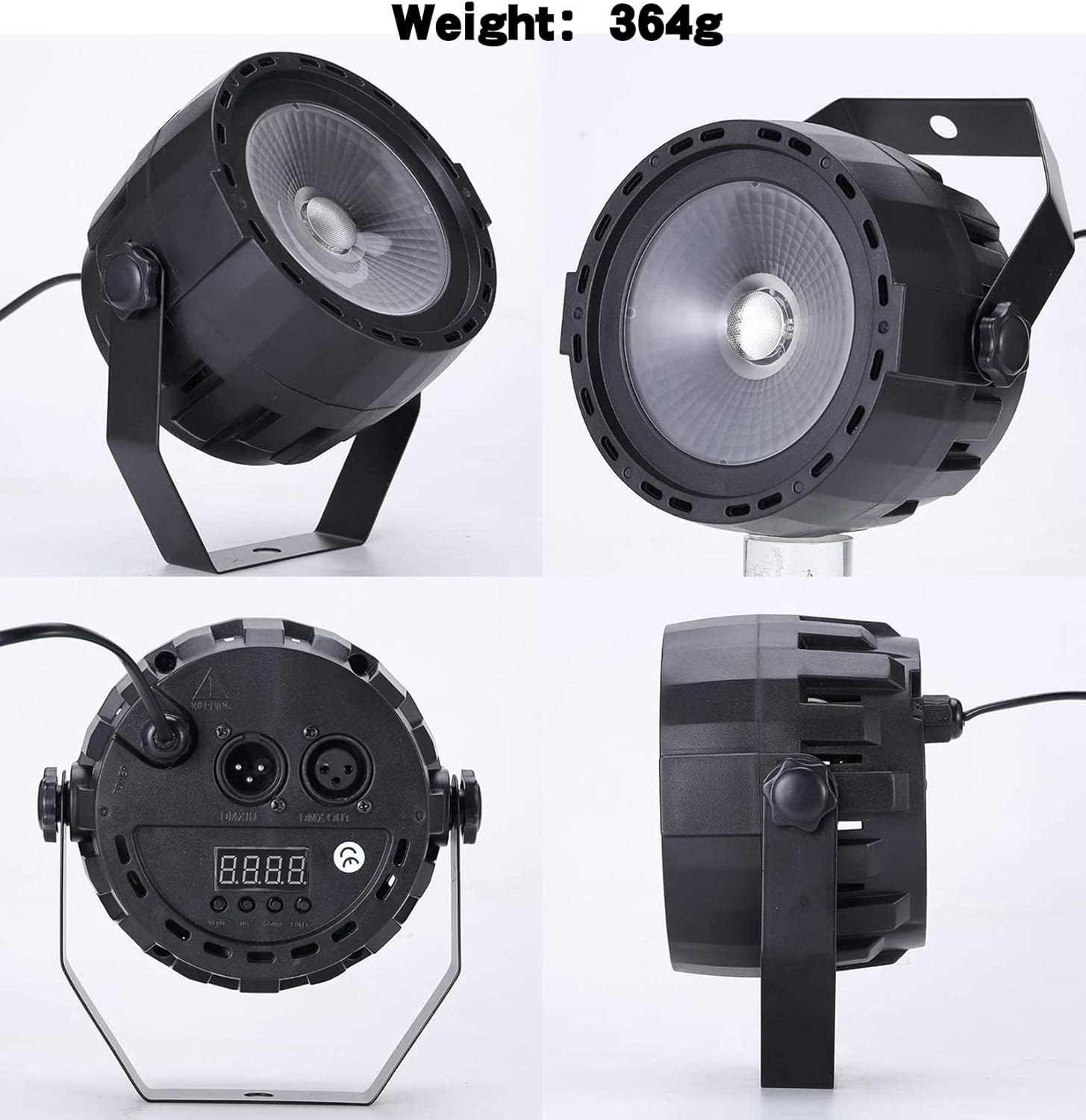
Figure 1: SHEHDS 30W COB RGB 3-in-1 LED Stage Par Light and its included accessories.
4. Setup Instructions
- Unpacking: Carefully remove the par light and all accessories from the packaging.
- Mounting:
- Attach the provided mounting bracket to the sides of the light using the screws. The bracket allows for flexible positioning.
- The light can be placed on a flat surface as a floor stand or hung from a truss or ceiling using appropriate clamps (not included) and safety cables.
- Power Connection: Connect the power cable to the "POWER IN" port on the back of the unit and then plug it into a standard electrical outlet (240 Volts).
- Initial Power On: The unit will power on automatically once connected to electricity. The digital display on the back will illuminate.

Figure 2: Views of the SHEHDS Stage Par Light, highlighting its physical features and connectivity.
5. Operating Instructions
5.1 Remote Control Operation
The included infrared remote control provides convenient access to various functions:

Figure 3: The SHEHDS Stage Par Light and its remote control.
- Power ON/OFF: Use the red power button to turn the light on or off.
- Color Selection (A1-A7):
- A1: Red
- A2: Green
- A3: Blue
- A4: Red + Green
- A5: Red + Blue
- A6: Green + Blue
- A7: Red + Green + Blue (All colors)
- Mode Selection:
- FADE: Smooth transition between colors.
- SOUND: Light changes and flashes according to ambient sound/music.
- JUMP: Abrupt changes between colors.
- FLASH: Strobe effect with adjustable speed.
- Speed Adjustment (+/-): Adjust the speed of color changes or flash rate in applicable modes.
5.2 Manual Control Panel Operation
The control panel on the back of the unit allows for direct configuration:
- Use the "MENU" button to cycle through different settings.
- Use the "UP" and "DOWN" buttons to adjust values or select options.
- Press "ENTER" to confirm your selection.
Refer to the digital display for current mode and setting information.
Video 1: Demonstration of the SHEHDS Stage Par Light's back panel controls and color adjustment capabilities.
6. DMX Control
The SHEHDS Stage Par Light supports DMX512 control, allowing integration into professional lighting setups. It features 7 DMX channels.
6.1 DMX Address Setting
- Connect a DMX cable from your DMX controller to the "DMX IN" port on the par light.
- Use the control panel buttons (MENU, UP, DOWN, ENTER) to navigate to the DMX address setting.
- Set the desired DMX starting address for the fixture. Ensure each fixture in a DMX chain has a unique starting address.
- Connect additional DMX fixtures by chaining them from the "DMX OUT" port of the first fixture to the "DMX IN" port of the next.
6.2 DMX Channel Functions (7-Channel Mode)
| Channel | Function | Value Range | Description |
|---|---|---|---|
| CH1 | Master Dimmer | 0-255 | Overall brightness adjustment (0% to 100%). |
| CH2 | Red Dimmer | 0-255 | Red LED intensity adjustment (0% to 100%). |
| CH3 | Green Dimmer | 0-255 | Green LED intensity adjustment (0% to 100%). |
| CH4 | Blue Dimmer | 0-255 | Blue LED intensity adjustment (0% to 100%). |
| CH5 | Strobe/Flash | 0-255 | Adjusts strobe speed or enables static light. |
| CH6 | Color Macro/Auto Programs | 0-255 | Selects pre-programmed color macros or auto-run sequences. |
| CH7 | Sound Active Mode | 0-255 | Enables sound-activated mode; sensitivity may be adjustable. |

Figure 4: DMX and Remote Control options for the Stage Par Light.
7. Maintenance
- Cleaning: Regularly clean the lens and exterior casing with a soft, dry cloth to maintain optimal light output. Avoid using harsh chemicals or abrasive materials.
- Ventilation: Ensure the cooling fan and ventilation slots are free from dust and debris to prevent overheating.
- Storage: When not in use, store the light in a cool, dry place, away from direct sunlight and extreme temperatures.
- Inspection: Periodically check the power cable and DMX connections for any signs of wear or damage.
8. Troubleshooting
| Problem | Possible Cause | Solution |
|---|---|---|
| Light does not turn on. | No power, faulty cable, unit malfunction. | Check power connection. Test with a different outlet. Inspect power cable for damage. If problem persists, contact support. |
| Remote control not working. | Dead battery, obstruction, out of range. | Replace remote battery. Ensure no obstructions between remote and light. Operate within effective range. |
| DMX control not responding. | Incorrect DMX address, faulty DMX cable, DMX controller issue. | Verify DMX address setting. Check DMX cable connections. Test with a different DMX cable or controller. |
| Light is overheating. | Blocked ventilation, prolonged use in high ambient temperature. | Ensure ventilation slots are clear. Operate in a well-ventilated area. Allow for cool-down periods if necessary. |
9. Specifications
| Feature | Detail |
|---|---|
| Model Number | 30W |
| Light Source | 30W COB RGB 3-in-1 LED |
| Colors | Red, Green, Blue (3-in-1 mixing) |
| Power Source | Corded Electric |
| Voltage | 240 Volts |
| Wattage | 30 Watts |
| Control Modes | DMX512 (7 channels), Sound Activated, Auto, Master-Slave |
| DMX Channels | 7 |
| Material | Plastic |
| Product Dimensions | 5.3"L x 5.2"W x 5.3"H |
| Item Weight | 1.19 pounds (0.54 kg) |
| Mounting Type | Floor Mount (with included bracket) |
10. Warranty and Support
SHEHDS is committed to providing quality products and customer satisfaction. For any issues or inquiries regarding your Stage Par Light, please refer to the following:
- Warranty: This product typically comes with a 1-year warranty. Please retain your proof of purchase for warranty claims.
- Replacements: A 1-month replacement policy may be available for defective units.
- Customer Service: For instant customer service or technical support, please contact SHEHDS directly through their official channels or the retailer where the product was purchased.

Figure 5: SHEHDS Customer Support details.
Related documents30W


Ask a question about this manual
Ask about setup, troubleshooting, compatibility, parts, safety, or missing instructions. Manuals+ will review the question and use this page’s manual context to help answer it.