
Diginex 1
Diginex HFeng IP68 Waterproof Outdoor Door Access Control System Kit User Manual
Model: 1
1. Introduction
This user manual provides comprehensive instructions for the installation, operation, and maintenance of your Diginex HFeng IP68 Waterproof Outdoor Door Access Control System Kit. This system is designed to provide secure and convenient access management for various door types, including metal, wooden, and glass doors.
Please read this manual thoroughly before installation and operation to ensure proper functionality and safety.
2. Product Overview and Components
The HFeng Access Control System Kit includes the following main components:
- RFID Access Control Keypad: The primary interface for user authentication.
- 180KG Electric Magnetic Lock: Provides secure locking mechanism.
- Power Supply: Converts AC to DC power for the system.
- Door Exit Button: Allows for easy exit from the secured area.
- RFID Keyfobs: Pre-programmed cards for convenient access.

Figure 2.1: Overview of the HFeng Access Control System Kit components, including the keypad, magnetic lock, power supply, exit button, and RFID keyfobs.
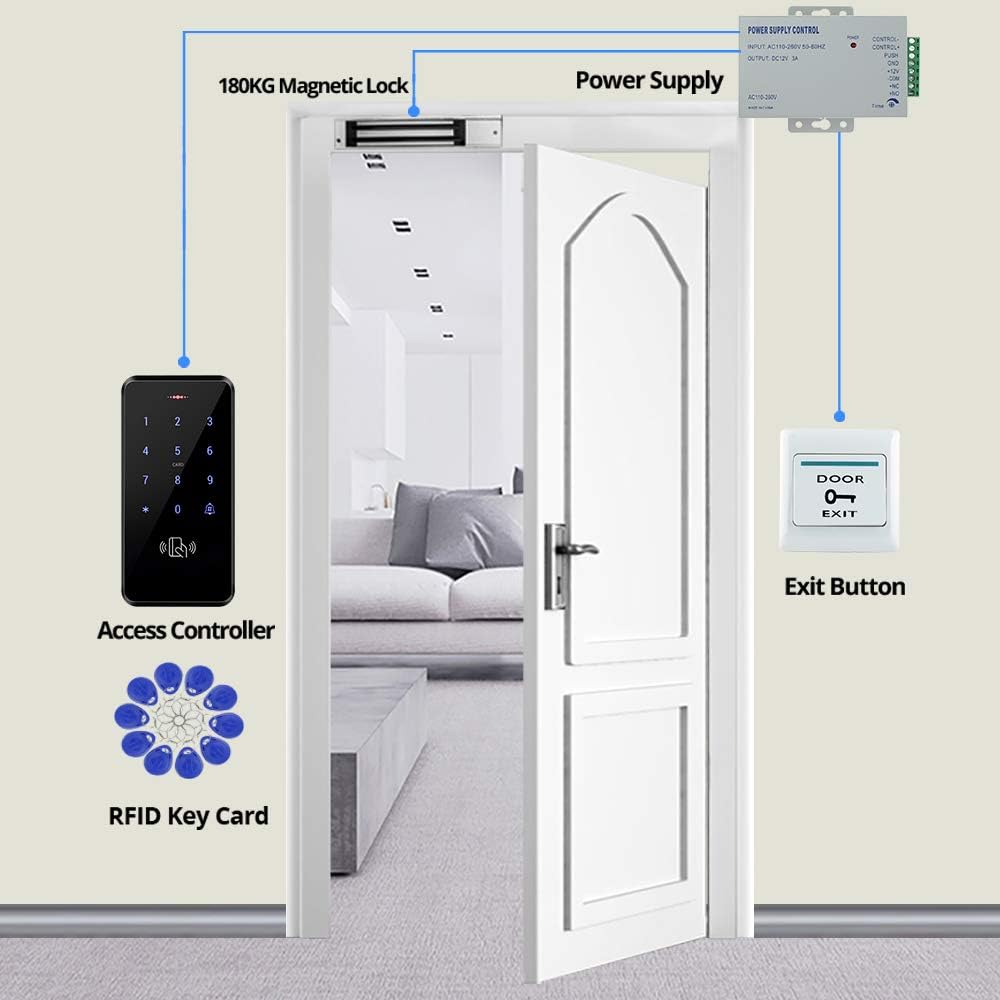
Figure 2.2: Diagram illustrating the interconnected components of the access control system, showing the access controller, magnetic lock, power supply, exit button, and RFID key cards in a typical door setup.
3. Specifications
| Component | Specification | Value |
|---|---|---|
| Access Control Keypad | User Capacity | 3000 |
| Material | ABS high quality material, Touch Screen Panel | |
| Waterproof Level | IP68 (Outdoor use) | |
| Working Frequency | 125KHz | |
| Card Reading Type | EM compatible card | |
| Identification Method | Card, Password, Card + Password | |
| Backlight | Blue backlight | |
| Wiegand Signal | WG26/34 input/output | |
| Working Voltage | DC 12V | |
| Dimensions | 140*70*16mm | |
| 180KG Magnetic Lock | Material | Aluminum alloy shell + iron plate |
| Holding Force | 180KG / 350lbs | |
| Working Voltage | DC12V | |
| Working Mode | Locked when power on, unlocked when power off (NC type) | |
| Suitable for | Metal, Wooden, Glass doors | |
| Dimensions | 172mm (L) x 40mm (W) x 21mm (H) for lock body; 130mm (L) x 32mm (W) x 11mm (H) for armature plate | |
| Power Supply | AC Input | AC100V-260V / 50-60HZ |
| DC Output | DC12V / 3A | |
| Time Delay | 0-15 seconds adjustable | |
| Dimensions | 140*67*33mm | |
| Door Exit Button | Material | Hard Plastic |
| Maximum Power Rating | 36V DC 3A-5A output | |
| Dimensions | 86*86mm | |
| RFID Keyfobs | Material | ABS |
| Operating Frequency | 125kHz | |
| Detection Range | 0-10cm | |
| Quantity | 10 pieces (pre-programmed, unique ID) |
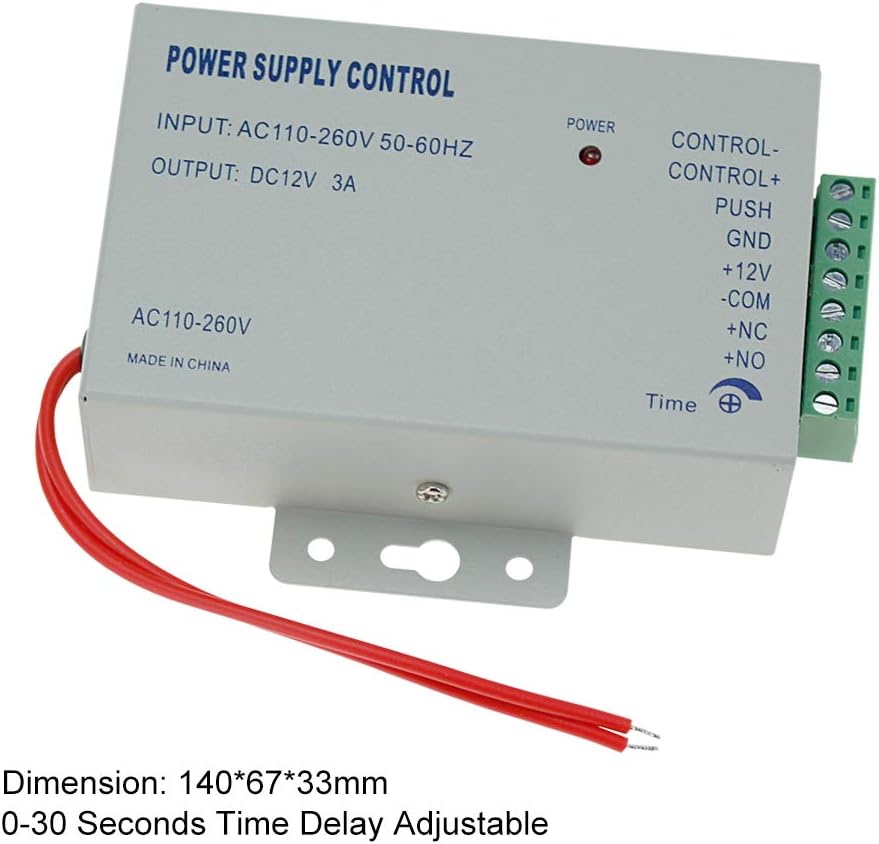
Figure 3.1: Detailed dimensions of the Access Control Keypad (140mm x 70mm x 16mm).

Figure 3.2: Dimensions of the 180KG Electric Magnetic Lock and its armature plate.

Figure 3.3: Dimensions of the Power Supply (140mm x 67mm x 33mm).

Figure 3.4: Details and dimensions of the Door Exit Button (86mm x 86mm) and RFID Keyfobs.
4. Setup and Installation
Before beginning installation, ensure all components are present and undamaged. This system operates on DC12V and does not require a computer for programming.
4.1. Mounting the Components
- Access Control Keypad: Mount the keypad at a convenient height near the door. The keypad is IP68 waterproof and can be installed outdoors. It features a touch screen panel and a doorbell button.
- Magnetic Lock: Install the magnetic lock (electromagnet) on the door frame and the armature plate on the door itself. Ensure proper alignment for secure locking. Note that a separate mounting bracket may be required depending on your door frame configuration.
- Power Supply: Mount the power supply in a secure, dry location, preferably indoors or within a weatherproof enclosure if outdoors.
- Door Exit Button: Install the exit button on the inside of the door frame, allowing for easy egress.
4.2. Wiring Diagram
Follow the wiring diagram carefully to connect all components. Incorrect wiring can damage the system.

Figure 4.1: Detailed wiring diagram showing connections between the Access Controller, Power Supply, Exit Button, and Magnetic Lock. Ensure all connections are secure and match the diagram.
- Connect the Access Controller to the Power Supply (DC12V, GND).
- Connect the Magnetic Lock to the Power Supply (NC, COM terminals for NC type lock).
- Connect the Exit Button to the Power Supply (PUSH, GND terminals).
- Ensure the Power Supply is connected to an AC100V-260V source.
The magnetic lock is an NC (Normally Closed) type, meaning it is locked when power is supplied and unlocks when power is cut. This is a fail-safe mechanism.
5. Operating Instructions
The system supports multiple identification methods: RFID card, password, or a combination of card and password.
5.1. Initial Setup and Programming
Refer to the specific programming instructions provided with your keypad for detailed steps on setting up administrator passwords, adding/deleting user cards, and setting door opening times (0-255 seconds adjustable). Programming can be done directly on the device.

Figure 5.1: The touch-sensitive keypad interface, highlighting the numeric keys and the doorbell button.
5.2. Accessing the Door
- Using an RFID Card: Present a registered RFID keyfob to the card reading area on the keypad. The door will unlock for the set duration.
- Using a Password: Enter your registered password on the keypad and press the '#' key. The door will unlock.
- Using Card + Password: Present your RFID keyfob, then enter your password and press the '#' key. The door will unlock.
The keypad features a blue backlight for visibility in low-light conditions and work indicating lights to confirm successful input.
5.3. Exiting the Secured Area
To exit, simply press the Door Exit Button located on the inside of the door. This will temporarily unlock the magnetic lock.
6. Maintenance
Regular maintenance ensures the longevity and optimal performance of your access control system.
- Cleaning: Wipe the keypad and other components with a soft, damp cloth. Avoid abrasive cleaners or solvents.
- Magnetic Lock: Periodically check the magnetic lock and armature plate for any debris or misalignment that could affect its holding force. Ensure the surfaces are clean and free of rust.
- Wiring: Inspect all wiring connections periodically to ensure they are secure and free from corrosion or damage, especially for outdoor installations.
- Keyfobs: Keep RFID keyfobs clean and dry. Avoid bending or damaging them.
- Waterproofing: Although the keypad is IP68 waterproof, ensure proper sealing during installation to prevent water ingress, especially around cable entries.

Figure 6.1: The IP68 waterproof design of the keypad, suitable for outdoor use in various weather conditions.
7. Troubleshooting
This section addresses common issues you might encounter with your access control system.
| Problem | Possible Cause | Solution |
|---|---|---|
| System does not power on / Keypad is dark. | No power to the power supply; faulty power supply; incorrect wiring. |
|
| Magnetic lock does not engage/disengage. | Incorrect wiring; insufficient power; misalignment of lock and armature plate; faulty lock. |
|
| RFID card or password not recognized. | Card not registered; incorrect password; card damaged; keypad malfunction. |
|
| Door Exit Button does not work. | Incorrect wiring; faulty button. |
|
| Keypad numbers/front panel detaches. | Physical damage; adhesive failure. |
|
8. Warranty and Support
For warranty information and technical support, please refer to the documentation provided with your purchase or contact Diginex customer service directly. Keep your purchase receipt as proof of purchase for warranty claims.
Manufacturer: HFeng
Brand: Diginex
ASIN: B08HN3M9J4
UPC: 192132291859
Ask a question about this manual
Ask about setup, troubleshooting, compatibility, parts, safety, or missing instructions. Manuals+ will review the question and use this page’s manual context to help answer it.