
1. Product Overview
The BURG TwinPad is an advanced electronic lock system designed for secure and convenient access to furniture such as drawers, cabinets, and lockers. It offers versatile operation through both RFID transponder technology and a numeric code keypad, providing enhanced security and ease of use. Its compact design and flexible installation options make it suitable for various applications.

Figure 1: Front view of the BURG TwinPad electronic lock, showing the numeric keypad and RFID reader area.
2. Components Included
Before installation, please ensure all components are present in the package:
- Control Unit (keypad and RFID reader)
- Locking Unit with Battery Compartment
- Blocking Unit (strike plate)
- Mini USB Cable (for emergency power supply)
- Mounting Hardware (screws, key for battery compartment)

Figure 2: All components of the BURG TwinPad lock laid out, including the control unit, locking unit, strike plate, and mounting hardware.
3. Setup and Installation
The TwinPad lock is designed for flexible installation, supporting both DIN right and DIN left configurations. Ensure you have 4x AA batteries (not included) for operation.
3.1 Mounting the Control Unit
Position the control unit on the exterior surface of your furniture. The unit features a sleek front with a metal frame. Ensure proper alignment before securing.

Figure 3: The BURG TwinPad control unit mounted on a cabinet door, demonstrating its slim profile.

Figure 4: Rear view of the control unit, showing the wiring harness for connection to the locking unit.
3.2 Installing the Locking Unit and Strike Plate
Install the locking unit inside the furniture, aligning it with the control unit. The locking unit contains the battery compartment. Secure the blocking unit (strike plate) to the frame of the furniture, ensuring it aligns with the locking mechanism.
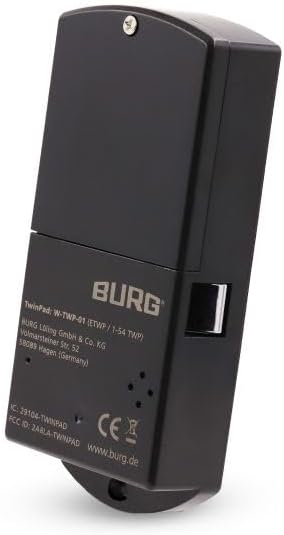
Figure 5: The locking unit of the BURG TwinPad, which houses the battery compartment and the locking bolt.
3.3 Dimensions for Installation
Refer to the following diagrams for precise measurements required for installation:

Figure 6: Technical drawing detailing the dimensions of the TwinPad touchpad (control unit).
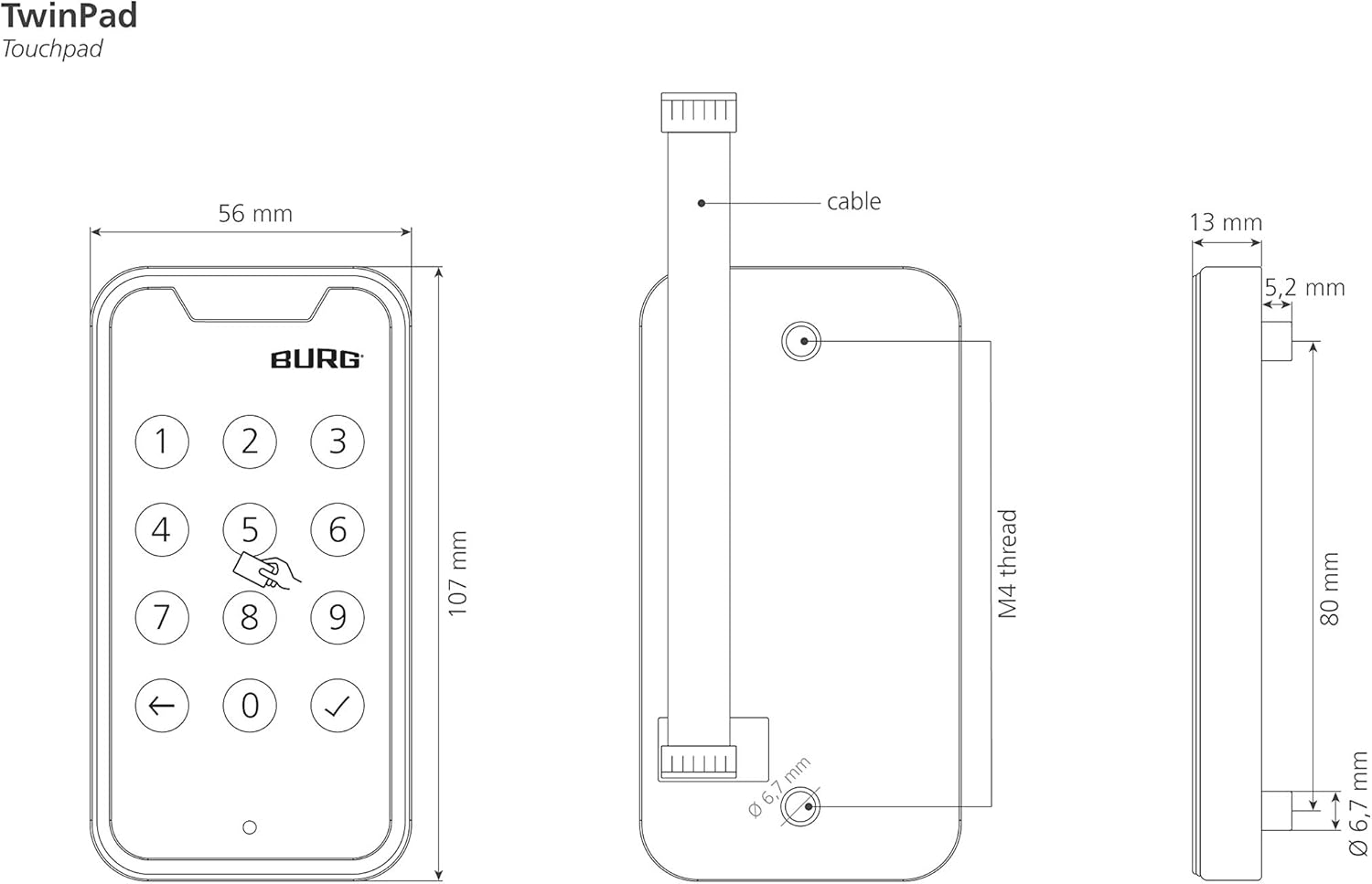
Figure 7: Technical drawing detailing the dimensions of the TwinPad back unit (locking unit).

Figure 8: Technical drawing detailing the dimensions of the TwinPad strike plate.
4. Operating Instructions
The TwinPad offers two primary modes of operation: Private Mode and Multi-User Mode. It can be operated using an RFID transponder (13.56 MHz) or a numeric code.
4.1 Unlocking with Numeric Code
- Wake the keypad by touching any key.
- Enter your pre-programmed numeric code.
- Press the checkmark (✓) button to confirm.
- The LED display will indicate successful unlock, and the lock will disengage.
4.2 Unlocking with RFID Transponder
- Present your registered RFID transponder to the designated RFID reading area on the control unit.
- The LED display will indicate successful unlock, and the lock will disengage.

Figure 9: A hand interacting with the TwinPad's touch keypad to enter a numeric code.
4.3 Locking Function
To lock the unit, simply close the furniture door/drawer. The lock will automatically engage. In some configurations, a manual lock command might be required (refer to specific programming instructions).
4.4 Private Mode vs. Multi-User Mode
- Private Mode: The lock is assigned to a single user with a permanent code/RFID.
- Multi-User Mode: The lock can be used by multiple users, typically with a temporary code that resets after each use (e.g., for lockers).
Refer to the detailed programming guide (not included in this general manual) for instructions on how to switch between modes and program user codes/RFID transponders.
5. Maintenance
To ensure the longevity and optimal performance of your BURG TwinPad lock, follow these maintenance guidelines:
- Cleaning: Wipe the control unit surface with a soft, dry cloth. Avoid abrasive cleaners or solvents that could damage the finish or electronic components.
- Battery Replacement: The lock requires 4x AA batteries. When the battery level is low, the LED display may provide an indication. Replace all batteries simultaneously with new, high-quality alkaline batteries. Access the battery compartment on the locking unit.
- Emergency Power: In case of complete battery depletion, the lock can be temporarily powered via the mini USB port on the control unit using the provided mini USB cable. This allows you to unlock the unit and replace the batteries.
6. Troubleshooting
If you encounter issues with your BURG TwinPad lock, consider the following common problems and solutions:
- Lock not responding: Check battery level. Replace batteries if necessary. Use the mini USB emergency power supply to test if the issue is battery-related.
- Code not accepted: Ensure you are entering the correct code. Verify the lock is in the expected operating mode (Private/Multi-User).
- RFID transponder not recognized: Ensure the transponder is correctly registered. Present the transponder firmly to the reading area.
- Alarm Function: The lock features an automatic alarm function. If an alarm sounds, it may indicate tampering or an incorrect entry attempt. Refer to the full programming manual for details on alarm triggers and resetting.
- Mechanical obstruction: Ensure there is no physical obstruction preventing the lock bolt from engaging or disengaging.
For persistent issues, please contact BURG customer support or refer to the comprehensive product manual available on the manufacturer's website.
7. Specifications
| Feature | Specification |
|---|---|
| Manufacturer | BURG |
| Model Number | W-TWP-01 |
| Color | Black |
| Material | Plastic |
| Shape | Rectangular |
| Special Features | Keyless functions |
| Included Components | Control unit, locking unit with battery compartment, blocking unit, mini USB cable |
| Batteries Included | No |
| Batteries Required | Yes |
| Battery Type | AA |
| Lock Type | Electronic furniture lock, door lock, numeric code |
| Recommended Uses | Furniture lock, drawers |
| Controller Type | Touch |
8. Warranty and Support
Warranty information for the BURG TwinPad lock is not provided within this manual. For details regarding product warranty, technical support, or to access the full programming manual, please visit the official BURG website or contact their customer service directly.
Manufacturer: BURG


