
Donner Circle Looper
Donner Circle Looper Pedal Drum Machine User Manual
Brand: Donner | Model: Circle Looper
Introduction
The Donner Circle Looper Pedal Drum Machine is a versatile 2-in-1 device designed for musicians. It combines a high-quality stereo looper with an integrated drum machine, offering extensive features for practice, performance, and recording. This manual provides detailed instructions on setting up, operating, maintaining, and troubleshooting your Circle Looper to ensure optimal performance.

Figure 1: Front view of the Donner Circle Looper Pedal Drum Machine, showcasing its compact design and main controls.
Setup
Before using your Donner Circle Looper, ensure it is properly connected and powered.
Power Supply
The Circle Looper requires a 9V DC power adapter with a center negative polarity and a minimum current of 500 mA. Ensure you use a compatible power supply to prevent damage to the unit. The power supply is not included with the pedal.
Connections
- Input: Connect your instrument (e.g., guitar) to the INPUT (LEFT) jack. For stereo input, connect a second instrument or stereo source to the INPUT (RIGHT) jack.
- Output: Connect the OUTPUT (LEFT) jack to your amplifier or audio interface. For stereo output, connect the OUTPUT (RIGHT) jack as well.
- USB: The Micro USB port is located on the top side of the pedal. This port is used for connecting the pedal to a computer for firmware updates, importing/exporting recorded loops, and using editor software.
- External Footswitch (Optional): An external footswitch (not included) can be connected to the EXT CTRL jack for additional control options.

Figure 2: Overview of the Donner Circle Looper's input, output, and USB connections, highlighting its ease of use for various setups.
Operating Instructions
This section details the functions of the Donner Circle Looper's controls and how to operate the device.
Controls Overview

Figure 3: Detailed diagram illustrating the various controls and indicators on the Donner Circle Looper pedal.
- Looper Knob: Controls parameters related to the looper function, including Memory slot selection, Loop Level, and Fade Out time.
- Rhythm Knob: Controls parameters for the drum machine, including Rhythm type selection, Drum Volume, and BPM (Beats Per Minute).
- Display Screen: A bright LCD screen that shows the current loop mode (Rec/Overdub/Play), time progress, and accurate timing information.
- Merger Ctrl Button: Toggles the looper and drum machine to work independently or simultaneously. Hold this button to delete recorded tracks.
- Left Footswitch (REC/DUB/TAP): Controls the looper mode. Press once to record, press again to overdub, and press again to play. Can also be used for Tap Tempo.
- Right Footswitch (STOP/PLAY/CLEAR): Controls drum machine mode and loop playback. Press once to stop playback, press and hold to clear the current loop.
Looping Functions
- Recording a Loop: Press the Left Footswitch once to start recording. The display will show 'Rec' and the recording time.
- Overdubbing: While a loop is playing, press the Left Footswitch again to enter overdub mode. The display will show 'Overdub'. Any new audio played will be added to the existing loop.
- Playing a Loop: If recording or overdubbing, press the Left Footswitch to stop recording/overdubbing and start playback. If no loop is playing, press the Right Footswitch to start playback of the current loop.
- Stopping a Loop: Press the Right Footswitch once to stop the current loop playback.
- Clearing a Loop: While the loop is stopped, press and hold the Right Footswitch to clear the current loop from memory.

Figure 4: The bright display screen accurately shows the current loop mode and time progress, making it easy to monitor your recording and playback.
Drum Machine Functions
The Circle Looper features 110 different drum grooves from 11 unique music styles and 10 types of metronome settings.
- Selecting Drum Grooves: Use the Rhythm Knob to scroll through the available drum grooves and metronome settings. The display will show the selected rhythm.
- Adjusting Drum Volume: Rotate the Rhythm Knob while in volume selection mode (indicated by the LED) to adjust the drum volume.
- Adjusting BPM: Rotate the Rhythm Knob while in BPM selection mode (indicated by the LED) to adjust the tempo of the drum groove or metronome.
- Tap Tempo: Press the Left Footswitch repeatedly in time with your desired tempo to set the BPM.

Figure 5: The Donner Circle Looper combines a 44.1 kHz, 24-bit loop station with 110 drum grooves from 10 music styles, offering comprehensive creative tools.
Memory and Storage
The Circle Looper boasts a large capacity for storing your creations.
- Memory Slots: The pedal has 40 memory slots, each capable of storing up to 4 minutes of recorded audio.
- Total Recording Capacity: This provides a total recording capacity of 160 minutes.
- Automatic Save: Recorded files are automatically saved, even if the pedal is powered off, ensuring your work is always preserved.
- Import/Export: Use the USB connection and dedicated editor software (available from the Donner website) to import and export recorded loops to and from your computer.

Figure 6: The internal memory architecture of the Donner Circle Looper, highlighting its 40 memory slots and 160 minutes of total recording time.
Additional Features
- Fade Out: The Fade Out function allows for a gradual decrease in loop volume, providing a smooth ending to your performance. Adjust the fade out time using the Looper knob.
- Merger Control: The Merger Ctrl button allows you to toggle between having the looper and drum machine work together or independently. This provides flexibility for various musical scenarios.
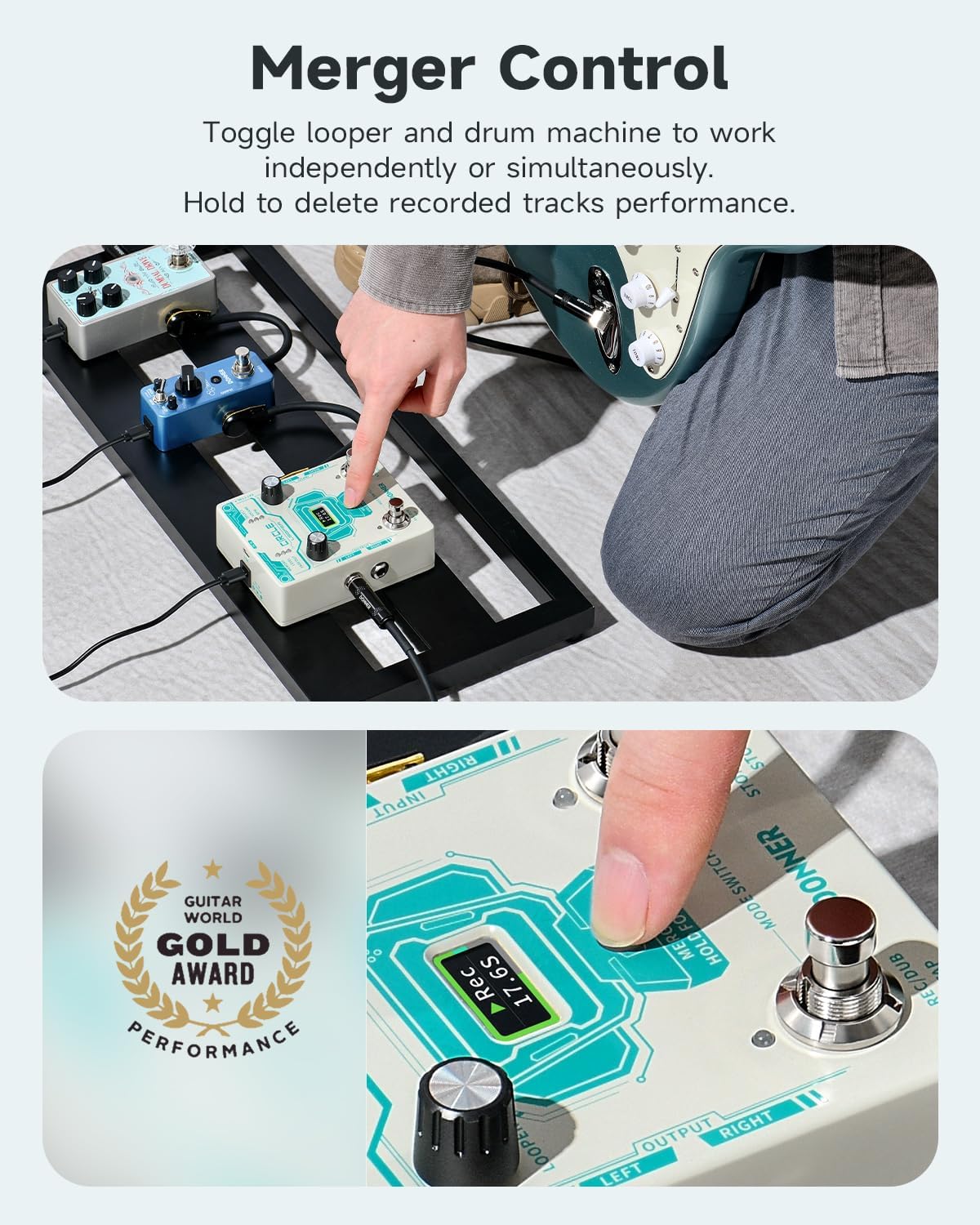
Figure 7: Demonstrates the Merger Control feature, allowing users to seamlessly integrate or separate the looper and drum machine functionalities.
Maintenance
Proper maintenance ensures the longevity and optimal performance of your Donner Circle Looper.
- Cleaning: Use a soft, dry cloth to clean the pedal's exterior. Avoid using abrasive cleaners or solvents, as they may damage the finish.
- Storage: Store the pedal in a cool, dry place away from direct sunlight and extreme temperatures. Disconnect the power supply when not in use for extended periods.
- Firmware Updates: Periodically check the Donner official website for firmware updates. Updates can improve performance and stability. As of 2025/2/11, firmware version 'V_1.0.4.1' is available. Refer to the 'Product guides and documents' section on the product page for download instructions.
Troubleshooting
If you encounter issues with your Donner Circle Looper, refer to the following common troubleshooting steps. For more detailed solutions, please consult the official Troubleshooting Guide (PDF) available on the product page.
- No Power: Ensure the power adapter meets the specifications (9V DC, center negative, 500mA minimum) and is securely connected to both the pedal and a working power outlet.
- No Sound: Check all audio cables (input and output) for secure connections. Verify that your instrument and amplifier are working correctly. Ensure the Looper Level and Drum Volume are not set to zero.
- Loop Not Recording/Playing: Confirm you are in the correct mode (Rec/Dub/Play) using the Left Footswitch. Check if the memory slot is full or corrupted; try clearing the loop or selecting a new slot.
- Drum Machine Issues: Ensure the drum volume is audible. Verify that a drum groove is selected and the BPM is set appropriately.
- Pedal Unresponsive: Try disconnecting and reconnecting the power supply to perform a soft reset. If issues persist, consider performing a factory reset via the editor software (refer to software manual).
Specifications
Key technical specifications for the Donner Circle Looper Pedal Drum Machine:
| Feature | Specification |
|---|---|
| Model Number | Circle Looper |
| Item Weight | 13.7 ounces (0.39 Kilograms) |
| Product Dimensions | 2.72 x 4.65 x 5.2 inches (4.7"L x 1.5"W x 3.7"H) |
| Hardware Interface | 1/4-inch Audio, USB |
| Signal Format | Digital |
| Power Source | Corded Electric |
| Voltage | 9 Volts (DC) |
| Looping Capacity | 40 memory slots, 4 minutes per slot (160 minutes total) |
| Drum Grooves | 110 drum grooves from 11 music styles |
Warranty and Support
Donner provides customer support and warranty services for its products. For specific warranty terms and conditions, please refer to the documentation included with your product or visit the official Donner website. If you require technical assistance or have questions not covered in this manual, please contact Donner Music customer service directly.
Related documentsCircle Looper


Ask a question about this manual
Ask about setup, troubleshooting, compatibility, parts, safety, or missing instructions. Manuals+ will review the question and use this page’s manual context to help answer it.