
Dyson TP04
Dyson TP04 Pure Cool Purifying Connected Tower Fan User Manual
Model: TP04 (310124-02) | Brand: Dyson
1. Introduction
The Dyson TP04 Pure Cool Purifying Connected Tower Fan is designed to provide both air purification and cooling. It automatically detects and reports air quality levels in real time, capturing 99.97% of microscopic pollutants as small as 0.3 microns using its 360° sealed HEPA and activated Carbon filters. The Air Multiplier technology projects powerful, purified airflow throughout the room. This device features adjustable oscillation and can be controlled via a remote or the Dyson Link app.

Figure 1: Front view of the Dyson TP04 Pure Cool Purifying Connected Tower Fan.
2. Setup
- Unboxing: Carefully remove all components from the packaging. Ensure all parts, including the main unit, filters, and remote control, are present.
- Filter Installation: The device comes with 360° sealed HEPA and activated Carbon filters. Refer to the 'Maintenance' section for detailed filter installation and replacement instructions.
- Placement: Place the fan on a stable, level surface indoors. It is suitable for use in bedrooms and living rooms. Ensure there is adequate space around the unit for optimal airflow.
- Power Connection: Connect the power cord to the unit and then plug it into a suitable electrical outlet. The device is corded electric.

Figure 2: Side view of the Dyson TP04 fan, illustrating its slim profile for easy placement.
3. Operating Instructions
The Dyson TP04 can be operated using the included remote control or the Dyson Link app.

Figure 3: The remote control, designed to store neatly on top of the fan, provides convenient access to all functions.
- Power On/Off: Press the power button on the remote control or the unit itself to turn the fan on or off.
- Fan Speed Adjustment: Use the '+' and '-' buttons on the remote to increase or decrease the airflow speed.
- Oscillation: Press the oscillation button on the remote to activate or deactivate the oscillating movement. The oscillation angle is adjustable from 45° to 350°, allowing for wide room coverage.
- Air Quality Monitoring: The device automatically senses and reports air quality levels. Detailed reports can be viewed via the Dyson Link app on your smartphone.
- Sleep Mode: Activate sleep mode for quieter operation and dimmed display lights, ideal for nighttime use.
- Timer Function: Set a timer for the fan to automatically turn off after a specified duration.
Video 1: An overview of the Dyson Pure Cool TP04, demonstrating its features and operation.
4. Maintenance
- Filter Replacement: The Dyson TP04 uses 360° sealed HEPA and activated Carbon filters. The machine will provide automatic filter life notifications when replacement is needed. Filters are designed for easy, tool-free replacement.
- Cleaning the Unit: To maintain optimal performance, regularly wipe down the exterior of the fan with a soft, dry cloth. The bladeless design simplifies cleaning.
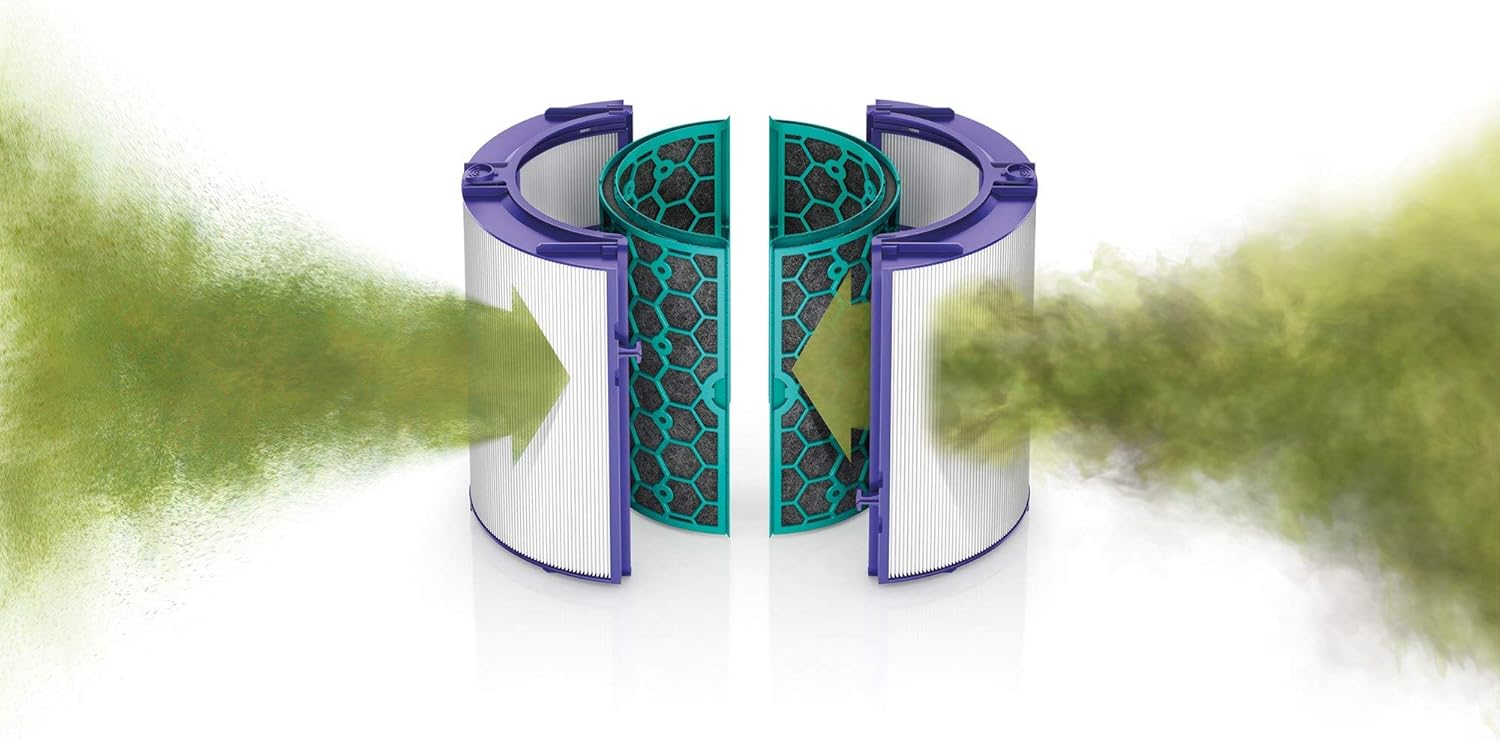
Figure 4: Illustration of the 360-degree filtration system, highlighting the HEPA and activated carbon filters.
Video 2: A demonstration of how to change the filter in a Dyson Air Purifier.
5. Troubleshooting
- Unit Not Turning On:
- Ensure the power cord is securely plugged into both the unit and a working electrical outlet.
- Check if the power outlet is functional by plugging in another device.
- If the screen backlight illuminates but the unit does not respond, try unplugging and restarting the device.
- Oscillation Not Working:
- Verify that the oscillation function is activated via the remote control.
- If the unit makes a clicking sound or displays an error during oscillation, contact customer support.
- Connectivity Issues (App/Remote):
- Ensure the remote control has working batteries and is pointed towards the unit.
- For app connectivity, ensure your device's Bluetooth and Wi-Fi are enabled and the Dyson Link app is up to date.
6. Specifications
| Brand | Dyson |
| Model Name | TP04 (310124-02) |
| Electric Fan Design | Floor Fan |
| Power Source | Corded Electric |
| Style | Modern |
| Room Type | Bedroom, Living Room |
| Special Feature | Oscillating |
| Recommended Uses | Air Circulation |
| Indoor/Outdoor Usage | Indoor |
| Control Method | App, Remote |
| Efficiency | High |
| Is Cordless? | No |
| Item Weight | 16.12 pounds |
| Package Dimensions | 43.6 x 10.5 x 10.3 inches |
7. Warranty & Support
For warranty information, product support, or to purchase replacement parts and accessories, please visit the official Dyson website or contact Dyson customer service. Protection plans may also be available for extended coverage.
For additional support, you may visit the Dyson Store on Amazon.
Related documentsTP04


Ask a question about this manual
Ask about setup, troubleshooting, compatibility, parts, safety, or missing instructions. Manuals+ will review the question and use this page’s manual context to help answer it.