
Introduction
This manual provides essential information for the safe and efficient operation of your QFX SBX-213 12-inch Portable Bluetooth Speaker. Please read it thoroughly before using the product and retain it for future reference.
Safety Instructions
To ensure safe operation and prevent damage, please observe the following safety precautions:
- Do not expose the unit to rain, moisture, or extreme temperatures.
- Do not open the speaker casing. Refer all servicing to qualified personnel.
- Keep the speaker away from heat sources, direct sunlight, and open flames.
- Use only the specified power adapter and charging cable provided with the unit.
- Ensure proper ventilation around the speaker to prevent overheating.
- Avoid placing heavy objects on the speaker.
Package Contents
Upon unpacking, please verify that all items listed below are present and in good condition:
- QFX SBX-213 Portable Bluetooth Speaker
- Power Cable
- Remote Control
- User Manual (this document)
Product Overview
The QFX SBX-213 is a 12-inch portable speaker designed for versatile audio playback. It features Bluetooth connectivity for wireless streaming, an FM radio tuner, and a USB input for playing audio files from a flash drive.
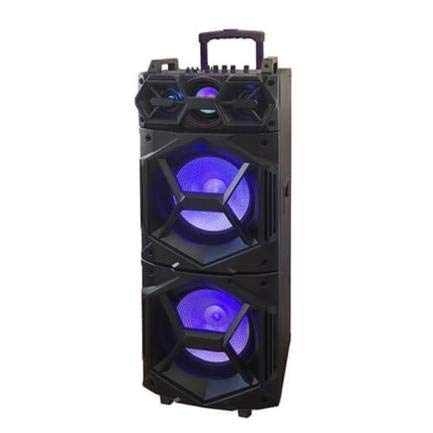
Image: Front view of the QFX SBX-213 Portable Bluetooth Speaker, showcasing its 12-inch driver and robust design. The speaker features a black finish and a protective grille over the main driver.
The speaker's control panel and ports typically include:
- Power On/Off Switch
- Mode Button (to switch between Bluetooth, FM, USB inputs)
- Volume Control Knobs or Buttons
- Play/Pause, Previous/Next Track Buttons
- USB Port for media playback
- Charging Port for power cable connection
- LED Indicator Lights for power, charging, and Bluetooth status
Setup
- Charging the Speaker: Before first use, connect the provided power cable to the speaker's charging port and plug it into a standard electrical outlet. Allow the speaker to fully charge. The charging indicator light will typically change color or turn off when charging is complete.
- Placement: Place the speaker on a stable, flat surface. For optimal sound dispersion, avoid placing it in enclosed spaces or directly against walls.
Operating Instructions
1. Power On/Off
To power on the speaker, locate the power switch, usually on the back or side panel, and slide it to the "ON" position. To power off, slide the switch to the "OFF" position.
2. Bluetooth Pairing
- Turn on the speaker. It will typically enter Bluetooth pairing mode automatically, indicated by a flashing LED light and an audible prompt.
- Enable Bluetooth on your mobile device (smartphone, tablet, etc.).
- Search for available Bluetooth devices. You should see "QFX SBX-213" or a similar name in the list.
- Select the speaker to pair. Once connected, you will hear a confirmation sound, and the LED indicator will stop flashing.
- You can now play audio from your device through the speaker.
3. FM Radio Operation
- Press the "MODE" button on the speaker or remote control until "FM" mode is selected.
- Press the "Play/Pause" button to initiate an automatic scan for FM stations. The speaker will save all found stations.
- Use the "Previous/Next Track" buttons to navigate between saved FM stations.
4. USB Playback
- Insert a USB flash drive containing MP3 audio files into the USB port on the speaker.
- Press the "MODE" button until "USB" mode is selected. The speaker will automatically begin playing audio files from the USB drive.
- Use the "Play/Pause" and "Previous/Next Track" buttons to control playback.
5. Volume Control
Adjust the master volume using the dedicated volume knob or buttons on the speaker. You can also control the volume from your connected Bluetooth device or the remote control.
Maintenance
- Cleaning: Use a soft, dry cloth to clean the speaker's exterior. Do not use abrasive cleaners, waxes, or solvents, as these may damage the finish.
- Storage: When not in use for extended periods, store the speaker in a cool, dry place, away from direct sunlight and extreme temperatures.
- Battery Care: To prolong battery life, avoid fully discharging the battery frequently. Charge the speaker regularly, even if not in use for long periods, to maintain battery health.
Troubleshooting
If you encounter any issues with your QFX SBX-213 speaker, please refer to the following table for common problems and solutions:
| Problem | Possible Cause | Solution |
|---|---|---|
| No power | Battery discharged; Power cable not connected securely | Charge the speaker fully; Ensure power cable is securely connected to both the speaker and the power outlet. |
| No Bluetooth connection | Bluetooth not enabled on device; Speaker not in pairing mode; Device too far from speaker | Enable Bluetooth on your device; Put the speaker into Bluetooth pairing mode; Move your device closer to the speaker (within 10 meters). |
| No sound output | Volume too low; Incorrect mode selected; Device or speaker is muted | Increase the volume on both the speaker and your connected device; Press the MODE button to select the correct input (Bluetooth, USB, FM); Check if the speaker or device is muted. |
| FM radio static or poor reception | Weak signal; Interference | Relocate the speaker to an area with better reception; Perform an auto-scan for stations again; Avoid placing near other electronic devices that may cause interference. |
Specifications
- Brand: QFX
- Model: SBX-213
- Speaker Size: 12 inches
- Connectivity Technology: USB, Bluetooth
- Special Features: Lightweight, Portable, FM Radio
- Mounting Type: Floor, Table Mount
- Controller Type: Remote Control
- Power Source: Electric Cable
- Dimensions (H x W x D): Approximately 113 x 42 x 42 cm
- Weight: Approximately 4 kg
- UPC: 606540036341
- ASIN: B08GL3SHQP
Warranty and Support
QFX products are designed for reliability and performance. For detailed warranty information or technical support, please refer to the warranty card included with your purchase or visit the official QFX website. Keep your proof of purchase for any warranty claims.
For further assistance, please contact QFX customer service through their official channels.


