
PROHEAR 037
PROHEAR 037 Bluetooth Noise-Cancelling Headphones User Manual
Model: 037 | Brand: PROHEAR
Introduction
Thank you for choosing the PROHEAR 037 Bluetooth Noise-Cancelling Headphones. These headphones are designed to provide superior hearing protection while allowing you to enjoy music and make calls in noisy environments. Featuring advanced Bluetooth V5.1 technology and a high Noise Reduction Rating (NRR 25dB) and Single Number Rating (SNR 30dB), the PROHEAR 037 ensures both safety and entertainment.

Image: The PROHEAR 037 Bluetooth Noise-Cancelling Headphones, black in color, showcasing their over-ear design and control buttons on the left earcup.
Product Features
- Advanced Bluetooth V5.1: Provides a more stable, faster, and wider range connection for seamless music streaming and call handling.
- High Noise Reduction: SNR 30dB and NRR 25dB effectively protect your hearing from loud noises in various work environments.
- Long-lasting Battery: Built-in 1500mAh lithium battery offers extended usage time, rechargeable via USB.
- Intuitive Controls: Raised buttons allow for easy adjustment of volume, song changes, and call management, even while wearing work gloves.
- Comfortable Design: Features a super soft and padded headband, adjustable fit, and soft, replaceable ear cushions for all-day comfort.
- Wired Mode Option: Includes a 3.5mm AUX jack for wired connection when Bluetooth is not desired or available.

Image: An infographic highlighting the benefits of Bluetooth 5.3 technology, including faster connection speed, wider range (33-49ft / 10-15m+), longer battery life (1500mAh, 40H+ playtime), better sound quality (deep bass, sufficient volume, true stereo), and stable connection. A person is shown using the headphones while operating a snow blower.

Image: An illustration detailing the comfort features of the headphones, including voice transmission for Bluetooth and phone ringing, a super soft and padded headband, adjustable fit for all sizes, replaceable ear pads, and soft cushions for prolonged use. A battery level display icon is also shown.
Package Contents
Please check the package to ensure all items are present:
- PROHEAR 037 Bluetooth Noise-Cancelling Headphones
- USB Charging Cable
- 3.5mm AUX Audio Cable
- User Manual (this document)
- Carrying Bag
Setup
1. Charging the Headphones
Before first use, fully charge the headphones. The built-in 1500mAh lithium battery provides long usage time.
- Connect the supplied USB charging cable to the Micro USB charging port on the headphones.
- Connect the other end of the USB cable to a compatible USB power source (e.g., computer USB port, wall adapter).
- The indicator light will show charging status. A full charge typically takes about 2 hours and provides over 40 hours of use.
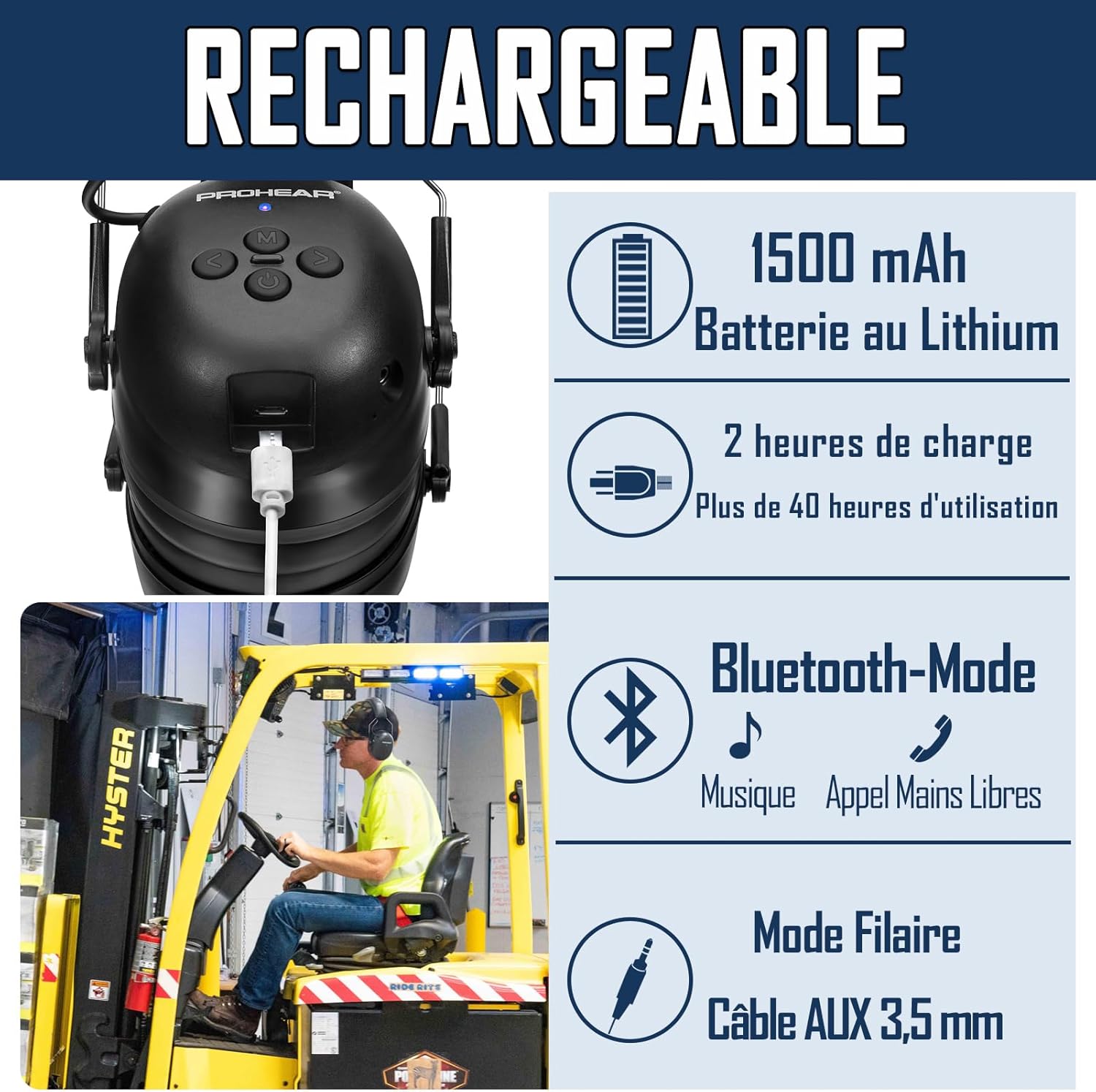
Image: A close-up view of the headphone's charging port with a USB cable inserted, illustrating the 1500mAh lithium battery, 2-hour charging time for over 40 hours of use, Bluetooth mode for music and hands-free calls, and wired mode via 3.5mm AUX cable.
2. Bluetooth Pairing
To connect your PROHEAR 037 headphones to a Bluetooth-enabled device:
- Ensure the headphones are charged and powered off.
- Press and hold the Power Button until the indicator light flashes, indicating pairing mode.
- On your device (smartphone, tablet, etc.), enable Bluetooth and search for available devices.
- Select "PROHEAR 037" from the list of found devices.
- Once connected, the indicator light will change to a steady blue, confirming successful pairing.
The headphones will automatically attempt to reconnect to the last paired device when powered on.
Operating Instructions
The PROHEAR 037 headphones feature intuitive controls designed for ease of use, even with work gloves. The raised button design helps in quickly locating controls by touch.

Image: A diagram showing the detailed functions and button layout of the PROHEAR 037 headphones. Labels indicate: 1. Power Button, 2. Tuning button (Volume/Track), 3. BT Button (M), 4. Micro USB Charging port, 5. AUX Jack, 6. Indicator light. Tables illustrate controls for Phone Mode (M button to answer/hang up) and BT Music Mode (Tuning buttons for changing songs, press and hold for volume; M button for pause, connect/disconnect Bluetooth).
Button Functions Overview:
| Button | Action | Function |
|---|---|---|
| Power Button | Press and Hold | Power On/Off |
| M (BT) Button | Short Press | Answer/End Call, Play/Pause Music |
| M (BT) Button | Press and Hold | Connect/Disconnect Bluetooth |
| Tuning Button (<) | Short Press | Previous Song |
| Tuning Button (<) | Press and Hold | Volume Down |
| Tuning Button (>) | Short Press | Next Song |
| Tuning Button (>) | Press and Hold | Volume Up |
Using in Wired Mode
To use the headphones with non-Bluetooth devices or when battery is low, connect the supplied 3.5mm AUX audio cable to the AUX jack on the headphones and to your audio source.
Maintenance
- Cleaning: Wipe the headphones with a soft, damp cloth. Do not use harsh chemicals or abrasive cleaners. Ensure no liquid enters the earcups or charging port.
- Storage: Store the headphones in a cool, dry place, away from direct sunlight and extreme temperatures. Use the provided carrying bag for protection during transport.
- Ear Cushions: The ear cushions are replaceable. If they become worn or damaged, contact PROHEAR support for replacement parts to maintain optimal noise reduction and comfort.
- Battery Care: For optimal battery life, avoid fully discharging the battery frequently. Charge the headphones regularly, even if not in use for extended periods.
Troubleshooting
| Problem | Possible Cause | Solution |
|---|---|---|
| Headphones won't turn on. | Low battery. | Charge the headphones fully. |
| Cannot pair via Bluetooth. | Headphones not in pairing mode; device Bluetooth off; too far from device. | Ensure headphones are in pairing mode (flashing light). Turn device Bluetooth off/on. Move headphones closer to device (within 10-15m). |
| No sound or low volume. | Volume too low on headphones or device; incorrect audio source selected. | Increase volume on both headphones and connected device. Check if AUX cable is fully inserted if using wired mode. |
| Poor call quality. | Environmental noise; weak Bluetooth connection. | Move to a quieter area if possible. Ensure strong Bluetooth connection. |
Specifications
- Model Number: 037
- Bluetooth Version: V5.1
- Noise Reduction Rating (NRR): 25dB
- Single Number Rating (SNR): 30dB
- Battery: 1500mAh Lithium-ion (included)
- Charging Time: Approximately 2 hours
- Usage Time: Over 40 hours (Bluetooth mode)
- Connectivity: Bluetooth, 3.5mm AUX
- Material: ABS Plastic
- Package Dimensions: 20.8 x 16.3 x 10.9 cm
- Weight: 520 grams
- Manufacturer: PROHEAR LLC.
- Country of Origin: China
Safety Information
Please read and follow these safety guidelines to ensure safe operation and prevent damage:
- Do not expose the headphones to extreme temperatures, humidity, or liquids.
- Do not disassemble or modify the headphones. This may void the warranty and pose safety risks.
- Use only the supplied charging cable or a certified equivalent.
- Keep out of reach of children.
- Ensure proper fit to achieve stated noise reduction levels.
- Be aware of your surroundings when using noise-cancelling headphones, especially in situations requiring alertness (e.g., near traffic).
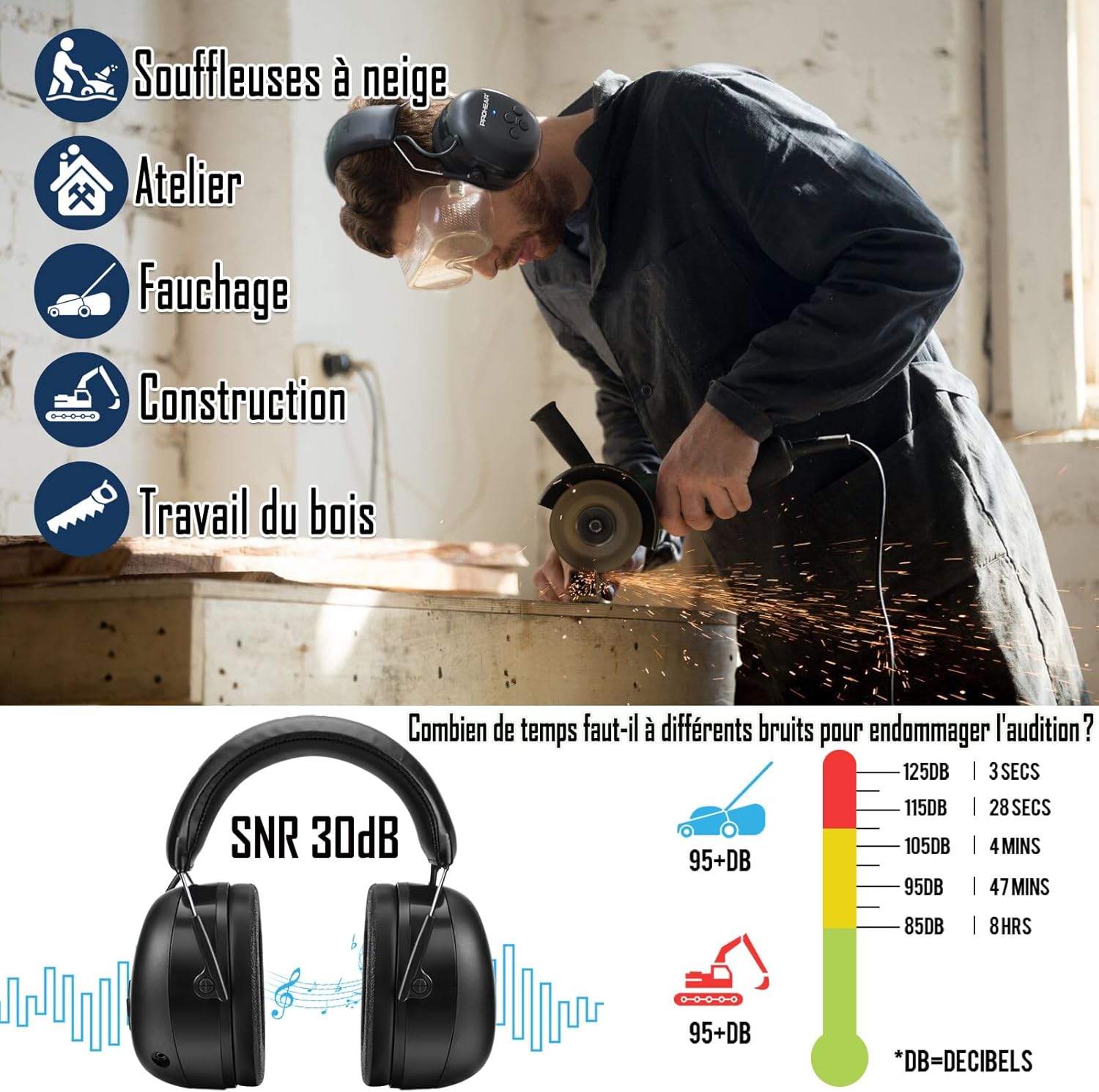
Image: An infographic illustrating common applications for the headphones (snow blowers, workshop, mowing, construction, woodworking) and a chart showing how long different noise levels (dB) can be tolerated before causing hearing damage. This emphasizes the importance of hearing protection.
Warranty and Support
PROHEAR products are designed for durability and performance. The PROHEAR 037 headphones come with a 3-year warranty. For warranty claims, technical support, or replacement parts, please contact PROHEAR customer service through the retailer where you purchased the product or visit the official PROHEAR website.
For more information and support, please visit: www.prohear.com
Related documents037


Ask a question about this manual
Ask about setup, troubleshooting, compatibility, parts, safety, or missing instructions. Manuals+ will review the question and use this page’s manual context to help answer it.