1. Product Overview
This YUSTDA USB Charger Cable is designed to provide reliable power to your iRulu AL101 10-inch Android Tablet. It features a high-quality construction for efficient and safe charging.
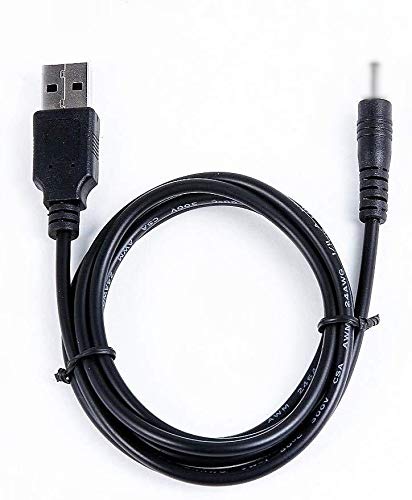
Image 1.1: The YUSTDA USB Charger Cable, featuring a DC power cord on one end and a USB A connector on the other, designed for charging compatible tablets.
Key Features:
- High-quality USB 2.0 charger cable.
- Connectors: DC power cord on one end, USB A on the other.
- Designed for use with a USB AC/Car charger (not included).
- Incorporates multiple safety features for protection during charging.
2. Setup Instructions
Follow these steps to properly set up your YUSTDA USB Charger Cable for use:
- Identify the Connectors: Locate the DC power cord end and the USB A connector end of the cable.
- Connect to Power Source: Insert the USB A connector end of the cable into a compatible USB AC wall adapter or a USB car charger (sold separately). Ensure the power source is functioning correctly.
- Connect to Tablet: Carefully insert the DC power cord end into the charging port of your iRulu AL101 10-inch Android Tablet. Ensure a secure connection.
- Verify Connection: Once connected, your tablet should indicate that it is charging. If not, check all connections and the power source.
3. Operating Instructions
Once the cable is set up, operating it is straightforward:
- Charging: With the cable connected to both a power source and your tablet, the tablet will begin to charge automatically. The charging indicator on your tablet will confirm this.
- Charging Time: Charging time may vary depending on the tablet's battery level, the power output of your USB adapter, and whether the tablet is in use during charging.
- Disconnection: To disconnect, first unplug the DC power cord from your tablet, then unplug the USB A connector from the power source.

Image 3.1: Illustration of the cable's internal structure, highlighting the high-quality copper wire and durable PVC insulation jacket for efficient power delivery.
4. Safety Features and Precautions
The YUSTDA USB Charger Cable is designed with multiple safety protections to ensure safe operation:
- Over Current Protection: Prevents damage from excessive current flow.
- Total Power Protection: Safeguards against power surges.
- Over Voltage Protection: Protects against voltage fluctuations.
- Short Circuit Protection: Automatically cuts off power in case of a short circuit.

Image 4.1: Visual representation of the integrated safety features, including protection against over-temperature, over-voltage, over-current, and short circuits.
General Precautions:
- Do not expose the cable to water or extreme temperatures.
- Avoid bending or twisting the cable excessively.
- Do not attempt to modify or repair the cable.
- Use only with compatible devices and power adapters.
5. Maintenance
Proper maintenance ensures the longevity and performance of your charger cable:
- Cleaning: Wipe the cable gently with a dry, soft cloth to remove dust or dirt. Do not use liquid cleaners.
- Storage: When not in use, store the cable in a cool, dry place, away from direct sunlight and extreme temperatures. Avoid tightly coiling the cable to prevent internal damage.
- Inspection: Periodically inspect the cable for any signs of wear, fraying, or damage to the connectors. Discontinue use if any damage is observed.

Image 5.1: The durable and compact design of YUSTDA products ensures long-lasting performance and ease of storage, reflecting the quality of the charger cable.
6. Troubleshooting
If you encounter issues with your charger cable, refer to the following common problems and solutions:
| Problem | Possible Cause | Solution |
|---|---|---|
| Tablet not charging | Loose connection, faulty power source, damaged cable. | Ensure all connections are secure. Try a different USB AC adapter or power outlet. Inspect the cable for visible damage. |
| Slow charging | Low power output from adapter, tablet in heavy use, background apps running. | Use a higher-output USB AC adapter. Close unnecessary apps on the tablet. Charge the tablet when it is not in active use. |
| Cable feels warm | Normal operation, excessive load, poor ventilation. | A slight warmth is normal. If it feels excessively hot, disconnect immediately and contact support. Ensure adequate ventilation around the tablet and adapter. |
If the problem persists after trying these solutions, please contact customer support.
7. Specifications
- Product Type: USB 2.0 Charger Cable
- Connectors: DC Power Cord (for tablet), USB A (for power adapter)
- Compatibility: iRulu AL101 10-inch Android Tablet
- Manufacturer: YUSTDA
- ASIN: B08G9PCR31
- First Available Date: August 19, 2020
8. Warranty Information
YUSTDA products are manufactured with quality and reliability in mind. For specific warranty details regarding your USB Charger Cable, please refer to the documentation provided at the time of purchase or contact YUSTDA customer support. Standard warranty policies typically cover manufacturing defects for a limited period from the date of purchase.
9. Support
If you have any questions, require assistance, or experience issues not covered in this manual, please do not hesitate to contact our customer support team.
Email: epcustomerservice@yahoo.com
Please provide your product model (YUSTDA USB Charger Cable) and a detailed description of your inquiry when contacting support to ensure a prompt and accurate response.


