
Introduction
Thank you for purchasing the HOCO BS30 Portable Bluetooth Speaker. This manual provides essential information for setting up, operating, and maintaining your speaker. Please read it carefully before use to ensure optimal performance and longevity of your device.
Product Overview
Familiarize yourself with the components and controls of your HOCO BS30 speaker.
Speaker Components
- Power Button: Turns the speaker on/off.
- Play/Pause Button: Controls media playback.
- Volume Up/Next Track Button: Increases volume or skips to the next track.
- Volume Down/Previous Track Button: Decreases volume or skips to the previous track.
- Mode Button: Switches between Bluetooth, TF Card, and AUX modes.
- Microphone: For hands-free calls.
- Charging Port: For connecting the charging cable.
- TF Card Slot: For inserting a MicroSD/TF card.
- AUX Input: For connecting external audio devices via a 3.5mm audio cable.
- LED Indicator: Shows power and connection status.
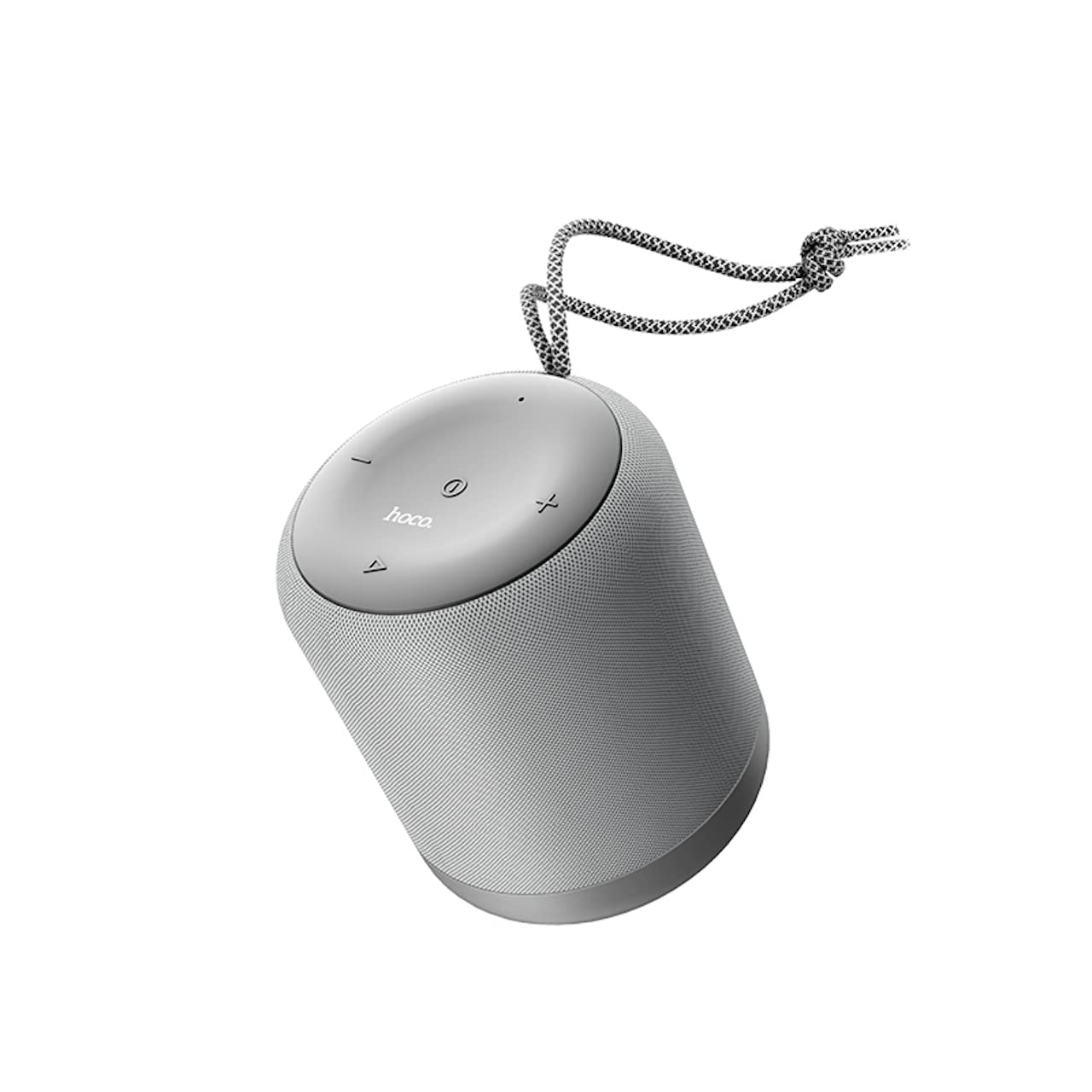
Figure 1: Top view of the HOCO BS30 speaker, showing the power, play/pause, volume, and mode buttons.

Figure 2: Side view of the HOCO BS30 speaker, illustrating the charging port, TF card slot, and AUX input.
Setup
1. Charging the Speaker
- Connect the provided USB charging cable to the speaker's charging port.
- Connect the other end of the USB cable to a 5V DC power adapter (not included) or a computer's USB port.
- The LED indicator will illuminate to show charging status.
- Charging typically takes approximately 2 hours for a full charge.
- Once fully charged, disconnect the charging cable.
Note: For optimal battery life, fully charge the speaker before first use.
2. Powering On/Off
- To power on, press and hold the Power Button until the LED indicator lights up and you hear an audible prompt.
- To power off, press and hold the Power Button again until the LED indicator turns off and you hear an audible prompt.
3. Bluetooth Pairing
- Ensure the speaker is powered on and in Bluetooth pairing mode (the LED indicator will typically flash blue). If not, press the Mode Button to switch to Bluetooth mode.
- Enable Bluetooth on your smartphone, tablet, or other audio device.
- Search for available Bluetooth devices.
- Select "HOCO BS30" from the list of devices.
- Once paired, the LED indicator will turn solid blue, and you will hear a confirmation sound.
- The speaker will automatically connect to the last paired device when powered on, if Bluetooth is enabled on the device.
Operating Instructions
Basic Controls
| Button/Action | Function |
|---|---|
| Power Button (Long Press) | Power On/Off |
| Play/Pause Button (Short Press) | Play/Pause music |
| Play/Pause Button (Short Press during call) | Answer/End call |
| Play/Pause Button (Long Press during call) | Reject call |
| Volume Up (+) (Short Press) | Increase Volume |
| Volume Up (+) (Long Press) | Next Track |
| Volume Down (-) (Short Press) | Decrease Volume |
| Volume Down (-) (Long Press) | Previous Track |
| Mode Button (Short Press) | Switch between Bluetooth / TF Card / AUX modes |
Bluetooth Mode
After successful pairing (see Setup section), you can stream audio wirelessly from your connected device. Use the speaker's controls or your device's controls to manage playback and volume.
TF Card Mode
- Insert a MicroSD (TF) card with MP3 audio files into the TF card slot.
- The speaker will automatically switch to TF Card mode, or you can press the Mode Button to select it.
- Playback will begin automatically. Use the speaker's controls to manage music.
AUX Mode
- Connect one end of a 3.5mm audio cable (not included) to the speaker's AUX input.
- Connect the other end to the audio output jack of your external device (e.g., MP3 player, laptop).
- The speaker will automatically switch to AUX mode, or you can press the Mode Button to select it.
- Control playback and volume primarily from your external device.
Maintenance
- Keep the speaker dry. Do not expose it to water or excessive moisture, as it is not water-resistant.
- Clean the speaker with a soft, dry cloth. Do not use abrasive cleaners or solvents.
- Avoid extreme temperatures. Store the speaker in a cool, dry place.
- Do not attempt to disassemble or repair the speaker yourself. This will void the warranty and may cause damage.
- Charge the speaker regularly, even if not in use, to maintain battery health.
Troubleshooting
| Problem | Possible Solution |
|---|---|
| Speaker does not power on. | Ensure the speaker is fully charged. Connect to a power source and try again. |
| Cannot pair via Bluetooth. |
|
| No sound or low volume. |
|
| Sound distortion. |
|
Specifications
| Feature | Detail |
|---|---|
| Model Name | BS30 |
| Bluetooth Version | V5.0 JLAC6928 |
| Bluetooth Protocols | A2DP, AVRCP, HFP, HSP |
| Battery Capacity | 2000mAh (18650 Type A) |
| Speaker Size | 52mm |
| Speaker Output Power | 5W (4Ω, THD+N 10%) |
| Charging Voltage | DC 5V |
| Charging Time | Approx. 2 hours |
| Music Playback Time | Up to 6 hours (at 80% volume) |
| Connectivity Options | Bluetooth, TF Card, AUX |
| Dimensions | 9 x 10.5 x 9 cm |
| Weight | 348 grams |
| Water Resistance | No |
| Included Components | Carrying Strap |
| Control Method | Remote |
Safety Information
- Do not expose the speaker to direct sunlight, heat sources, or open flames.
- Avoid dropping or subjecting the speaker to strong impacts.
- Keep out of reach of children.
- Do not use the speaker in environments with high humidity or dust.
- Use only the specified charging voltage (DC 5V).
- Dispose of the battery according to local regulations. Do not dispose of in household waste.
Warranty and Support
For warranty information or technical support, please refer to the documentation provided with your purchase or contact your retailer. Keep your proof of purchase for any warranty claims.


