
1. Introduction
Thank you for choosing the UBay Universal Remote Control. This manual provides essential information for setting up, operating, and maintaining your new remote control. Please read this manual thoroughly before use to ensure optimal performance and longevity of your device.
2. Product Overview
The UBay Universal Remote Control is designed as a direct replacement for TCL ROKU Smart TV remotes. It requires no programming and features dedicated shortcut buttons for popular streaming services.

Figure 2.1: Front and side view of the UBay Universal Remote Control, highlighting its ergonomic design and button layout.
Key features include:
- Pre-programmed for TCL ROKU Smart TVs.
- Dedicated shortcut buttons for Netflix, CBS All Access, Channel, and Google Play.
- Standard navigation and volume controls.
3. Setup
Setting up your UBay Universal Remote Control is a simple process that primarily involves battery installation.
3.1 Battery Installation
- Locate the battery compartment on the back of the remote control.
- Slide the battery cover downwards or outwards to open.
- Insert two new AAA alkaline batteries (not included), ensuring the positive (+) and negative (-) terminals align correctly with the markings inside the compartment.
- Replace the battery cover by sliding it back into position until it clicks securely.
Important Note:
This remote control requires no programming or pairing. It is designed to work immediately with compatible TCL ROKU Smart TVs once batteries are installed.
4. Operating Instructions
Once batteries are installed, point the remote control directly at your TCL ROKU Smart TV and begin use. Ensure there are no obstructions between the remote and the TV's infrared receiver.
4.1 Button Functions
- Power Button: Turns the TV on or off.
- Navigation Pad (Up, Down, Left, Right, OK): Used to navigate menus and select options.
- Back Button: Returns to the previous screen or menu.
- Home Button: Returns to the Roku TV home screen.
- Volume Up/Down: Adjusts the TV volume.
- Mute Button: Mutes or unmutes the TV audio.
- Instant Replay: Jumps back a few seconds in video playback.
- Play/Pause: Controls media playback.
- Fast Forward/Rewind: Skips forward or backward in media playback.
- Shortcut Buttons (Netflix, CBS All Access, Channel, Google Play): Provides direct access to these streaming applications.
5. Compatibility
This UBay Universal Remote Control is specifically designed for and compatible with a wide range of TCL ROKU Smart TV models. It is not compatible with Roku streaming box players, Roku Stick players, or other non-TCL Roku devices.
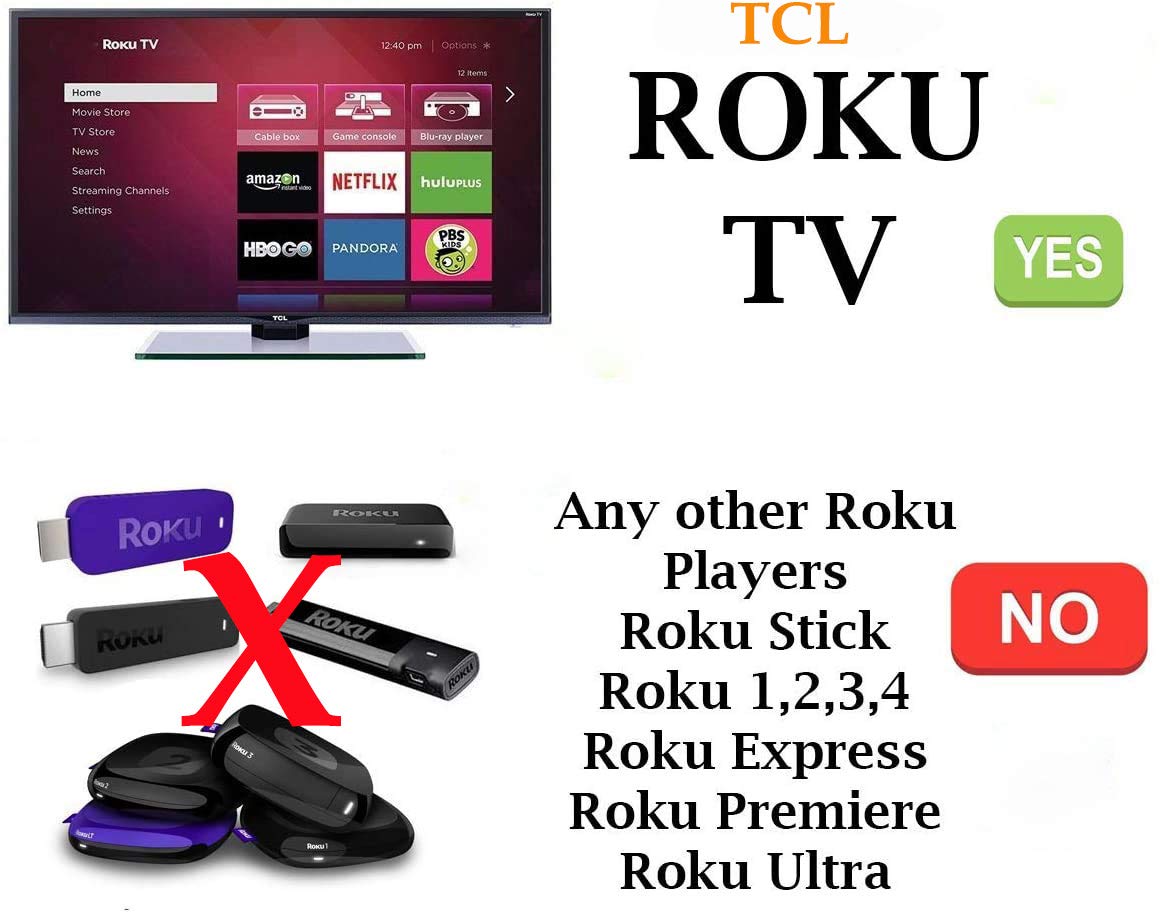
Figure 5.1: Visual representation of compatibility, indicating support for TCL Roku TVs and non-support for standalone Roku streaming players.
5.1 Compatible TCL TV Models
This remote is compatible with TCL ROKU Smart TV models including, but not limited to, the following series and specific models:
- 06-IRPT20-TRC280J
- 32S301, 32S303, 32S305, 32S321, 32S3700, 32S3750, 32S3800, 32S3850, 32S3850A, 32S3850B, 32S3850P, 32S4610R, 32S800, 32S850
- 40FS3700, 40FS3750, 40FS3800, 40FS3850, 40FS4610R, 40S303, 40S305, 40S321, 40S3800
- 43FP110, 43S303, 43S305, 43S403, 43S405, 43S421, 43S425, 43S515
- 48FS3700, 48FS3750, 48FS4610R
- 49FP110, 49S303, 49S305, 49S403, 49S405, 49S515
- 50FS3700, 50FS3750, 50FS3800, 50FS3850, 50S3800, 50S421, 50S425, 50UP120
- 55C803, 55D2900U, 55FS3700, 55FS3750, 55FS3800, 55FS3850, 55FS4610R, 55P605, 55R615, 55S401, 55S403, 55S405, 55S421, 55S425, 55S515, 55UP120, 55US57, 55US5800
- 65C803, 65D2930U, 65R615, 65S4, 65S401, 65S403, 65S405, 65S421, 65S425, 65S515, 65US5800
- 70S42, 75C803, 75S425
- 28S305, 28S3750
6. Troubleshooting
If you experience issues with your remote control, please refer to the following common solutions:
- Remote not responding:
- Ensure new alkaline batteries are correctly installed.
- Check if the batteries are depleted and replace them if necessary.
- Verify there are no obstructions between the remote's infrared emitter and the TV's receiver.
- Ensure you are within the effective range and pointing the remote directly at the TV.
- Specific buttons not working:
- This remote is pre-programmed and does not require setup. If a button is unresponsive, ensure the remote is compatible with your specific TCL ROKU TV model.
- Clean the remote's surface and buttons to remove any dirt or debris that might be interfering with button presses.
- Remote feels sluggish or requires multiple presses:
- This often indicates low battery power. Replace the batteries with fresh alkaline ones.
- Ensure a clear line of sight to the TV's IR sensor.
If problems persist after attempting these solutions, please contact customer support.
7. Specifications
| Feature | Detail |
|---|---|
| Model Number | UBay TCL RC280V13 |
| Product Dimensions | 6 x 1.5 x 0.6 inches |
| Item Weight | 1.8 ounces |
| Connectivity Technology | Infrared (IR) |
| Power Source | 2 x AAA Alkaline Batteries (not included) |
| Compatible Devices | TCL ROKU Smart TVs |
| Special Features | No Programming Required, Universal (for compatible TCL Roku TVs) |
| Manufacturer | UBay Factory |
| Date First Available | August 8, 2020 |
8. Maintenance
Proper care and maintenance will extend the life of your remote control.
- Cleaning: Use a soft, dry cloth to clean the surface of the remote. Do not use liquid cleaners or abrasive materials.
- Battery Care: Remove batteries if the remote will not be used for an extended period to prevent leakage. Dispose of used batteries responsibly according to local regulations.
- Storage: Store the remote in a cool, dry place away from direct sunlight and extreme temperatures.
9. Warranty and Support
For any questions, technical assistance, or warranty inquiries regarding your UBay Universal Remote Control, please contact the seller or manufacturer directly through your purchase platform. Please retain your proof of purchase for any warranty claims.


