
inGCO Auto Ranging Digital Clamp Meter DCM6005 User Manual
Model: DCM6005
Your comprehensive guide to operating and maintaining your inGCO Digital Clamp Meter.
1. Introduction
The inGCO Auto Ranging Digital Clamp Meter DCM6005 is a versatile and professional tool designed for a wide range of electrical measurements. It features True RMS for accurate readings, auto-ranging capabilities, and a variety of functions including AC/DC voltage, AC/DC current, resistance, capacitance, diode test, frequency, duty-cycle, and temperature measurement. This manual provides detailed instructions to ensure safe and effective use of your device.
2. What's in the Box
Upon opening your inGCO DCM6005 package, please verify that all the following items are included:
- AC/DC Clamp Meter (DCM6005)
- 2 x AAA batteries
- Test leads (red and black)
- Carrying case

Image: The inGCO DCM6005 Clamp Meter shown with its included accessories: test leads, two AAA batteries, and a black carrying case.
3. Key Features
The DCM6005 is equipped with advanced features for accurate and convenient measurements:
- Wide Range of Tests: Measures AC/DC voltage, AC/DC current, resistance, capacitance, diode test, frequency, duty-cycle, and temperature.
- Dual Readings & Smart Backlight: The backlight changes to orange when voltage exceeds 80V or current exceeds 3A, providing a visual alert for high readings.

Image: Illustration of the DCM6005's dual reading feature, showing the display with a normal white backlight and then an orange backlight when voltage is above 80V or current is above 3A.
- True RMS Measurement: Ensures accurate readings for non-sinusoidal waveforms, providing the true effective value of the current waveform.

Image: A graphical comparison demonstrating the difference between a general method of measurement and True RMS measurement for current waveforms, highlighting the accuracy of True RMS for complex signals.
- NCV Non-Contact Measurement: Safely detects AC voltage without direct contact, with flashing lights and a buzzer indicating signal strength.

Image: The DCM6005 performing a Non-Contact Voltage (NCV) measurement near a power strip, illustrating how the display and buzzer indicate weak ('---L') and strong ('---H' with orange backlight) current signals.
- Temperature Measurement: Capable of measuring temperature from -4°F to 1832°F using the included thermocouple.

Image: The DCM6005 connected to a thermocouple probe, measuring the temperature of water in a glass, with the display showing the temperature reading and the specified accuracy ranges.
- Built-in Flashlight: Provides illumination for working in dimly lit areas.

Image: A close-up view of the DCM6005 showing its built-in flashlight emitting light from the top clamp jaw, useful for illuminating dark work areas.
- Low Pass Filter (LPF): Ensures accurate drive output measurements.
- LowZ (Low Input Impedance Voltage Measurement): Safely troubleshoots sensitive electronic or control circuits and circuits that may contain false voltages.
- Auto Power Off: Automatically switches off after 15 minutes of inactivity to conserve battery life.
4. Setup
4.1 Battery Installation
The DCM6005 requires two AAA batteries (included). To install or replace batteries:
- Locate the battery compartment on the back of the meter.
- Use a screwdriver to open the battery cover.
- Insert the two AAA batteries, ensuring correct polarity (+/-).
- Replace the battery cover and secure it with the screw.
5. Operating Instructions
Familiarize yourself with the rotary dial and function buttons to select the desired measurement mode.
5.1 AC/DC Current Measurement
To measure current, turn the rotary dial to the '60A' or '600A' AC/DC current range. Open the clamp jaws and enclose a single conductor. The display will show the current reading. Ensure only one conductor is within the clamp for accurate measurement.

Image: The inGCO DCM6005 clamp meter being used to measure DC current on a cable connected to a vehicle battery, demonstrating its application in automotive electrical systems.
5.2 AC/DC Voltage Measurement
Connect the red test lead to the 'VΩHz' input jack and the black test lead to the 'COM' input jack. Turn the rotary dial to the 'V' (voltage) setting. Touch the test probes to the points where you want to measure voltage. The display will show the voltage reading. Use the 'FUNC' button to switch between AC and DC voltage if needed.
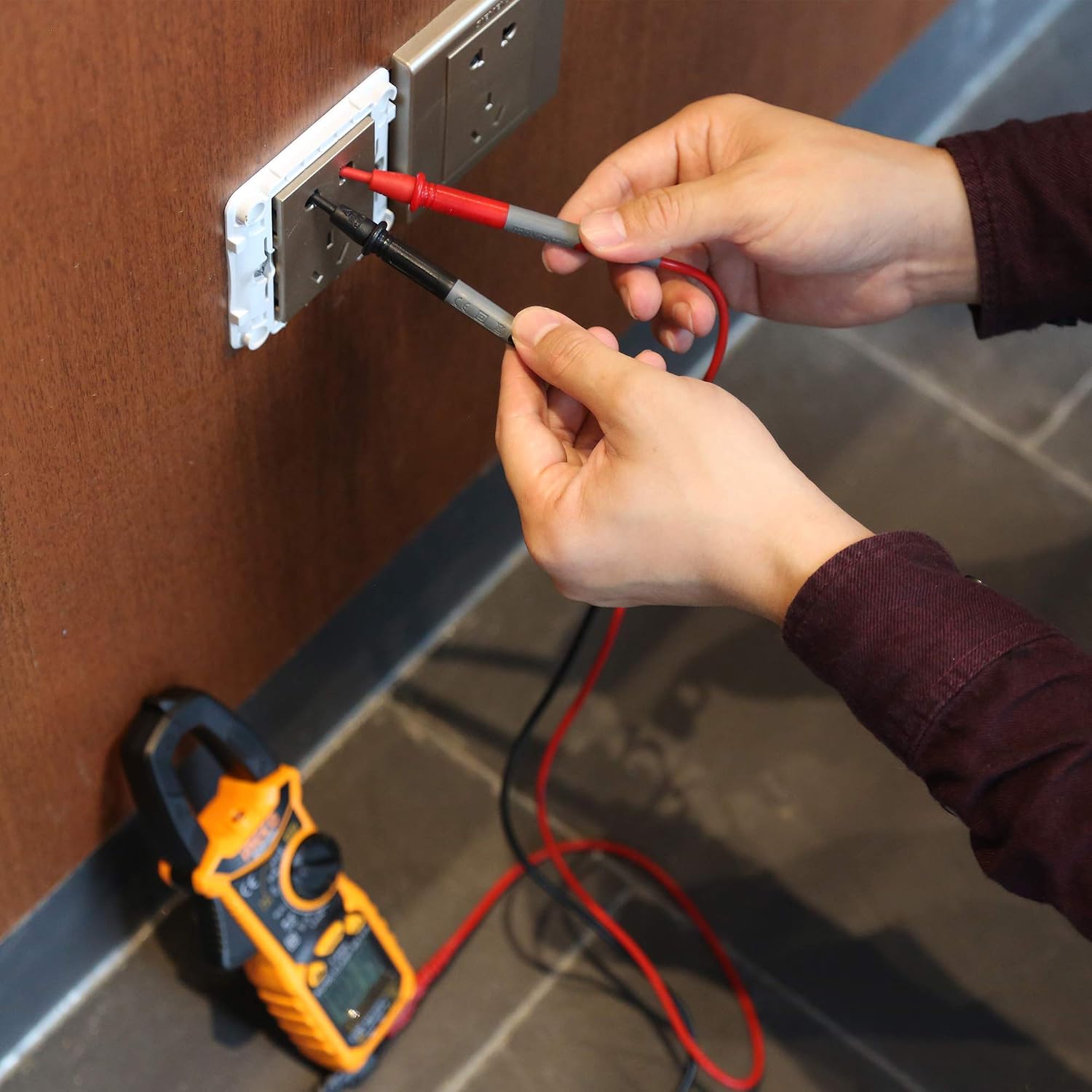
Image: A user holding the red and black test leads from the DCM6005 to measure AC voltage at a wall outlet, with the clamp meter resting on the floor nearby.
5.3 Diode Test
Turn the rotary dial to the diode symbol. Connect the red test lead to the 'VΩHz' input and the black test lead to the 'COM' input. Place the red probe on the anode and the black probe on the cathode of the diode. The display will show the forward voltage drop. Reverse the probes to check for open circuit (OL) in the reverse direction.
5.4 Capacitance Measurement
Turn the rotary dial to the capacitance symbol. Connect the test leads to the capacitor terminals. The meter will display the capacitance value in Farads (F), microfarads (µF), or nanofarads (nF).
5.5 Temperature Measurement
Plug the included thermocouple into the dedicated temperature input jacks (red to '+' and black to '-'). Turn the rotary dial to the '°C/°F' setting. Place the thermocouple tip on or in contact with the object whose temperature you wish to measure. The display will show the temperature reading.
5.6 Non-Contact Voltage (NCV) Detection
Press the NCV button. Hold the top of the clamp meter near an AC voltage source. The meter will beep and the NCV indicator will light up, with the frequency of beeps and light intensity increasing with stronger voltage.
5.7 Backlight and Flashlight Operation
Press the backlight/flashlight button to turn on the display backlight or the integrated flashlight. Press again to cycle through modes or turn off. Note that the backlight may automatically turn off after a short period to conserve battery.
5.8 Video Demonstration of Features
Video: An official product video from INGCO USA demonstrating various functions of the DCM6005 clamp meter, including AC/DC current and voltage measurement, diode testing, capacitance measurement, temperature measurement, backlight, flashlight, and non-contact AC voltage detection.
6. Maintenance
6.1 Cleaning
To clean the meter, wipe the case with a damp cloth and mild detergent. Do not use abrasives or solvents. Keep the input terminals free of dirt and moisture.
6.2 Battery Replacement
When the battery indicator appears on the display, replace the batteries promptly to ensure accurate readings. Refer to section 4.1 for battery installation instructions.
6.3 Storage
If the meter is not used for an extended period, remove the batteries to prevent leakage and damage. Store the meter in its carrying case in a cool, dry place.
7. Troubleshooting
This section addresses common issues you might encounter with your DCM6005.
- Meter does not power on: Check if batteries are installed correctly and have sufficient charge. Replace batteries if necessary.
- Inaccurate readings: Ensure test leads are properly connected and not damaged. Verify the correct measurement function is selected. For current measurements, ensure only one conductor is clamped. If measuring DC current, use the 'Zero' function to clear any offset before measurement.
- Backlight turns off too quickly: This is a power-saving feature. The backlight is designed to turn off automatically after a short period of inactivity. This behavior is normal and cannot be adjusted for continuous illumination.
- Auto-ranging seems slow or inconsistent: While the meter has auto-ranging, in some specific scenarios or with very rapidly changing signals, manual range selection might provide a more stable reading. Ensure the rotary dial is set to the appropriate auto-ranging position.
- Display shows 'OL' (Overload): This indicates that the input value exceeds the selected range. Switch to a higher range or verify the circuit conditions are within the meter's specifications.
- Short test leads: The included test leads are standard length. For applications requiring longer reach, compatible test leads can be purchased separately.
8. Specifications
Detailed technical specifications for the inGCO DCM6005 Digital Clamp Meter:
| Specification | Value |
|---|---|
| Product Dimensions | 7.87 x 2.76 x 1.18 inches |
| Item Model Number | DCM6005 |
| Batteries | 2 AAA batteries required (included) |
| Date First Available | October 29, 2020 |
| Manufacturer | Ingco |
| ASIN | B08FD9Q1Q5 |
| Power Source | Battery Powered |
| Style | Professional |
| Color | Orange |
| Item Weight | 422 Grams (14.89 ounces) |

Image: A diagram illustrating the physical dimensions of the inGCO DCM6005 clamp meter, showing its length (7.87 inches), width (2.76 inches), and thickness (1.18 inches).
9. Warranty and Support
Your inGCO DCM6005 Digital Clamp Meter comes with a satisfaction guarantee. If you are not 100% satisfied with your clamp meter, we offer a 90-day refund or replacement policy from the date of purchase.
For any issues, questions, or support needs, please contact us directly via email. We are committed to resolving any problems within 24 hours.
Thank you for choosing inGCO products.

