
Introduction
This manual provides essential information for setting up, operating, maintaining, and troubleshooting your Apple 2020 iMac with Retina 5K Display. The iMac features a stunning 27-inch Retina 5K display, powered by a 3.3GHz 6-core 10th-generation Intel Core i5 processor, 8GB of DDR4 RAM, and 512GB of ultrafast SSD storage. It also includes powerful AMD Radeon Pro 5300 graphics and versatile Thunderbolt 3 (USB-C) connectivity.

Image: The Apple 2020 iMac with Retina 5K Display, showcasing its elegant design and accompanying Magic Keyboard and Magic Mouse.
Setup
Follow these steps to set up your new iMac:
- Unboxing: Carefully remove the iMac and its accessories from the packaging. Ensure all components are present: iMac, Magic Keyboard, Magic Mouse, Power cord, and Lightning to USB Cable.
- Placement: Place the iMac on a stable, flat surface. Ensure adequate ventilation around the device.
- Connect Power: Connect the power cord to the power port on the back of the iMac and then to a wall outlet.
- Connect Peripherals:
- Connect the Magic Keyboard and Magic Mouse using the provided Lightning to USB Cable for initial pairing and charging. Once paired, they will connect wirelessly via Bluetooth.
- Utilize the two Thunderbolt 3 (USB-C) ports and four USB 3.0 ports for connecting external devices such as external hard drives, printers, or other accessories.
- For wired network connectivity, connect an Ethernet cable to the 10 Gigabit Ethernet port.
- First Boot: Press the power button located on the lower-right rear of the display. The iMac will guide you through the initial macOS setup process.
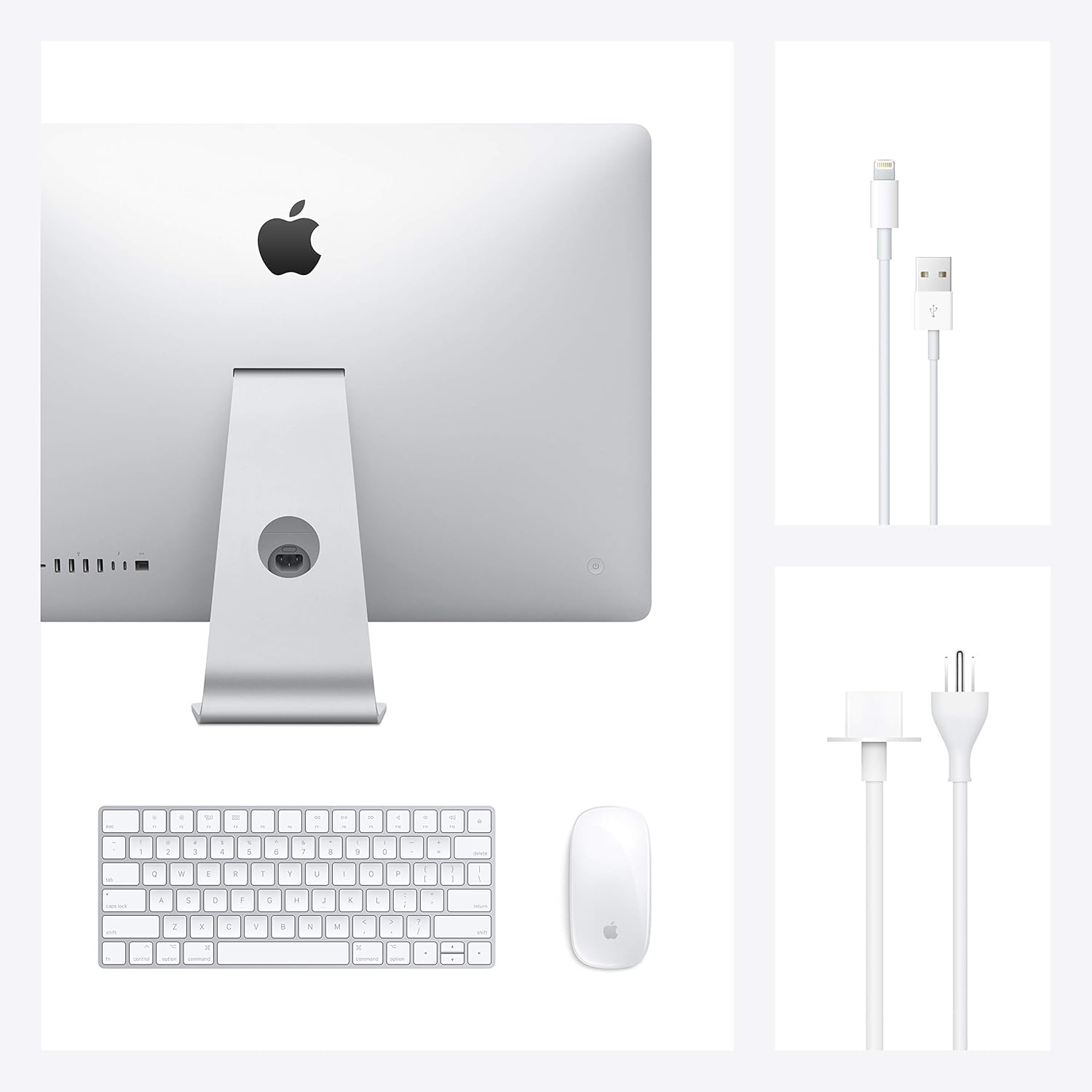
Image: Contents of the Apple iMac package, including the computer, keyboard, mouse, and necessary cables.

Image: Detail of the iMac's rear connectivity ports, including USB-C, USB-A, and Ethernet.
Operating Your iMac
The iMac runs on macOS, offering a user-friendly interface and a suite of powerful applications.
Key Features:
- Retina 5K Display: Enjoy vibrant images and sharp text on the 27-inch (diagonal) 5120-by-2880 resolution display.
- macOS: Navigate with ease using the intuitive macOS operating system.
- Pre-installed Applications: The iMac comes with essential applications such as Safari, Mail, Pages, Numbers, Keynote, Photos, Music, Messages, FaceTime, Calendar, and more.
- Connectivity: Integrated 802.11ac Wi-Fi and Bluetooth for wireless connections.
Basic Operations:
- Power On/Off: Use the power button on the back-right of the display.
- Sleep Mode: To put your iMac to sleep, go to the Apple menu in the top-left corner of the screen and select "Sleep."
- Adjust Display: The display can be tilted to your preferred viewing angle.

Image: The sleek side profile of the iMac, demonstrating its minimal footprint on a desk.
Maintenance
Proper maintenance ensures the longevity and optimal performance of your iMac.
- Cleaning: Use a soft, lint-free cloth to clean the screen and exterior. Avoid abrasive materials or harsh chemicals.
- Software Updates: Regularly update macOS and applications to ensure security and performance. Access updates via System Settings (or System Preferences) > Software Update.
- RAM Upgrade: The 27-inch iMac model allows for user-upgradable RAM up to 128GB. Consult Apple's official support documentation for detailed instructions on how to safely upgrade the RAM.
- Backup Data: Regularly back up your important data using Time Machine or other backup solutions to prevent data loss.
Troubleshooting
If you encounter issues with your iMac, try these basic troubleshooting steps:
- Restart: Often, a simple restart can resolve minor software glitches.
- Check Connections: Ensure all cables (power, peripherals) are securely connected.
- Software Issues: If an application is unresponsive, force quit it by pressing Command-Option-Esc, selecting the application, and clicking "Force Quit."
- Internet Connectivity: Verify your Wi-Fi or Ethernet connection. Try restarting your router if necessary.
- Apple Support: For persistent issues, visit the official Apple Support website or contact Apple customer service.
Specifications
| Feature | Detail |
|---|---|
| Display Size | 27 Inches (diagonal) |
| Screen Resolution | 5120 x 2880 (Retina 5K) |
| Processor | 3.3 GHz 6-core 10th-generation Intel Core i5 |
| RAM | 8 GB DDR4 (upgradable to 128 GB) |
| Memory Speed | 2666 MHz |
| Storage | 512 GB SSD |
| Graphics | AMD Radeon Pro 5300 (4 GB GDDR6) |
| USB 3.0 Ports | 4 |
| Thunderbolt 3 (USB-C) Ports | 2 |
| Wireless Connectivity | 802.11ac Wi-Fi, Bluetooth 5.0 |
| Operating System | macOS |
| Item Weight | 19.7 pounds |
| Dimensions (LxWxH) | 7.99 x 25.59 x 20.31 inches |
Warranty and Support
Your Apple iMac comes with a standard one-year limited warranty from Apple. Additionally, you may have the option to purchase AppleCare within 60 days of your purchase for extended coverage and technical support. For detailed warranty information and support resources, please visit the official Apple Support website.
Online resources and community forums are also available for troubleshooting and tips on maximizing your iMac experience.


