
1. Introduction and Overview
The Wathai 3x120mm Dual Ball Computer Fan is engineered to provide efficient and reliable cooling and ventilation for a wide range of electronic equipment and enclosed spaces. This fan unit features a robust dual-ball bearing design for extended lifespan and includes an adjustable AC speed controller, allowing users to customize airflow and noise levels according to specific requirements. This manual provides essential information for the proper setup, operation, and maintenance of your Wathai fan unit.

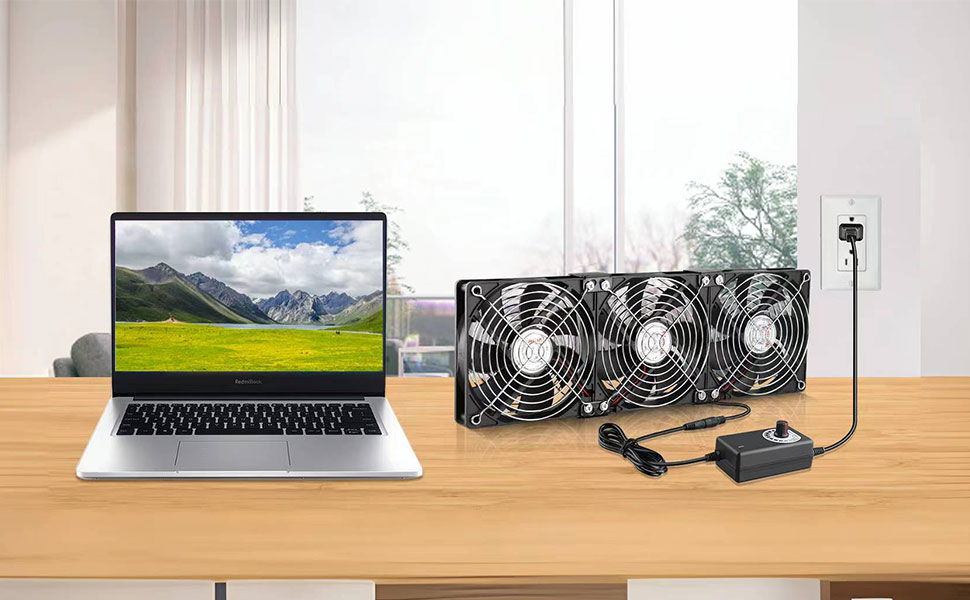
Wathai 3x120mm Dual Ball Computer Fan with AC speed controller and power plug.
2. Product Features
- Dual-Ball Bearings: Designed for a lifespan of 50,000 hours, allowing the fans to be mounted flat or upright without compromising performance.
- Variable Speed Control: Includes a 110V-220V AC power supply with a speed control function. The knob adjusts the fan speed from 3V to 12V DC and can also turn the fan off.
- Versatile Application: Suitable for cooling cabinets, chassis, servers, workstations, computer cases, studios, window exhaust, plant tents, crawl spaces, basements, RV refrigerators, gaming consoles (Xbox, PS4), amplifiers, and more.
- Compact Design: Each fan measures 120x120x25mm (4.72in L x 4.72in W x 1in H). The total unit size is 14.17in L x 4.72in W x 1in H.
- High Airflow: Each fan provides an airflow of 85 CFM, totaling 255 CFM for the 3-fan unit at maximum speed.
3. Package Contents
Please verify that all components are present in the package:
- 1 x Wathai 3x120mm Fan Unit
- 1 x AC Speed Controller with Power Plug (Input: 100V-240V 50/60Hz, Output: DC 3-12V 200-2000mA)
- Mounting Hardware (screws, rubber feet)

Wathai 3x120mm fan unit with speed controller and power connections.
4. Setup Instructions
- Unpack Components: Carefully remove all items from the packaging.
- Position the Fan Unit: Determine the optimal location for the fan unit based on your cooling needs. The dual-ball bearings allow for both horizontal and vertical mounting. Use the provided mounting hardware to secure the fan unit if necessary.
- Connect to Speed Controller: Connect the fan unit's DC plug to the DC input jack on the variable speed controller. Ensure a secure connection.
- Connect to Power: Plug the AC power plug of the speed controller into a standard 100V-240V AC electrical outlet.
5. Operating Instructions
The Wathai fan unit is designed for simple operation:
- Power On/Off: The speed controller knob also functions as a power switch. Turn the knob clockwise from the 'OFF' position to power on the fan. Turn it counter-clockwise to the 'OFF' position to power off.
- Adjust Fan Speed: Rotate the knob on the speed controller to adjust the fan speed. Turning it clockwise increases the speed and airflow, while turning it counter-clockwise decreases the speed and noise level.
- Optimal Setting: Experiment with different speed settings to find the optimal balance between cooling performance and noise level for your specific environment.
Short video demonstrating the Wathai fan with variable speed control for DIY cooling applications.
6. Applications
This fan unit is highly versatile and can be used in numerous scenarios requiring enhanced airflow and cooling:
- Electronic Equipment Cooling: Ideal for servers, workstations, computer cases, amplifiers, gaming consoles (Xbox, PS4), and other devices prone to overheating.
- Cabinet and Enclosure Ventilation: Effectively cools enclosed cabinets, chassis, and racks to prevent heat buildup.
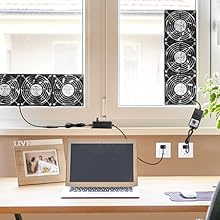
- Room and Space Ventilation: Can be used as a window exhaust or intake fan, for plant tents, crawl spaces, basements, laundry rooms, garages, and attics.
- Appliance Cooling: Suitable for improving air circulation around RV refrigerators or other appliances.

7. Maintenance
To ensure optimal performance and longevity of your Wathai fan unit, follow these maintenance guidelines:
- Regular Cleaning: Periodically clean the fan blades and protective grilles to remove dust and debris. Use a soft brush or compressed air. Ensure the fan is unplugged before cleaning.
- Ensure Clear Airflow: Regularly check that the intake and exhaust paths are free from obstructions to maintain efficient airflow.
- Inspect Connections: Occasionally inspect the power connections and fan cables for any signs of wear or damage.
8. Troubleshooting
If you encounter issues with your Wathai fan unit, refer to the following troubleshooting tips:
| Problem | Possible Cause | Solution |
|---|---|---|
| Fan does not turn on | No power, speed controller off, loose connection | Check if the AC plug is securely inserted. Ensure the speed controller knob is turned on and adjusted above the 'OFF' position. Verify all DC connections are firm. |
| Fan is excessively noisy | High speed setting, vibrations, obstruction | Reduce the fan speed using the controller knob. Ensure the fan unit is mounted stably and not vibrating against surfaces. Check for any foreign objects in the fan blades. |
| Insufficient cooling performance | Low speed setting, obstructed airflow, incorrect placement | Increase the fan speed. Ensure there are no obstructions blocking the fan's intake or exhaust. Re-evaluate the fan's placement to optimize airflow for the target area. |
9. Specifications
Detailed technical specifications for the Wathai 3x120mm Dual Ball Computer Fan:
| Specification | Value |
|---|---|
| Product Dimensions | 14.16"L x 4.72"W x 1"H |
| Brand | Wathai |
| Power Connector Type | AC power plug |
| Voltage (AC Input) | 100V - 240V |
| Voltage (DC Output) | 3-12V (Adjustable) |
| Wattage | 6 watts (Max) |
| Cooling Method | Air Cooling |
| Compatible Devices | Desktop, Gaming Console, Inverter, Refrigerator, Switch, Cabinets, Servers |
| Noise Level | 35 Decibels (Max) |
| Material | Plastic |
| Maximum Rotational Speed | 2500 RPM (per fan) |
| Air Flow Capacity | 85 Cubic Feet Per Minute (per fan) |
| Item Weight | 500 Grams |

Detailed performance specifications at various adjustable voltages.
10. Warranty Information
The Wathai 3x120mm Dual Ball Computer Fan comes with a 1-year limited warranty from the date of purchase. This warranty covers manufacturing defects and material flaws under normal use. Please retain your proof of purchase for warranty claims. The warranty does not cover damage resulting from misuse, accident, modification, or unauthorized repair.
11. Support
For technical assistance, product inquiries, or warranty support, please contact Wathai customer service through the official Wathai store on Amazon or refer to the contact information provided with your purchase. Our support team is available to help you with any questions or concerns.
Visit the Wathai Store on Amazon for more products and information.