
1. Introduction
This user manual provides detailed instructions for the installation, operation, and maintenance of the Flysky FS-CAT01 Altitude Telemetry Module. The FS-CAT01 is designed to provide real-time altitude data to compatible Flysky transmitters, enhancing the telemetry capabilities of your RC system. It is compatible with Flysky AFHDS 2A protocol receivers that support i-BUS sensor ports.
2. Product Overview
The Flysky FS-CAT01 is a compact and lightweight altitude telemetry module. It integrates seamlessly with Flysky's AFHDS 2A system to provide accurate altitude readings.

Figure 2.1: Front view of the Flysky FS-CAT01 Altitude Telemetry Module, showing the "ALTITUDE" label, "FS-CAT01" model name, "IN" and "OUT" ports, and an LED indicator.
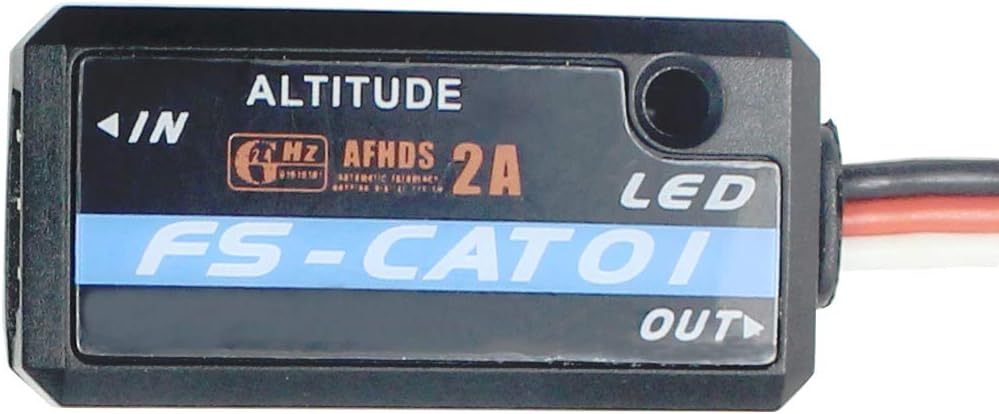
Figure 2.2: Top view of the Flysky FS-CAT01 Altitude Telemetry Module, highlighting the "ALTITUDE" branding and the AFHDS 2A logo.

Figure 2.3: Rear view of the Flysky FS-CAT01 Altitude Telemetry Module, showing the smooth casing and mounting screw points.

Figure 2.4: The Flysky FS-CAT01 module connected to a short three-wire cable, illustrating its compact size and connectivity.

Figure 2.5: The Flysky FS-CAT01 module with a longer three-wire cable, showing the standard servo-style connector for receiver integration.
3. Specifications
| Feature | Detail |
|---|---|
| Model | FS-CAT01 |
| Brand | Flysky |
| Material | Ceramic, Plastic, Metal |
| Maximum Supply Voltage | 6.5 Volts (DC) |
| Output Type | Digital |
| Specific Uses | RC vehicles, drones, hobbyist applications |
| Upper Temperature Rating | 250 Degrees Celsius |
| Item Weight | 9.6 ounces |
| Package Dimensions | 3.25 x 3.24 x 1 inches |
4. Setup and Installation
Follow these steps to properly set up and install your FS-CAT01 Altitude Telemetry Module:
- Compatibility Check: Ensure your Flysky receiver supports the i-BUS sensor port and AFHDS 2A protocol. Compatible transmitters include FS-i6, FS-i10, and IT4S.
- Connect the Module: Locate the i-BUS sensor port on your Flysky receiver. Carefully plug the FS-CAT01 module's three-wire connector into this port. Ensure the polarity is correct (signal, positive, negative).
- Secure the Module: Mount the FS-CAT01 module securely within your RC vehicle or drone. Use double-sided tape or a suitable mounting bracket to prevent movement during operation. Ensure it is not exposed to excessive vibrations or direct heat sources.
- Power On: Connect the battery to your RC system (receiver and transmitter). The LED on the FS-CAT01 module should illuminate, indicating it is receiving power.
- Transmitter Configuration:
- Access the telemetry settings on your Flysky transmitter (e.g., FS-i6X).
- Navigate to the sensor list or data display menu.
- The FS-CAT01 should be automatically detected as an altitude sensor. If not, initiate a sensor scan.
- Once detected, you may need to calibrate or set the ground air pressure for accurate altitude readings, as described in your transmitter's manual.
Note: Refer to your specific Flysky transmitter and receiver manuals for detailed instructions on telemetry setup and sensor management.
5. Operating Instructions
Once the FS-CAT01 module is installed and configured, it will begin transmitting altitude data to your compatible Flysky transmitter.
- Real-time Data Display: The altitude data will be displayed on your transmitter's screen. The format and display options may vary depending on your transmitter model.
- Altitude Reference: The module measures altitude relative to its initial power-on location or a user-defined ground reference. For accurate flight altitude, ensure the module is powered on at the desired ground level.
- Data Logging: Some Flysky transmitters support data logging. If available, you can record altitude data along with other telemetry information for post-flight analysis. Consult your transmitter's manual for data logging features.
- Telemetry Alarms: You can set up custom alarms on your transmitter for specific altitude thresholds. For example, an alarm can be triggered if the altitude exceeds or falls below a certain value.
6. Maintenance
The FS-CAT01 Altitude Telemetry Module is designed for durability and requires minimal maintenance. Adhere to the following guidelines to ensure its longevity:
- Keep Clean: Regularly inspect the module for dust, dirt, or debris. Use a soft, dry cloth to gently clean the exterior. Avoid using liquid cleaners or solvents.
- Protect from Moisture: The module is not waterproof. Keep it away from water, humidity, and extreme weather conditions to prevent damage to internal electronics.
- Avoid Physical Impact: Protect the module from drops, impacts, and excessive vibrations, which can damage its sensitive internal components.
- Proper Storage: When not in use, store the module in a cool, dry place, away from direct sunlight and extreme temperatures.
- Cable Inspection: Periodically check the connecting cable for any signs of wear, fraying, or damage. Replace the cable if necessary to ensure reliable data transmission.
7. Troubleshooting
If you encounter issues with your FS-CAT01 Altitude Telemetry Module, refer to the following troubleshooting tips:
| Problem | Possible Cause | Solution |
|---|---|---|
| No altitude data displayed on transmitter. |
|
|
| Inaccurate altitude readings. |
|
|
| Module LED not lit. |
|
|
8. Warranty Information
Flysky products are typically covered by a limited warranty against defects in materials and workmanship. The warranty period and terms may vary by region and retailer. Please retain your proof of purchase for warranty claims.
This warranty does not cover damage caused by:
- Improper installation or operation.
- Unauthorized modifications or repairs.
- Accidents, misuse, abuse, or neglect.
- Exposure to extreme temperatures, moisture, or corrosive environments.
For specific warranty details, please refer to the documentation included with your product or visit the official Flysky website.
9. Customer Support
For technical assistance, troubleshooting, or warranty inquiries, please contact Flysky customer support through their official channels. You may find support resources, FAQs, and contact information on the official Flysky website:
Official Website: www.flysky-cn.com
When contacting support, please be prepared to provide your product model (FS-CAT01), serial number (if applicable), and a detailed description of the issue.

