
1. Introduction
The FiiO FH3 HiFi In-Ear Earphones are designed to deliver high-fidelity audio. They incorporate a hybrid driver system, combining a dynamic driver with two Knowles balanced armature drivers, to provide a balanced and detailed sound experience. This manual provides instructions for setup, operation, maintenance, and troubleshooting to ensure optimal performance and longevity of your earphones.
2. Package Contents
Verify that all items are present in your FiiO FH3 package:
- FiiO FH3 In-Ear Monitors
- High-purity monocrystalline silver-plated copper cable (1.2 m)
- 11 pairs of ear tips (4 different types in various sizes)
- Carry cases (one soft pouch, one solid transparent case)
- Eartip brush

Image: FiiO FH3 earphones, cable, and various ear tips included in the package.
3. Setup
3.1 Attaching the Cable
- Identify the left (blue ring) and right (red ring) earphone units and cable connectors.
- Align the cable connector with the earphone unit's socket. Ensure the correct orientation.
- Gently push the connector into the socket until it clicks securely into place. Do not force it.

Image: Close-up of FiiO FH3 earphones showing the red and blue color coding for right and left channels on the cable connection points.
3.2 Selecting and Installing Ear Tips
Proper ear tip selection is crucial for sound quality and comfort. Experiment with the included ear tips to find the best fit for your ears.
- Balanced Ear Tips: Provide a neutral sound signature.
- Bass Ear Tips: Enhance low-frequency response.
- Vocal Ear Tips: Emphasize mid-range frequencies for clearer vocals.
- Foam Ear Tips: Offer superior noise isolation and a warm sound.
- Gently remove the pre-installed ear tips by pulling them off the nozzle.
- Select a new pair of ear tips of appropriate size and type.
- Push the new ear tip onto the earphone nozzle, ensuring it is fully seated and forms a tight seal.

Image: A selection of different ear tips provided with the FiiO FH3 earphones, including silicone and foam options.
3.3 Wearing the Earphones
- Identify the left and right earphone units.
- Place the earphone into your ear canal, ensuring a snug fit.
- Route the cable over the top of your ear. The pre-formed ear hooks on the cable help secure the earphones in place.
- Adjust the earphones and cable for maximum comfort and a secure seal. A good seal is essential for optimal bass response and sound isolation.
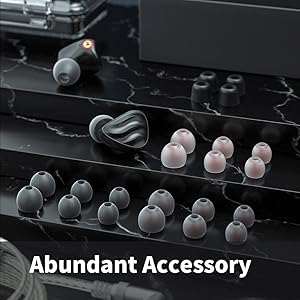
Image: Diagram showing the correct way to wear the FiiO FH3 earphones, with the cable looped over the ear for stability.
4. Operating Instructions
Connect the 3.5mm jack of the earphone cable to your audio source (smartphone, PC, tablet, digital audio player, etc.). Ensure the connection is secure. Adjust the volume on your audio source to a comfortable listening level before placing the earphones in your ears.

Image: FiiO FH3 earphones with their cable and 3.5mm jack, ready for connection to an audio device.
5. Key Features
5.1 Hybrid Driver System
The FH3 earphones utilize a sophisticated hybrid driver configuration:
- 10mm Beryllium-Plated Dynamic Driver: Provides powerful and deep bass response.
- Knowles RAD-33518 Balanced Armature Driver: Delivers clear, extended, and smooth high frequencies.
- Knowles ED-30262 Balanced Armature Driver: Produces sweet and full mid-range vocals and contributes to a wider soundstage.
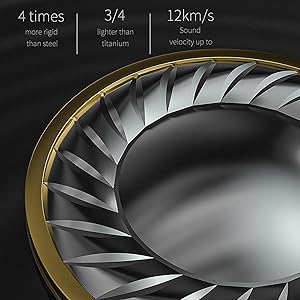
Image: Illustration of the two Knowles Balanced Armature drivers used in the FiiO FH3 earphones.
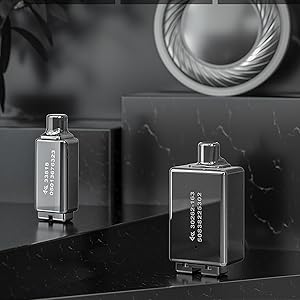
Image: Close-up of the 10mm beryllium-plated diaphragm dynamic driver, responsible for bass reproduction.
5.2 S.TURBO Acoustic Design
FiiO's patented S.TURBO acoustic design is integrated into the FH3, providing deeper and more impactful bass. This design optimizes the airflow within the earphone cavity to enhance low-frequency performance.
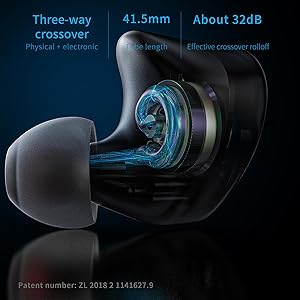
Image: Cross-section diagram illustrating the S.TURBO acoustic design within the earphone, highlighting the path for bass enhancement.
5.3 High-Purity Monocrystalline Silver-Plated Copper Cable
The included 1.2m cable is constructed from 4 strands of 96 wires of high-purity monocrystalline silver-plated copper. This material choice ensures excellent signal transmission, contributing to the earphones' fidelity and ability to reproduce fine audio details.

Image: The FiiO FH3 earphones showcasing their high-quality, detachable silver-plated copper cable.
5.4 Aerospace-Grade Aluminum-Magnesium Alloy Shell
The earphone shells are crafted from aerospace-grade aluminum-magnesium alloy using 5-axis CNC precision machining. This construction ensures durability, a comfortable fit, and contributes to the acoustic performance by minimizing resonance.
6. Maintenance
- Cleaning: Regularly clean the earphone nozzles and ear tips using the provided eartip brush or a soft, dry cloth. Ensure no earwax or debris accumulates in the sound tubes.
- Storage: When not in use, store the earphones in one of the provided carry cases to protect them from dust, moisture, and physical damage.
- Cable Care: Avoid sharply bending or pulling the cable. Detach the cable gently when needed.
- Water Resistance: The earphones are water-resistant, but not waterproof. Avoid submerging them in water or exposing them to heavy rain. Dry them thoroughly if they get wet.
7. Troubleshooting
- No Sound or Intermittent Sound:
- Ensure the 3.5mm jack is fully inserted into the audio source.
- Check that the cable connectors are securely attached to the earphone units.
- Verify the audio source is playing and its volume is turned up.
- Test with a different audio source or cable to isolate the issue.
- Poor Sound Quality (Lack of Bass, Muffled Sound):
- Ensure the ear tips form a proper seal in your ear canal. Try different sizes or types of ear tips.
- Clean the earphone nozzles and ear tips to remove any obstructions.
- Check the audio source for any equalizer settings that might be affecting the sound.
- Discomfort or Poor Fit:
- Experiment with different ear tip sizes and materials until you find a comfortable and secure fit.
- Adjust the cable routing over your ear to relieve any pressure points.
8. Specifications
| Feature | Specification |
|---|---|
| Model Name | FH3 |
| Drivers | 1 Dynamic (10mm Beryllium-plated) + 2 Knowles BA (RAD-33518, ED-30262) |
| Frequency Response | 10Hz - 40kHz |
| Impedance | 24 Ohm @ 1kHz |
| Sensitivity | 114 dB @ 1mW |
| Headphones Jack | 3.5 mm Jack |
| Connectivity Technology | Wired |
| Cable Feature | Detachable |
| Cable Material | High-purity monocrystalline silver-plated copper |
| Material | Aluminum-Magnesium Alloy |
| Item Weight (single unit) | 7 Grams (0.247 ounces) |
| Water Resistance Level | Water Resistant |
| Product Dimensions | 4.72 x 0.79 x 0.79 inches |
| Compatible Devices | Android, iOS, Mac, Windows |
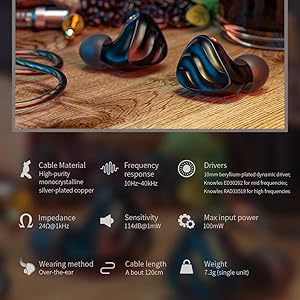
Image: A summary graphic of the FiiO FH3's technical specifications, including driver type, frequency response, impedance, and sensitivity.
9. Warranty and Support
FiiO products are covered by a limited warranty. For specific warranty terms and conditions, please refer to the warranty card included with your product or visit the official FiiO website. For technical support, product inquiries, or service requests, please contact FiiO customer support through their official channels.
Important: International products may have separate terms and may differ from local products, including fit, age ratings, and language of product, labeling, or instructions.
10. Official Product Videos
The following videos provide additional information and visual guidance for your FiiO FH3 earphones.
Video: FiiO FH3 Product Overview. This video provides a general introduction to the FiiO FH3 earphones, highlighting their design and key features.
Video: FiiO FH3 Features Showcase. This video demonstrates specific features and technologies incorporated into the FiiO FH3 earphones.


