
Introduction
This document serves as the official user manual for the GoolRC Programming Card. This device is specifically designed to program HOBBYFANS, OCDAY, and GOOLRC brushless Electronic Speed Controllers (ESCs) used in RC cars, particularly 1/10 scale climbing cars.
Please read this manual thoroughly before operating the programming card to ensure correct usage and to prevent any potential damage to your equipment.

Image: The GoolRC Programming Card, a compact black device with a digital display and four control buttons.
Setup and Connection
To begin programming your ESC, follow these steps to connect the GoolRC Programming Card:
- Ensure your RC car's ESC is powered off and disconnected from the motor and battery.
- Locate the programming port on your compatible HOBBYFANS, OCDAY, or GOOLRC brushless ESC. This is typically a small, dedicated port.
- Connect the programming card to the ESC's programming port using the appropriate cable (usually supplied with the ESC or programming card). Ensure the connection is secure and correctly oriented.
- Power on the ESC. The programming card should illuminate and display the current settings.

Image: The GoolRC Programming Card shown alongside a 1/10 scale RC climbing car, illustrating its intended use for programming compatible ESCs.
Operating Instructions
The GoolRC Programming Card features four buttons for navigation and setting adjustments: ITEM, VALUE, OK, and RESET.

Image: Close-up view of the GoolRC Programming Card, highlighting the ITEM, VALUE, OK, and RESET buttons.
- ITEM Button: Press this button to cycle through the available programmable parameters. Each press will advance to the next setting.
- VALUE Button: Once an item is selected, press this button to change the value or option for that specific parameter.
- OK Button: After selecting the desired value for a parameter, press the OK button to confirm and save the setting to the ESC.
- RESET Button: Press this button to restore all programmable parameters to their factory default settings. Use with caution.
Programmable Parameters
The following parameters can be adjusted using the programming card:
- Low Voltage Cut Off: Adjustable from 3.7V to 2.6V (3.7V/3.6V/3.5V/3.4V/3.3V/3.2V/3.1V/3.0V/2.9V/2.8V/2.7V/2.6V). This setting protects your battery from over-discharge.
- Start Modes: Options include Medium, Soft, and Strong. This controls the initial acceleration characteristics of the motor.
- Max. Brake Force:
- For 25A, 35A, 45A, 60A ESCs: 50%, 25%, 75%, 100%
- For 80A, 120A ESCs: 25%, 50%, 75%, 100%
- Max. Reverse Force: Adjustable to 25%, 50%, 75%, 100%. This controls the maximum power available for reverse movement.
- Neutral Range: Options include 9%, 6%, 12% work state. This defines the dead band around the neutral throttle position.

Image: The programming card's display showing options for Max. Brake force and Max. Reverse force settings.

Image: A detailed view of the programming card's reverse side or a sticker, displaying a comprehensive table of all programmable items and their corresponding value options.
Maintenance
To ensure the longevity and proper functioning of your GoolRC Programming Card, please observe the following maintenance guidelines:
- Cleaning: Use a soft, dry cloth to clean the surface of the programming card. Avoid using liquid cleaners or solvents, as these can damage the electronics.
- Storage: Store the programming card in a cool, dry place away from direct sunlight and extreme temperatures. Keep it protected from dust and moisture.
- Handling: Handle the card with care. Avoid dropping it or subjecting it to strong impacts, which could damage internal components.
- Connections: Always ensure cables are connected and disconnected gently to prevent damage to the ports on both the programming card and the ESC.
Troubleshooting
If you encounter issues while using your GoolRC Programming Card, consider the following common problems and solutions:
| Problem | Possible Cause | Solution |
|---|---|---|
| Card does not power on/display. | Incorrect connection to ESC, ESC not powered, or faulty cable. | Ensure the programming card is correctly connected to the ESC. Verify the ESC is powered on. Try a different cable if available. |
| Settings are not saving. | "OK" button not pressed, or ESC compatibility issue. | After selecting a value, press the "OK" button to confirm. Double-check that your ESC is compatible with this programming card (HOBBYFANS, OCDAY, GOOLRC brushless ESCs only). |
| Unexpected behavior after programming. | Incorrect parameter settings. | Review the programmed settings. Use the "RESET" button to revert to factory defaults and reprogram carefully. Consult your ESC's manual for recommended settings. |
For issues related to the ESC itself, please refer to the specific user manual for your Electronic Speed Controller.
Specifications
| Feature | Detail |
|---|---|
| Item Name | Programming Card |
| Model Number | ZGK6681975570202OW |
| Compatible ESCs | HOBBYFANS, OCDAY, GOOLRC brushless ESCs |
| Low Voltage Cut Off | 3.7V/3.6V/3.5V/3.4V/3.3V/3.2V/3.1V/3.0V/2.9V/2.8V/2.7V/2.6V |
| Start Modes | Medium, Soft, Strong |
| Max. Brake Force (25A-60A ESCs) | 50%, 25%, 75%, 100% |
| Max. Brake Force (80A-120A ESCs) | 25%, 50%, 75%, 100% |
| Max. Reverse Force | 25%, 50%, 75%, 100% |
| Neutral Range | 9%, 6%, 12% work state |
| Color | Black |
| Main Material | Plastic |
| Dimensions (L x W x H) | 8 cm x 5.4 cm x 1.3 cm (approx. 3.15 x 2.13 x 0.51 inches) |
| Weight | Approximately 31g (1.09 oz) |
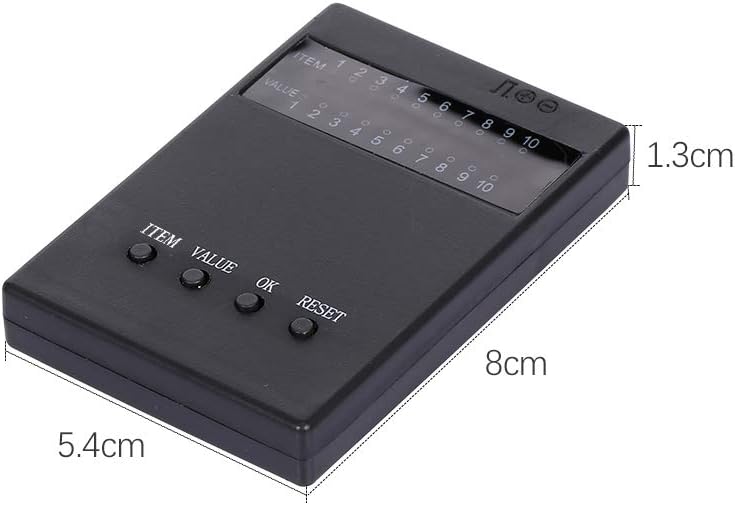
Image: The GoolRC Programming Card with its approximate dimensions (length, width, and thickness) indicated.
Warranty and Support
GoolRC provides a warranty for this product. If you encounter any problems or have questions regarding the GoolRC Programming Card, please contact the GoolRC store or customer support channel where you purchased the product. They will provide a satisfactory solution.
For further assistance, you may visit the official GoolRC store on Amazon: GoolRC Amazon Store.