
Product Overview
The HUANUO Triple Monitor Stand (Model HNTS3S) is designed to enhance your workspace by elevating three computer monitors, freeing up valuable desk space. This full-motion articulating gas spring monitor mount is compatible with three flat or curved LCD screens ranging from 17 to 32 inches in size. Each arm can support up to 17.6 lbs and is compatible with VESA mounting holes of 75x75mm and 100x100mm.
The stand offers extensive adjustability, allowing you to swivel, tilt, and rotate your monitors to achieve optimal viewing angles and positions. This flexibility helps to increase comfort and efficiency during work, enabling you to set your monitors in either landscape or portrait mode. The design also incorporates cable management features to keep your desk tidy and organized.

Setup and Installation
Before beginning installation, ensure your monitors meet the compatibility requirements: 17-32 inch size, VESA 75x75mm or 100x100mm mounting patterns, and a weight of no more than 17.6 lbs per arm. Please note that ultrawide screens are not supported.

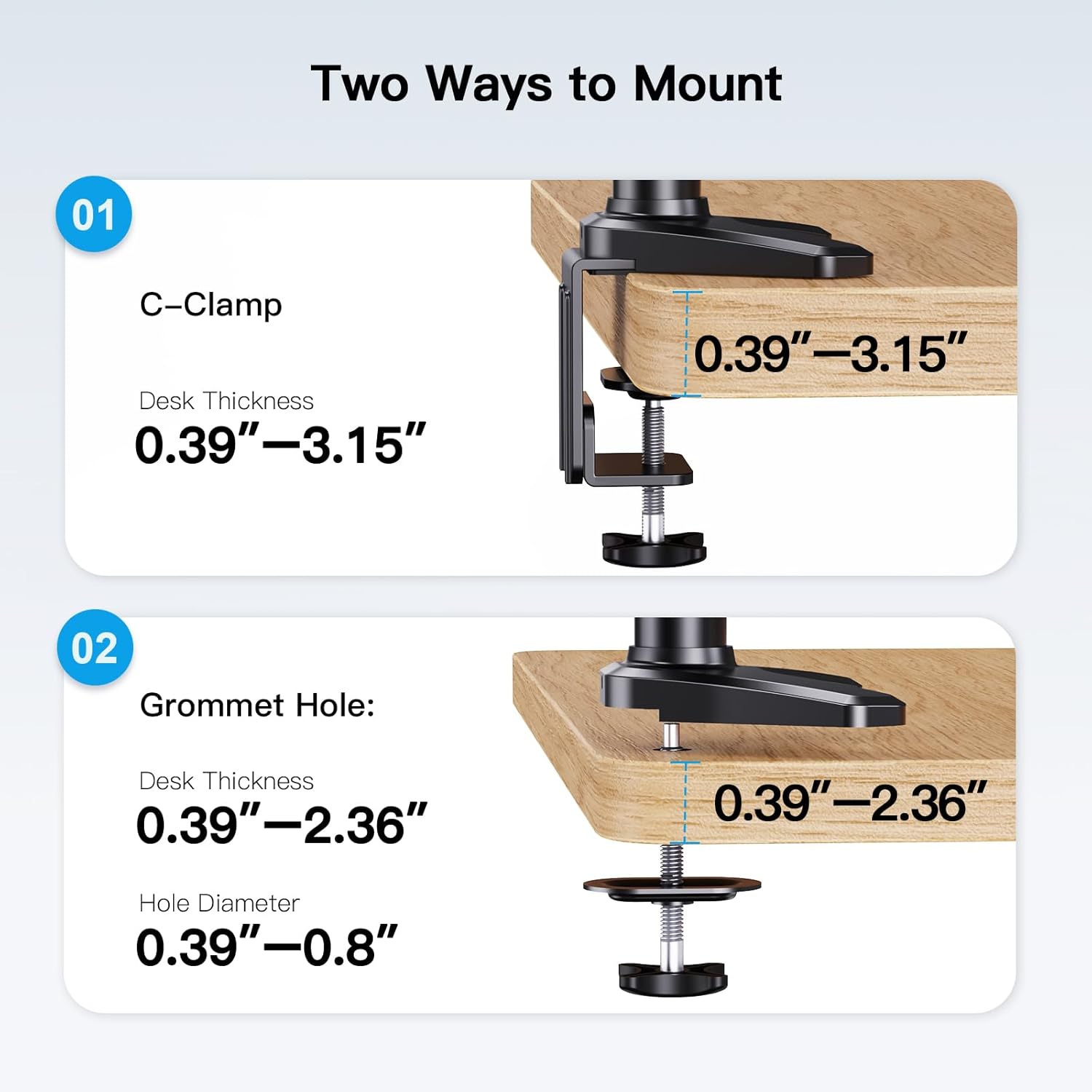
Mounting Options
The stand offers two versatile mounting options to suit your desk setup:
- C-Clamp: Securely attaches to the edge of your desk. Compatible with desk thicknesses between 0.39 inches and 3.15 inches.
- Grommet Hole: Utilizes an existing hole in your desk. Compatible with desk thicknesses between 0.39 inches and 2.36 inches, and hole diameters between 0.39 inches and 0.8 inches.
Installation Steps
- Assemble the Base: Depending on your chosen method (C-clamp or grommet), assemble the base components as per the included instructions.
- Attach Base to Desk: Securely fasten the assembled base to your desk. Ensure it is tightened sufficiently to provide a stable foundation for the monitors.
- Assemble Main Pole and Arms: Attach the main pole to the base. Then, slide the arm assembly onto the main pole.
- Attach VESA Plates to Monitors: Secure the VESA mounting plates to the back of each monitor using the provided screws. Ensure the screws are tightened firmly.
- Mount Monitors: Carefully slide each monitor (with attached VESA plate) onto the corresponding arm.
- Adjust Gas Spring Tension: The gas springs may require adjustment to properly support the weight of your monitors. Use the provided tool to increase or decrease tension until the monitors hold their position smoothly.
- Cable Management: Route all monitor cables through the integrated cable management channels on the arms and pole to maintain a clean and organized workspace.
Installation Video
Operation and Adjustments
The HUANUO Triple Monitor Stand offers full articulation for customized viewing. Once installed, you can easily adjust your monitors to your preferred ergonomic position.

Adjusting Your Monitors
- Height Adjustment: The monitors can be moved up and down along the central pole to achieve your desired eye-level height.
- Tilt: Each monitor can be tilted from +85 degrees (upwards) to -90 degrees (downwards) to reduce glare and optimize viewing comfort.
- Swivel: Monitors can be swiveled +/-90 degrees horizontally, allowing you to share your screen with others or adjust for different tasks.
- Rotation: For landscape or portrait viewing, monitors can be rotated a full 360 degrees.
Cable Management
To maintain a clean and organized workspace, utilize the integrated cable management system. Cables can be routed along the arms and down the central pole, keeping them out of sight and preventing clutter.

Maintenance
To ensure the longevity and optimal performance of your HUANUO Triple Monitor Stand, regular maintenance is recommended:
- Cleaning: Periodically wipe down the stand with a soft, damp cloth to remove dust and debris. Avoid using harsh chemicals or abrasive cleaners.
- Check Connections: Every few months, inspect all screws and connections to ensure they remain tight. Re-tighten if necessary to maintain stability.
- Gas Spring Adjustment: If monitors begin to sag or are difficult to adjust, re-evaluate the gas spring tension and adjust as needed using the provided tool.
Troubleshooting
If you encounter any issues with your monitor stand, consider the following common troubleshooting steps:
- Monitors are sagging or not holding position: This is typically due to insufficient gas spring tension. Refer to the
Related Documents - HNTS3S

HUANUO HNSS8 Monitor Desk Mount Instruction Manual
This instruction manual provides comprehensive guidance for installing and adjusting the HUANUO HNSS8 Monitor Desk Mount. Learn about safety information, weight restrictions, VESA compatibility, C-clamp and grommet mounting options, gas spring tension adjustment, and cable management for optimal monitor positioning.
HUANUO HNCM12 Monitor Desk Mount Instruction Manual
Comprehensive instruction manual for the HUANUO HNCM12 monitor desk mount. Covers safety precautions, VESA compatibility checks, tools required, parts list, and step-by-step installation guides for both C-clamp and grommet mounting methods. Includes instructions for monitor attachment, hanging, and tilt angle adjustments.
HUANUO HNDS7/HNDS12 Desk Monitor Arm - Dual Monitor Mount Installation Guide
Comprehensive installation guide for the HUANUO HNDS7 and HNDS12 dual desk monitor arms. Learn how to assemble, mount, and adjust your VESA-compatible monitor stand for optimal viewing. Includes parts list, safety warnings, and step-by-step instructions.
HUANUO HNTS3 / EGDMA114-TS Desk Monitor Arm - Installation and Adjustment Guide
Detailed installation and adjustment guide for the HUANUO HNTS3 / EGDMA114-TS desk monitor arm. Covers safety, parts, C-clamp and grommet mounting, VESA attachment, and tension adjustments for optimal ergonomic setup.
HUANUO HNSS8 Desk Monitor Arm Instruction Manual
Detailed guide for installing and using the HUANUO HNSS8 Desk Monitor Arm. Learn about product features, compatibility checks, safety precautions, and step-by-step assembly for a secure and ergonomic monitor setup.
HUANUO HNWSS4 Wall Monitor Arm Installation Guide
This instruction manual provides detailed steps for installing the HUANUO HNWSS4 Wall Monitor Arm. It covers important safety information, VESA compatibility checks, installation procedures for wood stud and concrete walls, gas spring tension adjustment, cable management, and monitor adjustments (tilt, swivel, rotation). Includes parts list, tools needed, and technical support contact information.Ask a question about this manual
Ask about setup, troubleshooting, compatibility, parts, safety, or missing instructions. Manuals+ will review the question and use this page’s manual context to help answer it.