
Introduction
This user manual provides comprehensive instructions for the installation, operation, and maintenance of your Gecko in.Stream 2 Outdoor Audio Station. Designed for outdoor environments, the in.Stream 2 offers robust audio capabilities with multiple connectivity options. Please read this manual thoroughly before using the product to ensure proper function and safety.
Product Overview
The Gecko in.Stream 2 is an outdoor audio station engineered for durability and high-quality sound. Key features include:
- Built-in universal power supply and a robust, fully splash-proof (IPx5) enclosure, making it suitable for outdoor use.
- Powerful and efficient Class D amplifiers for superior audio performance.
- Support for up to 4 speaker outputs (200W at 4 Ohms) and 1 subwoofer output (100W at 2 Ohms).
- Multiple audio sources: Auxiliary input, USB stick playback, FM radio, and Bluetooth streaming.
- Integrated USB connector for smartphone charging.
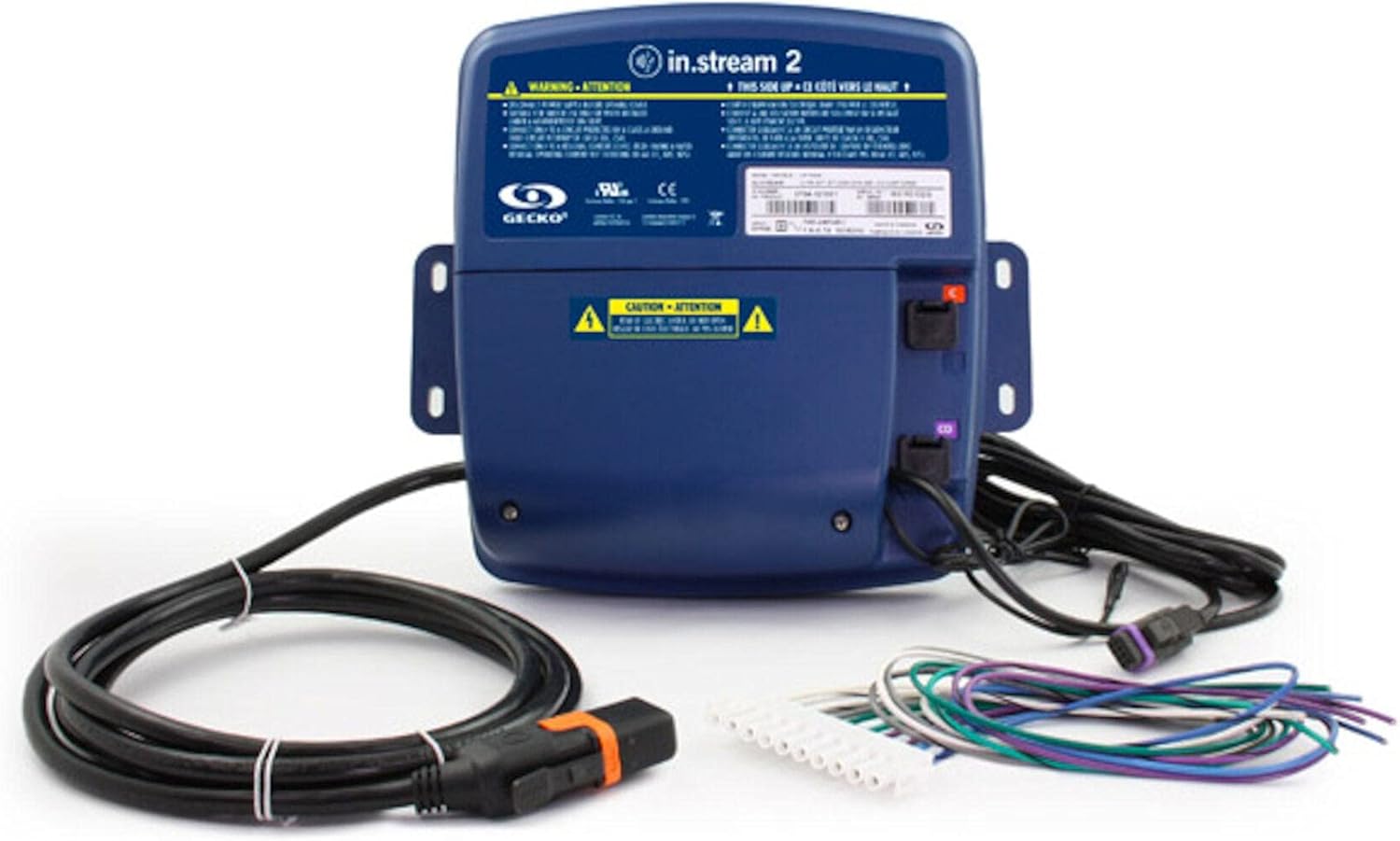
Figure 1: The Gecko in.Stream 2 Outdoor Audio Station, showing the main unit, power cable, and various audio connection wires. The unit is dark blue with warning labels and connection ports visible.
Setup
Proper setup is crucial for optimal performance and safety.
1. Mounting
- Select a suitable outdoor location that is protected from direct, prolonged exposure to extreme weather conditions, despite its splash-proof design.
- Ensure the mounting surface is stable and can support the weight of the unit.
- Use appropriate mounting hardware (not included) to secure the unit firmly. The unit features integrated mounting tabs.
2. Power Connection
- Connect the in.Link cord to the designated power input on the in.Stream 2 unit.
- Plug the power cord into a grounded electrical outlet. Ensure the outlet is suitable for outdoor use and protected by a Ground Fault Circuit Interrupter (GFCI) if required by local electrical codes.
3. Speaker and Subwoofer Connections
- Connect your speakers to the speaker outputs. The in.Stream 2 supports up to 4 speakers (200W at 4 Ohms).
- If using a subwoofer, connect it to the dedicated subwoofer output (100W at 2 Ohms).
- Ensure all connections are secure and properly insulated for outdoor use.
Operating Instructions
The in.Stream 2 offers multiple ways to enjoy your audio.
1. Powering On/Off
- Once connected to power, the unit will typically power on automatically or can be controlled via a connected spa pack or external control system. Refer to your spa's manual for specific integration details.
2. Selecting Audio Sources
The in.Stream 2 supports the following audio inputs:
- Bluetooth Streaming: Enable Bluetooth on your smartphone or audio device and pair with "Gecko in.Stream 2". Once paired, you can stream audio wirelessly.
- Auxiliary Input: Connect an external audio device (e.g., MP3 player) using a standard 3.5mm auxiliary cable to the AUX input port.
- USB Stick: Insert a USB flash drive containing audio files into the USB port. The unit will automatically detect and play compatible audio formats.
- FM Radio: Tune into FM radio stations. Specific controls for tuning may be integrated with your spa's control panel or an external remote.
3. Smartphone Charging
- Connect your smartphone to the USB port using a compatible USB cable to charge your device. Note that charging speed may vary.
Maintenance
Regular maintenance ensures the longevity and optimal performance of your in.Stream 2.
- Cleaning: Wipe the unit with a soft, damp cloth. Do not use abrasive cleaners or solvents, as these can damage the enclosure.
- Inspections: Periodically inspect all cables and connections for signs of wear, damage, or corrosion. Ensure all ports are free of debris.
- Storage: If the unit will not be used for an extended period, especially during harsh winter conditions, consider disconnecting it from power and storing it in a dry, protected area.
Troubleshooting
If you encounter issues with your in.Stream 2, refer to the following common problems and solutions:
| Problem | Possible Cause | Solution |
|---|---|---|
| No power | Power cord disconnected; no power at outlet; tripped GFCI. | Check power cord connection; test outlet with another device; reset GFCI. |
| No audio output | Incorrect source selected; speakers not connected; volume too low; device not paired (Bluetooth). | Ensure correct audio source is selected; check speaker connections; increase volume; re-pair Bluetooth device. |
| Bluetooth pairing issues | Device too far; interference; unit already paired with another device. | Move device closer to in.Stream 2; reduce interference; disconnect from other Bluetooth devices. |
| Poor FM radio reception | Weak signal; antenna obstruction. | Adjust antenna position; try tuning to a stronger station. |
Specifications
Detailed technical specifications for the Gecko in.Stream 2 Outdoor Audio Station:
| Feature | Detail |
|---|---|
| Model Number | 0704-121007 |
| Controller Type | Corded electric |
| Surround Sound Channel Configuration | 2.0 |
| Waterproof Rating | IPx5 (Splash Proof) |
| Power Source | Corded Electric |
| Connectivity Protocol | Bluetooth |
| Connectivity Technology | Auxiliary, Bluetooth, USB |
| Mounting Type | Plug Mount |
| Speaker Type | Subwoofer (output) |
| Recommended Uses | Outdoor |
| Package Dimensions | 12 x 10 x 5 inches |
Warranty and Support
For warranty information and technical support, please refer to the official Gecko website or contact their customer service directly. Keep your purchase receipt as proof of purchase for warranty claims.
Gecko Customer Support:
Visit the Gecko Store on Amazon or the official Gecko website for contact details and further assistance.


