
1. Introduction
The HBN Outdoor Smart Plug (Model BNC-U13WT) is a versatile and durable solution for controlling your outdoor electrical devices. This smart plug features six grounded outlets, allowing you to manage multiple devices simultaneously. With Wi-Fi connectivity, it offers convenient remote control via a smartphone application and voice commands through compatible smart assistants. Its robust, waterproof design ensures reliable performance in various outdoor conditions.

Figure 1: HBN Outdoor Smart Plug and companion app interface.
2. Safety Information
Please read all safety instructions carefully before use and retain for future reference.
- Electrical Rating: 125V, 15A, 1875W. Do not exceed these ratings.
- Outdoor Use: This product is rated IP44 waterproof for outdoor use. Ensure all outlet covers are securely closed when not in use to prevent water ingress.
- Overload Protection: The unit features built-in overload protection. If an overload occurs, the power will automatically shut off. Disconnect devices and reduce the load before resetting.
- Wi-Fi Network: This device operates exclusively on a 2.4GHz Wi-Fi network. It is not compatible with 5GHz networks.
- Grounding: Ensure the product is properly grounded. Use only with grounded outlets.
- Placement: Install the smart plug in a location where it is protected from direct heavy rain or standing water. The included stake is designed for secure ground placement.
- Children and Pets: Keep out of reach of children and pets.
3. Package Contents
- 1 x HBN Outdoor Smart Plug (Model BNC-U13WT)
- 1 x Ground Stake (may be in multiple parts for assembly)
- 1 x User Manual (this document)
4. Product Features
- APP & Voice Control: Maximize convenience by controlling your outdoor electronics via the HBN Smart, Smart Life, or TUYA Smart Apps. Full compatibility with Amazon Alexa and Google Home Assistant enables voice control.
- Smart Scheduling & Timers: Set custom schedules and timers for your devices directly from the smartphone app. Options include countdown, schedule, circulate, and random modes.
- Multiple Outlets: Features 6 grounded outlets with individual spring-loaded covers, allowing simultaneous power for multiple devices.
- Durable Design: Equipped with IP44 waterproofing and a robust 12-inch green stake for seamless integration into your garden or lawn, designed to withstand harsh weather conditions.
- Overload Protection: Built-in protection ensures safety by preventing damage from electrical overloads.
- Long Power Cord: Includes a 6ft heavy-duty power cord for flexible placement.
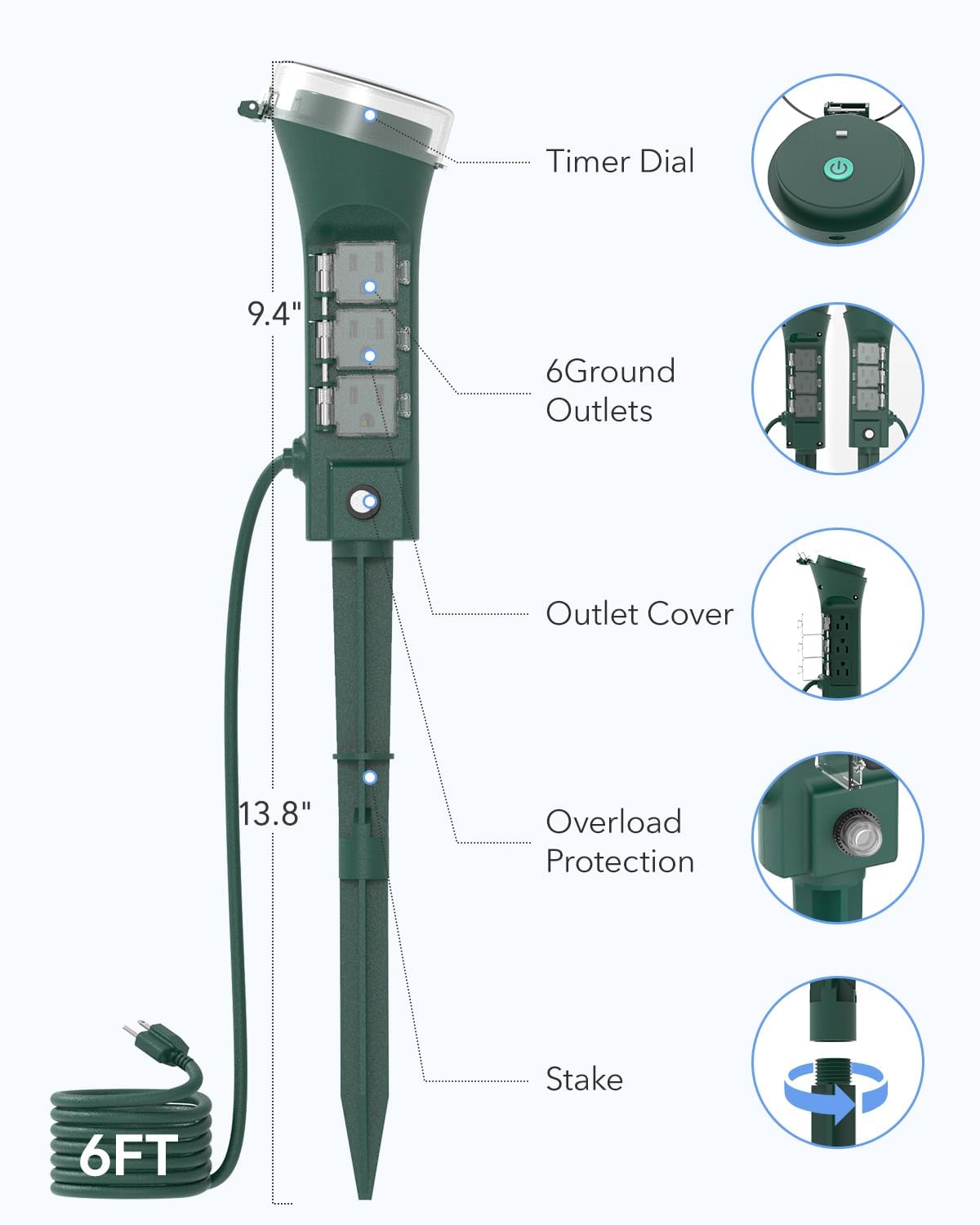
Figure 2: Detailed diagram of the HBN Outdoor Smart Plug components.
5. Setup
5.1 Physical Installation
- Assemble the Stake: If the ground stake is in multiple parts, connect them securely.
- Attach to Smart Plug: Insert the assembled ground stake into the designated slot at the bottom of the smart plug unit.
- Secure Placement: Choose a suitable outdoor location with access to a 125V grounded outlet. Firmly push the stake into the ground until the smart plug is stable and upright.
- Plug In: Connect the smart plug's 6ft power cord to a grounded outdoor electrical outlet.
5.2 App Download and Connection
The HBN Outdoor Smart Plug requires a 2.4GHz Wi-Fi network for smart control. Ensure your smartphone is connected to a 2.4GHz network during the setup process.
- Download App: Download the HBN Smart, Smart Life, or TUYA Smart app from your device's app store (Google Play Store for Android, Apple App Store for iOS).
- Register/Login: Open the app and register for a new account or log in if you already have one.
- Add Device: Tap the


