
1. Introduction
The FOXWELL NT301 OBD2 Reader and BT705 Auto Battery Tester is a powerful combination tool designed for comprehensive vehicle diagnostics and battery analysis. The NT301 OBD2 Reader allows you to read and clear diagnostic trouble codes (DTCs), view live data, and check I/M readiness status for your vehicle's engine system. The BT705 Battery Tester provides accurate analysis of 12V and 24V batteries, including cranking and charging system tests, ensuring optimal battery performance.
2. Setup
2.1. Unboxing and Initial Inspection
Carefully unpack all items from the box and inspect for any damage. Ensure all components are present:
- FOXWELL NT301 OBD2 Reader
- FOXWELL BT705 Battery Tester Cables
- USB Cable
- User Manual
- Carrying Case

Image Description: A black carrying case unzipped, revealing the orange and black FOXWELL NT301 OBD2 Reader secured by an elastic strap on one side, and a clear plastic bag containing the red and black battery test cables on the other side.
2.2. Software Update
To ensure optimal performance and access to the latest vehicle data, it is recommended to update the device software. Connect the NT301 to your computer using the provided USB cable and follow the instructions in the Quick Start Guide to download and install the update tool from the FOXWELL website.
Video Description: A user demonstrates connecting the FOXWELL NT301 to a laptop via USB cable and performing a software update using the Foxwell update tool. The device screen shows 'Program mode...' during the update process.
2.3. Connecting the NT301 to Your Vehicle
Locate the 16-pin Data Link Connector (DLC) port in your vehicle, typically found under the dashboard on the driver's side. Plug the NT301's OBD2 connector firmly into the vehicle's DLC port. The device will power on automatically.
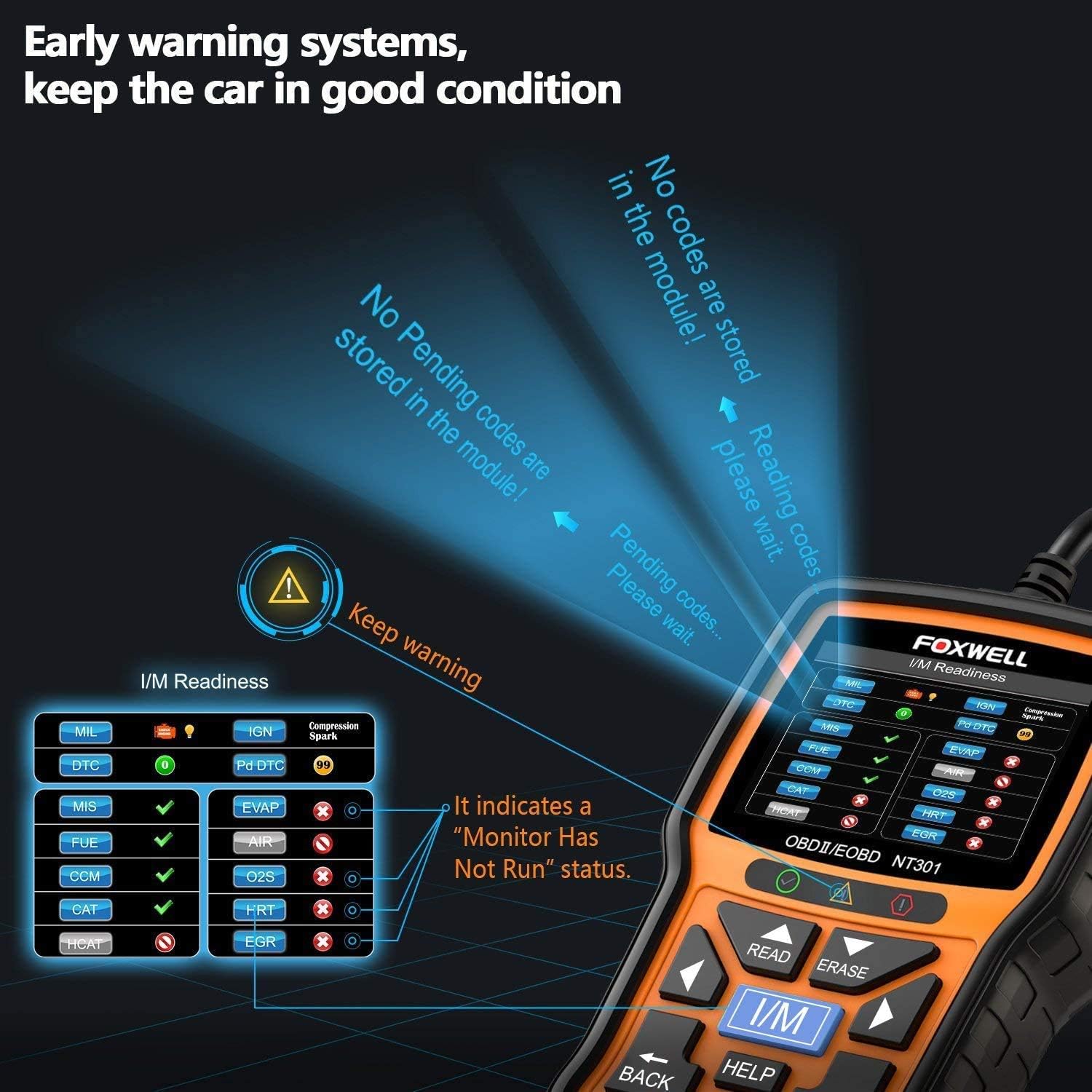
Image Description: The FOXWELL NT301 OBD2 Reader is shown connected to a vehicle's OBD2 port, displaying the I/M Readiness screen with various system checks indicated by green checkmarks, red 'X' marks, and yellow exclamation points.
3. Operating Instructions
3.1. Using the NT301 OBD2 Reader
Once connected, the NT301 will link to the vehicle. Use the navigation buttons to select desired functions:
- Read DTCs: Select 'OBDII/EOBD' then 'Read Codes' to retrieve diagnostic trouble codes. The device will display the code and a brief description.
- Clear CEL: After repairs, select 'Erase Codes' to turn off the Check Engine Light (CEL) and reset monitors.
- View Live Data: Access real-time sensor data from the vehicle's ECU.
- I/M Readiness: Check the status of the emission-related monitoring systems to ensure the vehicle is ready for a smog test.

Image Description: The FOXWELL NT301 OBD2 Reader screen shows a 'DTC Guide' with examples of diagnostic trouble codes and their potential causes, such as 'Fuel pump circuit fuse blown' or 'Faulty Engine Control Module (ECM)'.

Image Description: The FOXWELL NT301 OBD2 Reader screen displays 'I/M Readiness' status, showing various monitoring systems (MIL, DTC, IGN, Misfire, Fuel System, etc.) with their completion status indicated by green checkmarks, red 'X' marks, or yellow exclamation points.
3.2. Using the BT705 Battery Tester
The BT705 is designed for 12V and 24V batteries. Connect the red clamp to the positive (+) battery terminal and the black clamp to the negative (-) battery terminal. Select 'Battery' from the main menu to perform tests:
- Battery Test: Measures actual cold cranking amps (CCA), voltage, State of Health (SOH), and State of Charge (SOC).
- Cranking Test: Analyzes the starter system, cranking voltage, and cranking time.
- Charging System Test: Checks the alternator's output voltage and overall charging system performance.

Image Description: The FOXWELL BT705 Battery Analyzer is shown with its screen displaying various test options including SOC Test, SOH Test, Resistance Test, Charging Test, Cranking Test, Starter Voltage Test, Alternator Voltage Test, and Battery Voltage Test.

Image Description: The FOXWELL BT705 Battery Tester is shown connected to a car battery, with text overlays indicating compatibility with GEL, EFB, Regular-flooded, AGM Flat Plate, and AGM Spiral battery types, and a capacity range of 12V 24V 100-2000CCA.

Image Description: A mechanic is shown performing a Cranking Test with the FOXWELL BT705 Battery Tester connected to a car battery. The device screen displays 'CRANKING RESULT: REPLACE BATTERY' along with voltage and time readings, indicating a need for battery replacement.

Image Description: A user is performing a Charging System Analysis with the FOXWELL BT705 Battery Tester connected to a car battery. The device screen displays 'CHARGING RESULT: NO PROBLEMS' with 'NO LOAD' and 'LOADED' voltage readings, indicating a healthy charging system.
Image Description: A close-up comparison of the FOXWELL BT705's upgraded battery clamps (red and black) showing a 'Larger Contact' area compared to older, smaller clamps with 'Smaller Contact'. The new clamps are labeled 'NEW' and are designed for stable and accurate test results.
4. Maintenance
To ensure the longevity and accuracy of your FOXWELL diagnostic tools, keep them clean and store them in the provided carrying case when not in use. Regularly check for and apply software updates as described in Section 2.2 to maintain compatibility with new vehicle models and diagnostic protocols.
5. Troubleshooting
If you encounter issues, refer to the following common troubleshooting steps:
- Device not powering on: Ensure the OBD2 connector is securely plugged into the vehicle's DLC port. For battery tests, ensure clamps are correctly attached to battery terminals.
- Connection errors: Verify the vehicle's ignition is on (engine off or running as required by the test). Ensure the vehicle is OBDII compliant.
- DTC Lookup: Use the 'DTC Lookup' function on the NT301 to get detailed explanations for specific trouble codes.
6. Specifications
- Brand: FOXWELL
- Screen Size: 2.8 Inches
- Operating System: Android 9.0 (for certain functionalities/updates)
- Battery Tester Compatibility: 12V & 24V batteries (100-2000 CCA), including regular flooded, AGM flat plate, AGM spiral, GEL, and deep cycle batteries.
- OBD2 Reader Functions: Read/Clear DTCs, I/M Readiness, Live Data, VIN Retrieval.
7. Warranty and Support
FOXWELL provides a 1-year seller assurance for this product. Enjoy free lifetime updates for the device software to ensure continued compatibility and functionality. For further assistance or to explore more FOXWELL products, please visit the official FOXWELL Store.


