
WORKPRO W126054
WORKPRO 20V 4.0Ah Lithium-Ion Battery
User Manual
Introduction
Thank you for choosing the WORKPRO 20V 4.0Ah Lithium-Ion Battery. This battery is designed to provide reliable power for your WORKPRO 20V cordless power tools. This manual provides essential information for the safe and efficient use, maintenance, and troubleshooting of your battery.
Safety Information
Always observe the following safety precautions when using, charging, or storing your battery:
- Use only with compatible WORKPRO 20V chargers and tools.
- Do not expose the battery to water, moisture, or extreme temperatures.
- Avoid short-circuiting the battery terminals.
- Do not attempt to disassemble, open, or service the battery pack.
- Protect against incorrect voltage, overcharge, and internal overheating. The battery features built-in protection functions.
- Store the battery in a cool, dry place away from direct sunlight and heat sources.
- Dispose of batteries responsibly according to local regulations. Do not dispose of in household waste.
Product Overview
The WORKPRO 20V 4.0Ah Lithium-Ion Battery is a high-quality, rechargeable power source for your cordless tools. It weighs approximately 700g and contains 10 individual 3.7V 18650-4000mAh Lithium-ion cells.

A front-side view of the WORKPRO 20V 4.0Ah Lithium-Ion Battery, showcasing its compact design and power indicator lights.
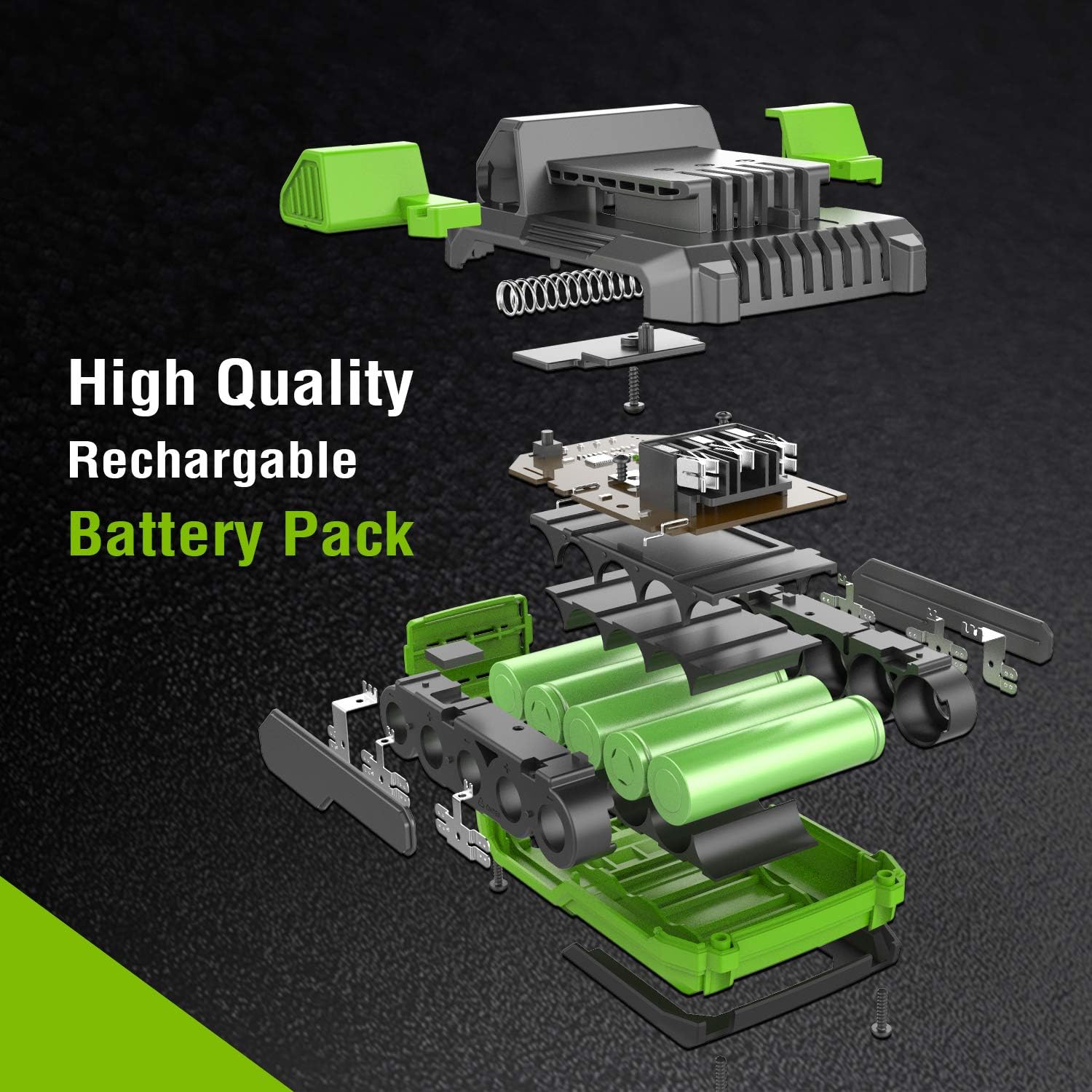
An exploded diagram illustrating the internal components of the WORKPRO 20V 4.0Ah Lithium-Ion Battery, including individual battery cells and circuit board.
Power Indicator
The battery is equipped with 4 LED indicator lights that show the real-time charge status. Simply press the power indicator button to check the remaining battery life.

A close-up view of a finger pressing the power indicator button on the WORKPRO 20V 4.0Ah Lithium-Ion Battery, showing the illuminated charge status lights.
Setup and Installation
To install or remove the battery from your WORKPRO 20V cordless tool:
- Ensure the tool is turned off and disconnected from any power source.
- Align the battery with the battery slot on the tool.
- Press the release button (if applicable) on the battery or tool, and slide the battery firmly into place until it clicks.
- To remove, press the release button and slide the battery out.

An image demonstrating the process of installing or removing the WORKPRO 20V 4.0Ah Lithium-Ion Battery from a compatible power tool by pressing the release button.
Compatibility
This battery is exclusively compatible with the WORKPRO 20V cordless power tool series, including but not limited to:
- Drills
- Impact Drivers
- Impact Wrenches
- Angle Grinders
- Reciprocating Saws
- Hedge Trimmers
- Pole Saws
- And other WORKPRO 20V tools (e.g., W004578AU, W122039AU, W125049AU, W125062AU, W159007AU, W159009AU).

The WORKPRO 20V 4.0Ah Lithium-Ion Battery centrally placed, surrounded by various compatible WORKPRO 20V cordless power tools such as drills, impact drivers, and hedge trimmers, illustrating its versatility.
Operating Instructions
Charging the Battery
To charge your WORKPRO 20V 4.0Ah Lithium-Ion Battery:
- Ensure you are using an official WORKPRO 20V battery charger.
- Connect the charger to a suitable power outlet.
- Slide the battery onto the charger until it is securely seated.
- The charger's indicator lights will show the charging status. Refer to your charger's manual for specific light patterns.
- Once fully charged, remove the battery from the charger. Do not leave the battery on the charger for extended periods after it is fully charged.
The battery has no memory effect, allowing it to be charged freely without needing to be fully discharged first.
Maintenance and Storage
Proper maintenance and storage will extend the life of your battery:
- Cleaning: Keep the battery terminals clean and free of debris. Use a dry cloth to wipe the battery exterior.
- Storage: For long-term storage, store the battery in a cool, dry place, ideally at room temperature (20-25°C or 68-77°F). Store the battery with a partial charge (around 50%) rather than fully charged or fully discharged.
- Temperature: Avoid storing or operating the battery in extreme hot or cold conditions.
- Regular Use: If storing for extended periods, it is recommended to charge the battery to about 50% every 3-6 months to prevent deep discharge.
Troubleshooting
| Problem | Possible Cause | Solution |
|---|---|---|
| Battery not charging |
|
|
| Battery not powering tool |
|
|
| Power indicator lights not working |
|
|
Specifications
| Feature | Detail |
|---|---|
| Brand | WORKPRO |
| Model Number | W126054 |
| Battery Type | Lithium-ion |
| Voltage | 20 Volts |
| Capacity | 4.0 Amp-hours (4000mAh) |
| Number of Cells | 10 (3.7V 18650 cells) |
| Weight | 700 Grams |
| Reusability | Rechargeable |
| Recommended Use | Power tool battery |
| Manufacturer | Hang Zhou Great Star Industrial Co.,LTD |
| Country of Origin | China |
Warranty and Support
For warranty information or technical support, please refer to the documentation included with your original purchase or contact WORKPRO customer service directly. Keep your purchase receipt as proof of purchase.
For further assistance, you may visit the official WORKPRO website or contact their customer support channels.
Related documentsW126054


Ask a question about this manual
Ask about setup, troubleshooting, compatibility, parts, safety, or missing instructions. Manuals+ will review the question and use this page’s manual context to help answer it.