1. Introduction
This instruction manual provides essential information for the safe and effective operation of your MAGIC SELECT 5000 mg/h Ozone Generator. This device is designed for air purification and the elimination of unpleasant odors in various environments, including homes and commercial spaces. Please read this manual thoroughly before first use and retain it for future reference.
2. Important Safety Information
Ozone is a powerful oxidant. Improper use can be harmful. Adhere strictly to these safety guidelines:
- No Presence of Living Beings: The machine must be operated only in unoccupied rooms. Ensure no people, pets, or plants are present in the area during operation.
- Mandatory Ventilation: After the ozone treatment is complete and the machine has turned off, it is crucial to ventilate the treated room for a minimum of 30 minutes before re-entry. This ensures that no toxic ozone residues remain in the environment.
- Placement: Place the ozone generator in a dry area, free from obstructions. Maintain a minimum distance of 40 cm (16 inches) from walls and 150 cm (59 inches) from the ground for optimal air circulation and safety.
- Storage: Store the machine in a dry place that does not promote internal humidity proliferation.
- Power: Use only the specified power source and ensure the power plug is securely connected.
3. Product Overview and Features
The MAGIC SELECT Ozone Generator is a robust and efficient device designed for powerful air purification.

Figure 3.1: Key Features
This image highlights the strong handle for easy transport, the portable dimensions of the unit, and the integrated timer dial for setting operation duration.

Figure 3.2: Internal and External Components
This image shows the secure power plug with screws, the internal turbine fan designed to prevent large particle entry, and the durable stainless steel construction.
Key Components:
- Strong Handle: Equipped with a robust handle for convenient transportation between different rooms.
- Portable Design: Compact dimensions allow for easy movement and placement in various locations.
- Timer: An integrated timer allows you to program the operating time according to your purification needs.
- Safe Plug + Switch: The power plug is secured with screws for enhanced stability and safety. Includes an ionization level regulation switch.
- Turbine Fan with Filter: Features a powerful fan with a filter to prevent the entry of large particles, ensuring durability and efficient operation. The unit is antioxidant and anticorrosive.
- Stainless Steel Construction: Made from 304 stainless steel, providing antioxidant and anticorrosive properties for a long lifespan.
4. Setup and Placement
Proper setup and placement are crucial for the safe and effective operation of your ozone generator.
- Unpacking: Carefully remove the ozone generator from its packaging. Inspect the unit for any signs of damage.
- Choose a Location: Select a dry, unobstructed area for the machine. Ensure there is at least 40 cm (16 inches) of clearance from walls and 150 cm (59 inches) from the ground to allow for proper air intake and ozone distribution.
- Power Connection: Connect the power cable securely to the unit and then to a suitable electrical outlet.

Figure 4.1: Use Guide Overview
This image illustrates the three main steps for using the ozone generator: closing the room and ensuring no occupants, placing the machine correctly, and ventilating the room after treatment.
5. Operating Instructions
Follow these steps to operate your ozone generator safely and effectively:
- Prepare the Room: Close all windows and doors in the room to be treated. Crucially, ensure that no people, pets, or plants are inside the room.
- Position the Generator: Place the ozone generator in the center of the room or an area that allows for optimal ozone distribution. Maintain the recommended distances from walls and the ground (see Section 4).
- Set the Timer: Use the timer dial to set the desired operating time. A minimum of 30 minutes is recommended for most treatments. The duration will depend on the room size and the intensity of the odor problem.
- Start Operation: Turn on the device. Once activated, leave the room immediately.
- Post-Treatment Ventilation: After the programmed time has elapsed and the machine has automatically shut off, wait for at least 30 minutes before re-entering the room. Upon re-entry, open windows and doors to ventilate the room thoroughly for another 30 minutes to ensure all residual ozone has dissipated.
Usage Frequency:
- Home Use: For domestic environments, ozone treatment can be performed once or twice per week, always adhering to the safety guidelines.
- Commercial Use: For commercial applications, the device can be programmed to operate up to three times per week, ideally during non-business hours.
6. Applications and Odor Elimination
The MAGIC SELECT Ozone Generator is highly effective in eliminating a wide range of unpleasant odors and purifying air in spaces up to 100 square meters.

Figure 6.1: Common Odor Sources
This image illustrates typical areas where the ozone generator can be used to eliminate odors, including kitchen odors, bathroom smells, pet odors, and car smoke.
Effective Against:
- Kitchen odors (e.g., cooking smells)
- Bathroom odors
- Pet-related odors
- Smoke odors (e.g., car smoke, tobacco smoke)
- General stale air and musty smells
Restricted Professional Use:

Figure 6.2: Commercial Applications
This image demonstrates the suitability of the ozone generator for purifying the air in small shops, restaurants, bars, and cafeterias with surfaces up to 100 square meters.
The device can be used to purify the air in small shops, restaurants, bars, and cafeterias with surfaces equal to or less than 100m², provided all safety protocols are followed.
7. Maintenance and Storage
Regular maintenance ensures the longevity and optimal performance of your ozone generator.
- Cleaning: Ensure the device is unplugged before cleaning. Wipe the exterior with a dry or slightly damp cloth. Do not use abrasive cleaners or allow water to enter the unit. Periodically check the air intake and fan for dust accumulation and clean gently with a soft brush or vacuum cleaner.
- Ceramic Plate: The ceramic ozone plate is a consumable part. If ozone output decreases significantly over time, the ceramic plate may need replacement. (No specific replacement instructions are provided in the product information.)
- Storage: When not in use, store the ozone generator in a cool, dry place, away from direct sunlight and excessive humidity.
8. Specifications
Technical details of the MAGIC SELECT Ozone Generator.
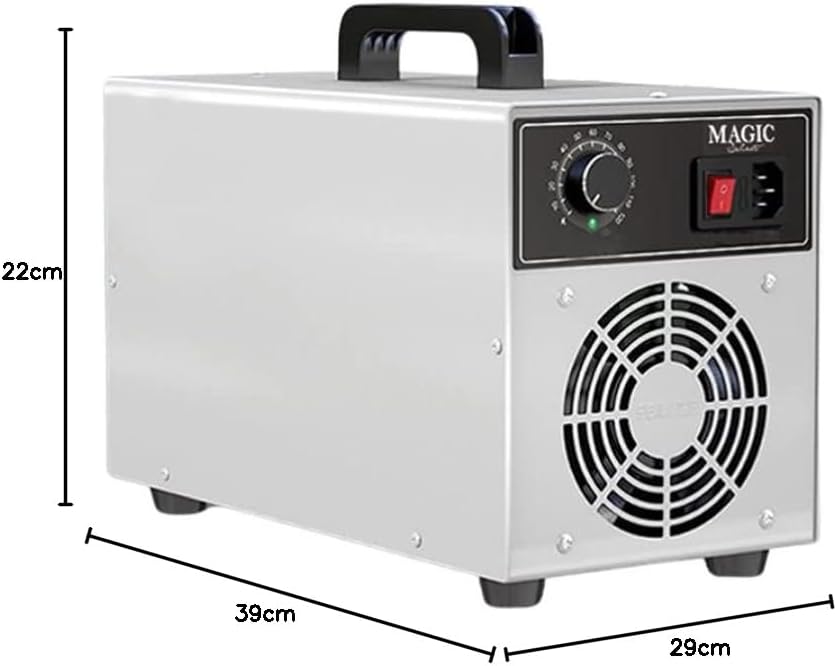
Figure 8.1: Product Dimensions
This image provides a visual representation of the ozone generator's physical dimensions.
| Feature | Detail |
|---|---|
| Brand | MAGIC SELECT |
| Model Number | 7427070751916 |
| Ozone Output | 5000 mg/h |
| Material | Stainless Steel |
| Color | Stainless Steel |
| Dimensions (L x W x H) | 39 x 29 x 22 cm (15.35 x 11.42 x 8.66 inches) |
| Weight | 3.94 Kilograms (8.69 lbs) |
| Power Source | Corded Electric |
| Control Method | Tactile (Push-button control) |
| Filter Type | Ozone (Ceramic Plate) |
| Certifications | CE, ROHS |
| Max. Coverage Area | 100 m² |
9. Troubleshooting
If you encounter issues with your ozone generator, please refer to these common troubleshooting steps:
- Device Not Turning On:
- Check if the power cable is securely plugged into both the device and the electrical outlet.
- Ensure the power switch on the unit is in the 'ON' position.
- Verify that the electrical outlet is functional by testing it with another appliance.
- Low Ozone Output / Weak Odor Elimination:
- Ensure the room is properly sealed (windows and doors closed) during operation.
- Check if the air intake and fan are free from dust or obstructions. Clean if necessary (see Section 7).
- The ceramic ozone plate may be nearing the end of its lifespan and require replacement.
- Confirm the timer is set for an adequate duration for the room size and odor intensity.
- Unusual Noises:
- Check for any foreign objects obstructing the fan. Disconnect power before inspecting.
- If unusual noises persist, discontinue use and contact customer support.
For issues not covered here, please contact MAGIC SELECT customer support.


