
1. Introduction
This manual provides detailed instructions for the safe and effective use of your UBeesize 67-inch Camera Tripod. Please read this manual thoroughly before operating the product and retain it for future reference. This versatile tripod is designed to provide stable support for various devices, including cameras, cell phones, projectors, webcams, and spotting scopes.
2. Product Overview and Features
The UBeesize 67-inch Camera Tripod is constructed from high-grade aluminum alloy and ABS resin, ensuring durability and stability. It features a panhead for flexible positioning, adjustable legs for varied heights, and includes essential accessories for enhanced usability.
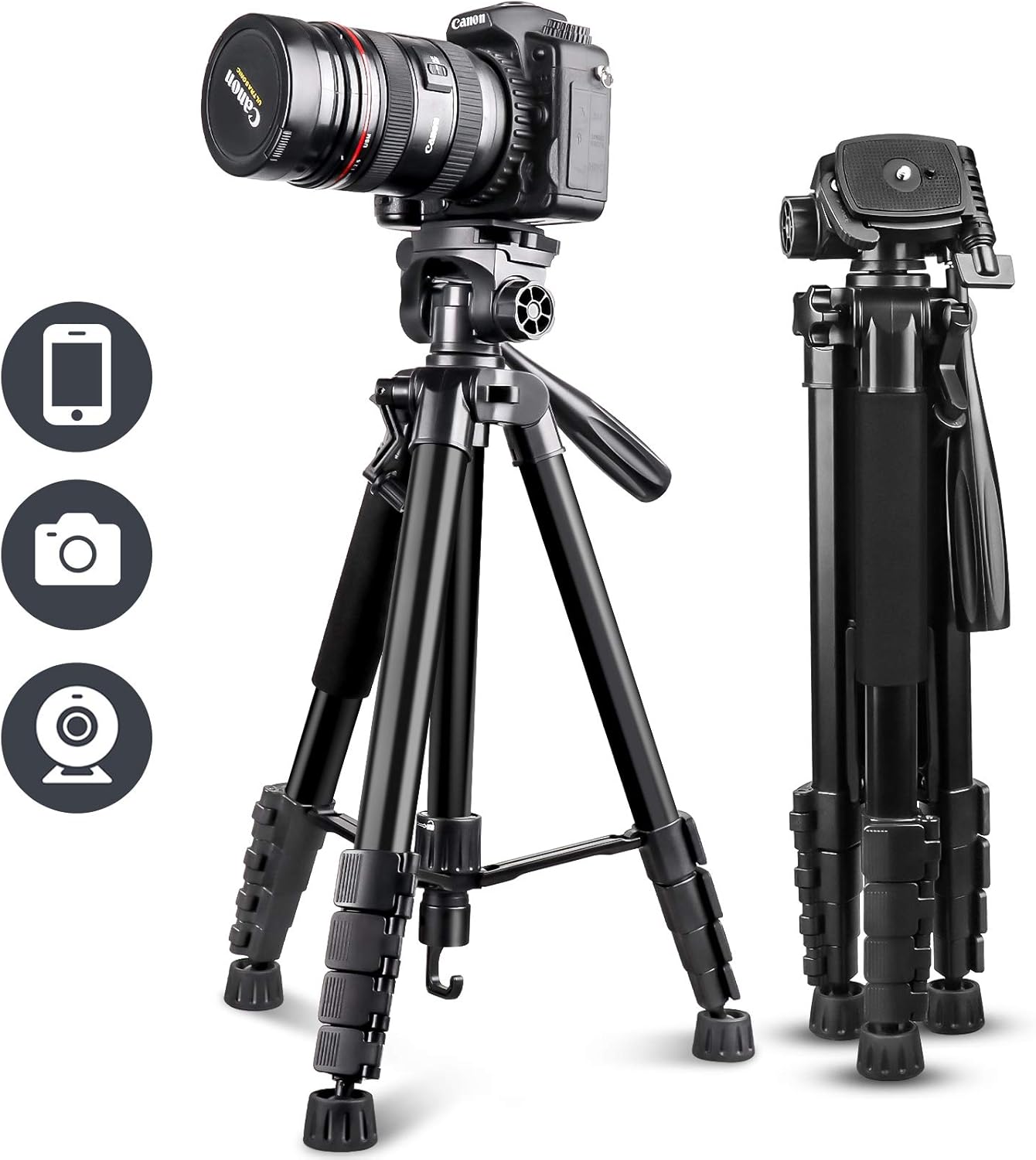
Figure 1: UBeesize 67-inch Camera Tripod with device compatibility icons.
Key Components:
- Tripod Body: Main structure with adjustable legs and center column.
- 3-Way Panhead: Allows for horizontal (pan), vertical (tilt), and landscape/portrait adjustments.
- Quick Release Plate: For easy attachment and detachment of cameras.
- Universal Phone Holder: Adjustable clamp for various smartphone sizes.
- Wireless Bluetooth Remote: For remote photo and video capture.
- Travel Bag: For convenient transport and storage.
Features:
- Impressive Height Ranges: Collapses to 20.1 inches and extends up to 67.3 inches, adapting to various shooting requirements.
- Multiple Shooting Angles: The versatile central mechanism allows for quick adjustments to achieve Landscape Mode, Portrait Mode, Low Angle Shot, and High Angle Shot.
- Universal Phone Mount & Wireless Remote: The 360° rotating phone holder accommodates smartphones from 2.3 inches (58mm) to 4.5 inches (115mm) wide. The included Bluetooth remote pairs with your mobile device for remote control up to 30 feet (10 meters).
- Unique Durable Design: Constructed from high-grade aluminum alloy and ABS resin for stability and longevity.
- High Compatibility: Suitable for a wide range of devices including DSLR/mirrorless cameras (Nikon D3500, Fujifilm X-T200, Canon EOS 250D, Olympus, Panasonic), cell phones (iPhone, Samsung Galaxy, Google Pixel, OnePlus), iPads, projectors, webcams, and spotting scopes.

Figure 2: Tripod height adjustments from folded to fully extended.
This diagram illustrates the various height settings of the tripod, ranging from a compact 18.8 inches (48cm) when folded to a maximum extension of 67 inches (170cm).

Figure 3: Examples of diverse shooting angles achievable with the tripod.
The tripod's panhead allows for flexible positioning, enabling users to capture shots in landscape, portrait, low-angle, and high-angle orientations, as well as 360-degree panoramic views.
3. Setup Instructions
3.1 Unfolding the Tripod
- Place the tripod on a flat, stable surface.
- Gently spread the tripod legs outwards until they are fully extended and stable.
- Locate the flip-locks on each leg section. Open the flip-locks and extend each leg section to your desired height. Close the flip-locks securely to lock the legs in place.
- To raise the center column, loosen the center column locking knob, crank the handle to extend the column, and then tighten the locking knob.
- Use the built-in bubble level on the tripod head to ensure your setup is perfectly horizontal.
3.2 Attaching Your Device
For Cameras:
- Locate the quick release plate on the tripod head. Push the release lever to detach the plate.
- Screw the quick release plate securely onto the bottom of your camera.
- Slide the camera with the attached plate back into the tripod head until it clicks into place. Ensure the release lever is locked.
For Cell Phones:
- Attach the universal phone holder to the quick release plate (if not already attached) or directly to the tripod's standard screw mount.
- Expand the phone holder clamp and carefully insert your smartphone. Ensure it is held firmly without obstructing buttons or ports.
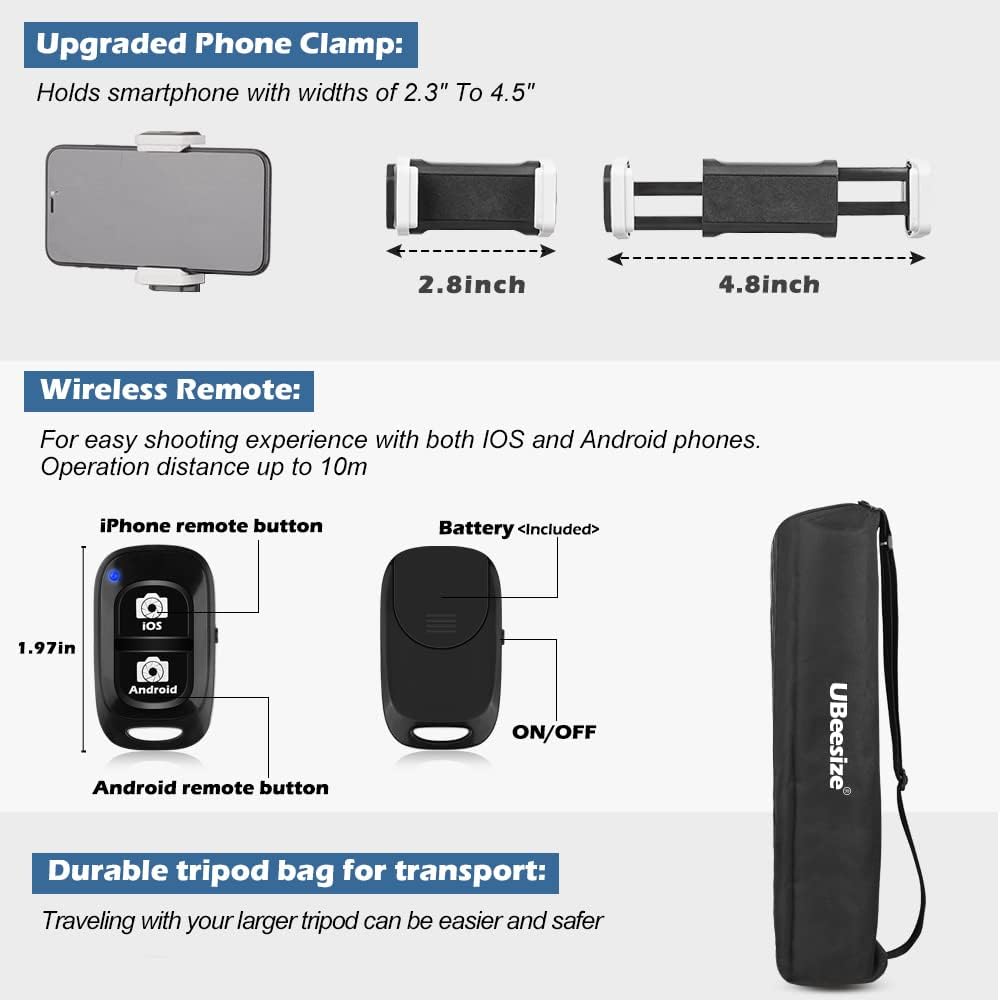
Figure 4: Details of the phone clamp, Bluetooth remote, and carry bag.
The phone clamp is designed to securely hold smartphones with widths between 2.3 and 4.5 inches. The wireless remote allows for convenient photo and video capture from a distance.
3.3 Pairing the Wireless Bluetooth Remote
- Turn on the Bluetooth remote by sliding the ON/OFF switch. The indicator light will flash.
- On your smartphone, go to Bluetooth settings and search for new devices.
- Select the device named "AB Shutter3" or similar from the list to pair. The indicator light will stop flashing once paired.
- Open your camera app. Press the appropriate button on the remote (iOS or Android) to capture photos or start/stop video recording.
4. Operating Instructions
4.1 Adjusting Panhead Angles
- Panning (Horizontal): Loosen the horizontal locking knob on the panhead. Rotate the handle to pan the camera left or right. Tighten the knob to secure the position.
- Tilting (Vertical): Loosen the vertical locking knob. Tilt the camera up or down using the handle. Tighten the knob to secure the position.
- Portrait/Landscape Mode: The panhead allows for quick switching between horizontal and vertical orientations. Adjust the side lever to change the camera's orientation.
4.2 Enhancing Stability
For increased stability, especially with heavier devices or in windy conditions, utilize the hook located at the bottom of the center column. You can hang a weight (e.g., your camera bag, a sandbag) from this hook to lower the tripod's center of gravity.

Figure 5: Tripod demonstrating stability with a camera and a bag hanging from the hook.
The image highlights the tripod's net weight of 2.8 lbs (1.28 kg) and a maximum load capacity of 12 lbs (5.5 kg), with a hook for adding extra weight for stability.
5. Maintenance
- Cleaning: Wipe the tripod with a soft, dry cloth after each use. For stubborn dirt, use a slightly damp cloth and mild soap, then dry thoroughly. Avoid harsh chemicals.
- Storage: Always collapse the tripod to its folded size and store it in the provided travel bag when not in use. Store in a cool, dry place away from direct sunlight and extreme temperatures.
- Moving Parts: Periodically check all screws, knobs, and flip-locks for tightness. Do not over-tighten. If any part feels stiff, a small amount of silicone-based lubricant can be applied, but avoid oil-based lubricants.
6. Troubleshooting
- Tripod is Unstable: Ensure all leg flip-locks are securely closed and the center column locking knob is tightened. Spread the legs as wide as possible. Consider hanging a weight from the center column hook.
- Bluetooth Remote Not Connecting: Make sure the remote is charged (if applicable) and turned on. Ensure your phone's Bluetooth is enabled and the remote is within range (30ft/10m). Forget the device in your phone's Bluetooth settings and try pairing again.
- Device Not Fitting in Phone Holder: Verify your phone's width is within the 2.3-4.5 inch (58-115mm) range. Remove bulky phone cases if necessary.
- Camera Wobbles on Tripod Head: Ensure the quick release plate is tightly screwed onto your camera and securely locked into the tripod head. Tighten all panhead locking knobs.
7. Specifications
| Feature | Specification |
|---|---|
| Model Number | TBC001 |
| Material | High-grade Aluminum Alloy with ABS Resin |
| Max Height | 67.3 inches (170 cm) |
| Folded Height | 20.1 inches (51 cm) |
| Item Weight | 3.1 pounds (1.4 kg) |
| Max Load Capacity | 12 pounds (5.5 kg) |
| Phone Holder Width | 2.3 - 4.5 inches (58 - 115 mm) |
| Bluetooth Remote Range | 30 feet (10 meters) |
| Batteries (Remote) | 1 Lithium Metal battery (included) |
8. Warranty and Support
UBeesize products are backed by a 1-year warranty. Additionally, a 180-day full money-back and product replacement guarantee is provided. For any questions or support needs, please contact our professional customer support team. We promise to reply to you within 24 hours.
For further assistance, please visit the UBeesize Store on Amazon.
9. Product Videos
UBeesize 67'' Tripod Review
Video demonstrating the UBeesize 67-inch tripod's features, stability, and accessories like the phone mount and remote. It highlights the sturdy build and adjustable height.
Honest Review of the UBeesize 67" Tripod
A user review showcasing the tripod's portability, ease of extension, and the functionality of the panhead and leg locks. It also demonstrates the quick release plate.
UBeesize Camera Tripod with Bag: What you should know?
This video provides an overview of the tripod's components, including the quick release plate, phone holder, and the included carry bag, emphasizing its practical aspects.
Awesome Workhorse Tripod
A detailed demonstration of the tripod's robust construction, ease of adjustment, and various features, highlighting its suitability for demanding use.
Lightweight Camera Tripod With Carrying Bag | Full Review
An unboxing and full review of the tripod, demonstrating its setup, features, and portability with the included carrying bag. It shows how to extend the legs and adjust the head.


