
1. Product Overview
The DSD TECH SH-BT01C Bluetooth Relay V2 is a single-channel Bluetooth 4.0 BLE relay module designed for remote control applications. This second-generation relay introduces enhanced features such as timer functions and security code authentication. It is compatible with both iOS and Android 4.3 or later devices, offering a control distance of up to 10 meters in open environments.
The module supports both 5V and 12V DC power inputs and can switch both DC and AC loads. The maximum DC control voltage is 30V, and the maximum AC switching voltage is 250V. The maximum load power should not exceed 600W.

Figure 1: DSD TECH SH-BT01C Bluetooth Relay V2. This image displays the compact design of the Bluetooth relay module.
2. Package Contents
Verify that all items are present in the package:
- DSD TECH SH-BT01C Bluetooth Relay V2 Module
- USB Cable (for power or data, depending on application)
- Product Qualified Certificate

Figure 2: Package Contents. This image shows the Bluetooth relay module, a USB cable, and a product certificate.
3. Setup and Wiring
3.1 Power Supply Connection
The SH-BT01C module can be powered by either 5V DC or 12V DC. Connect the appropriate power source to the VCC and GND terminals on the input side of the module.
- 5V Input: Connect 5V DC to the '5V' terminal and ground to 'GND'.
- 12V Input: Connect 12V DC to the '12V' terminal and ground to 'GND'.
3.2 Load Connection
The relay provides three output terminals: Normally Open (NO), Normally Closed (NC), and Common (COM). Select the appropriate connection based on your application's requirements.
- Normally Open (NO): The circuit is open (disconnected) when the relay is de-energized and closes (connects) when the relay is energized.
- Normally Closed (NC): The circuit is closed (connected) when the relay is de-energized and opens (disconnects) when the relay is energized.
- Common (COM): This is the common terminal for both NO and NC connections.

Figure 3: Input and Output Terminals. This diagram clearly labels the 5V, 12V, and GND input terminals, as well as the NC, COM, and NO output terminals, and the control button.

Figure 4: Wiring Example. This image illustrates how to connect power and load wires to the relay module's terminals.
3.3 App Installation
To control the relay, download the official DSD TECH Switch application:
- For Android devices: Search for "DSD TECH Switch" in the Google Play Store.
- For iOS devices (iPhone and iPad): Search for "DSD TECH Switch" in the Apple App Store.
4. Operating Instructions
4.1 Bluetooth Connection
- Ensure the SH-BT01C module is powered on.
- Enable Bluetooth on your smartphone or tablet.
- Open the "DSD TECH Switch" application. The app will automatically scan for available DSD TECH Bluetooth relays.
- Select your SH-BT01C module from the list within the app to establish a connection.
4.2 Relay Control via App
Once connected, the app interface will allow you to control the relay's state (ON/OFF). The SH-BT01C V2 also supports advanced features:
- Timer Function: Set schedules for the relay to turn on or off automatically at specified times.
- Security Code: Implement a security code to prevent unauthorized control of the relay. Refer to the app's settings for configuring this feature.
4.3 Manual Control
The module includes a physical button for direct control of the relay's state. Pressing this button will toggle the relay between its ON and OFF states.

Figure 5: Multiple Control Scenarios. This image illustrates how one person can control multiple relays, and how multiple people can control a single relay using their smartphones.
5. Specifications
| Feature | Specification |
|---|---|
| Model Number | SH-BT01C |
| Bluetooth Module | DSD TECH SH-HC-08 (Bluetooth 4.0 BLE) |
| Compatibility | iOS devices, Android 4.3 and later |
| Control Distance | Up to 10m (open space) |
| Module Operating Voltage (VCC) | DC 5V / 12V |
| DC Control Maximum Voltage | DC 30V |
| Switching Control Maximum Voltage | AC 250V |
| Maximum Load Power | 600W |
| Connector Type | Terminals |
| Contact Material | Copper |
| Contact Type | Normally Open (NO), Normally Closed (NC) |
| Mounting Type | DIN Rail Mount |
| Product Dimensions | 3.9 x 1.55 x 0.79 inches |
| Weight | 3.17 ounces |
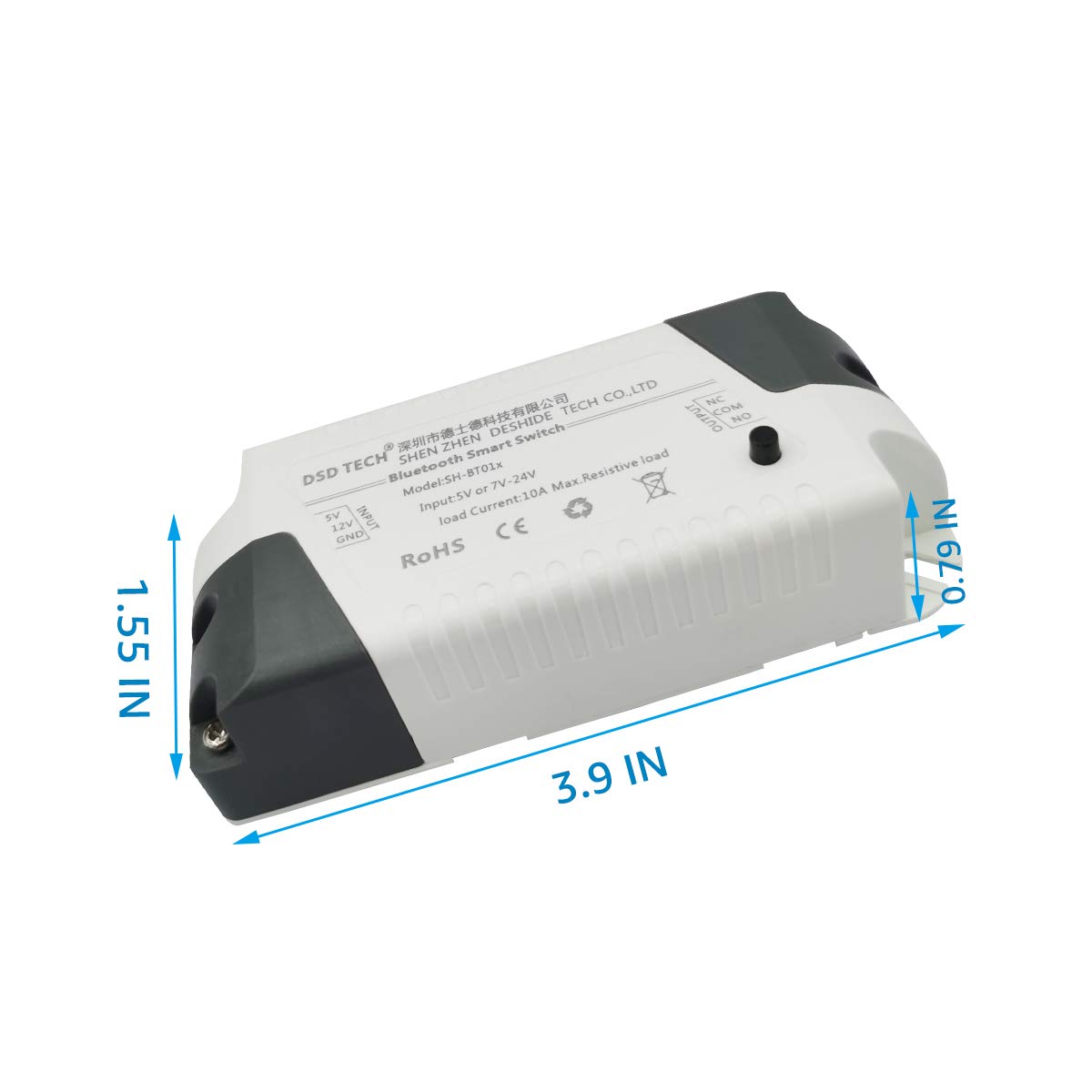
Figure 6: Product Dimensions. This image provides a visual representation of the relay module's physical dimensions in inches.
6. Maintenance
To ensure optimal performance and longevity of your DSD TECH SH-BT01C Bluetooth Relay V2, follow these maintenance guidelines:
- Keep Clean: Regularly clean the exterior of the module with a dry, soft cloth. Avoid using liquid cleaners or solvents.
- Environmental Conditions: Operate the module within its specified temperature and humidity ranges. Avoid exposure to extreme heat, cold, or moisture.
- Load Management: Do not exceed the maximum load power of 600W. Overloading can damage the relay and connected devices.
- Wiring Integrity: Periodically check all wiring connections to ensure they are secure and free from corrosion or damage.
7. Troubleshooting
If you encounter issues with your DSD TECH SH-BT01C Bluetooth Relay V2, consider the following troubleshooting steps:
- No Power: Ensure the power supply (5V or 12V DC) is correctly connected and providing the specified voltage. Check for loose connections.
- Bluetooth Connection Issues:
- Verify Bluetooth is enabled on your mobile device.
- Ensure the relay module is within the 10-meter control range.
- Confirm your device's Bluetooth version is 4.0 BLE or higher. This relay is not compatible with Bluetooth 2.0 SPP devices.
- Restart the DSD TECH Switch app and your mobile device.
- Relay Not Activating:
- Check the load wiring (NO, NC, COM) for correct connections.
- Ensure the connected load does not exceed the maximum 600W power rating.
- Test the relay using the physical button on the module to rule out app-related issues.
- App Functionality: If the app is not responding or features like timers/security codes are not working, ensure the app is updated to the latest version.
If problems persist after attempting these steps, please contact DSD TECH customer support for further assistance.
8. Warranty and Support
DSD TECH is committed to providing high-quality products and excellent customer service. The SH-BT01C Bluetooth Relay V2 comes with the following:
- One-Year Warranty Service: Covers manufacturing defects and malfunctions under normal use for one year from the date of purchase.
- Lifetime Technical Support: Access to expert assistance for any technical questions or issues you may encounter with the product.
- One-Year Product Replacement Service: In case of eligible product failure within the warranty period.
For any questions or support needs regarding this product, please contact DSD TECH customer service. We aim to respond to all inquiries within 24 hours.
Additionally, programming instructions for developing your own application to control this Bluetooth relay are openly available for advanced users.