
Tribesigns Tribesigns Computer Desk with 5 Storage Shelves and Monitor Stand
Tribesigns Computer Desk with 5 Storage Shelves and Monitor Stand User Manual
Model: Tribesigns Computer Desk with 5 Storage Shelves and Monitor Stand
1. Introduction and Overview
Thank you for choosing the Tribesigns Computer Desk. This versatile workstation is designed to optimize your home office or study space, featuring five storage shelves, an adjustable monitor stand, and a mobile desk component. Its industrial design combines functionality with aesthetic appeal, suitable for various room types including bedrooms, living rooms, and offices. This manual provides essential information for safe assembly, proper usage, and effective maintenance of your new desk.

Image 1.1: The Tribesigns Computer Desk, showcasing its integrated shelving unit and mobile desk.
2. Safety Information
- Read all instructions carefully before assembly and use.
- Ensure all components are present and undamaged before beginning assembly.
- Assemble the desk on a soft, clean surface to prevent scratches.
- Do not overtighten screws during assembly, as this may damage the material.
- Distribute weight evenly across shelves and the desktop. Do not exceed the maximum weight capacity of 450 lbs (204 kg).
- Utilize the included anti-tip hardware to secure the desk to a wall, especially if children are present, to prevent accidental tipping.
- Keep small parts away from children during assembly to avoid choking hazards.
3. Package Contents
Before assembly, verify that all parts and hardware are included in your package. A complete list of components and a screwdriver for assembly are provided. If any parts are missing or damaged, please contact customer service.
- Desk panels (engineered wood)
- Metal frame components
- 5 storage shelves
- Monitor stand shelf
- Casters (wheels) with brakes
- Assembly hardware (screws, bolts, nuts, plastic plugs)
- Screwdriver
- Anti-tip kit
- Instruction manual
4. Assembly Instructions
Follow these steps carefully to assemble your Tribesigns Computer Desk. It is recommended to have two people for certain steps, though one person can complete the assembly.
4.1 Preparation
- Clear a spacious area for assembly.
- Lay out all parts and hardware, comparing them against the provided parts list to ensure everything is accounted for.
- Identify each component by its label.
4.2 Step-by-Step Assembly
- Assemble the Main Frame: Begin by connecting the vertical metal supports with the horizontal bars using the provided screws. Ensure all connections are snug but do not fully tighten yet.
- Attach Shelves: Secure the main shelving units to the frame. The bookshelf can be assembled on either the left or right side of the main desk structure, according to your preference.
- Install Monitor Stand: Position the monitor stand shelf at your desired height. This shelf is adjustable to help achieve an ergonomic viewing level.
- Assemble Mobile Desk: Construct the mobile desk portion, ensuring the casters are securely attached to its base.
- Integrate Mobile Desk: Slide the mobile desk into its designated position within the main frame.
- Final Tightening: Once all components are in place and aligned, systematically tighten all screws and bolts.
- Attach Anti-Tip Kit: Secure the desk to the wall using the anti-tip hardware provided.

Image 4.1: The reversible bookshelf design allows for flexible placement on either side of the desk.

Image 4.2: The adjustable monitor stand promotes correct sitting posture and reduces strain.

Image 4.3: Detailed view of the 6-shelf storage, spacious desktop, and lockable casters.
5. Operating Instructions
5.1 Utilizing the Mobile Desk
The smaller desk portion is equipped with four casters, allowing it to be moved freely. To secure the mobile desk in place, engage the brakes on the casters. To move it, disengage the brakes. This feature provides flexibility for various tasks and space configurations.
5.2 Adjusting the Monitor Stand
The central shelf, designed as a monitor stand, can be adjusted vertically. This allows you to position your monitor at an optimal height for ergonomic viewing, reducing neck and eye strain. Refer to the assembly instructions for how to reposition this shelf.
5.3 Storage Shelves
The integrated 5-tier shelving unit provides ample space for books, office supplies, decorative items, or even a printer. Organize your items to maintain a tidy and efficient workspace.
6. Maintenance
- Cleaning: Wipe surfaces with a soft, damp cloth. Avoid harsh chemicals or abrasive cleaners that could damage the finish.
- Hardware Check: Periodically check all screws and bolts to ensure they remain tight. Retighten as necessary to maintain stability.
- Caster Care: Keep casters free of debris to ensure smooth movement. Lubricate if necessary.
- Avoid Overloading: Do not place excessive weight on any shelf or the desktop to prevent structural damage.
7. Troubleshooting
- Desk Wobbles: Ensure all screws and bolts are fully tightened. Check that the desk is on a level surface. Adjust leg pads if applicable.
- Difficulty Moving Mobile Desk: Verify that the caster brakes are disengaged. Check for any obstructions or debris around the wheels.
- Parts Not Fitting: Double-check the assembly instructions and part labels. Some parts may appear similar but are designed for specific positions. Do not force parts together.
- Scratches or Damage: Contact customer service for assistance with replacement parts or repair advice.
8. Specifications
| Feature | Detail |
|---|---|
| Brand | Tribesigns |
| Model Name | Tribesigns Computer Desk with 5 Storage Shelves and Monitor Stand |
| Product Dimensions | 13.77"D x 51.18"W x 64.96"H (35cm D x 130cm W x 165cm H) |
| Color | Black |
| Style | Industrial |
| Base Material | Metal |
| Top Material Type | Engineered Wood |
| Special Feature | Adjustable Monitor Stand, Mobile Desk, Reversible Bookshelf |
| Room Type | Bedroom, Living Room, Office, Study Room |
| Maximum Weight Capacity | 450 lbs (204 kg) |
| Assembly Required | Yes |
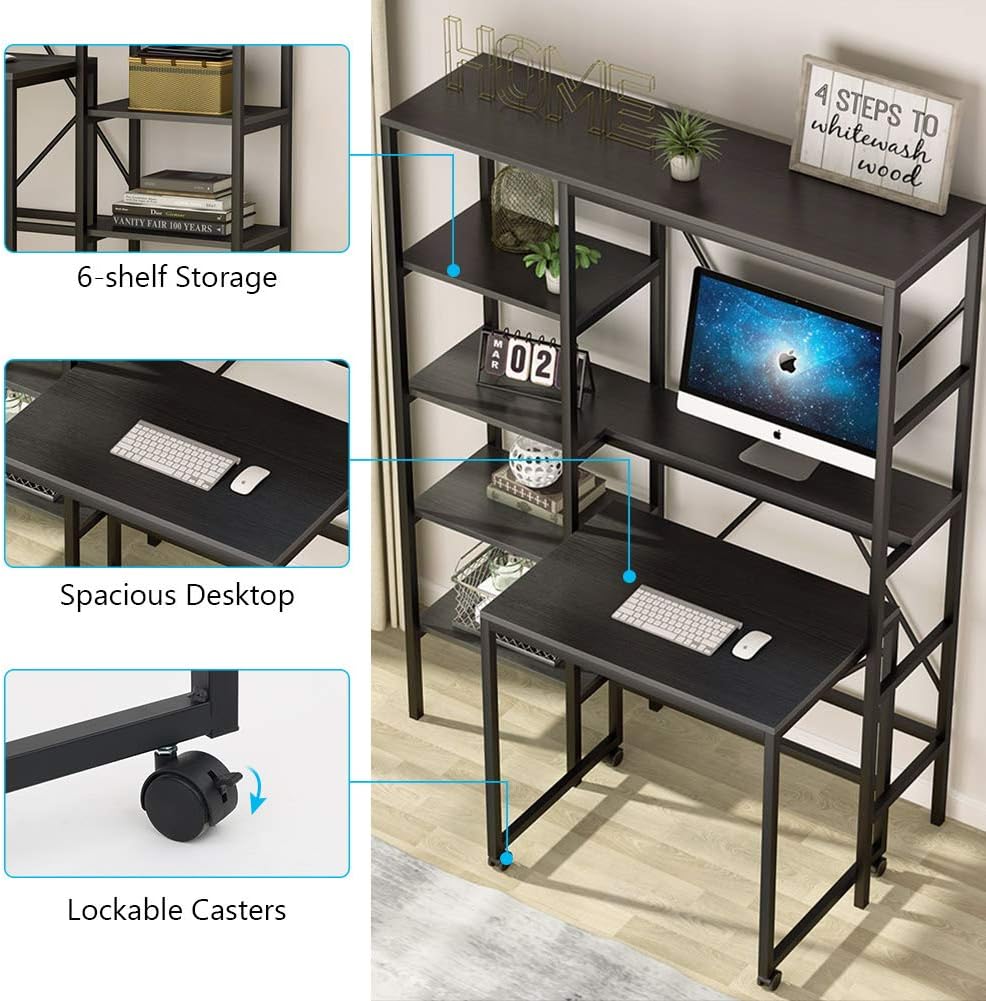
Image 8.1: Detailed dimensions of the Tribesigns Computer Desk.
9. Warranty and Support
Tribesigns provides an 18-month warranty for this product, covering manufacturing defects. For any questions, missing parts, or issues not covered in this manual, please contact Tribesigns customer service. Our friendly customer service team is available to assist you.
Contact Information:
Please refer to the contact details provided on your purchase receipt or the official Tribesigns website for the most current support information.
Related documentsTribesigns Computer Desk with 5 Storage Shelves and Monitor Stand


Ask a question about this manual
Ask about setup, troubleshooting, compatibility, parts, safety, or missing instructions. Manuals+ will review the question and use this page’s manual context to help answer it.