
STANLEY FATMAX SFMCH900B
Stanley FatMax SFMCH900B SDS-Plus Cordless Combination Hammer
Model: SFMCH900B
User Manual
Introduction
The Stanley FatMax SFMCH900B SDS-Plus Cordless Combination Hammer is a versatile and powerful tool designed for various drilling and chiseling applications. Its brushless motor technology ensures high performance, extended runtime, and maximum service life. This manual provides essential information for the safe and effective operation, setup, and maintenance of your tool.

Figure 1: Stanley FatMax SFMCH900B SDS-Plus Cordless Combination Hammer, showing its main body, auxiliary handle, and chuck.
Safety Information
Always observe basic safety precautions to reduce the risk of fire, electric shock, and personal injury when using power tools. Keep this manual for future reference.
- Work Area Safety: Keep the work area clean and well-lit. Do not operate power tools in explosive atmospheres, such as in the presence of flammable liquids, gases, or dust.
- Electrical Safety: Avoid body contact with earthed or grounded surfaces. Do not expose power tools to rain or wet conditions.
- Personal Safety: Always wear eye protection, hearing protection, and suitable work gloves. Dress properly; avoid loose clothing or jewelry.
- Tool Use and Care: Do not force the power tool. Use the correct power tool for your application. Disconnect the battery pack from the power tool before making any adjustments, changing accessories, or storing power tools.
- Battery Tool Use and Care: Recharge only with the charger specified by the manufacturer. Use power tools only with specifically designated battery packs.
Product Overview and Components
Familiarize yourself with the key components of your Stanley FatMax SFMCH900B combination hammer.
- SDS-Plus Chuck
- Mode Selector Switch (Drill, Hammer Drill, Chisel)
- Auxiliary Handle
- Depth Stop
- Trigger Switch
- Battery Release Button
- Battery Port
- LED Battery Indicator

Figure 2: Side view of the combination hammer, highlighting the ergonomic design and main operational areas.
Setup
1. Battery Installation and Removal
The tool operates on an 18V Stanley FatMax V20 Lithium-Ion battery (not included with the basic version).
- Installation: Align the battery pack with the battery port on the tool. Slide the battery pack into the tool until it clicks securely into place.
- Removal: Press the battery release button (6) and pull the battery pack out of the tool.

Figure 3: Proper method for inserting the battery pack into the tool's base.

Figure 4: The 3-level LED indicator on the battery shows the remaining charge level.
2. Auxiliary Handle Attachment
The auxiliary handle provides additional control and stability during operation.
- Loosen the auxiliary handle by twisting it counter-clockwise.
- Slide the handle onto the front of the tool body.
- Rotate the handle to the desired position for comfortable and secure grip.
- Tighten the handle by twisting it clockwise until it is firmly secured.

Figure 5: Adjusting the auxiliary handle for optimal grip and control.
3. SDS-Plus Bit/Chisel Installation
This tool uses SDS-Plus bits for quick and secure accessory changes.
- Clean the shank of the drill bit or chisel.
- Pull back the chuck collar (1) and insert the SDS-Plus bit into the chuck.
- Release the chuck collar. The bit should click into place. Pull on the bit to ensure it is securely locked. A slight axial play is normal for SDS-Plus systems.
- To remove, pull back the chuck collar and pull the bit out.

Figure 6: Inserting an SDS-Plus drill bit into the tool's chuck.
4. Depth Stop Adjustment
The depth stop allows for precise control over drilling depth.
- Insert the depth stop rod into the hole on the auxiliary handle.
- Adjust the rod to the desired drilling depth by sliding it in or out.
- Secure the depth stop by tightening the knob on the auxiliary handle.

Figure 7: Adjusting the depth stop for controlled drilling depth.
Operating Modes
The SFMCH900B features a mode selector switch (2) to choose between different operating functions:

Figure 8: The mode selector switch allows selection of drilling, hammer drilling, or chiseling functions.
1. Hammer Drilling Mode (Hammer and Drill Bit Icon)
This mode is for drilling in concrete, masonry, and brick. It combines rotary action with powerful hammer blows for fast drilling progress.

Figure 9: Demonstrating hammer drilling into a wall.
2. Drilling Mode (Drill Bit Icon)
This mode provides rotary action only, suitable for drilling in wood, metal, plastics, and ceramics. The impact mechanism is disengaged.
3. Chiseling Mode (Chisel Icon)
This mode provides hammer action only with a rotary stop, ideal for light chiseling work in plaster, tiles, or for removing small amounts of material. Ensure a chisel bit is installed.
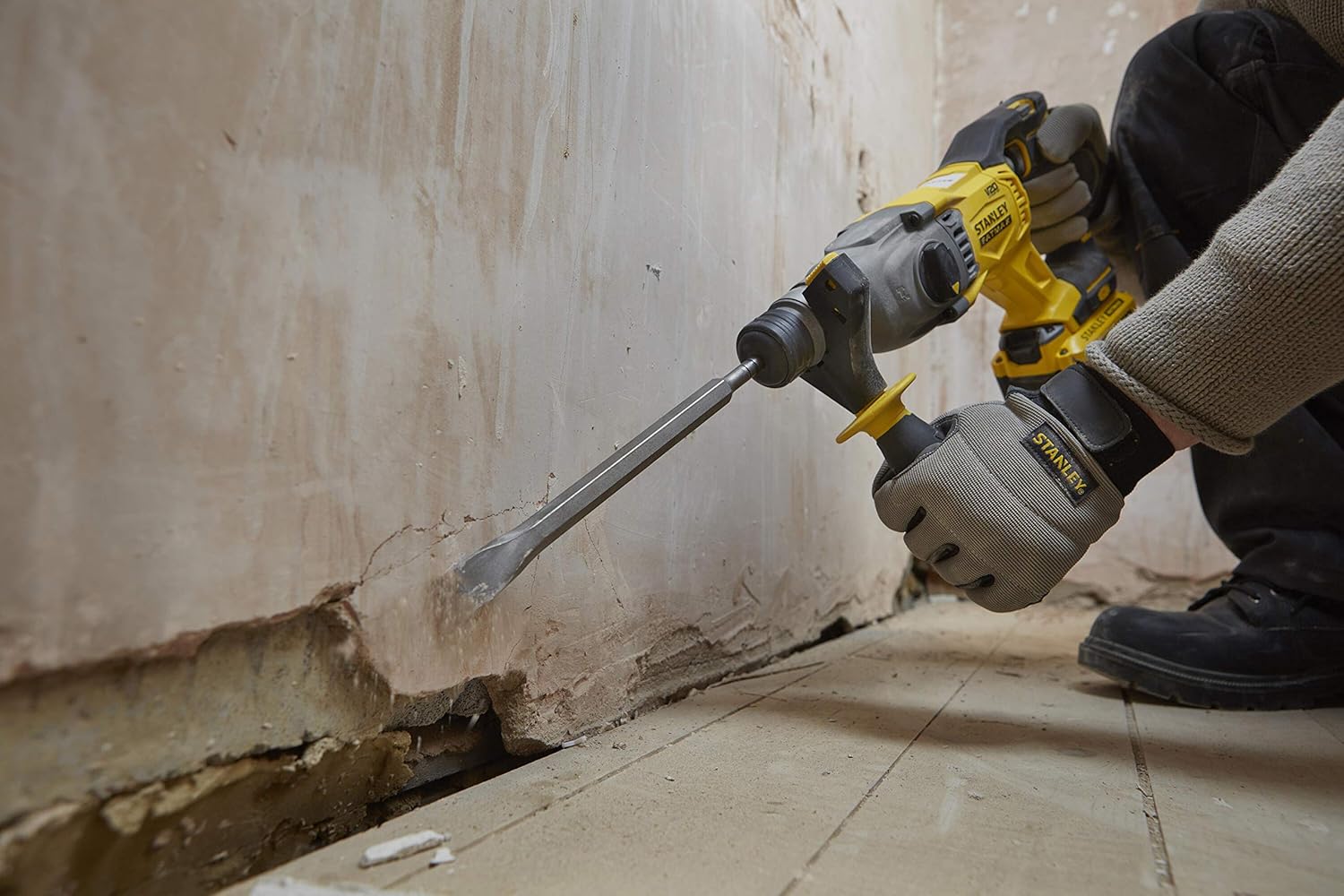
Figure 10: Performing light chiseling work with the tool.
To change modes, rotate the mode selector switch to the desired icon. Ensure the tool is off before changing modes.
Operation
Before starting any operation, ensure the work area is clear and you are wearing appropriate personal protective equipment.
- Starting the Tool: Squeeze the trigger switch (5) to start the tool. The speed is variable depending on the pressure applied to the trigger.
- Stopping the Tool: Release the trigger switch to stop the tool.
- Applying Pressure: Apply steady, firm pressure to the tool. Do not lean into the tool excessively; let the hammer mechanism do the work.
- Overheating: If the tool becomes excessively hot, run it without load for a few minutes to cool the motor.
Maintenance
Regular maintenance ensures the longevity and optimal performance of your tool.
- Cleaning: Keep the ventilation slots clean and free from dust. Use a soft brush or dry cloth to clean the tool. Do not use water or chemical cleaners.
- Brushless Motor: The brushless motor design significantly reduces maintenance requirements compared to traditional brushed motors, as there are no carbon brushes to replace.
- Storage: Store the tool and battery in a cool, dry place, away from direct sunlight and moisture. Ensure the battery is removed from the tool before storage.
- Accessory Care: Keep drill bits and chisels clean and sharp for best performance.

Figure 11: Storing the tool and accessories in a compatible TSTAK case for protection and organization.
Troubleshooting
| Problem | Possible Cause | Solution |
|---|---|---|
| Tool does not start. | Battery not charged or not properly inserted. | Ensure battery is fully charged and securely inserted. |
| Reduced drilling performance. | Dull or incorrect drill bit; incorrect mode selected. | Replace with a sharp, appropriate bit. Verify mode selector is in the correct position. |
| Tool overheats. | Continuous heavy use; blocked ventilation. | Allow tool to cool down. Clear ventilation slots. Reduce load. |
| Bit not locking into chuck. | Chuck collar not pulled back sufficiently; debris in chuck. | Pull chuck collar fully back. Clean chuck and bit shank. |
Specifications
| Feature | Specification |
|---|---|
| Brand | STANLEY FATMAX |
| Model Number | SFMCH900B-XJ |
| Power Source | Battery Powered |
| Voltage | 18 Volts |
| Impact Energy | 2.0 Joule |
| Motor Type | Brushless Motor |
| Max. Drilling Capacity (Metal) | 22 Millimeters |
| Speed | 2200 RPM |
| Item Weight | 2.84 Kilograms (6.25 pounds) |
| Product Dimensions | 15.75"L x 6.3"W x 10.04"H |
| Material | Rubber (Handle and Grip), Metal (Body, Chuck, Key Components) |
| Included Components | Cordless combination hammer (Battery and Charger Not Included in basic version) |
Warranty and Support
For warranty information, technical support, or service inquiries, please refer to the official STANLEY FATMAX website or contact their customer service department. Keep your proof of purchase for warranty claims.
Manufacturer: Stanley
Related documentsSFMCH900B


Ask a question about this manual
Ask about setup, troubleshooting, compatibility, parts, safety, or missing instructions. Manuals+ will review the question and use this page’s manual context to help answer it.