
comiso x26M
COMISO Bluetooth Speaker User Manual
Model: X26M
Brand: comiso
Introduction
Thank you for choosing the COMISO X26M Bluetooth Speaker. This compact and powerful speaker is designed to deliver high-quality 360° HD sound with enhanced bass, making it ideal for various environments, from home to outdoor adventures. Featuring Bluetooth 5.3 for stable connectivity, TWS stereo pairing capability, a built-in microphone for hands-free calls, and IP65 waterproof and dustproof rating, the X26M offers versatility and durability. This manual provides detailed instructions on setting up, operating, and maintaining your speaker to ensure optimal performance.

Image: The COMISO X26M Bluetooth Speaker, black in color, held in a hand, demonstrating its portable size and water-resistant design with visible water droplets.
Package Contents
Please check the package contents upon unboxing to ensure all items are present:
- 1 x COMISO X26M Bluetooth Speaker
- 1 x USB Charging Cable
- 1 x Quick Start Guide
- 1 x Service Card
- 1 x Hook (detachable)
Key Features
Omnidirectional 360° HD Sound
The X26M speaker delivers balanced, detailed sound in a 360° radius. A built-in amplifier powers the speaker for full sound, offering a rich audio experience and enhanced bass that exceeds expectations for its compact size.

Image: A black COMISO X26M speaker with visual representations of sound waves expanding outwards, highlighting its 360° HD sound capability.
Bluetooth 5.3 & Built-in Microphone
Equipped with the latest Bluetooth 5.3 technology, the speaker ensures lower power consumption, faster transmission, and a more stable signal without delay. The integrated microphone allows for convenient hands-free calling.
True Wireless Stereo (TWS) Pairing
For an immersive audio experience, you can connect two X26M mini portable speakers to create a true stereo sound setup. This feature is easy to operate and enhances the soundstage significantly.

Image: Two COMISO X26M speakers positioned on either side of a tablet, illustrating their dual pairing capability for stereo sound.
IP65 Waterproof & Dustproof
The speaker boasts an IP65 rating, providing protection against water jets and dust ingress. This makes it suitable for outdoor sports, hiking, or worry-free use in environments like bathrooms and kitchens.
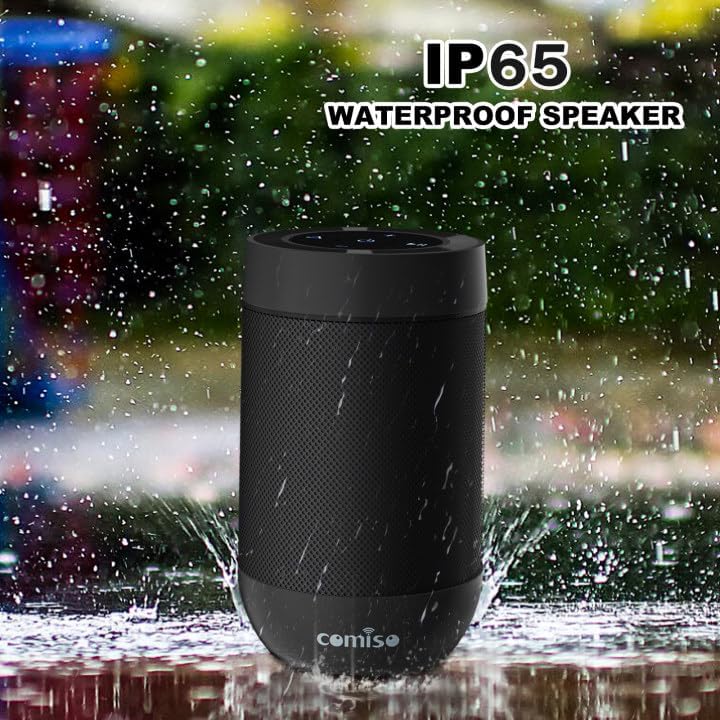
Image: The COMISO X26M speaker shown with water splashing around it, emphasizing its IP65 waterproof feature.
TF Card Support
In addition to Bluetooth streaming, the speaker supports TF (Micro SD) cards, allowing you to play music directly from your stored music library.
Ultra-Portable Design
Weighing under 5.5 ounces and measuring 3.2 inches tall with a 2.2-inch diameter, the cylindrical design is ultra-compact. Its pocket-handheld size and detachable hook make it perfect for travel, hiking, or desktop use.

Image: A person riding a bicycle outdoors with the COMISO X26M speaker attached to their backpack, demonstrating its suitability for outdoor activities and portability.
Setup
1. Charging the Speaker
Before first use, fully charge the speaker. Connect the provided USB charging cable to the speaker's charging port (located under the silicon cover near the base) and a USB power source (e.g., computer USB port, wall adapter). The charging indicator light will illuminate. A full charge takes approximately 2 hours.
2. Power On/Off
- To Power On: Press and hold the Power button (⏻) for approximately 2-3 seconds until you hear an audible prompt and the indicator light turns on.
- To Power Off: Press and hold the Power button (⏻) for approximately 2-3 seconds until you hear an audible prompt and the indicator light turns off.
3. Bluetooth Pairing
- Ensure the speaker is powered on and in Bluetooth pairing mode (the indicator light will typically flash blue rapidly).
- On your device (smartphone, tablet, computer), enable Bluetooth and search for available devices.
- Select "COMISO X26M" from the list of found devices.
- Once connected, you will hear a confirmation tone, and the indicator light will turn solid blue.
The speaker has a Bluetooth range of up to 10 meters (33 feet) in an open area.
4. True Wireless Stereo (TWS) Pairing (for two X26M speakers)
To achieve a true stereo sound experience, you can pair two COMISO X26M speakers together:
- Ensure both X26M speakers are powered on and not connected to any Bluetooth device.
- On one of the speakers (this will become the primary speaker), long-press the TWS button (often indicated by a triangle or chain link icon) for approximately 2 seconds. You will hear a "DI~DI" prompt tone, and the light will flash.
- The two speakers will automatically search for and pair with each other. Once successfully paired, you will hear a confirmation tone, and the indicator light on the primary speaker will flash, while the secondary speaker's light will be solid.
- Now, turn on Bluetooth on your device and connect to the primary "COMISO X26M" speaker. Both speakers will play audio in stereo.
The speakers will remember their TWS pairing for future use.
5. TF Card Usage
To play music directly from a TF (Micro SD) card:
- Insert a TF card (with pre-loaded music files) into the TF card slot on the speaker (under the silicon cover).
- The speaker will automatically switch to TF card playback mode.
- Use the speaker's control buttons to play, pause, skip tracks, and adjust volume.
Operating Instructions
Button Functions (Refer to speaker top panel for layout)
| Button/Icon | Function |
|---|---|
| ⏻ (Power Button) | Press and hold to Power On/Off. |
| + (Volume Up) | Short press to increase volume. Long press for next track. |
| - (Volume Down) | Short press to decrease volume. Long press for previous track. |
| ▶‖ (Play/Pause) | Short press to Play/Pause music. |
| ⟁ (TWS/Mode Button) | Long press for TWS pairing (when two speakers are present). Short press to switch between Bluetooth and TF Card modes. |
Making and Receiving Calls
When connected to a smartphone via Bluetooth, the built-in microphone allows for hands-free calling:
- Answer Call: Short press the Play/Pause button (▶‖) when an incoming call rings.
- End Call: Short press the Play/Pause button (▶‖) during a call.
- Reject Call: Long press the Play/Pause button (▶‖) when an incoming call rings.
- Redial Last Number: Double-press the Play/Pause button (▶‖).
Maintenance
- Cleaning: Wipe the speaker with a soft, damp cloth. Do not use harsh chemicals or abrasive cleaners.
- Storage: Store the speaker in a cool, dry place away from extreme temperatures and direct sunlight when not in use for extended periods.
- Battery Care: To prolong battery life, avoid fully discharging the battery frequently. Charge the speaker regularly, even if not in constant use.
- Water Resistance: While IP65 rated, avoid submerging the speaker in water. Ensure the silicon cover for charging port and TF card slot is securely closed to maintain water resistance.
Troubleshooting
| Problem | Possible Solution |
|---|---|
| Speaker does not turn on. | Ensure the speaker is charged. Connect it to a power source and try again. |
| Cannot pair with Bluetooth device. |
|
| No sound or low volume. |
|
| TWS pairing fails. |
|
| Poor sound quality / distortion. |
|
Specifications
| Feature | Detail |
|---|---|
| Model Name | X26M |
| Brand | comiso |
| Connectivity Technology | Bluetooth 5.3 |
| Speaker Type | Portable Outdoor Speaker |
| Audio Output Mode | Stereo (with TWS pairing) |
| Speaker Maximum Output Power | 8 Watts (total for TWS pair, 5W per speaker) |
| Water Resistance Level | IP65 (Water Resistant & Dustproof) |
| Battery Life | Up to 12 Hours |
| Charging Time | Approximately 2 Hours |
| Bluetooth Range | 10 Meters (33 feet) |
| Built-in Microphone | Yes |
| TF Card Support | Yes |
| Product Dimensions | 4"D x 2"W x 2"H (approx. 3.2 inches tall, 2.2 inches diameter) |
| Item Weight | 4.2 ounces |
Warranty and Support
The COMISO X26M Bluetooth Speaker comes with a Limited Warranty. For specific warranty terms and conditions, please refer to the included Service Card or visit the official COMISO website. If you encounter any issues or require technical assistance, please contact COMISO customer support through their official channels or the retailer from whom you purchased the product.
For further assistance, you may visit the COMISO Store on Amazon.
Related documentsx26M


Ask a question about this manual
Ask about setup, troubleshooting, compatibility, parts, safety, or missing instructions. Manuals+ will review the question and use this page’s manual context to help answer it.