
1. Introduction
This manual provides comprehensive instructions for the safe and efficient operation, setup, maintenance, and troubleshooting of the TECHTONGDA FR-880 Continuous Auto Sealing Machine. Please read this manual thoroughly before operating the machine to ensure proper usage and to prevent damage or injury.
The FR-880 is designed for continuous sealing of various plastic film bags, including PP, PE, PV, OPP, and PS, with a thickness range of 0.02mm-0.8mm on both sides. It features an automatic conveyor belt, cooling/heating blocks, and an embossing function for printing production dates.
2. Safety Instructions
- Always ensure the machine is connected to a grounded 110V power supply.
- Do not operate the machine with wet hands or in damp environments.
- Keep hands and loose clothing away from moving parts, especially the sealing area and conveyor belt, during operation.
- In case of emergency, immediately press the red emergency stop button.
- Before performing any maintenance or cleaning, disconnect the machine from the power source.
- Ensure proper ventilation around the machine during operation.
- Do not attempt to modify the machine. Repairs should only be performed by qualified personnel.
- The sealing area becomes hot during operation. Avoid direct contact to prevent burns.
Warning: Failure to follow these safety instructions may result in electric shock, fire, or serious injury.
3. Product Overview and Components
The TECHTONGDA FR-880 Continuous Auto Sealing Machine consists of several key components designed for efficient bag sealing.

Figure 3.1: Front-side view of the FR-880 sealing machine, showing the main unit and conveyor belt.

Figure 3.2: Rear-side view of the FR-880 sealing machine, highlighting the power input and control panel area.
Key Components:
- Control Panel: Located on the top of the main unit, it includes power, heat, belt, and fan controls, along with a temperature monitor.
- Emergency Safety Switch: A prominent red button on the control panel for immediate shutdown.
- Durable Feed Port: The entry point for bags onto the conveyor belt.
- Conveyor Belt: Automatically transports bags through the sealing process.
- Sealing Mechanism: Contains pure copper heating blocks and premium cooling blocks for neat and firm seals.
- Printing Wheel: A high-quality steel wheel for automatic embossing of production dates or other information.
- Safety Power Protection: The main power input with protective features.
- Scald Safety Cover: Protects users from hot sealing components.

Figure 3.3: Detailed view of the control panel, showing temperature control and various switches.

Figure 3.4: Internal view of the sealing area, illustrating the heating and cooling blocks.
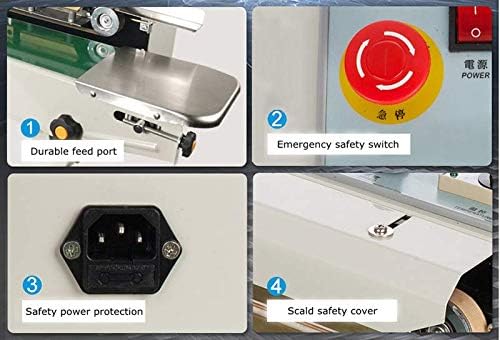
Figure 3.5: Key operational and safety features, including the feed port, emergency stop, power input, and safety cover.
4. Setup
- Unpacking: Carefully remove the machine from its packaging. Inspect for any shipping damage. Retain packaging for future transport or storage.
- Placement: Place the machine on a stable, level surface capable of supporting its weight (approximately 41.1 pounds). Ensure adequate space around the machine for operation and ventilation.
- Power Connection: Connect the power cord to the machine's safety power protection port, then plug it into a standard 110V AC grounded outlet.
- Initial Inspection: Before powering on, visually inspect all components to ensure they are securely in place and free from obstructions.
5. Operating Instructions
- Power On: Turn on the main power switch located on the control panel.
- Adjust Temperature: Use the temperature control knob on the control panel to set the desired sealing temperature. The optimal temperature depends on the bag material and thickness (0.02mm-0.8mm). Monitor the temperature display. Allow the machine to preheat until the set temperature is reached.
- Adjust Conveyor Belt Speed: If applicable, adjust the conveyor belt speed using the corresponding control on the panel. A slower speed may be required for thicker materials or stronger seals.
- Engage Heating and Fan: Ensure the heat and fan switches are in the "ON" position. The fan assists in cooling the sealed area.
- Prepare Bags: Ensure bags are clean and free from wrinkles in the sealing area.
- Start Sealing: Gently feed the open end of the bag into the durable feed port, guiding it onto the conveyor belt. The machine will automatically pull the bag through the sealing mechanism.
- Embossing (Optional): If date printing is required, ensure the printing wheel is properly installed and configured. The machine will automatically imprint information during the sealing process.
- Monitor Sealing Quality: Periodically check the sealed bags for consistency and strength. Adjust temperature or speed as needed to achieve an optimal seal.
- Power Off: After use, turn off the heat switch first, allowing the cooling blocks to reduce temperature. Once cooled, turn off the belt and main power switches.
Note: Experiment with temperature and speed settings on scrap bags to find the ideal configuration for your specific bag material and thickness.
6. Maintenance
Regular maintenance ensures the longevity and optimal performance of your sealing machine.
- Cleaning: Regularly clean the conveyor belt and sealing area to prevent residue buildup. Use a soft, dry cloth. For stubborn residue, a mild, non-abrasive cleaner can be used, ensuring the machine is unplugged and completely dry before next use.
- Heating and Cooling Blocks: Inspect the heating and cooling blocks for wear or damage. Replace if necessary.
- Conveyor Belt Tension: Check the tension of the conveyor belt periodically. Adjust if it becomes too loose or too tight according to the machine's design.
- Lubrication: Apply appropriate lubricant to moving parts as indicated in the machine's specific maintenance guidelines (if provided by manufacturer, otherwise general moving parts).
- Electrical Connections: Periodically check all electrical connections for tightness and signs of wear.
Caution: Always disconnect power before performing any maintenance.
7. Troubleshooting
| Problem | Possible Cause | Solution |
|---|---|---|
| Machine does not power on. | No power supply; power switch off; emergency stop engaged. | Check power cord connection and outlet; turn on power switch; disengage emergency stop button. |
| Poor seal quality (weak or incomplete). | Incorrect temperature setting; conveyor belt speed too fast; worn heating elements; bag material incompatible. | Increase temperature; decrease conveyor belt speed; inspect and replace heating elements; ensure bag material is suitable for the machine. |
| Bags get stuck or do not feed smoothly. | Conveyor belt misalignment; foreign objects; excessive bag thickness. | Check and adjust conveyor belt alignment; remove any obstructions; ensure bag thickness is within specified range (0.02mm-0.8mm). |
| Loud humming noise during operation. | Normal operation sound (as noted by some users); loose components; motor issue. | Verify all external components are secure. If the noise is unusual or excessive, contact customer support. |
If the problem persists after attempting these solutions, contact TECHTONGDA customer support for assistance.
8. Specifications
| Feature | Detail |
|---|---|
| Brand | TECHTONGDA |
| Model | FR-880 |
| Material | Stainless Steel |
| Product Dimensions (L x W x H) | 33.46" x 16.54" x 12.6" |
| Power Source | Corded Electric |
| Operation Mode | Automatic |
| Wattage | 550 watts |
| Voltage | 110 Volts |
| Item Weight | 41.1 pounds |
| Sealing Speed | 0-16 m/min |
| Sealing Width | 6-12 mm |
| Applicable Bag Thickness | 0.02mm-0.8mm (both sides) |
| Applicable Bag Materials | PP, PE, PV, OPP, PS |
9. Warranty and Support
For warranty information, technical support, or service inquiries, please contact TECHTONGDA customer service. Keep your purchase receipt and product model number (FR-880) readily available when contacting support.
Refer to the official TECHTONGDA website or your purchase documentation for specific warranty terms and contact details.