
1. Product Overview
The Hamilton Beach Digital Air Fryer Toaster Oven Combo (Model 31220) is a versatile kitchen appliance designed for efficient cooking. It features 1800 watts of power for rapid air circulation, enabling faster cooking and reduced energy consumption compared to traditional ovens. This multifunction unit offers 10 distinct cooking methods, including air frying, baking, broiling, toasting, and dehydrating, all controlled via an intuitive digital panel.
The oven is capable of accommodating a 12-inch pizza, up to 3 lbs of chicken wings, or 6 slices of toast, making it suitable for various meal sizes. It includes essential accessories such as a metal mesh basket for air frying, a bake pan, and a broil rack, along with two rack positions for flexible cooking.

Figure 1: Hamilton Beach Digital Air Fryer Toaster Oven Combo, showcasing its sleek black and stainless steel design.
Key Features:
- 1800 Watts Power: Ensures fast and even cooking by powerfully circulating air.
- 10 Cooking Functions: Includes air fry, bake, broil, toast, convection, and dehydrate.
- Digital Control Panel: Intuitive LED capacitive-touch controls with memory for last used settings.
- Air Fry Mode & Presets: Quickly crisps and browns food with minimal oil.
- Large Capacity: Fits a 12-inch pizza, 3 lbs of chicken wings, or 6 slices of toast.
- Included Accessories: Metal mesh air fry basket, bake pan, and broil rack.
- 2 Rack Positions: Offers flexibility for different cooking needs.
2. Setup Instructions
- Unpack: Carefully remove the appliance and all accessories from the packaging. Retain packaging for future storage or shipping.
- Clean: Wash the metal mesh air fry basket, bake pan, and broil rack in warm, soapy water. Rinse thoroughly and dry completely. Wipe the interior and exterior of the oven with a damp cloth.
- Placement: Place the oven on a stable, heat-resistant surface with adequate clearance (at least 6 inches) from walls and other appliances to allow for proper ventilation. Ensure the power cord is not obstructed.
- Power Connection: Plug the power cord into a grounded electrical outlet.
- Initial Burn-Off: Before first use, operate the oven empty for approximately 15 minutes at 400°F (200°C) on the "Bake" setting to burn off any manufacturing residues. A slight odor or smoke is normal during this process. Ensure good ventilation.
3. Operating Instructions
The Hamilton Beach Digital Air Fryer Toaster Oven features a digital control panel for selecting functions, adjusting time, and temperature. The control panel remembers your last cooking function adjustments for convenience.

Figure 2: Digital control panel with function, cook time, temperature, and air fry preset buttons.
General Operation:
- Power On: Press the Function button to turn on the oven.
- Select Function: Use the Function button to cycle through available cooking modes: Bake, Air Fry, Convection, Toast, Broil, Dehydrate. The selected function will illuminate.
- Adjust Settings:
- For Bake, Air Fry, Convection, Broil, Dehydrate: Use the "Cook Time" and "Temperature" buttons/dials to set desired time and temperature.
- For Toast: Use the "Slices" and "Shade" buttons/dials to select the number of slices and desired toast shade.
- Air Fry Presets: Press the "Air Fry Preset" button (P) to select from pre-programmed settings for common air-fried foods like chicken, fries, steak, or seafood.
- Start Cooking: Press the Start/Stop button to begin the cooking cycle.
- Stop Cooking: Press the Start/Stop button again to pause or end the cooking cycle.
Specific Cooking Functions:
- Air Fry: Place food in the metal mesh basket, positioned over the bake pan to catch drippings. Select "Air Fry" function or an "Air Fry Preset." This mode uses rapid hot air circulation for crispy results.

Figure 3: Air frying french fries in the mesh basket for even crisping.
- Bake: Use the bake pan or other oven-safe bakeware. Select "Bake" function and set desired temperature and time. Ideal for cakes, cookies, and casseroles.
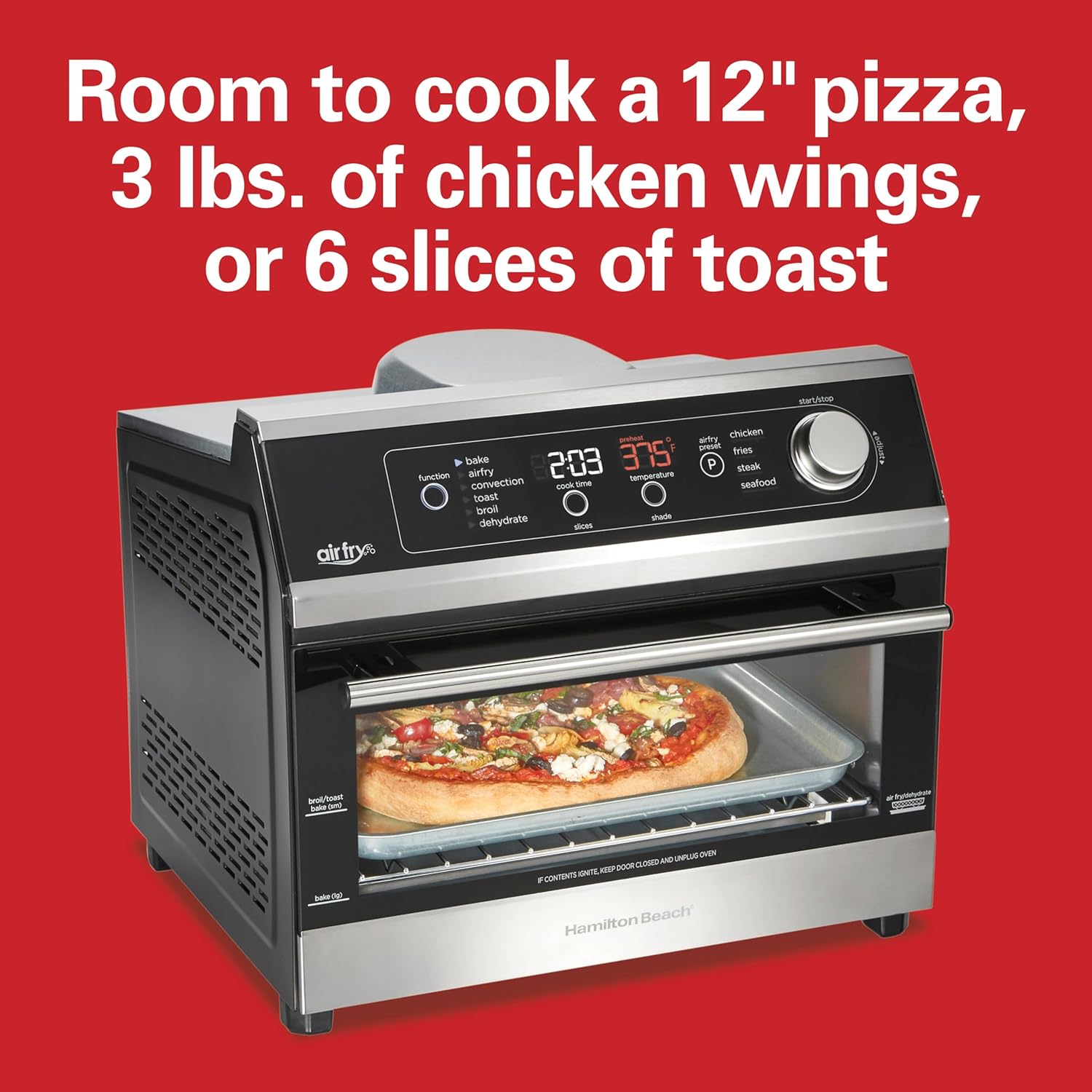
Figure 4: The oven's capacity allows for baking a 12-inch pizza.
- Broil: Place food on the broil rack. Select "Broil" function. Monitor food closely as broiling is a high-heat function.
- Toast: Place bread slices directly on the wire rack. Select "Toast" function, then adjust slices and shade.
- Dehydrate: Arrange thinly sliced food on the mesh basket or wire rack. Select "Dehydrate" function and set a low temperature for an extended period.
Official Product Video:
Video 1: An official Hamilton Beach video demonstrating the 10-in-1 Digital Air Fryer Toaster Oven's various functions and features, including air frying, toasting, and baking capabilities.
4. Care and Maintenance
Regular cleaning ensures optimal performance and extends the lifespan of your appliance.
- Unplug and Cool: Always unplug the oven from the electrical outlet and allow it to cool completely before cleaning.
- Clean Accessories: The metal mesh air fry basket, bake pan, and broil rack are dishwasher safe or can be washed by hand in warm, soapy water. Avoid abrasive cleaners or scouring pads.
- Clean Interior: Wipe the interior walls and bottom crumb tray with a damp cloth and mild detergent. For stubborn stains, a non-abrasive cleaner designed for oven interiors can be used. Ensure all cleaning solution is wiped away.
- Clean Exterior: Wipe the exterior surfaces with a damp cloth. For stainless steel parts, use a stainless steel cleaner if necessary. Do not immerse the oven in water.
- Crumb Tray: The removable crumb tray should be emptied and cleaned regularly to prevent grease buildup and potential fire hazards.
5. Troubleshooting
If you encounter issues with your Hamilton Beach Digital Air Fryer Toaster Oven, refer to the following common problems and solutions:
| Problem | Possible Cause | Solution |
|---|---|---|
| Oven does not turn on. | Not plugged in; power outage; circuit breaker tripped. | Ensure the oven is securely plugged into a working outlet. Check household circuit breaker. |
| Food is not cooking evenly. | Overcrowding; incorrect rack position; insufficient preheating. | Avoid overcrowding the basket/pan. Use recommended rack position. Allow oven to preheat fully. Turn or shake food halfway through cooking. |
| Excessive smoke during cooking. | Grease buildup; fatty foods; food touching heating elements. | Clean the oven interior and crumb tray regularly. Trim excess fat from food. Ensure food does not touch heating elements. |
| Digital display not responding. | Temporary electronic glitch. | Unplug the oven for 1 minute, then plug it back in. If the issue persists, contact customer support. |
6. Specifications
- Brand: Hamilton Beach
- Model Name: Hamilton Beach Digital Toaster Oven Air Fryer
- Model Number: 31220
- Color: Black & Stainless Steel
- Product Dimensions (D x W x H): 15.4" x 15.1" x 12.7"
- Item Weight: 11 pounds
- Power Source: Electric (1800 Watts)
- Control Type: Touch Control
- Door Style: Dropdown Door
- Door Material Type: Tempered Glass
- Temperature Range: Up to 450°F (232°C)
- Number of Shelves: 2
- Capacity: Fits 12-inch pizza, 3 lbs chicken wings, 6 slices of toast
- Included Components: Bake Pan, Broil Rack, Digital Air Fryer Toaster Oven, Mesh Air Fry Basket
- Special Features: Adjustable Rack, Auto Cook Menu, Automatic Shut-Off, Broiler Option, LED Display, Large Capacity, Programmable, Removable Crumb Tray, Timer
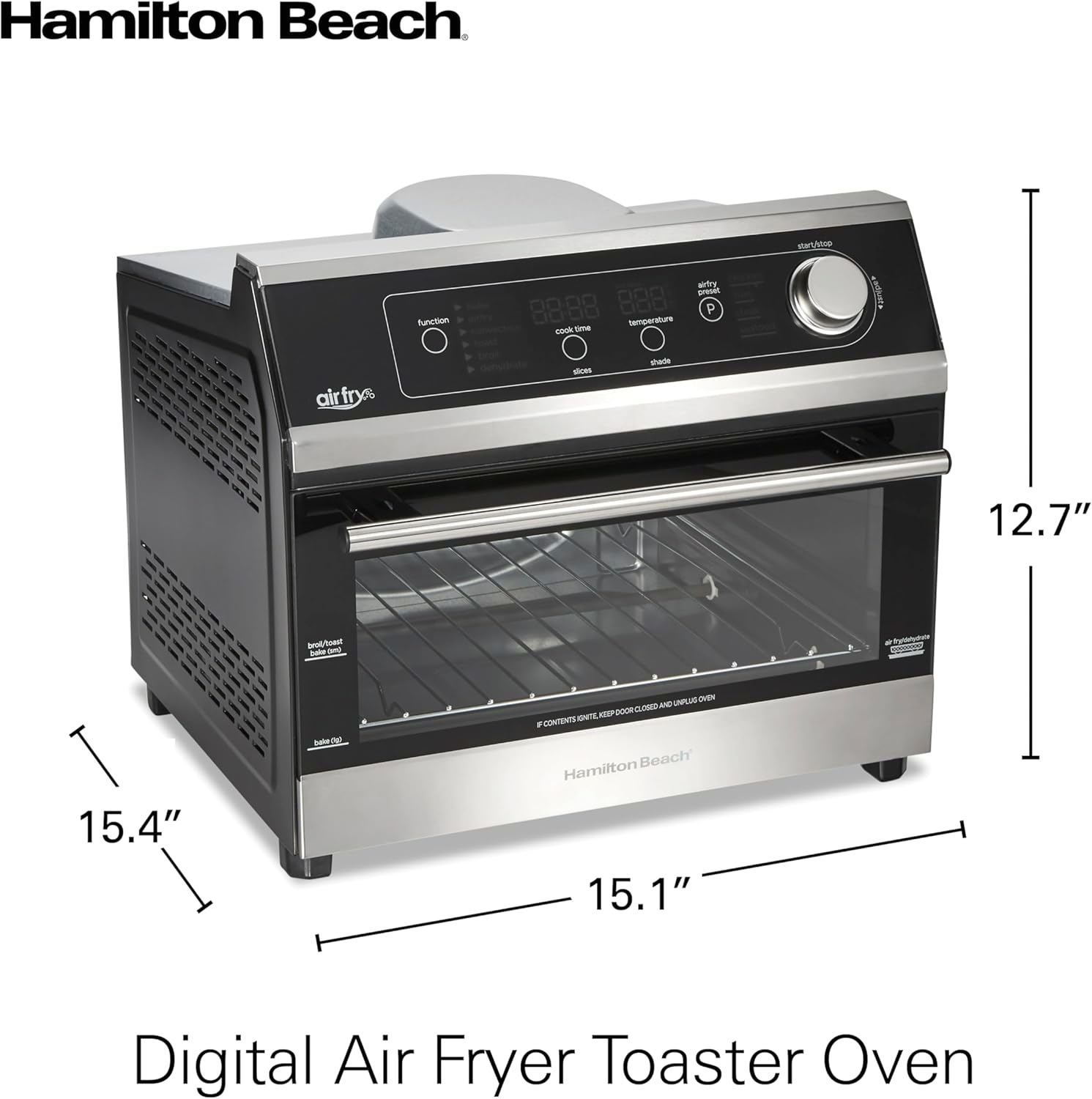
Figure 5: Product dimensions: 15.4"D x 15.1"W x 12.7"H.

Figure 6: Included accessories: mesh basket, bake pan, crumb tray, and broil rack.
7. Warranty and Support
For detailed warranty information, please refer to the warranty card included with your product or visit the official Hamilton Beach website. Keep your purchase receipt as proof of purchase for warranty claims.
For technical assistance, troubleshooting not covered in this manual, or to order replacement parts, please contact Hamilton Beach Customer Service. Contact details can typically be found on the product packaging or the official brand website.


