1. Introduction
This manual provides comprehensive instructions for the SANNCE 1080P 4-in-1 Security Camera, Model C51. This camera is designed for both indoor and outdoor surveillance, offering 1080P Full HD resolution, versatile 4-in-1 video output modes (AHD/TVI/CVI/CVBS), and robust IP66 weather resistance. Please read this manual carefully before installation and operation to ensure proper use and optimal performance.

Image: SANNCE 1080P 4-in-1 Bullet Security Camera, front-angled view.
2. Package Contents
Verify that all items listed below are included in your package. If any items are missing or damaged, please contact SANNCE customer support.
- 1 x SANNCE 1080P 4-in-1 Security Camera
- 1 x User Manual
- 1 x Wall Sticker
- 1 x Screw Bag (mounting screws and wall plugs)

Image: Contents of the product package.
3. Setup
3.1 Mounting the Camera
The SANNCE C51 camera features an adjustable 3-axis mounting bracket, allowing for flexible installation on walls or ceilings. Ensure the mounting surface is strong enough to support the camera.
- Choose a suitable location for optimal surveillance coverage.
- Use the provided wall sticker as a template to mark the drill holes.
- Drill holes and insert the wall plugs if necessary.
- Secure the camera's base to the mounting surface using the screws.
- Adjust the camera angle using the 3-axis bracket for desired viewing. The bracket allows 360-degree rotation and 180-degree horizontal adjustment.

Image: Camera installation on a wall.

Image: Flexible mounting options with 3-axis adjustment.
3.2 Wiring and Connection
Connect the camera to your Digital Video Recorder (DVR) and power supply as follows:
- Connect the camera's video output cable to an available video input port on your DVR.
- Connect the camera's power input to a 12V DC power adapter (not included).
- Ensure all connections are secure.

Image: Typical camera connection diagram.
4. Operating
4.1 Video Output Mode Switching
The SANNCE C51 camera supports four video output modes: AHD, TVI, CVI, and CVBS. This allows compatibility with a wide range of DVRs. To switch modes, use the control button located on the camera's cable:
- Push the button left for AHD mode.
- Push the button right for TVI mode.
- Push the button down for CVI mode.
- Push the button up for CVBS mode.
Hold the button in the desired direction for approximately 5 seconds until the mode changes. Ensure the camera's mode matches your DVR's input type.
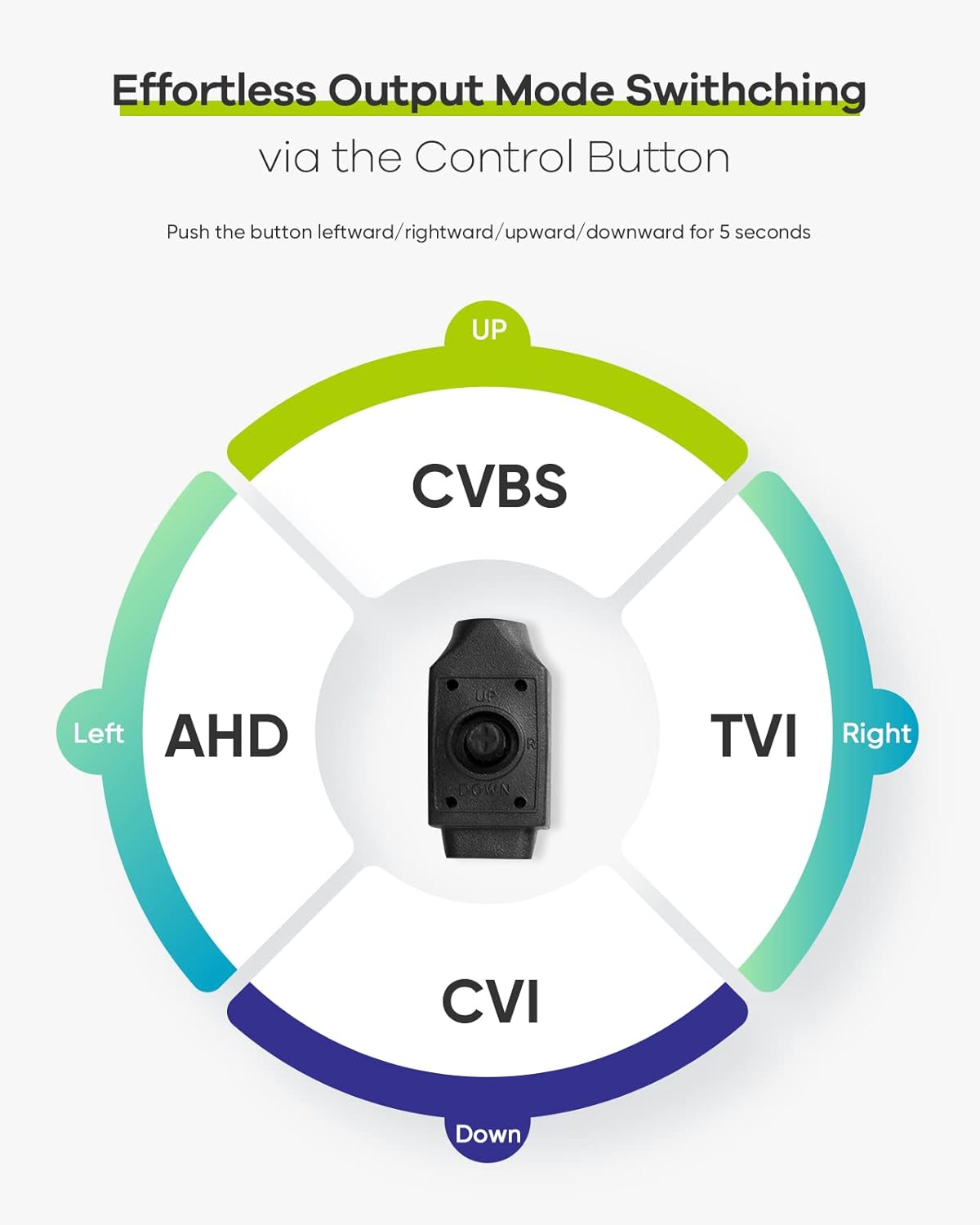
Image: 4-in-1 output mode switching via control button.

Image: Mode switching and DVR compatibility.
4.2 DVR Compatibility
The SANNCE C51 camera is compatible with SANNCE DVRs and most third-party analog DVRs that support 2MP, 3MP, 5MP, or 8MP resolutions, depending on the selected output mode.

Image: Camera compatibility with SANNCE and third-party DVRs.
4.3 Video Quality
The camera provides 1080P Full HD video resolution, offering clear and detailed images for effective surveillance.

Image: Comparison of 720p vs 1080p video quality.

Image: Smartphone view comparing 720p and 1080p resolution.
4.4 Night Vision
Equipped with Smart IR technology, the camera provides clear night vision up to 30 meters (approximately 100 feet). The infrared LEDs automatically activate in low-light conditions, ensuring continuous surveillance.

Image: Night vision comparison with and without Smart IR.

Image: Day and night vision display.
5. Maintenance
5.1 Weather Resistance
The SANNCE C51 camera has an IP66 weatherproof rating, protecting it from dust, rain, snow, and extreme temperatures. It is designed to operate reliably in various outdoor conditions, with an operating temperature range from -4°F to 122°F (-20°C to 50°C).

Image: Camera demonstrating IP66 waterproof rating in adverse weather.

Image: Camera resilience in cold and warm temperatures.
5.2 Cleaning
To maintain optimal image quality, periodically clean the camera lens with a soft, dry cloth. Avoid using harsh chemicals or abrasive materials that could scratch the lens or housing.
6. Troubleshooting
- No Video Output:
1. Check all cable connections (video and power) to ensure they are secure.
2. Verify that the camera's video output mode (AHD/TVI/CVI/CVBS) matches the input mode of your DVR.
3. Ensure the power adapter is functioning correctly and providing 12V DC. - Poor Image Quality:
1. Clean the camera lens to remove any dirt or smudges.
2. Ensure the camera is properly focused (if adjustable).
3. Check the cable length and quality; long or low-quality cables can degrade signal. - Night Vision Not Working:
1. Ensure there is sufficient power to the camera for the IR LEDs to activate.
2. Check for any obstructions blocking the IR LEDs or the camera's view.
3. Verify that the camera is in a dark environment for the IR to automatically switch on. - Camera Not Powering On:
1. Confirm the power adapter is connected and working.
2. Check the power cable for any damage.
7. Specifications
| Feature | Specification |
|---|---|
| Model Number | C51 |
| Video Resolution | 1080P (1920 x 1080 pixels) |
| Video Output Modes | AHD / TVI / CVI / CVBS (4-in-1) |
| Night Vision Range | Up to 30 meters (100 feet) |
| Weather Resistance | IP66 |
| Operating Temperature | -4°F to 122°F (-20°C to 50°C) |
| Power Source | Wired Electric (12V DC) |
| Mounting Type | Wall Mount |
| Viewing Angle | 100 Degrees |
| Material | Plastic |
| Dimensions (LxWxH) | 10 x 8.5 x 3 cm |
| Weight | 200 grams |
| Special Features | Night Vision |
| Connectivity Technology | Wired (Wireless mentioned in product data, but camera is analog wired) |
8. Warranty and Support
SANNCE products are designed for reliability and performance. For warranty information, technical support, or any inquiries regarding your SANNCE C51 camera, please refer to the official SANNCE website or contact their customer service directly. Keep your purchase receipt for warranty claims.
For further assistance, you may visit the SANNCE store on Amazon: SANNCE Store


