
Seeutek 12x15 8 in 1
Seeutek 8-in-1 Heat Press Machine User Manual
Model: 12x15 8 in 1
1. Safety Instructions
Please read all instructions carefully before operating the Seeutek 8-in-1 Heat Press Machine. Failure to follow these safety guidelines may result in injury or damage to the equipment.
- Always operate the heat press on a stable, heat-resistant surface.
- Keep hands and fingers clear of the heating plate during operation to prevent burns. The Teflon coated heating plate can reach temperatures up to 482°F (250°C).
- Ensure proper ventilation in your workspace to dissipate heat and any fumes from materials.
- Do not leave the machine unattended while it is powered on or heating.
- Unplug the machine from the power outlet when not in use or before cleaning and maintenance.
- Keep children and pets away from the heat press machine.
- Use appropriate heat-resistant gloves when handling hot items or adjusting components.
- Do not attempt to modify or repair the machine yourself. Contact customer support for assistance.
- Ensure the correct voltage (110 Volts) is used for the machine.
2. Product Overview
The Seeutek 8-in-1 Heat Press Machine is a versatile tool designed for heat transfer sublimation onto various items such as T-shirts, mugs, hats, and plates. It features a 360-degree swing-away design and a digital control box for precise temperature and time settings.

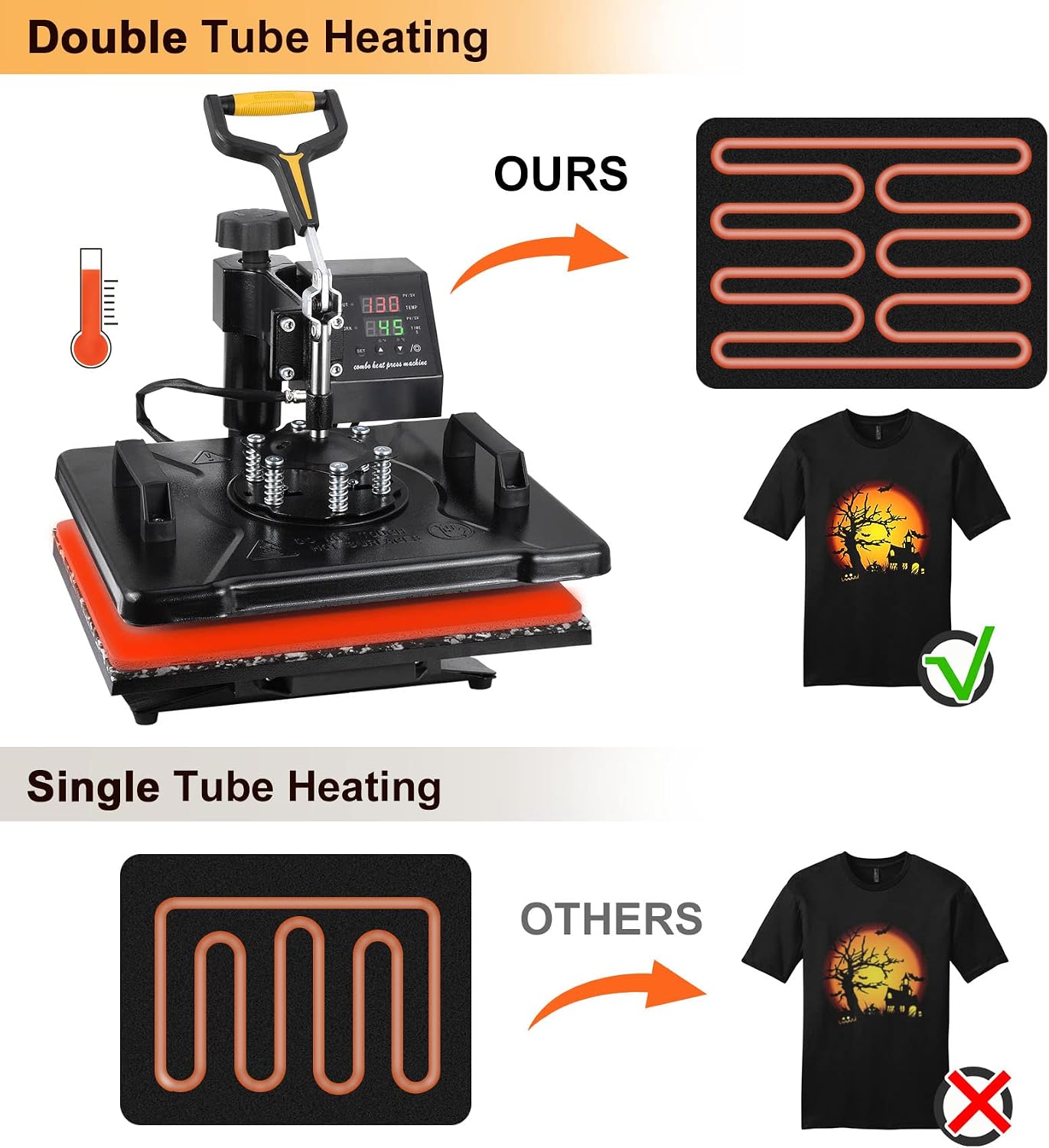
The machine utilizes a double-tube heating design for even heat distribution, resulting in clearer printed patterns. The Teflon coated heating plate protects your vinyl and clothing during transfer and is easy to clean.
3. Setup and Assembly
3.1 Initial Setup
Upon unboxing, ensure all components are present as listed in the packing list. Some heating elements, such as mug and plate presses, may have a protective plastic film that needs to be removed before first use. This film is visible in the provided images of the mug and plate attachments.

3.2 Attaching Different Elements
The 8-in-1 heat press comes with various attachments for different items. The main heating plate can be easily removed and replaced with other elements like the hat press, mug presses, or plate presses.
3.2.1 Installing the Plate Press
To install the plate press, first remove the main heating plate by loosening the screws on the base. Then, secure the desired plate press attachment using the provided screws and tools.
Video 3.1: Installation of Plate Press. This video demonstrates how to remove the main heating plate and install the plate press attachment. (Relevant segment from 2:05 to 2:25)
3.2.2 Installing the Hat/Cap Press
Similar to the plate press, the hat/cap press can be installed by removing the main heating plate and securing the hat press attachment to the main unit.
Video 3.2: Installation of Hat/Cap Press. This video illustrates the process of attaching the hat/cap press. (Relevant segment from 2:44 to 2:58)
3.2.3 Installing the Mug/Cup Press
The mug/cup press attachment is designed for cylindrical items. Follow the same procedure of removing the main plate and installing the mug press securely.
Video 3.3: Installation of Mug/Cup Press. This video shows how to attach the mug/cup press. (Relevant segment from 3:12 to 3:25)
4. Operating Instructions
4.1 Digital Control Box Settings
The digital control box allows you to set the desired temperature and time for your heat transfer projects. It features a temperature indicator, time indicator, heating indicator, working indicator, and setting buttons.

4.1.1 Setting Temperature and Time
To set the temperature and time, refer to the following steps:
- Press the "SET" button three times to set the unit (Fahrenheit/Celsius). Use the "up/down" buttons to adjust.
- Press the "SET" button once to set the temperature. Display will show "SP". Use "up/down" buttons to adjust the value.
- Press the "SET" button twice to set the heating time. Display will show "St". Use "up/down" buttons to adjust the value.
- Once settings are complete, press "SET" again to confirm.
Video 4.1: Digital Control Box Instruction. This video provides a detailed guide on how to set the temperature and time on the control panel.
4.2 Adjusting Pressure
Adjust the proper pressure with the adjustment knob for better performance. The pressure knob is located at the top of the machine, allowing you to increase or decrease the pressure applied during heat transfer.
4.3 Swing-Away and Slide-Out Design
The 360-degree swing-away design allows the heating element to be moved safely aside, reducing the chances of accidental contact with the hot plate. The slide-out design of the lower platen makes it easier to position garments and materials.
Video 4.2: Swing-Away and Slide-Out Features. This video demonstrates the machine's swing-away and slide-out rail design for ease of use and safety. (Relevant segment from 0:18 to 0:30)
4.4 Specific Pressing Applications
The 8-in-1 heat press is suitable for various items. Always ensure the correct attachment is installed and the appropriate temperature and time settings are used for your specific material and transfer type.
4.4.1 T-Shirt Pressing
Place the T-shirt flat on the heat transfer pad. Position your design, cover with a Teflon sheet (if needed), and lower the heating plate. Press the "down" button to start the timer once the desired temperature is reached.
Video 4.3: T-Shirt Pressing Demonstration. This video shows the process of preparing and pressing a T-shirt. (Relevant segment from 1:00 to 1:50)
4.4.2 Plate Pressing
After installing the plate press attachment, place the plate with your design on the pad. Lower the heating element and apply pressure for the recommended time and temperature.
Video 4.4: Plate Pressing Demonstration. This video illustrates the use of the plate press attachment. (Relevant segment from 2:17 to 2:25)
4.4.3 Hat/Cap Pressing
Once the hat/cap press is installed, carefully position the hat with your design. Ensure the design is flat against the heating surface before pressing.
Video 4.5: Hat/Cap Pressing Demonstration. This video shows how to use the hat/cap press attachment. (Relevant segment from 2:58 to 3:10)
4.4.4 Mug/Cup Pressing
With the mug/cup press installed, place the mug with the transfer paper securely. Close the clamp to apply even pressure and heat.
Video 4.6: Mug/Cup Pressing Demonstration. This video demonstrates the use of the mug/cup press. (Relevant segment from 3:20 to 3:25)
5. Maintenance
Proper maintenance ensures the longevity and optimal performance of your heat press machine.
- **Cleaning:** Regularly wipe down the heating plate and other surfaces with a soft, damp cloth when the machine is cool and unplugged. The Teflon coating makes it easy to clean.
- **Teflon Sheet Care:** Use Teflon sheets to protect the heating plate and your materials. Replace them if they become damaged or excessively dirty.
- **Storage:** Store the heat press in a dry, dust-free environment when not in use.
- **Inspections:** Periodically check all screws and connections to ensure they are secure.
6. Troubleshooting
If you encounter issues with your heat press machine, refer to the following common troubleshooting tips:
- **Uneven Heating:** Ensure the heating plate is clean and free of debris. Verify that the pressure is evenly distributed across the platen. The double-tube heating design is intended to provide even heat.
- **Temperature Fluctuations:** Check that the machine is plugged into a stable power source. Ensure the temperature settings on the digital control box are correctly entered as per Section 4.1. If the issue persists, contact customer support.
- **Timer Not Starting/Stopping:** Verify that the "down" button is pressed firmly to initiate the timer after the desired temperature is reached. Ensure the alarm sounds when the countdown is over.
- **Attachments Not Fitting Securely:** Double-check that the correct screws are used and tightened properly when installing different heating elements.
For more complex issues or persistent problems, please contact Seeutek customer support.
7. Specifications
| Feature | Detail |
|---|---|
| Model Number | 12x15 8 in 1 |
| Product Dimensions | 12 x 15 x 17 inches (12"L x 15"W x 17"H) |
| Item Weight | 41 pounds |
| Upper Temperature Rating | 482 Degrees Fahrenheit (250°C) |
| Voltage | 110 Volts |
| Material | Alloy Steel |
| Color | Black |
| UPC | 768459190313 |
| Manufacturer | Seeutek |
8. Warranty and Support
This Seeutek heat press machine comes with a 2-year warranty from the date of purchase. This warranty covers manufacturing defects and significant malfunctions under normal use.
If you encounter any issues or require assistance with your product, please do not hesitate to contact Seeutek customer support. Our team is dedicated to providing prompt and helpful service.
For support, please refer to the contact information provided with your product packaging or visit the official Seeutek store on Amazon: Seeutek Store.
Related documents12x15 8 in 1


Ask a question about this manual
Ask about setup, troubleshooting, compatibility, parts, safety, or missing instructions. Manuals+ will review the question and use this page’s manual context to help answer it.