
1. Introduction
This manual provides essential information for the safe and efficient use of your FLEXISPOT EG1 Electric Height Adjustable Standing Desk. Please read this manual thoroughly before assembly and operation to ensure proper functionality and to prevent damage or injury.
The FLEXISPOT EG1 desk is designed to offer a versatile workspace, allowing users to easily switch between sitting and standing positions. It features a robust electric lifting system, a spacious desktop, and a user-friendly control panel.

Figure 1.1: FLEXISPOT EG1 Electric Height Adjustable Standing Desk.
2. Safety Information
- Ensure all components are securely fastened before use.
- Keep children and pets away from the desk during operation.
- Do not place hands or objects near moving parts during height adjustment.
- Avoid overloading the desk. The maximum load capacity is 70 kg (excluding desktop weight).
- Disconnect power before cleaning or maintenance.
- Operate the desk only in a dry environment.
- The desk features an anti-collision rebound function. If an obstruction is detected, the desk will stop and slightly reverse its movement.

Figure 2.1: Anti-Collision Rebound Function in action.
3. Package Contents
Before assembly, verify that all parts are present and undamaged. Refer to the detailed parts list provided in your physical assembly manual. Typical components include:
- Desktop (Maple Top)
- Desk Frame (White)
- Lifting Columns (Legs)
- Control Box
- Control Panel (2-Button)
- Power Cable
- Assembly Hardware (screws, tools)
- Cable Management Tray
- Side Hooks (Set of 2)
4. Assembly Instructions
Assembly of the FLEXISPOT EG1 desk is designed to be straightforward and typically takes less than 30 minutes. For detailed, step-by-step instructions, please refer to the dedicated assembly manual included in your product packaging. The following provides a general overview:
- Unpack Components: Carefully remove all parts from the packaging and lay them out on a clean, flat surface. Verify against the parts list.
- Assemble Frame: Attach the lifting columns to the crossbar and feet according to the manual's diagrams.
- Attach Desktop: Securely fasten the desktop to the assembled frame using the provided screws.
- Install Control Box and Panel: Mount the control box and connect the motor and control panel cables. Position the 2-button control panel conveniently under the desktop.
- Cable Management: Utilize the included cable management tray and side hooks to organize power cords and accessories for a tidy workspace.
- Connect Power: Plug the power cable into the control box and then into a wall outlet.
Note: The industrial-grade steel frame ensures solid construction. Ensure all connections are tight for stability.

Figure 4.1: Integrated cable organizer and side hooks for convenience.
5. Operating Instructions
The FLEXISPOT EG1 desk features an intuitive 2-button control panel for easy height adjustment.
5.1. Control Panel Overview
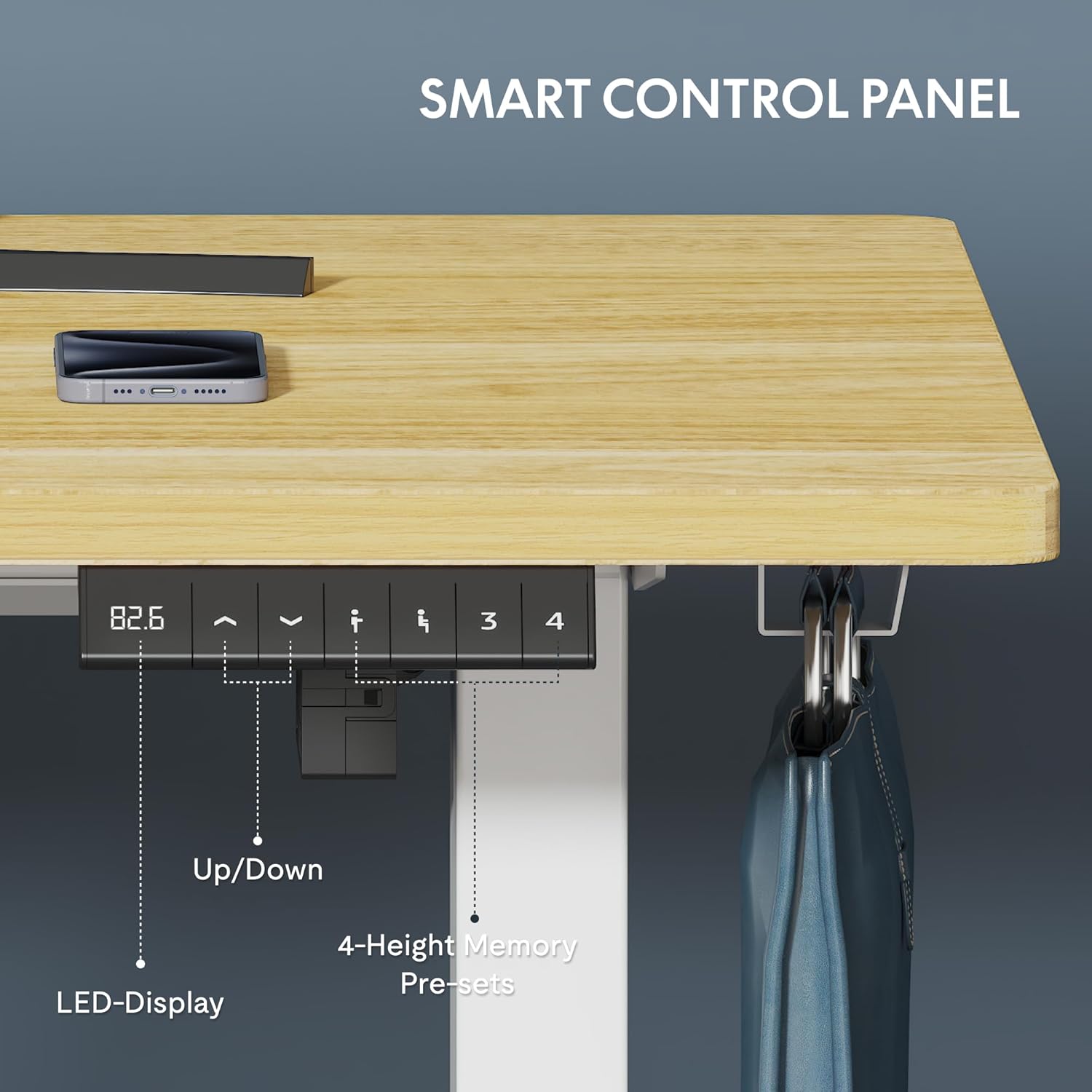
Figure 5.1: Smart Control Panel with LED Display.
- Up/Down Buttons: Use the arrow buttons to smoothly adjust the desk height. The LED display shows the current height in centimeters.
- Height Range: The desk can be adjusted from 73 cm (minimum) to 121 cm (maximum).
- Speed: The desk adjusts at a maximum speed of 2.5 cm/second.
- Noise Level: Operation is quiet, with a noise level of less than 50 dB.

Figure 5.2: Large Adjustment Range for various user heights and activities.
5.2. Adjusting Height
To adjust the desk height:
- Press and hold the Up arrow button to raise the desk.
- Press and hold the Down arrow button to lower the desk.
- Release the button when the desired height is reached.
The desk transitions smoothly between sitting and standing positions in less than 10 seconds, making it ideal for dynamic work environments.
6. Maintenance and Care
Regular maintenance ensures the longevity and optimal performance of your FLEXISPOT EG1 desk.
- Cleaning: Wipe the desktop and frame with a soft, damp cloth. Avoid abrasive cleaners or harsh chemicals that could damage the finish.
- Cable Management: Periodically check and tidy cables to prevent tangling or damage, especially during height adjustments.
- Fasteners: Occasionally check all screws and bolts to ensure they remain tight. Retighten if necessary.
- Motor Inspection: While the motor is designed for 20,000 cycles, listen for any unusual noises during operation. If you notice any issues, refer to the troubleshooting section or contact support.
7. Troubleshooting
If you encounter issues with your FLEXISPOT EG1 desk, refer to the common problems and solutions below. If the problem persists, contact customer support.
| Problem | Possible Cause | Solution |
|---|---|---|
| Desk does not move | Power cable disconnected; Control box error; Overload | Check power connection; Reset the desk (unplug for 30s, then replug); Reduce weight on desk |
| Uneven height adjustment | Obstruction; Loose connections | Clear any obstructions; Check all frame connections and tighten if loose |
| Desk stops unexpectedly | Anti-collision activated; Overheating | Check for obstructions; Allow motor to cool down for 20 minutes before resuming operation |
| Unusual noises during operation | Loose components; Motor issue | Ensure all screws are tight; Contact customer support if noise persists |
8. Specifications
| Feature | Detail |
|---|---|
| Model Number | EC1W-EU+PR1206-Maple |
| Brand | FLEXISPOT |
| Desktop Dimensions (L x W) | 120 cm x 60 cm (47.24 x 23.62 inches) |
| Height Adjustment Range | 73 cm to 121 cm (28.7 to 47.6 inches) |
| Lifting Speed | Max 2.5 cm/second |
| Noise Level | Less than 50 dB |
| Load Capacity | 70 kg (without desktop) |
| Frame Material | Industrial-grade Steel |
| Desktop Material | Engineered Wood (Maple finish) |
| Control Panel | 2-Button with LED Display |
| Certifications | CE, ROHS |
| Item Weight | 29.4 Kilograms |
9. Warranty and Support
FLEXISPOT stands by the quality of its products. Your EG1 desk is covered by the following warranties:
- 5-Year Warranty: Covers the desk frame, motor, and other mechanical components.
- 2-Year Warranty: Covers the controller, switch, and electronic components.
For warranty claims, technical assistance, or any questions not covered in this manual, please contact FLEXISPOT customer support. Please have your model number (EC1W-EU+PR1206-Maple) and purchase information ready when contacting support.

Figure 9.1: FLEXISPOT Warranty Information.


