1. Introduction
Thank you for choosing the BYGD 750W Car Power Inverter. This device converts 12V DC power from your vehicle's battery into 110V AC household power, along with providing dual 2.4A USB charging ports. It is designed to power various electronic devices during travel, camping, or in situations where standard AC outlets are unavailable. Please read this manual thoroughly before use to ensure safe and optimal operation.
2. Product Overview
The BYGD 750W Car Power Inverter is a compact and portable unit featuring two AC outlets and two USB ports. It is constructed from insulation and fire-resistant ABS material, ensuring durability and safety. The inverter includes a built-in fuse and comprehensive protection features to safeguard your devices and the inverter itself.
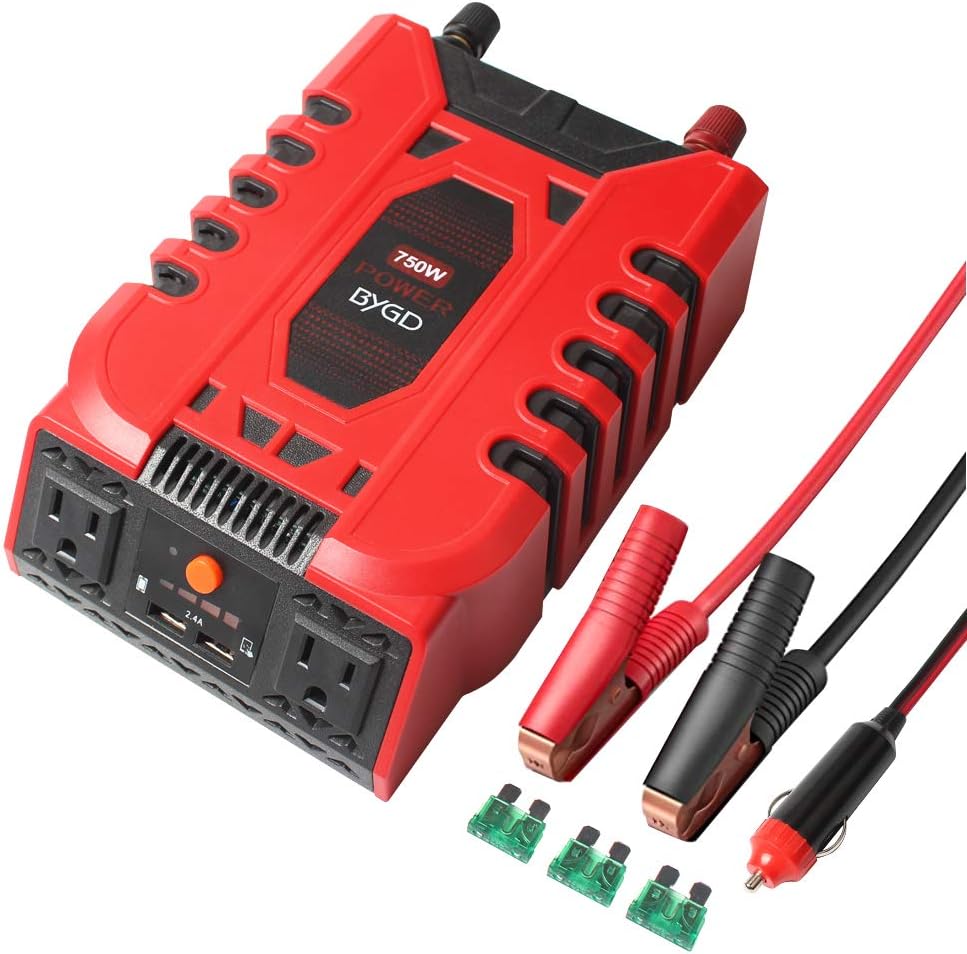
Figure 2.1: Front view of the BYGD 750W Car Power Inverter, showcasing its compact design, two AC outlets, and two USB ports.
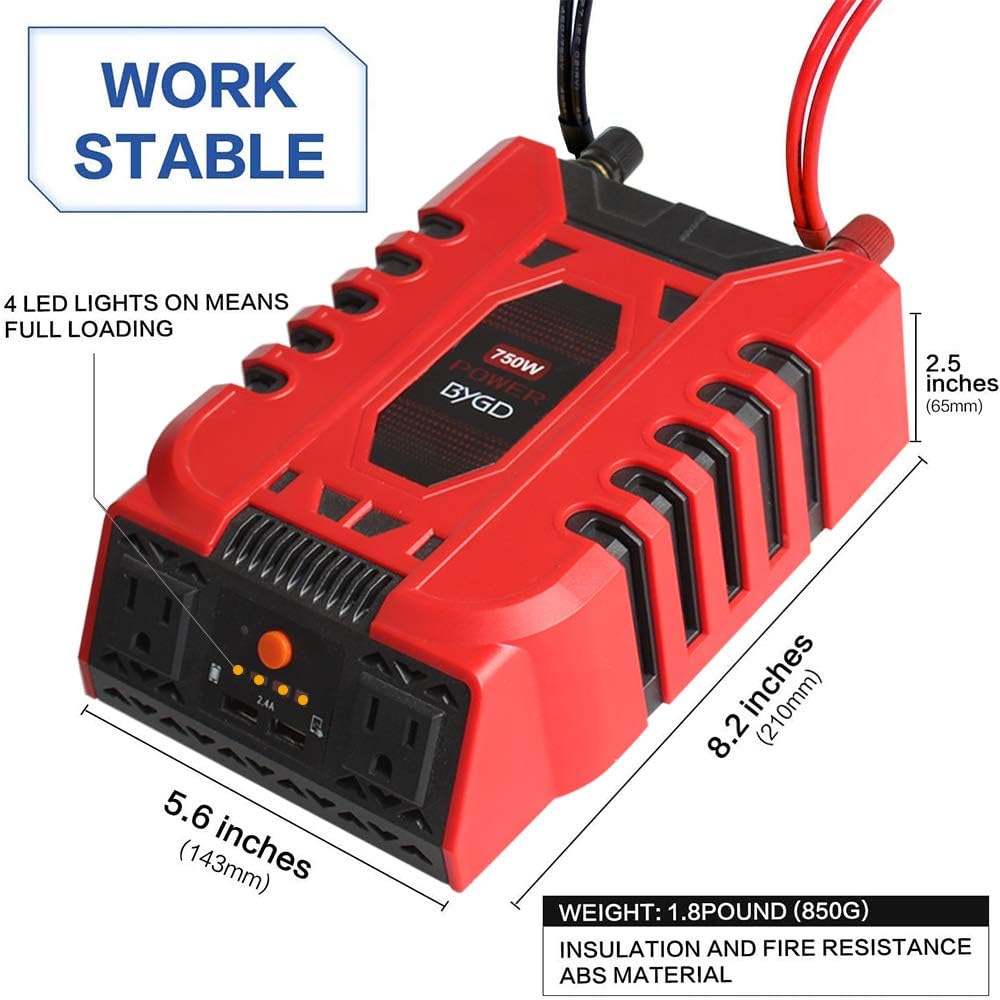
Figure 2.2: The BYGD 750W Car Power Inverter with dimensions labeled: 8.2 inches (210mm) length, 5.6 inches (143mm) width, and 2.5 inches (65mm) height. It weighs 1.8 pounds (850g) and is made of insulation and fire-resistant ABS material.
2.1 Components and Accessories
The inverter comes with essential accessories for connection and maintenance.

Figure 2.3: Detailed view of the inverter and its accessories. Key components include two AC outlets, two 2.4A USB ports, an ON/OFF switch, LED indicators, positive and negative terminals, a cooling fan, and a fuse. Accessories shown are 3x 30A spare fuses, a cigarette lighter cable (21.6 inches), and battery cables (22 inches).
- AC Outlets: Two 110V AC outlets for standard electronic devices.
- USB Ports: Dual 2.4A USB ports for fast charging mobile devices.
- ON/OFF Switch: Controls the power to the inverter.
- LED Indicators: Four LED lights indicate the loading status; all four lights on signify full loading.
- Cooling Fan: Automatically activates to dissipate heat and maintain optimal operating temperature.
- Input Terminals: Positive (red) and Negative (black) terminals for 12V DC input.
- Fuse: Built-in for protection, with spare fuses included.
- Cables: Includes battery clamp cables and a cigarette lighter adapter cable.
3. Setup Instructions
Proper setup is crucial for the safe and efficient operation of your power inverter.
3.1 Connecting to a 12V DC Power Source
- Ensure Vehicle is Off: Before connecting, make sure your vehicle's engine is turned off.
- Choose Connection Method:
- For loads up to 150W (approx.): Use the cigarette lighter adapter cable. Insert the plug firmly into your vehicle's 12V cigarette lighter socket.
- For loads above 150W up to 750W: Use the battery clamp cables. Connect the red clamp to the positive (+) terminal of your vehicle's battery and the black clamp to the negative (-) terminal. Ensure a secure connection.
- Connect to Inverter: Connect the other end of the chosen cable (cigarette lighter plug or battery clamps) to the corresponding input terminals on the inverter (red to positive, black to negative). Ensure polarity is correct.
- Secure Placement: Place the inverter on a stable, flat surface, ensuring adequate ventilation around the unit. Avoid placing it in direct sunlight or near heat sources.
4. Operating Instructions
Follow these steps to operate your BYGD power inverter.
- Turn On the Inverter: After connecting the inverter to the 12V DC power source, press the ON/OFF switch on the inverter. The LED indicator will illuminate, indicating the inverter is powered on.
- Connect Devices: Plug your AC-powered devices into the 110V AC outlets or your USB-powered devices into the 2.4A USB ports. Ensure the total wattage of all connected AC devices does not exceed 750W.
- Monitor LED Indicators: The four LED lights on the inverter indicate the load status. When all four LEDs are illuminated, it signifies that the inverter is operating at or near its full loading capacity.
- Powering Devices: The inverter provides stable power for a wide range of devices, including smartphones, cameras, iPads, notebooks, PSPs, and other electronics.

Figure 4.1: Examples of devices that can be powered by the BYGD 750W Car Power Inverter, including tablets, laptops, mobile phones, cameras, CD players, PSPs, and hair dryers.

Figure 4.2: The inverter features intelligent current output, controlled by a built-in chip for stable output. It supports fast charging via its two USB ports and provides two 110V AC outlets.

Figure 4.3: The BYGD 750W Car Power Inverter in use within a vehicle, simultaneously charging a smartphone and powering a laptop, demonstrating its practical application for on-the-go power needs.
5. Safety Precautions
To prevent injury or damage to the inverter and connected devices, observe the following safety guidelines:
- Ventilation: Ensure the inverter is placed in a well-ventilated area. Do not block the cooling fan or vents.
- Moisture: Do not expose the inverter to water, rain, or excessive moisture.
- Temperature: Avoid operating the inverter in extremely high or low temperatures.
- Overload: Do not exceed the inverter's rated power output of 750W. Overloading can damage the inverter and connected devices.
- Polarity: Always connect the cables with correct polarity (red to positive, black to negative). Incorrect polarity can cause severe damage.
- Children: Keep the inverter out of reach of children.
- Flammable Materials: Do not operate the inverter near flammable liquids or gases.
- Disassembly: Do not attempt to disassemble or modify the inverter. Refer all servicing to qualified personnel.
5.1 Intelligent Security Protection
The BYGD inverter is equipped with multiple protection features:

Figure 5.1: The BYGD 750W Car Power Inverter features six intelligent security protections: High Voltage Protection, Reverse Protection, Overload Protection, Low Voltage Protection, Short Circuit Protection, and Over-Temperature Protection.
- High Voltage Protection: Shuts down if input voltage exceeds safe limits.
- Reverse Protection: Protects against incorrect battery terminal connections.
- Overload Protection: Shuts down if connected devices draw too much power.
- Low Voltage Protection: Shuts down if input voltage drops below safe limits, protecting your vehicle's battery.
- Short Circuit Protection: Prevents damage from short circuits in connected devices.
- Over-Temperature Protection: Shuts down if the internal temperature becomes too high.
6. Troubleshooting
If you encounter issues with your inverter, refer to the following common problems and solutions:
- No Power Output:
- Check if the inverter is properly connected to the 12V DC source and the ON/OFF switch is pressed.
- Verify the vehicle's battery voltage is within the operating range (12V).
- Check the fuse. If blown, replace with a spare 30A fuse.
- Ensure the cigarette lighter socket or battery terminals are clean and making good contact.
- Low Power Output / Device Not Charging:
- Ensure the total wattage of connected devices does not exceed 750W.
- Check if the input voltage from the vehicle's battery is stable.
- For high-power devices, ensure you are using the battery clamp connection, not the cigarette lighter adapter.
- Inverter Shuts Down Automatically:
- This indicates one of the built-in protection features has activated (e.g., overload, high/low voltage, over-temperature).
- Reduce the load, check battery voltage, or allow the inverter to cool down if it's hot.
- Ensure proper ventilation and clear any obstructions from the cooling fan.
- Cooling Fan Not Operating:
- The fan operates automatically when needed. If the inverter is cool and under light load, the fan may not be active.
- If the inverter is hot and the fan is not running, check for obstructions or contact customer support.
7. Maintenance
Regular maintenance helps ensure the longevity and performance of your inverter.
- Cleaning: Periodically clean the exterior of the inverter with a soft, dry cloth. Do not use abrasive cleaners or solvents.
- Vents: Ensure the cooling vents and fan are free from dust and debris. Use compressed air if necessary to clear them.
- Connections: Regularly check all cable connections to ensure they are secure and free from corrosion.
- Storage: When not in use, store the inverter in a cool, dry place, away from direct sunlight and moisture.
- Fuse Replacement: If the fuse blows, replace it only with a fuse of the same type and rating (30A). Refer to Figure 2.3 for fuse location.
8. Specifications
| Feature | Specification |
|---|---|
| Brand | BYGD |
| Model Number | E8968 |
| Input Voltage | 12 Volts DC |
| Output Voltage | 110 Volts AC |
| Output Power (Continuous) | 750 Watts |
| AC Outlets | 2 |
| USB Ports | 2 (2.4A each) |
| Product Dimensions | 20.83 x 14.22 x 6.35 cm (8.2 x 5.6 x 2.5 inches) |
| Item Weight | 1.41 kg (1.8 lb / 850g) |
| Material | Insulation and Fire Resistance ABS |
| Included Components | Fuse (spare fuses included) |
| Power Source Type | Battery Powered |
9. Warranty and Support
BYGD offers an 18-month warranty for this car power inverter. For customer after-sale service and support, please contact your seller or refer to the contact information provided with your purchase. We are committed to your satisfaction and will assist with any product-related inquiries or issues.


