
1. Product Overview
The VGR V-386 is a versatile 4-in-1 electric grooming kit designed for comprehensive personal care. This rechargeable device features multiple interchangeable heads for shaving, trimming, and facial cleansing, offering convenience and efficiency.
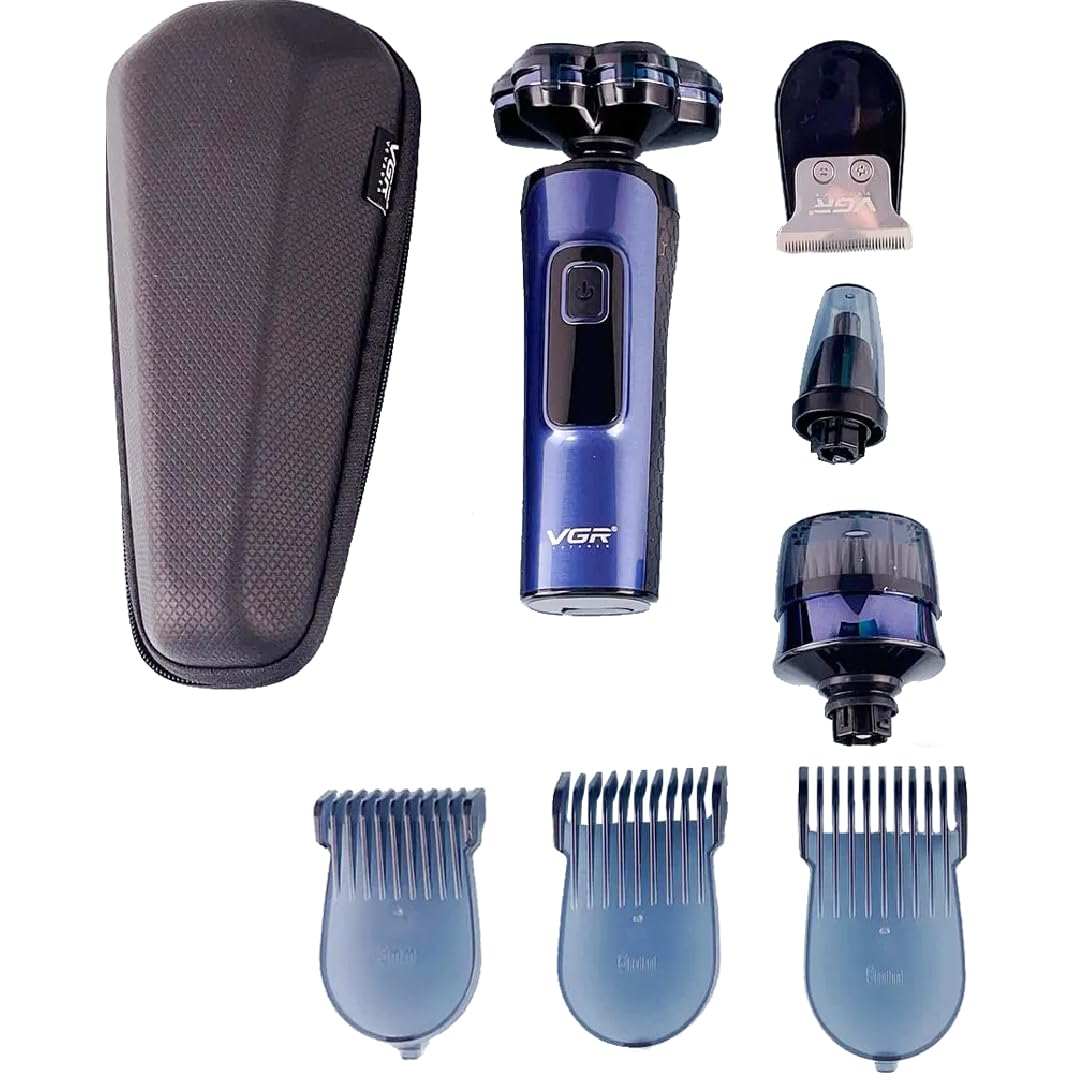
Figure 1: VGR V-386 Electric Shaver with Rotary Head
Key Features:
- 4-in-1 Functionality: Includes rotary shaver, hair/beard trimmer, nose/ear trimmer, and facial cleansing brush.
- IPX5 Water Resistance: Suitable for wet and dry use, and easy to clean under running water.
- Rechargeable Battery: 1200 mAh Lithium battery provides up to 150 minutes of cordless operation.
- LED Display: Shows battery status and charging indication.
- USB Charging: Convenient charging via USB cable.
- Turbo Function: Two motor speeds for enhanced performance.
2. Package Contents
Please check the package for the following items:
- VGR V-386 Main Shaver Body
- Rotary Shaver Head with 5 Floating 4D Blades
- Hair, Beard, and Mustache Trimmer Head
- Nose and Ear Trimmer Head
- Facial Cleansing Brush Head
- 3 Guide Combs (3mm, 6mm, 9mm)
- USB Charging Cable
- Cleaning Brush
- Travel Pouch
- User Manual

Figure 2: VGR V-386 Product Packaging and Contents
3. Safety Information
- Read all instructions before using the appliance.
- Keep the appliance dry. Do not immerse the main body in water.
- Do not use the appliance if it is damaged.
- Keep out of reach of children.
- Only use the provided USB cable for charging.
- Do not disassemble or attempt to repair the appliance yourself.
- Avoid using the appliance on irritated or broken skin.
4. Setup
4.1 Charging the Device
- Ensure the shaver is turned off.
- Connect the USB charging cable to the charging port on the shaver.
- Plug the other end of the USB cable into a compatible USB power adapter (e.g., phone charger, computer USB port).
- The LED display will indicate charging status. A full charge takes approximately 180 minutes.
- Once fully charged, the LED display will show 100% or a full battery icon. Disconnect the charger.
4.2 Attaching/Detaching Heads
- To attach a head: Align the desired attachment head with the main body and press it down until it clicks securely into place.
- To detach a head: Hold the main body firmly and gently pull the attachment head upwards to remove it.
5. Operating Instructions
5.1 Power On/Off and Turbo Function
- Press the power button once to turn the shaver on. The LED display will light up.
- Press the power button again to activate the turbo function (higher speed).
- Press the power button a third time to turn the shaver off.
5.2 Using the Rotary Shaver Head

Figure 3: Rotary Shaver Head
- Attach the rotary shaver head to the main body.
- Turn on the shaver.
- Gently press the shaver against your skin and move it in small, circular motions.
- For best results, shave against the direction of hair growth.
- Can be used wet with shaving foam/gel or dry.
5.3 Using the Hair/Beard Trimmer Head

Figure 4: Hair/Beard Trimmer Head
- Attach the hair/beard trimmer head.
- Select a guide comb (3mm, 6mm, or 9mm) and attach it to the trimmer head if desired for specific lengths.
- Turn on the shaver.
- Move the trimmer slowly against the direction of hair growth.
- Use without a comb for precise edging and detailing.
5.4 Using the Nose and Ear Trimmer Head

Figure 5: Nose and Ear Trimmer Head
- Attach the nose and ear trimmer head.
- Turn on the shaver.
- Gently insert the trimmer tip into your nostril or ear canal.
- Move it slowly to trim unwanted hair. Do not insert too deeply.
5.5 Using the Facial Cleansing Brush Head

Figure 6: Facial Cleansing Brush Head
- Attach the facial cleansing brush head.
- Dampen your face and apply your preferred facial cleanser to the brush head or your skin.
- Turn on the shaver.
- Gently move the brush in circular motions across your face.
- Rinse your face and the brush head after use.
6. Maintenance
6.1 Cleaning
- Always turn off and unplug the shaver before cleaning.
- Detach the used head from the main body.
- Rinse the attachment head under running water to remove hair and debris. For thorough cleaning, use the provided cleaning brush.
- The main body is IPX5 water-resistant, meaning it can withstand splashes and light rinsing, but should not be fully immersed. Wipe the main body with a damp cloth.
- Allow all parts to air dry completely before reattaching or storing.
6.2 Storage
- Store the shaver and its attachments in a cool, dry place, away from direct sunlight.
- Use the provided travel pouch for convenient and protected storage, especially when traveling.
7. Troubleshooting
| Problem | Possible Cause | Solution |
|---|---|---|
| Shaver does not turn on. | Low battery or no charge. | Charge the shaver for at least 3 hours. |
| Poor shaving/trimming performance. | Blades are dull or clogged with hair. | Clean the attachment head thoroughly. Consider replacing the head if blades are dull (replacement heads sold separately). |
| Shaver makes unusual noise. | Attachment head not properly secured or internal issue. | Ensure the attachment head is clicked into place. If the issue persists, contact customer support. |
| LED display not working. | Device malfunction. | Ensure the device is charged. If still not working, contact customer support. |
8. Specifications
- Model: VGR-386
- Power Source: Rechargeable 1200 mAh Lithium Battery
- Charging Time: Approximately 180 minutes
- Operating Time: Up to 150 minutes
- Water Resistance: IPX5
- Input: 5V 1A
- Dimensions (Package): 22 x 20 x 10 cm
- Weight (Package): 600 grams
- Manufacturer: VGR

Figure 7: Back of VGR V-386 Shaver with Model Information
9. Warranty and Support
This VGR V-386 Electric Shaver comes with a standard manufacturer's warranty. Please refer to the warranty card included in your package for specific terms and conditions, including the warranty period and coverage details.
For technical support, troubleshooting assistance, or warranty claims, please contact the retailer where you purchased the product or visit the official VGR website for customer service contact information.


