1. Important Safety Information
Please read this manual thoroughly before installation and use. Keep this manual for future reference. If you have any questions, please contact customer support.
- Weight Capacity: Do not exceed the maximum weight capacity of 110 lbs (50 kg). Exceeding this limit may result in property damage or serious injury.
- TV Size: This mount is designed for 32-65 inch flat screen TVs.
- Wall Type: This mount is intended for installation on wood studs (8, 12, or 16 inches apart), solid concrete, or brick walls. DO NOT install on drywall alone.
- VESA Compatibility: Ensure your TV's VESA mounting pattern is between 75x75mm and 400x400mm.
- Professional Installation: If you are unsure about the installation process or the suitability of your wall, consult a qualified professional.
- Component Check: Verify that all components are present and undamaged before installation. Do not use damaged parts.
2. Product Overview
The USX MOUNT Full Motion TV Wall Mount provides a secure and flexible solution for mounting your television. Its articulating dual arms allow for a wide range of motion, including swivel, tilt, and extension, ensuring optimal viewing angles from various positions in your room. The mount is constructed from heavy-duty steel for superior stability and is UL certified for load-bearing safety.
Key Features:
- Universal Design: Compatible with most 32-65 inch TVs.
- Heavy Duty Construction: Supports TVs up to 110 lbs (50 kg).
- Full Motion: Swivel (±45°), Tilt (+5°/-15°), and Extension (3.43" to 15.07").
- Post-Installation Leveling: ±4° adjustment for perfect TV alignment.
- Pre-Assembled Design: Reduces installation steps.
- UL Certified: Ensures safety and reliability.
Components:
The package includes the main wall mount assembly, TV brackets, a bubble level, cable ties, and all necessary standard mounting hardware.

The USX MOUNT Full Motion TV Wall Mount, showcasing its articulating arms, wall plate, TV brackets, and included accessories like a bubble level and cable ties.
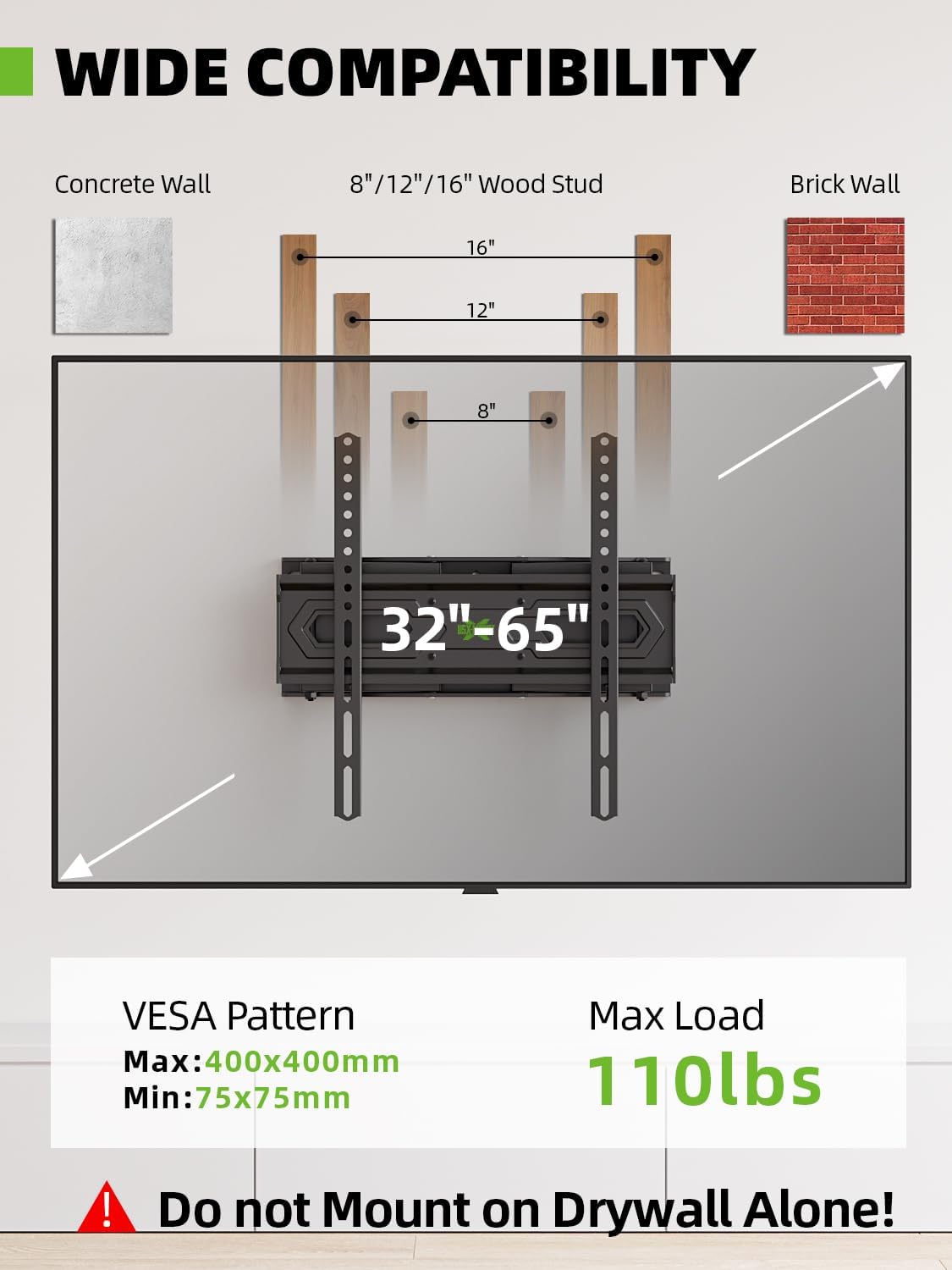
This diagram illustrates the wide compatibility of the TV mount with various wall types including concrete, 8, 12, or 16-inch wood studs, and brick walls. It also specifies the VESA pattern range (Max 400x400mm, Min 75x75mm) and a maximum load capacity of 110 lbs. A warning indicates not to mount on drywall alone.
3. Setup and Installation
Careful planning and preparation are crucial for a safe and successful installation. Ensure you have all necessary tools and understand each step before proceeding.
Pre-Installation Checks:
- Check TV VESA Pattern: Measure the horizontal and vertical distance between the mounting holes on the back of your TV. This mount supports VESA patterns from 75x75mm to 400x400mm.
- Verify TV Weight: Confirm your TV's weight does not exceed 110 lbs (50 kg).
- Identify Wall Type: Determine if your wall is wood stud, concrete, or brick. Use a stud finder for wood studs.
- Check Cable Outlets: Ensure the mount will not block any essential cable outlets on your TV or wall.
Recommended Tools (Not Included):
- Pencil
- Drill
- Stud Finder (for wood stud installation)
- Socket Wrench
- Phillips Head Screwdriver
- Measuring Tape
Installation Steps (Simplified):
The USX MOUNT features a pre-assembled design to simplify installation. A detailed manual and video are available for comprehensive guidance.
- Attach Brackets to TV: Secure the TV brackets to the back of your television using the provided screws and spacers, ensuring they align with your TV's VESA pattern.
- Mount Wall Plate: Position the wall plate on your chosen wall location. Mark and drill pilot holes, then securely bolt the wall plate to the wood studs, concrete, or brick using the appropriate hardware. Use the included bubble level to ensure accuracy.
- Hang TV on Wall Plate: Carefully lift your TV (with attached brackets) and hook it onto the wall plate. Secure the TV to the wall plate using the safety screws or locking mechanisms.
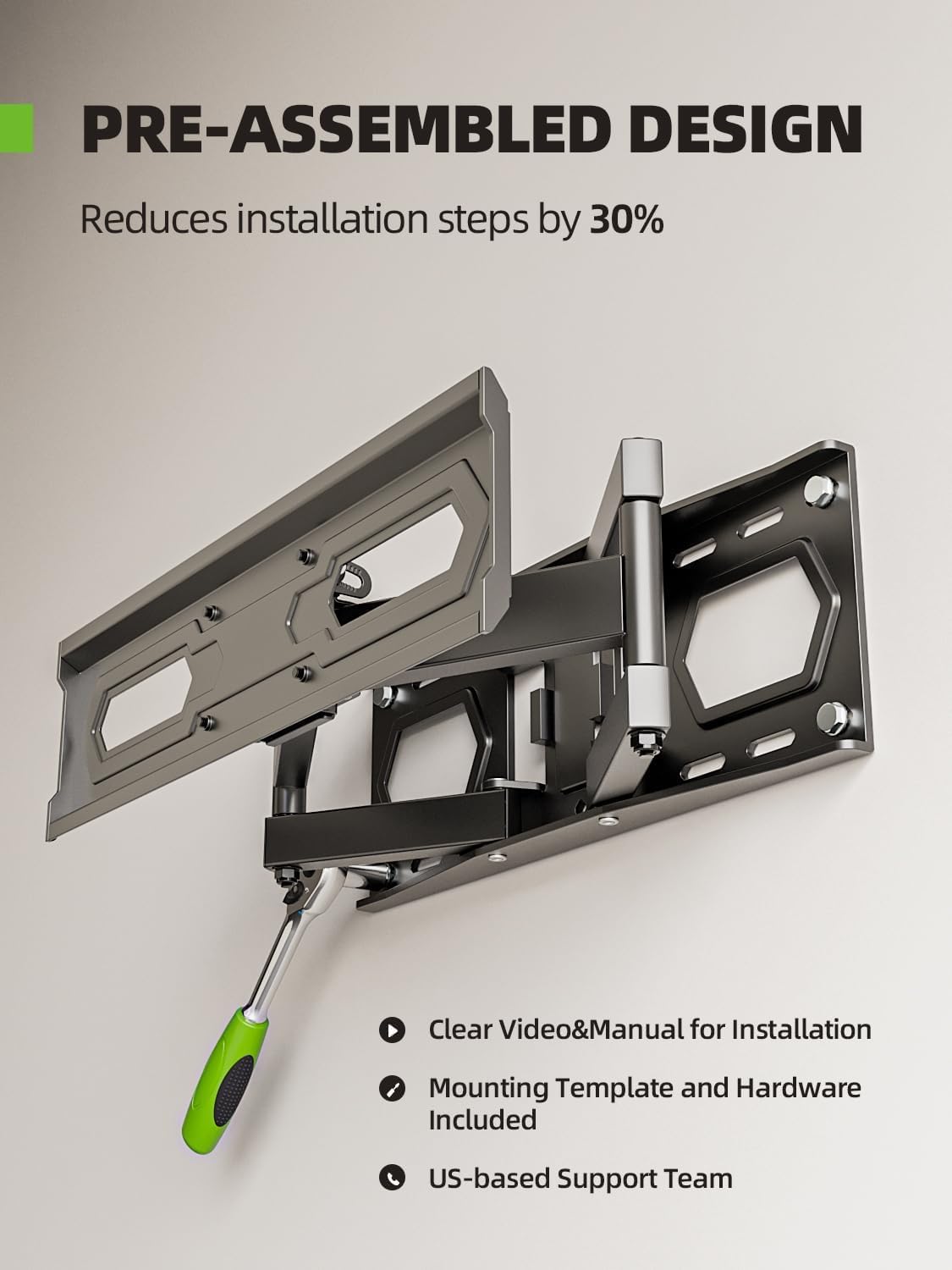
The TV wall mount is shown with its pre-assembled components, emphasizing that this design reduces installation steps by 30%. It also mentions clear video and manual for installation, mounting template, hardware, and US-based support.
4. Operating Instructions
Once installed, your USX MOUNT TV wall mount offers various adjustments to achieve your desired viewing experience.
Adjusting Your TV:
- Tilt Adjustment: The mount allows for a +5° upward tilt and -15° downward tilt. Loosen the tilt knobs on the TV brackets, adjust the screen to the desired angle, and then tighten the knobs to secure. This helps reduce glare.
- Swivel Adjustment: The articulating arms enable a ±45° swivel range. Gently push or pull the TV to the left or right to achieve your preferred horizontal viewing angle. The maximum swivel angle may vary depending on your TV's size.
- Extension and Retraction: Extend the TV out from the wall up to 15.07 inches or retract it back to a minimum of 3.43 inches. Carefully pull or push the TV assembly to adjust the distance from the wall.
- Post-Installation Leveling: If your TV appears slightly unlevel after installation, use the ±4° post-installation leveling feature. This adjustment is typically done by rotating the TV brackets slightly and securing them. Refer to the detailed manual for specific instructions on this adjustment.

This image demonstrates the mount's flexibility, showing a ±4° leveling adjustment for perfect TV alignment after installation, and an easy tilt function allowing for +5° upward tilt and -15° downward tilt to reduce glare.

This visual explains the flexible viewing options provided by the mount, including a ±45° swivel angle to adjust the TV horizontally, and the ability to extend the TV from 3.43 inches to 15.07 inches from the wall.
5. Maintenance
Regular maintenance helps ensure the longevity and safe operation of your TV wall mount.
- Cleaning: Dust the mount periodically with a soft, dry cloth. Avoid using abrasive cleaners or solvents that could damage the finish.
- Periodic Checks: Every few months, inspect all mounting bolts and screws to ensure they remain securely tightened. Check for any signs of wear or damage to the articulating arms or wall plate.
- Lubrication: If the articulating arms become stiff over time, a small amount of silicone-based lubricant can be applied to the pivot points. Avoid oil-based lubricants that may attract dust.
6. Troubleshooting
If you encounter issues with your TV wall mount, refer to the following common problems and solutions.
- Problem: The TV is not level after installation.
Solution: Use the ±4° post-installation leveling adjustment feature. Loosen the leveling screws slightly, adjust the TV to be level using the included bubble level, and then re-tighten the screws. - Problem: Difficulty moving the TV (swivel or extension).
Solution: Ensure no cables are snagged or obstructing movement. Check if any adjustment knobs or screws are overtightened. If stiffness persists, apply a small amount of silicone lubricant to the pivot points. - Problem: The mount feels unstable.
Solution: Immediately remove the TV from the mount. Re-check all wall mounting bolts and TV bracket screws to ensure they are fully tightened. Verify that the wall type and stud spacing are appropriate for the mount and that the TV's weight does not exceed the capacity. If unsure, consult a professional. - Problem: Missing parts or damaged components.
Solution: Do not proceed with installation. Contact USX MOUNT customer support for assistance and replacement parts.
7. Specifications
| Feature | Specification |
|---|---|
| Model Number | XMM021-70in |
| TV Size Compatibility | 32 - 65 inches |
| Weight Capacity | Up to 110 lbs (50 kg) |
| VESA Compatibility | 75x75mm to 400x400mm |
| Tilt Angle | +5° / -15° |
| Swivel Angle | ±45° |
| Level Adjustment | ±4° |
| Extension from Wall | 3.43 inches to 15.07 inches |
| Wall Type Compatibility | 8, 12, 16 inch Wood Studs, Solid Concrete, Brick |
| Material | Heavy-Duty Steel |
| Certifications | UL Listed (Certificate NO: UL-CA-2307881-0) |

This image focuses on the robust construction of the mount, specifically its heavy-duty steel articulating arms, underscoring its superior stability and ability to support TVs up to 110 lbs.

An exploded view diagram of the TV mount, detailing its heavy-duty steel components, integrated cable management, and specific adjustment points for tilting and leveling. It also reiterates compatibility for 32-65 inch TVs and a 110 lbs weight capacity.
8. Warranty Information
USX MOUNT products are manufactured with quality and durability in mind. This product comes with a standard manufacturer's warranty covering defects in materials and workmanship under normal use. Please refer to the product packaging or contact customer support for specific warranty terms and duration.
9. Customer Support
For any questions, technical assistance, or warranty claims, please contact USX MOUNT customer support. Our team is dedicated to providing prompt and helpful service.
- Online Support: Visit the official USX MOUNT website for FAQs and support resources.
- Email Support: Refer to your product packaging or the official website for contact email.
- Phone Support: Refer to your product packaging or the official website for contact phone number.


