
ROIDMI S2
ROIDMI S2 Cordless Vacuum Cleaner User Manual
Model: S2 | Brand: ROIDMI
Introduction
This manual provides detailed instructions for the safe and efficient use of your ROIDMI S2 Cordless Vacuum Cleaner. Please read this manual thoroughly before operating the appliance and retain it for future reference.
Safety Instructions
- Ensure the power adapter is compatible with your local voltage.
- Do not use the vacuum cleaner to pick up liquids, burning objects, or sharp objects.
- Keep hair, loose clothing, fingers, and all parts of the body away from openings and moving parts.
- Do not operate the vacuum cleaner if it is damaged or malfunctioning.
- This appliance is not intended for use by persons with reduced physical, sensory or mental capabilities, or lack of experience and knowledge, unless they have been given supervision or instruction concerning use of the appliance by a person responsible for their safety.
- Children should be supervised to ensure that they do not play with the appliance.
Package Contents
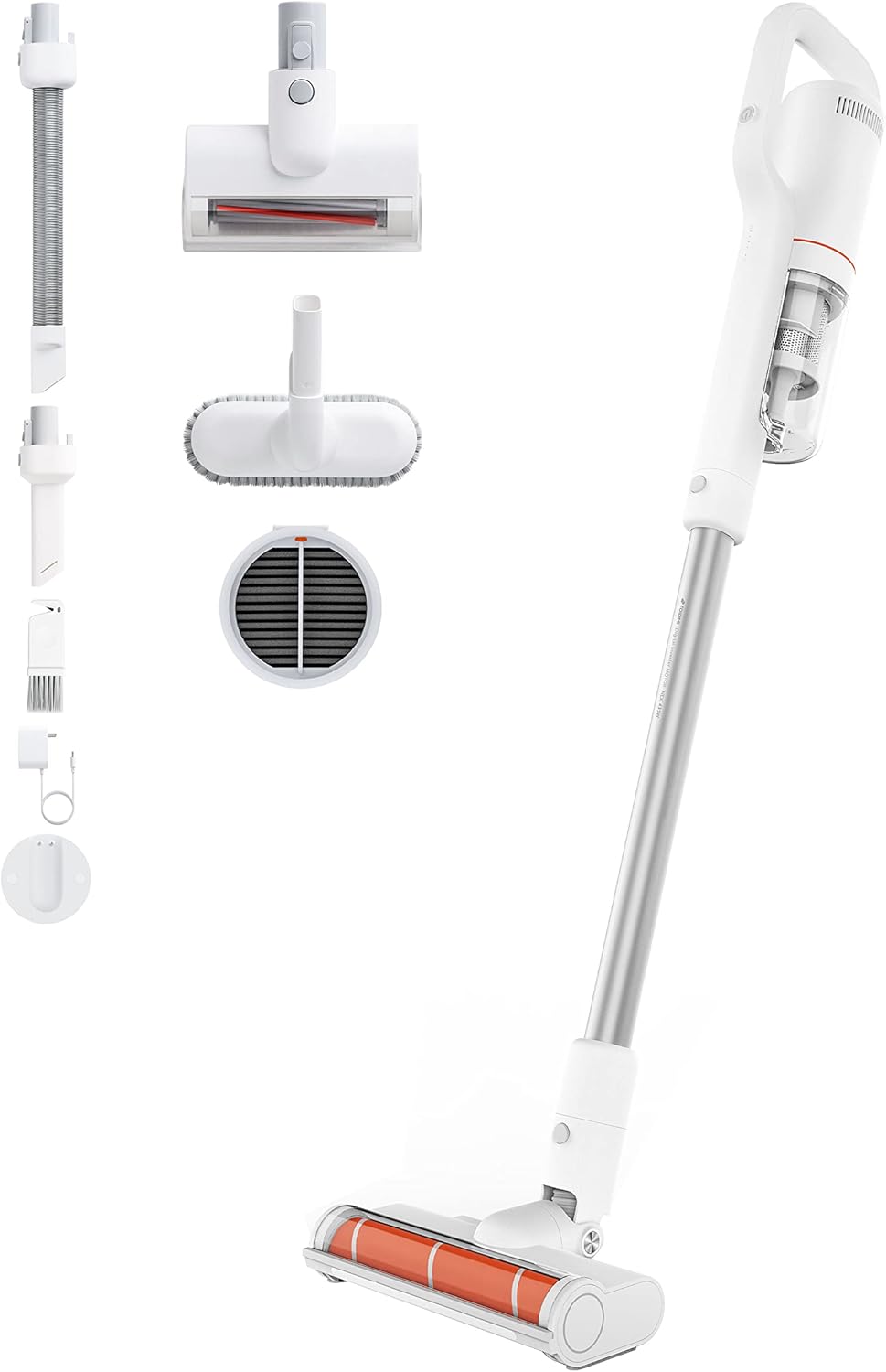
Image: All components included with the ROIDMI S2 Cordless Vacuum Cleaner, laid out on a white background. This includes the main vacuum unit, extension wand, floor brush, various nozzles, and the magnetic wall mount.
Verify that all items are present and in good condition:
- ROIDMI S2 Cordless Vacuum Cleaner (Main Unit)
- Electric Floor Brush
- Metal Connecting Tube (Extension Wand)
- Mattress Brush
- Multi-function Brush
- Flat Nozzle
- Dust Filter (pre-installed or spare)
- Power Adapter
- Magnetic Wall Charging Station
- Mounting Screws
- User Manual
Setup
1. Assembly
- Attach the Extension Wand: Insert the metal connecting tube into the main vacuum unit until it clicks securely.
- Attach the Floor Brush: Connect the electric floor brush to the other end of the extension wand. Ensure it clicks into place.
- Alternative Attachments: For handheld use, attach the mattress brush, multi-function brush, or flat nozzle directly to the main unit.
2. Charging the Battery
Before first use, fully charge the vacuum cleaner. The battery takes approximately 2.5 hours to fully charge.

Image: Close-up of the ROIDMI S2 main unit magnetically attaching to its wall-mounted charging station. Blue indicator lights are visible, signifying charging status.
- Install Wall Charging Station: Choose a suitable location on a wall near a power outlet. Use the provided screws to securely mount the magnetic charging station.
- Connect Power: Plug the power adapter into the charging station and then into a wall outlet.
- Charge Vacuum: Place the vacuum cleaner onto the magnetic charging station. The indicator lights on the vacuum will show the charging status.
Operating Instructions
1. Power On/Off and Mode Selection
Press the power button to turn the vacuum cleaner on. Press it again to cycle through different suction modes (Standard, Max). Press and hold to turn off.
2. Using the Floor Brush

Image: The ROIDMI S2 cordless vacuum in use, showing the motorized floor brush with its automatic LED sensor light illuminating the area in front of it. The brush is designed for various floor types.
- The electric floor brush is suitable for hard floors, laminate, parquet, and carpets.
- The automatic LED sensor light illuminates dark areas, improving visibility during cleaning.
- The 270° flexible design allows for easy maneuverability around furniture and into tight spaces.
3. Using Attachments

Image: A collage of four images demonstrating the versatility of the ROIDMI S2. Top left shows the vacuum standing upright against a wall. Top right shows the flat nozzle cleaning between sofa cushions. Bottom left shows the multi-function brush cleaning a laptop keyboard. Bottom right shows the main unit with the mattress brush cleaning a bed.
- Mattress Brush: Ideal for cleaning upholstery, mattresses, and pet hair.
- Multi-function Brush: Use for delicate surfaces, keyboards, and car interiors.
- Flat Nozzle: Perfect for narrow gaps, corners, and hard-to-reach areas.
4. Battery Runtime
- Standard Mode: Up to 60 minutes.
- Max Mode: Up to 10 minutes.
5. ROIDMI Cleaner App

Image: A smartphone screen displaying the ROIDMI Cleaner App interface. The app shows information such as current electricity percentage, battery starting time, and filter remaining life, providing smart control and monitoring of the vacuum cleaner.
The ROIDMI Cleaner App provides additional features such as battery status, filter condition, and cleaning statistics. Download the app from your device's app store and follow the in-app instructions to connect your S2 vacuum cleaner.
Maintenance
1. Emptying the Dust Bin
Empty the dust bin regularly to maintain optimal suction performance. Press the release button to detach the dust bin from the main unit, then open the lid and empty the contents.
2. Cleaning the Filters

Image: An exploded view of the ROIDMI S2's multi-stage filtration system, showing individual components like the HEPA filter, dust filter, and isolation filter. This illustrates the layers of filtration for effective dust capture.
- The multi-filter system (HEPA, dust filter, isolation) should be cleaned periodically.
- Remove the filters from the dust bin. Tap them gently to remove loose dust.
- Rinse washable filters under cold running water. Ensure they are completely dry before reassembling.
- Replace filters if they are heavily soiled or damaged.
3. Cleaning the Brush Roll
Regularly check the brush roll for tangled hair or debris. Remove the brush roll from the floor head (refer to the diagram in the full manual for specific instructions) and use scissors or a cleaning tool to remove any obstructions. Reinsert the brush roll securely.
4. General Cleaning
Wipe the exterior of the vacuum cleaner with a soft, damp cloth. Do not use harsh detergents or solvents.
Troubleshooting
| Problem | Possible Cause | Solution |
|---|---|---|
| Vacuum does not turn on. | Battery is depleted. | Charge the battery fully. |
| Reduced suction power. | Dust bin is full; Filters are clogged; Brush roll is obstructed. | Empty dust bin; Clean or replace filters; Remove obstructions from brush roll. |
| Brush roll not spinning. | Obstruction in brush roll; Brush roll not properly installed. | Remove obstructions; Ensure brush roll is securely installed. |
| Vacuum stops unexpectedly. | Battery is low; Overheating protection activated. | Charge the battery; Allow the vacuum to cool down for at least 30 minutes. |
Specifications
| Brand | ROIDMI |
| Model Number | S2 (XCQ12RM) |
| Power | 425 Watts |
| Suction Power | 23,500 Pa (135 AW) |
| Voltage | 100 Volts |
| Battery Type | Lithium-ion (2500 mAh) |
| Runtime | Up to 60 minutes (Standard Mode) |
| Charging Time | Approx. 2.5 hours |
| Noise Level | 72 Decibels |
| Weight (Main Unit) | 1.5 Kilograms |
| Dimensions (L x W x H) | 119.1 x 25.9 x 15.8 cm |
| Filter Type | Multi-filter (HEPA, Dust, Isolation) |
| Special Features | Automatic LED Sensor Light, Magnetic Wireless Charging, ROIDMI Cleaner App Connectivity |
Warranty and Support
For warranty information and customer support, please refer to the warranty card included in your product packaging or visit the official ROIDMI website. Keep your purchase receipt as proof of purchase.
Online Resources: For further assistance, FAQs, and product registration, please visit: www.roidmi.com
Related documentsS2


Ask a question about this manual
Ask about setup, troubleshooting, compatibility, parts, safety, or missing instructions. Manuals+ will review the question and use this page’s manual context to help answer it.