
1. Product Overview
The EASYGUARD EC211 is an intelligent Passive Keyless Entry (PKE) and remote engine start system designed for vehicles equipped with a factory OEM push-button start. This system enhances vehicle convenience and security by allowing automatic locking/unlocking and remote engine activation.
Important Compatibility Note: This system is exclusively for vehicles with an existing factory OEM push-button start. It is not compatible with vehicles that use a standard key start ignition. For vehicles without a factory OEM push-button start, please refer to EASYGUARD EC002 series products.
Professional Installation Required: Installation of this system requires specialized knowledge and tools. It is strongly recommended that installation be performed by a professional car alarm or audio installer.
2. Package Contents
Please verify that all components listed below are present in your package:
- Main Control Unit (Brain) x 1
- Remote Control Key Fobs x 2
- PKE Antennas x 2
- Wire Harnesses x 3
- Bypass Module x 1
- English Installation Guide x 1 (Refer to this for detailed wiring diagrams)

3. Setup and Installation Notes
As previously stated, professional installation is highly recommended due to the complexity of vehicle electrical systems and the need for precise wiring and soldering.
3.1 Bypass Module Integration
The system includes a bypass module. To enable the remote start and PKE functions, one of your vehicle's original OEM keys must be integrated into this bypass module. This process typically involves disassembling the OEM key and soldering its circuit board (PCB) to the bypass module's designated points.


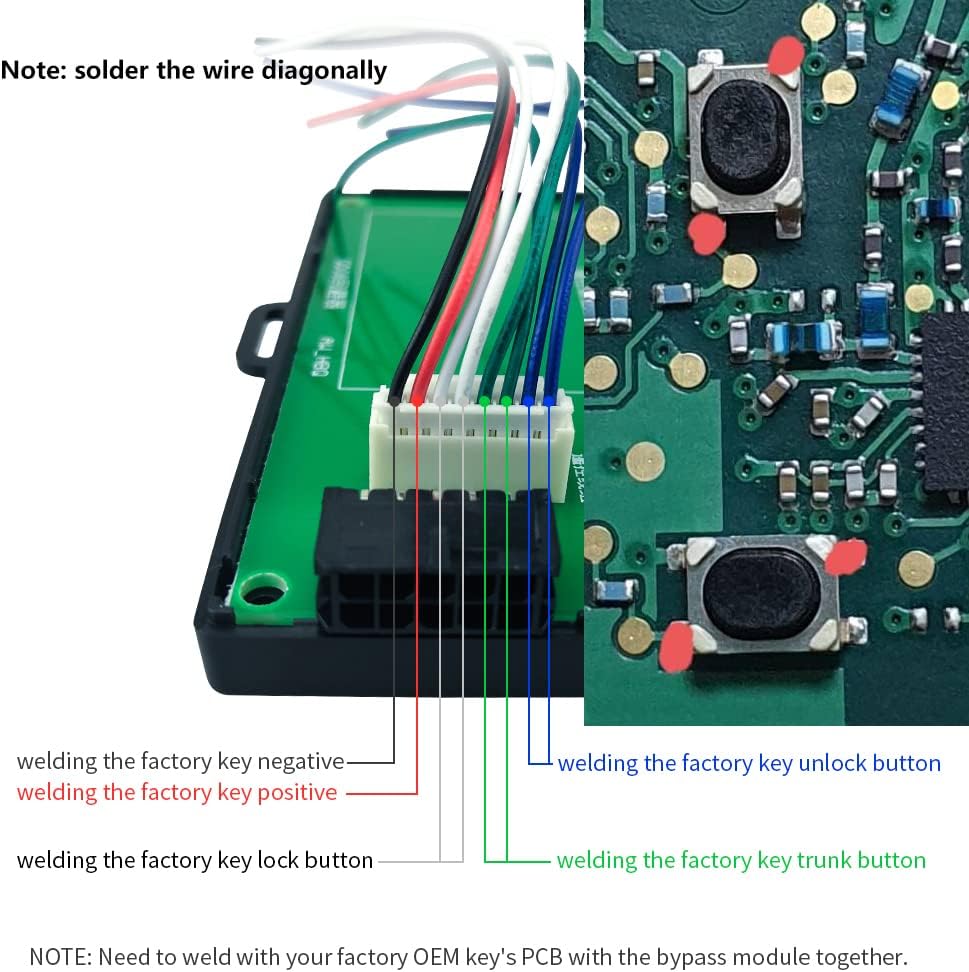
Refer to the included English installation guide for detailed wiring diagrams and specific instructions for your vehicle's make and model, if provided.
4. Operating Instructions
4.1 Passive Keyless Entry (PKE)
The PKE feature allows for automatic locking and unlocking of your vehicle without pressing buttons on the remote control, provided the key fob is within range.
- Automatic Unlock: When you approach your vehicle with the key fob within approximately 1-2 meters, the car doors will automatically unlock.
- Automatic Lock: When you walk away from your vehicle with the key fob, and you are approximately 2-3 meters away, the car doors will automatically lock.


4.2 Remote Control Key Fob Functions
The system includes two key fobs. Note that only one key fob operates at a time; the other enters a sleep mode until activated.

- Arm / Panic Mode: Press the lock button to arm the system and lock the doors. Press and hold for panic mode.
- Disarm / Unlock: Press the unlock button to disarm the system and unlock the doors.
- Remote Engine Start / Trunk Release: Press the start button to activate remote engine start. This button may also function for remote trunk release, depending on vehicle wiring.
4.3 Remote Engine Start/Stop
The remote engine start feature allows you to start your vehicle's engine from a distance, enabling pre-cooling in hot weather or pre-warming in cold weather.

4.4 Additional Features
- Mute Alarm / Audible Alarm: Toggle between silent and audible alarm modes.
- Alarm Trigger: The system will trigger an alarm upon illegal door opening.
- Central Door Locking Automation: Automatic locking/unlocking of all doors.
- Intelligent Power Off: System powers off intelligently when armed.
- Door Unlock Warning: Provides a warning if a door is not properly closed after unlocking.
- Emergency Override: A function to disarm the system in emergencies.
- Automatic Window Closing (Optional): Requires an additional window closer module (e.g., ASIN: B00N3RKA8E) for this functionality.
- PKE On/Off Setting: Allows enabling or disabling the Passive Keyless Entry feature.
- Programming Switch: Used for system programming and pairing new key fobs.
5. Maintenance
5.1 Key Fob Battery Replacement
The remote control key fobs require CR2 batteries. When the remote's range decreases or it becomes unresponsive, it may be time to replace the battery. Refer to the key fob's design for instructions on how to open it and replace the battery.
5.2 General Care
Keep the main control unit and key fobs dry and away from extreme temperatures. Avoid dropping the key fobs or exposing them to strong impacts.
6. Troubleshooting
- System Not Responding: Check the key fob battery. Ensure you are within range for PKE or remote functions.
- One Key Fob Not Working: Remember that only one key fob is active at a time. If one is in use, the other will be in sleep mode. Try activating the other key fob.
- Installation Issues: If the system is not functioning as expected after installation, re-verify all wiring connections. Contact a professional installer for assistance.
- Remote Start Failure: Ensure all doors are closed, the hood is closed, and the parking brake is engaged (if applicable to your vehicle's setup).
7. Specifications
| Feature | Specification |
|---|---|
| Model Number | EC211 |
| Item Weight | 2.86 pounds |
| Package Dimensions | 9.45 x 6.3 x 3.94 inches |
| Batteries Required | 2 CR2 batteries (included for key fobs) |
| Wireless Remote | Yes |

8. Warranty and Support
For warranty information, please refer to the documentation provided with your purchase or contact the seller directly. For technical support or installation inquiries, it is recommended to reach out to the manufacturer, EASYGUARD, or consult with your professional installer.
Manufacturer: ieasyguard.com


