
1. Introduction
This manual provides detailed instructions for the installation, operation, and maintenance of your SpeaKa Professional Dual Monitor Mount, model SP-8986136. This monitor mount is designed for office and retail environments, offering flexible monitor positioning with 360° rotation and stepless adjustment. Please read this manual thoroughly before installation and use to ensure proper function and safety.
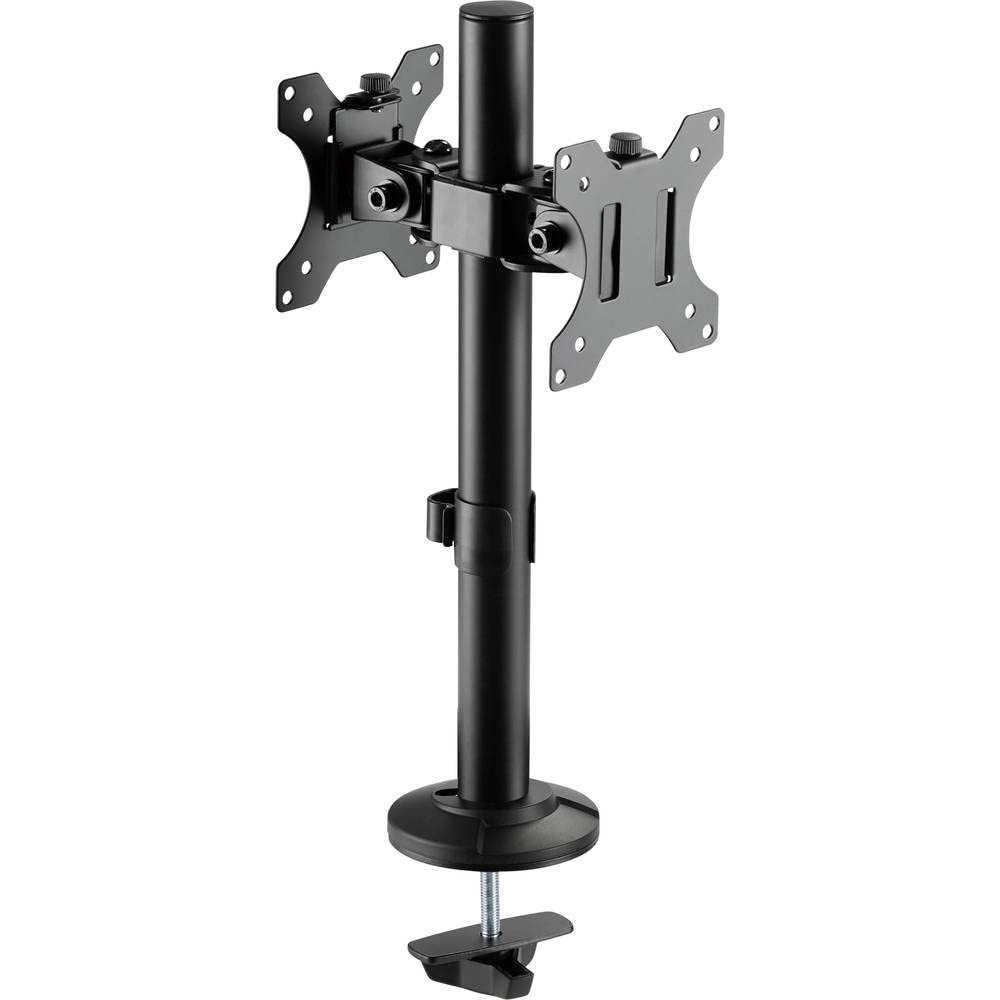
Figure 1: SpeaKa Professional Dual Monitor Mount (SP-8986136) overview.
2. Safety Information
- Ensure all components are present and undamaged before installation.
- Do not exceed the maximum weight capacity specified for the mount.
- Install the mount on a stable and sturdy surface capable of supporting the combined weight of the mount and monitors.
- Tighten all screws securely, but do not overtighten to avoid stripping threads.
- Keep children and pets away during installation.
- If you encounter any difficulties, consult a qualified professional.
3. Package Contents
Please verify that all parts are included in your package. If any parts are missing or damaged, contact customer support.
- Main Pole with Clamp Base
- VESA Monitor Arms (2x)
- VESA Plates (2x)
- Optional Screw Base
- Hardware Kit (screws, washers, Allen keys)
- Cable Management Clips
4. Setup and Installation
The SpeaKa Professional Dual Monitor Mount offers two installation options: a clamp base for most tables and desks, and a screw base for added security.
4.1. Choosing Your Mounting Option

Figure 2: Clamp base (left) and screw base (right) options.
- Clamp Base: Ideal for desks with an edge. Provides strong support without drilling.
- Screw Base: Requires drilling a hole through the desk. Offers maximum stability and security.
4.2. Clamp Base Installation
- Attach the clamp base to the bottom of the main pole.
- Position the main pole on your desk edge.
- Tighten the clamp screw until the mount is securely fastened to the desk. Ensure it is stable and does not wobble.
4.3. Screw Base Installation (Grommet Mount)
- If your desk has a grommet hole, ensure it is large enough for the screw base. If not, drill a suitable hole (consult desk manufacturer for recommendations).
- Attach the screw base to the bottom of the main pole.
- Insert the main pole through the grommet hole.
- Secure the screw base from underneath the desk using the provided hardware. Tighten firmly.
4.4. Attaching Monitor Arms and VESA Plates
- Slide the monitor arms onto the main pole at your desired height. Use the provided Allen key to tighten the set screw on each arm.
- Attach the VESA plates to the back of your monitors using the appropriate screws from the hardware kit. Ensure the VESA pattern (e.g., 75x75mm or 100x100mm) matches your monitor.
- Carefully slide the monitors (with VESA plates attached) onto the monitor arms. Secure them with the locking mechanism on the VESA plate.
5. Operating and Adjustments
The monitor mount allows for various adjustments to achieve an optimal viewing experience.
- Height Adjustment: Loosen the set screw on the monitor arm, adjust the arm to the desired height on the main pole, and re-tighten the screw.
- Tilt Adjustment: The monitor can be tilted up to 90 degrees. Loosen the tilt knob on the VESA plate, adjust the monitor angle, and re-tighten.
- Swivel Adjustment: The monitor arms can swivel horizontally along the main pole. The VESA plate also allows for 360-degree rotation, enabling portrait or landscape orientation.
- Cable Management: Use the integrated cable management clips on the main pole to route and organize your monitor cables for a tidy workspace.

Figure 3: Example of dual monitor application in a retail setting.
6. Maintenance
Regular maintenance ensures the longevity and safe operation of your monitor mount.
- Cleaning: Wipe the mount with a soft, damp cloth. Avoid abrasive cleaners or solvents.
- Tightness Check: Periodically check all screws and connections to ensure they remain tight. Re-tighten if necessary.
- Weight Capacity: Do not add monitors that exceed the specified weight capacity.
7. Troubleshooting
| Problem | Possible Cause | Solution |
|---|---|---|
| Monitor wobbles or sags. | Screws are loose; mount not securely fastened to desk; monitor too heavy. | Check and tighten all screws on the VESA plate, monitor arm, and desk clamp/screw base. Ensure monitor weight is within limits. |
| Difficulty adjusting monitor position. | Adjustment knobs/screws are too tight. | Slightly loosen the relevant adjustment knob or screw (e.g., tilt knob, arm height screw) before attempting to adjust. Re-tighten after positioning. |
| Cables are messy. | Cable management not utilized. | Route cables through the integrated cable management clips on the main pole. |
8. Specifications
| Model Number | SP-8986136 |
| Brand | SpeaKa Professional |
| Mounting Type | Tabletop Mount (Clamp or Grommet) |
| Movement Type | Swivel, Tilt, Rotation (360°) |
| Maximum Tilt Angle | 90 Degrees |
| Compatible Devices | Monitor (VESA compatible) |
| Color | Black |
| Item Weight | 2.15 Kilograms |
| Package Dimensions | 46.3 x 35.2 x 10.1 cm |
| First Available Date | July 24, 2020 |
9. Warranty Information
SpeaKa Professional products are designed for durability and performance. For specific warranty terms and conditions, please refer to the warranty card included with your product or visit the official SpeaKa Professional website. Keep your proof of purchase for warranty claims.
10. Customer Support
If you have any questions, require technical assistance, or need to report a missing/damaged part, please contact SpeaKa Professional customer support.
- Online Support: Visit the official SpeaKa Professional website for FAQs and support resources.
- Contact Information: Refer to the product packaging or the official website for current contact details (phone, email).
