
1. Important Safety Information
Read all instructions carefully before assembly and use. Failure to follow these instructions may result in injury or damage to the product.
- This desk is designed for indoor use only.
- Ensure all screws are tightened securely before use. Periodically check and re-tighten all fasteners.
- Do not overload the desk. The maximum weight recommendation is 176 pounds (80 kg).
- Keep children and pets away from the desk during operation.
- Avoid placing the desk in direct sunlight or in damp environments.
- Do not disassemble or modify the desk's electrical components. Contact customer support for service.
Warning: The product will arrive in two separate packages and may be shipped separately. Do not discard any packaging until assembly is complete and the desk is fully functional.
2. Package Contents
Your FLEXISPOT EN2 Electric Standing Desk is shipped in two packages. Please ensure you have received both packages before beginning assembly.
- Package 1: Desktop (48" Mahogany Top)
- Package 2: Desk Frame (Gray Frame), Motor, Control Panel, Power Strip, Cable Management Tray, Hardware, and User Manual.

Figure 2.1: The FlexiSpot EN2 desk components are shipped in two separate packages for safe delivery.
3. Setup and Assembly
Assembly typically requires one person and approximately 30-60 minutes. An electric drill (not included) may be helpful for certain steps.
- Unpack Components: Carefully remove all parts from both packages and lay them out on a soft, clean surface to prevent scratches. Verify all components are present against the packing list.
- Assemble Desk Frame: Attach the lifting columns to the feet. Ensure the crossbeam is correctly oriented.
- Attach Crossbeam: Secure the crossbeam to the lifting columns. Note that while some holes are pre-drilled for legs, the center holes for the crossbeam and cable tray may require self-tapping screws. Apply firm pressure with an electric drill for easy installation.
- Install Motors and Control Box: Follow the manual to connect the motor cables to the control box and secure the control box to the frame.
- Attach Desktop: Carefully place the desktop onto the assembled frame. Align the pre-drilled holes on the desktop with the frame and secure with screws.
- Install Control Panel and Power Strip: Mount the 6-button digital control panel and the clamp-on power strip to the desired location on the desktop. The power strip can be clipped to the back or side.
- Cable Management: Utilize the included cable management device to organize and secure all power and data cables underneath the desk. This helps prevent cables from snagging during height adjustments.

Figure 3.1: Assembled FLEXISPOT EN2 Electric Standing Desk.

Figure 3.2: Effective cable management keeps your workspace tidy and safe.
4. Operating Instructions
The desk features a 6-button digital controller for easy height adjustment and memory presets.
4.1 Height Adjustment
- Raise Desk: Press and hold the 'Up' arrow button (▲) to raise the desk. The LED display will show the current height.
- Lower Desk: Press and hold the 'Down' arrow button (▼) to lower the desk. The LED display will show the current height.
- The motorized system adjusts smoothly from 28.1 inches to 45.7 inches. The motor operates quietly at less than 50 dB.
4.2 Memory Presets
The controller features 4 programmable memory presets to quickly switch between your preferred sitting and standing heights.
- Adjust the desk to your desired height using the Up/Down arrow buttons.
- Press the 'M' button (Memory). The display will show 'S-'.
- Press one of the number buttons (1, 2, 3, or 4) within 3 seconds. The display will show 'S-1', 'S-2', etc., indicating the height is saved to that preset.
- To recall a saved height, simply press the corresponding number button (1, 2, 3, or 4). The desk will automatically move to the saved position.
4.3 Integrated Power Strip and USB Ports
The desktop is equipped with a removable power strip for convenient device charging and power access.
- The power strip includes 3 AC outlets (125V/12A) and 2 USB charging ports (5V/2A).
- It can be clipped to the back or side of your desk to suit your setup.

Figure 4.1: Digital control panel for height adjustment and memory presets.

Figure 4.2: Integrated power strip with AC outlets and USB charging ports.
4.4 Timer Function (if available on your model)
Some models may include a timer function to remind you to switch between sitting and standing positions. Refer to your specific model's manual for details on setting and using this feature.
5. Features
- Whole-Piece Desktop: The 1-inch eco-friendly desktop provides a seamless and spacious work surface, offering enhanced stability compared to multi-piece desktops.
- Durable Construction: Constructed with an industrial-grade steel frame and solid tabletop, the desk can support up to 176 pounds (80 kg). Each frame undergoes rigorous testing for performance and durability.
- Rounded Corners: The desktop features rounded corners for safety and to prevent accidental bumps or damage.
- Quiet Operation: The motor operates at less than 50 dB, ensuring a quiet work environment during height adjustments.

Figure 5.1: The whole-piece desktop offers enhanced stability and a smooth surface.

Figure 5.2: The desk operates with a quiet motor, producing less than 50 dB of noise.

Figure 5.3: The desk's robust construction supports up to 176 lbs.
6. Maintenance
- Cleaning: Wipe the desktop and frame with a soft, damp cloth. Avoid abrasive cleaners or harsh chemicals that may damage the finish.
- Inspection: Periodically check all screws and bolts to ensure they are tight. Re-tighten if necessary.
- Cable Management: Ensure cables remain neatly organized and are not pinched or strained during height adjustments.
7. Troubleshooting
- Desk Not Moving: Check all cable connections, especially the power cord and motor cables. Ensure the power outlet is functional.
- Uneven Movement: Perform a reset procedure (refer to the full user manual for specific steps). Ensure the desk is not overloaded or obstructed.
- Error Codes: If an error code appears on the LED display, consult the comprehensive user manual for specific troubleshooting steps related to that code.
8. Specifications
| Feature | Detail |
|---|---|
| Brand | FLEXISPOT |
| Model Number | EN2 |
| Desktop Size | 48"D x 24"W (Dimensions may vary slightly by 0 to 1") |
| Desktop Material | Wood (Mahogany Top) |
| Frame Material | Alloy Steel (Gray Frame) |
| Height Adjustment Range | 28.1" to 45.7" |
| Lifting Mechanism | Electric |
| Motor Noise Level | Less than 50 dB |
| Max Load Capacity | 176 Pounds (80 kg) |
| Control Panel | 6-button digital controller with 4 memory presets |
| Power Outlet | 3 AC outlets (125V/12A) |
| USB Charging Ports | 2 USB ports (5V/2A) |
| Assembly Required | Yes |
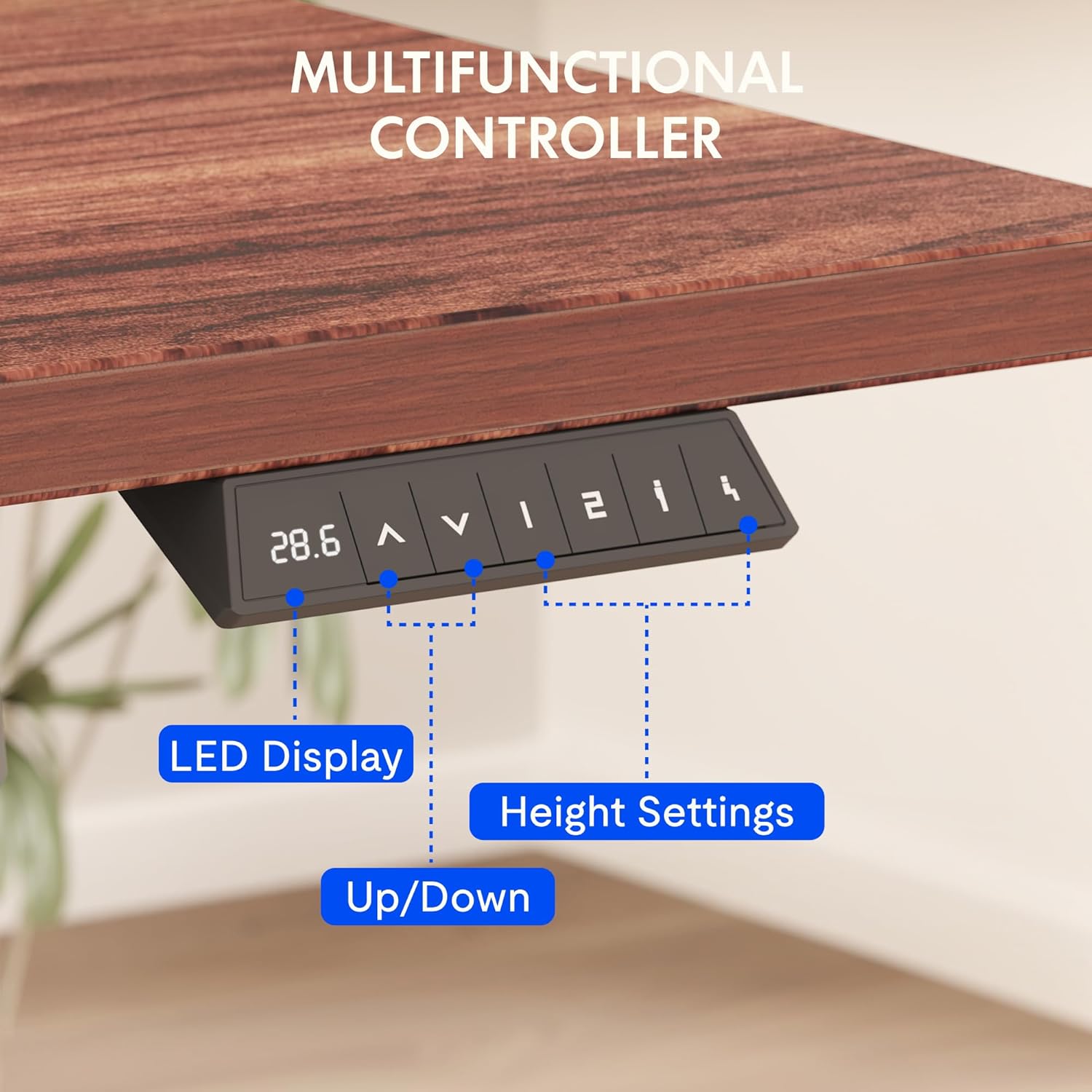
Figure 8.1: Key dimensions and features of the FLEXISPOT EN2 desk.
9. Warranty and Support
FLEXISPOT provides comprehensive warranty coverage for your EN2 Electric Standing Desk:
- 5-Year Warranty: Applies to frames, motors, and other mechanical devices.
- 2-Year Warranty: Applies to controllers, switches, and electronics.
For customer support, troubleshooting assistance, or warranty claims, please visit the official FLEXISPOT website or contact their customer service department directly.
10. Official Product Videos
10.1 Computer Workstation Table Test
Video 10.1: A demonstration of the FLEXISPOT EN2 desk's stability and functionality as a computer workstation.
10.2 Flexispot Classic Height Adjustable Standing Desk Series
Video 10.2: An overview of the FlexiSpot Classic Height Adjustable Standing Desk Series, highlighting key features and design.
10.3 FLEXISPOT Brand Introduction
Video 10.3: A brief introduction to the FLEXISPOT brand and its commitment to ergonomic solutions.


