
1. Introduction
Thank you for choosing the SANODESK E8W Electric Sit-Stand Desk. This manual provides essential information for the safe and efficient assembly, operation, and maintenance of your new desk. The SANODESK E8W is designed to offer a flexible and ergonomic workspace, allowing seamless transitions between sitting and standing positions. It features dual motors for smooth adjustments, a robust frame, and intelligent control functions.
2. Safety Information
- Read all instructions carefully before assembly and use.
- Ensure all components are securely fastened before operating the desk.
- Keep children and pets away from the desk during operation to prevent injury.
- Do not place hands or objects in the path of moving parts.
- The desk is equipped with an anti-collision function. However, always monitor the desk's movement to prevent damage or injury.
- Do not overload the desk beyond its maximum weight capacity of 125 kg.
- Only use the provided power adapter and ensure it is connected to a grounded outlet.
- If any unusual noise, smell, or smoke occurs, immediately unplug the desk and contact customer support.
3. Package Contents
Please check the packaging for the following components. If any parts are missing or damaged, contact SANODESK customer support immediately.
- Desk Frame (legs, crossbars, feet)
- Control Panel
- Control Box
- Power Adapter and Cable
- Assembly Hardware (screws, wrenches, etc.)
- Instruction Manual (this document)
- Note: Desktop surface is typically sold separately or may be included depending on your purchase.
4. Setup
Assembly of the SANODESK E8W is straightforward and typically takes less than an hour. It is recommended to have a second person assist with lifting the assembled desk.
- Unpack Components: Carefully remove all parts from the packaging and lay them out on a clean, flat surface. Verify all components are present according to the package contents list.
- Assemble Frame: Follow the detailed assembly instructions provided in the separate assembly guide included with your product. This typically involves attaching the feet to the legs, connecting the crossbars, and installing the control box.
- Attach Desktop: Place your chosen desktop (recommended depth 60-80 cm, width 120-200 cm, thickness >2.5 cm) upside down on a protective surface. Position the assembled desk frame onto the desktop. Secure the frame to the desktop using the provided screws or your preferred mounting system.
- Install Control Panel: Mount the control panel to the underside of the desktop in a convenient location using the provided hardware. Connect the control panel cable to the control box.
- Connect Power: Plug the power adapter into the control box, then plug the power cable into a grounded electrical outlet.
- Initial Calibration: Refer to your separate assembly guide for initial calibration steps, which may involve holding the down button until the desk reaches its lowest point and slightly rises.

Image: The SANODESK E8W Electric Sit-Stand Desk fully assembled in a home office environment.

Image: Diagram illustrating the adjustable height range of the desk frame, from 60cm to 125cm.
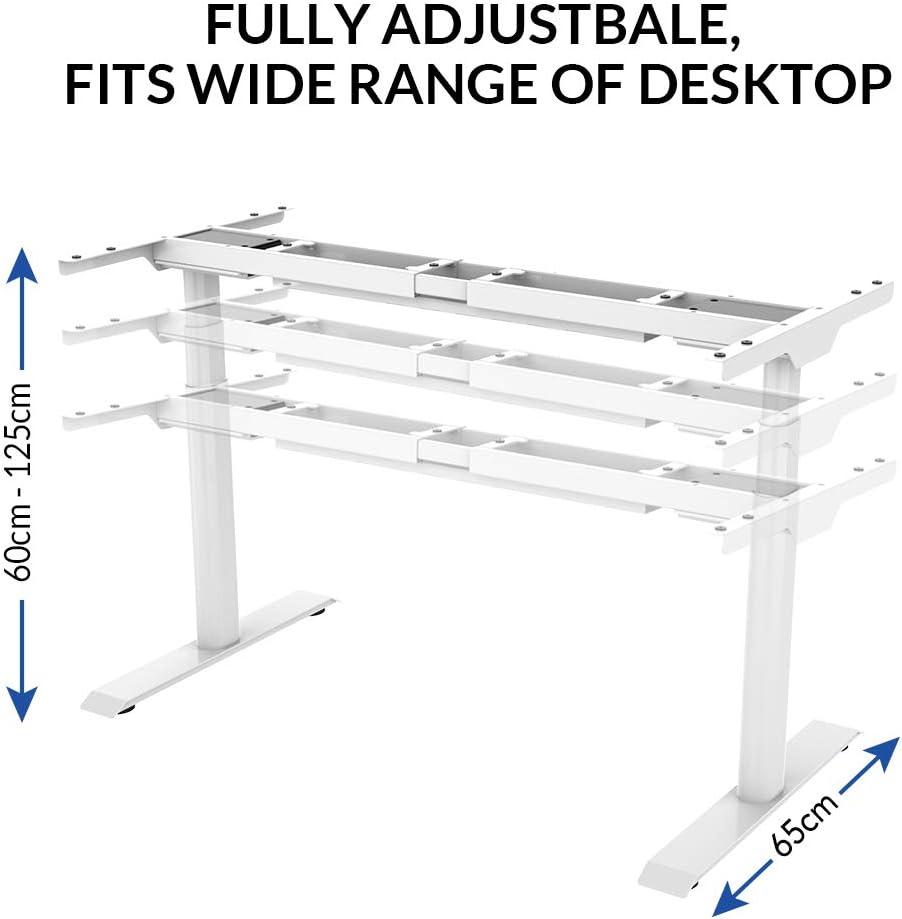
Image: Diagram illustrating the adjustable width of the desk frame, ranging from 110cm to 190cm.
5. Operating Instructions
The SANODESK E8W features an intuitive touch screen control panel for easy height adjustment and memory functions.

Image: Close-up of the SANODESK E8W touch screen control panel.
5.1 Basic Height Adjustment
- Up Arrow (▲): Press and hold to raise the desk. Release to stop at the desired height.
- Down Arrow (▼): Press and hold to lower the desk. Release to stop at the desired height.
- The digital display will show the current height in centimeters.
5.2 Memory Presets
The control panel allows you to save up to four preferred height settings.
- Adjust the desk to your desired height using the up/down arrows.
- Press the 'M' button. The display will show 'S-'.
- Within 3 seconds, press one of the number buttons (1, 2, 3, or 4) to save the current height to that preset. The display will confirm with 'S-1', 'S-2', etc.
- To recall a saved height, simply press the corresponding number button (1, 2, 3, or 4). The desk will automatically move to the saved position.
5.3 Parental Lock Function
To prevent accidental operation, especially by children, the control panel includes a parental lock.
- To Activate Lock: Press and hold the 'M' button for approximately 5 seconds until 'LOC' appears on the display. All buttons will be disabled.
- To Deactivate Lock: Press and hold the 'M' button again for approximately 5 seconds until 'LOC' disappears from the display. The control panel will now be operational.
5.4 Anti-Collision System
The desk is equipped with an anti-collision system that detects obstacles during height adjustment. If an obstacle is detected, the desk will stop and reverse slightly to prevent damage.

Image: The anti-collision system detects obstacles and stops movement.
- While this system enhances safety, always exercise caution and ensure the path of the desk is clear during movement.
- The sensitivity of the anti-collision system may be adjustable; refer to your specific control box manual for details.
6. Maintenance
Regular maintenance ensures the longevity and optimal performance of your SANODESK E8W.
- Cleaning: Wipe the desk surface and frame with a soft, damp cloth. Avoid abrasive cleaners or solvents that could damage the finish.
- Cable Management: Periodically check all cables for wear or damage. Ensure cables are neatly managed to prevent entanglement or strain during height adjustments.
- Fasteners: Occasionally check all screws and bolts to ensure they remain tight. Retighten if necessary.
- Motor Inspection: Listen for any unusual noises from the motors during operation. If you notice any changes, contact customer support.
7. Troubleshooting
If you encounter issues with your SANODESK E8W, refer to the following common troubleshooting steps:
| Problem | Possible Cause | Solution |
|---|---|---|
| Desk does not move | Power cable disconnected; Parental lock active; Overload; Motor error | Check power connections; Deactivate parental lock (hold 'M' button); Reduce load; Unplug for 10 minutes then replug. |
| Uneven movement | Unbalanced load; Calibration needed | Distribute weight evenly; Perform calibration (refer to assembly guide). |
| Anti-collision system triggers frequently | Obstacle in path; High sensitivity setting | Ensure clear path; Adjust sensitivity if possible (refer to control box manual). |
| Display shows error code | Specific system error | Note the error code and consult the detailed troubleshooting section in your assembly guide or contact customer support. |
If the problem persists after attempting these solutions, please contact SANODESK customer support for further assistance.
8. Specifications
| Feature | Specification |
|---|---|
| Brand | SANODESK |
| Model Number | E8W-EU |
| Color | White |
| Height Adjustment Range | 60 cm to 125 cm |
| Frame Width Adjustment | 110 cm to 190 cm |
| Maximum Load Capacity | 125 kg |
| Lifting Speed | 3.8 cm/s |
| Noise Level | <50 dB |
| Number of Motors | Dual Motors |
| Control Panel | Touch screen with 4 memory presets, parental lock |
| Safety Features | Anti-collision system, Parental lock |
| Compatible Desktop Depth | 60 cm to 80 cm |
| Compatible Desktop Width | 120 cm to 200 cm |
| Compatible Desktop Thickness | >2.5 cm |
| Materials | Cold rolled steel, aluminum, copper, POM plastic |
| Item Weight (Frame only) | 28 Kilograms |
9. Warranty Information
The SANODESK E8W Electric Sit-Stand Desk comes with the following warranty:
- Desk Frame: 5-year warranty
- Motor: 3-year warranty
Please retain your proof of purchase for warranty claims. The warranty covers manufacturing defects under normal use. It does not cover damage caused by misuse, accidents, unauthorized modifications, or failure to follow the instructions in this manual.
10. Support
For technical assistance, warranty claims, or any questions regarding your SANODESK E8W Electric Sit-Stand Desk, please contact SANODESK customer support through the retailer where you purchased the product or visit the official SANODESK website for contact information.
When contacting support, please have your model number (E8W-EU) and proof of purchase readily available.

