Introduction
The Motorola Solutions WM500 is a wireless remote speaker microphone designed for Push-to-Talk (PTT) applications on two-way radios or smartphones. This device offers secure and efficient communication, featuring a durable, thin design with an internal battery providing up to 40 hours of operation. It incorporates Windporting technology for clear communication in challenging weather conditions and includes a 3.5mm earpiece jack for discreet audio reception. The WM500 is rated IP67 for dust and water resistance, ensuring reliability in demanding environments.

Figure 1: Front view of the Motorola Solutions WM500 Bluetooth Remote Speaker Microphone.
Package Contents
- WM500 Bluetooth Remote Speaker Microphone
- USB Charging Cable
Device Overview
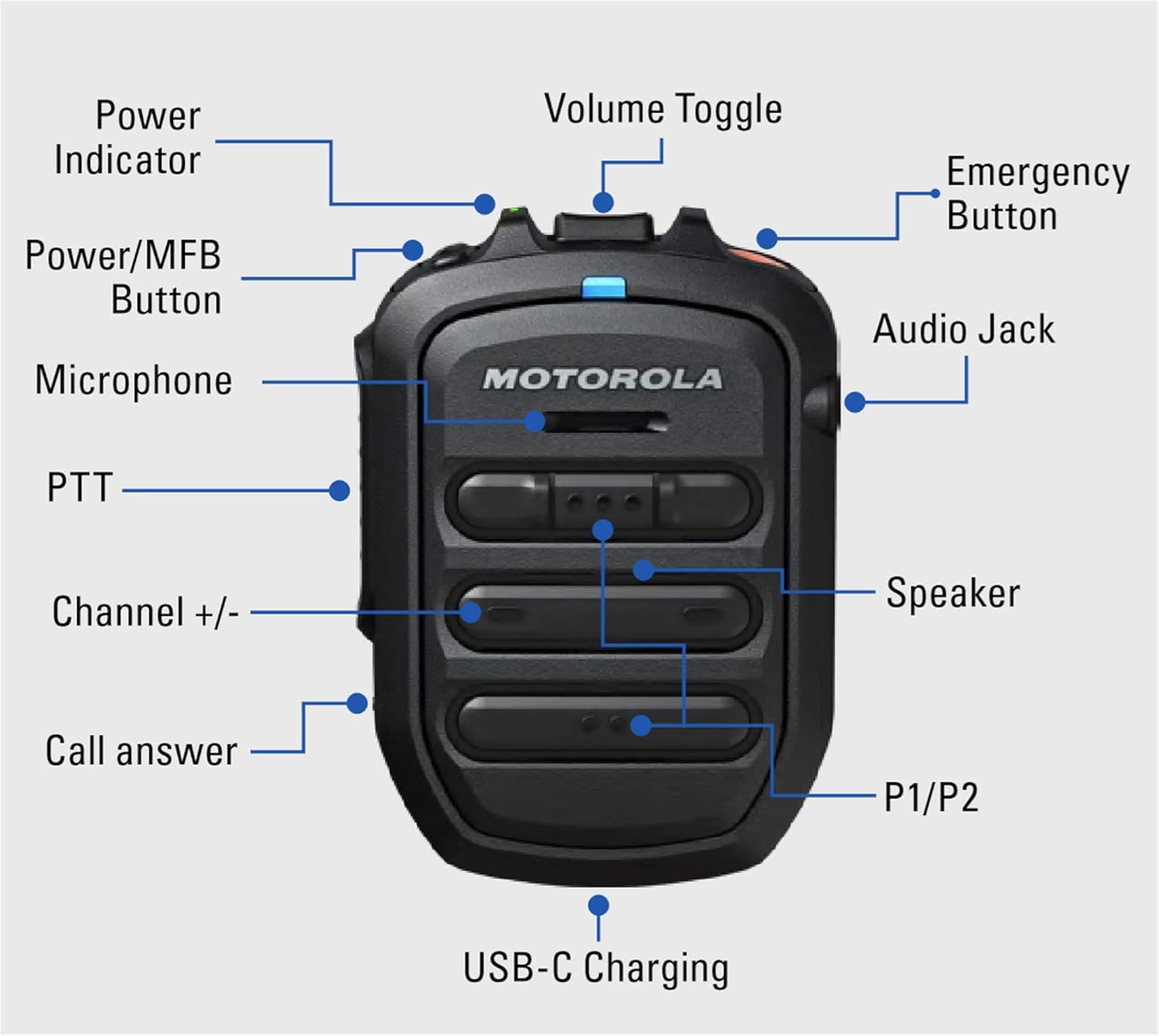
Figure 2: Labeled diagram of the WM500, indicating Power Indicator, Power/MFB Button, Microphone, PTT, Channel +/-, Call Answer, USB-C Charging Port, P1/P2 Buttons, Speaker, Audio Jack, Volume Toggle, and Emergency Button.
- Power Indicator: Displays device status.
- Power/MFB Button: Powers the device on/off and performs multi-function tasks.
- Microphone: For voice input.
- PTT (Push-to-Talk) Button: Activates voice transmission.
- Channel +/-: Navigates channels or talkgroups.
- Call Answer: Manages incoming calls.
- USB-C Charging: Port for charging the device.
- P1/P2 Buttons: Programmable buttons for custom functions.
- Speaker: For audio output.
- Audio Jack: 3.5mm port for earpiece accessories.
- Volume Toggle: Adjusts speaker volume.
- Emergency Button: For emergency signaling (if configured).
Setup
1. Charging the Device
Before initial use, fully charge the WM500. Connect the supplied USB charging cable to the USB-C port on the device and to a compatible USB power source. The power indicator will show charging status. A full charge provides up to 40 hours of operational time (5/5/90 working period).
2. Powering On/Off
- To Power On: Press and hold the Power/MFB button until the power indicator illuminates.
- To Power Off: Press and hold the Power/MFB button until the power indicator turns off.
3. Pairing with a Radio or Smartphone
The WM500 uses Bluetooth 5.0 for wireless connection. It is compatible with TLK100 and TLK150 PoC two-way radios, as well as PTT-over-cellular applications on smartphones.
- Ensure the WM500 is powered on and in pairing mode (refer to device indicator for status).
- On your compatible radio or smartphone, enable Bluetooth and search for available devices.
- Select "WM500" from the list of found devices to initiate pairing.
- Follow any on-screen prompts to complete the pairing process.
The WM500 also supports NFC pairing for compatible devices. Tap the WM500 to the NFC area of your device to initiate pairing.
Operating Instructions
Push-to-Talk (PTT) Communication
- To transmit, press and hold the PTT button. Speak clearly into the microphone.
- Release the PTT button to listen.
Volume Adjustment
Use the Volume Toggle buttons to increase or decrease the speaker volume.
Channel/Talkgroup Selection
Use the Channel +/- buttons to navigate through available channels or talkgroups on your connected radio or application.
Call Management
Press the Call Answer button to accept an incoming call. Press again to end a call.
Discreet Listening
For private communications, plug a compatible 3.5mm earpiece accessory into the Audio Jack. Audio will then be routed to the earpiece.
Programmable Buttons (P1/P2)
The P1 and P2 buttons can be configured for various functions through your connected radio or PTT application. Refer to your radio's or application's user guide for customization options.
Maintenance
Cleaning
Wipe the device with a soft, damp cloth. Do not use harsh chemicals or abrasive cleaners. Ensure the USB-C port cover is securely closed before cleaning with moisture.
Water and Dust Resistance
The WM500 is rated IP67, meaning it is dust-tight and can withstand immersion in up to 1 meter of water for 30 minutes. While designed for durability, avoid unnecessary exposure to water and ensure all port covers are sealed when in wet environments. The device features enhanced water drainage to prevent clogging.

Figure 3: Back view of the WM500, highlighting the robust belt clip and model identification.
Troubleshooting
- Device not powering on: Ensure the battery is charged. Connect to a power source and try again.
- Cannot pair with radio/smartphone:
- Ensure both devices have Bluetooth enabled.
- Make sure the WM500 is in pairing mode.
- Check that the WM500 is within range of the host device.
- Restart both devices and attempt pairing again.
- No audio or poor audio quality:
- Check the volume level on both the WM500 and the connected device.
- Ensure the WM500 is properly paired.
- If using an earpiece, ensure it is fully plugged into the 3.5mm jack.
- Verify that the connected radio or application is functioning correctly.
- PTT not working:
- Confirm the WM500 is successfully paired and connected.
- Check the PTT application or radio settings to ensure the WM500 is selected as the audio accessory.
If issues persist, refer to the support section for further assistance.
Specifications
| Feature | Detail |
|---|---|
| Model Number | WM500 (PMMN4127) |
| Compatible Radios | TLK100, TLK150 |
| Connectivity | Bluetooth 5.0, NFC |
| Battery Life | Up to 40 hours (5/5/90 working period) |
| Charging | USB-C |
| Water Resistance | IP67 (Dust-tight, submersible up to 1m for 30 min) |
| Dimensions (H x W x D) | 3.2 x 2.3 x 1 inches (80 x 24.5 x 57.5 mm) |
| Weight | 3 ounces (85 grams) |
| Operating Temperature | -20°C to +60°C (+4°F to +140°F) |
| Storage Temperature | -55°C to +85°C (-67°F to +185°F) |
| Audio Jack | 3.5mm |
Warranty Information
Warranty terms and conditions for the Motorola Solutions WM500 are provided by the manufacturer. Please refer to the warranty card included with your product or visit the official Motorola Solutions website for detailed warranty information. It is recommended to retain your proof of purchase for warranty claims.
Support
For additional support, technical assistance, or to inquire about accessories and replacement parts, please visit the official Motorola Solutions website or contact an authorized Motorola Solutions dealer.
Official Website: motorolasolutions.com/WM500
Legal Disclaimer: Motorola Solutions recommends only purchasing from an authorized dealer.


