
1. Introduction
Thank you for choosing the PETWANT F1-C Smart Pet Feeder with Camera. This device is designed to provide convenience and peace of mind by allowing you to manage your pet's feeding remotely and monitor their well-being through a dedicated smartphone application. This manual provides detailed instructions for setup, operation, and maintenance to ensure optimal performance and a positive experience for both you and your pet.
2. Product Overview
Key Features:
- Remote Feeding Control: Schedule feeding times and portion sizes via the smartphone app.
- Integrated Camera: Monitor your pet with a 1-megapixel camera, including night vision capabilities.
- Two-Way Audio: Speak to and hear your pet through the built-in speaker and microphone.
- Wi-Fi Connectivity: Seamless connection to your home network for remote access.
- Easy to Clean: Detachable food tray for simple hand washing.
Included Components:
- PETWANT F1-C Feeder Unit
- Power Adapter (Wired Electric)
- User Manual
Product Views:


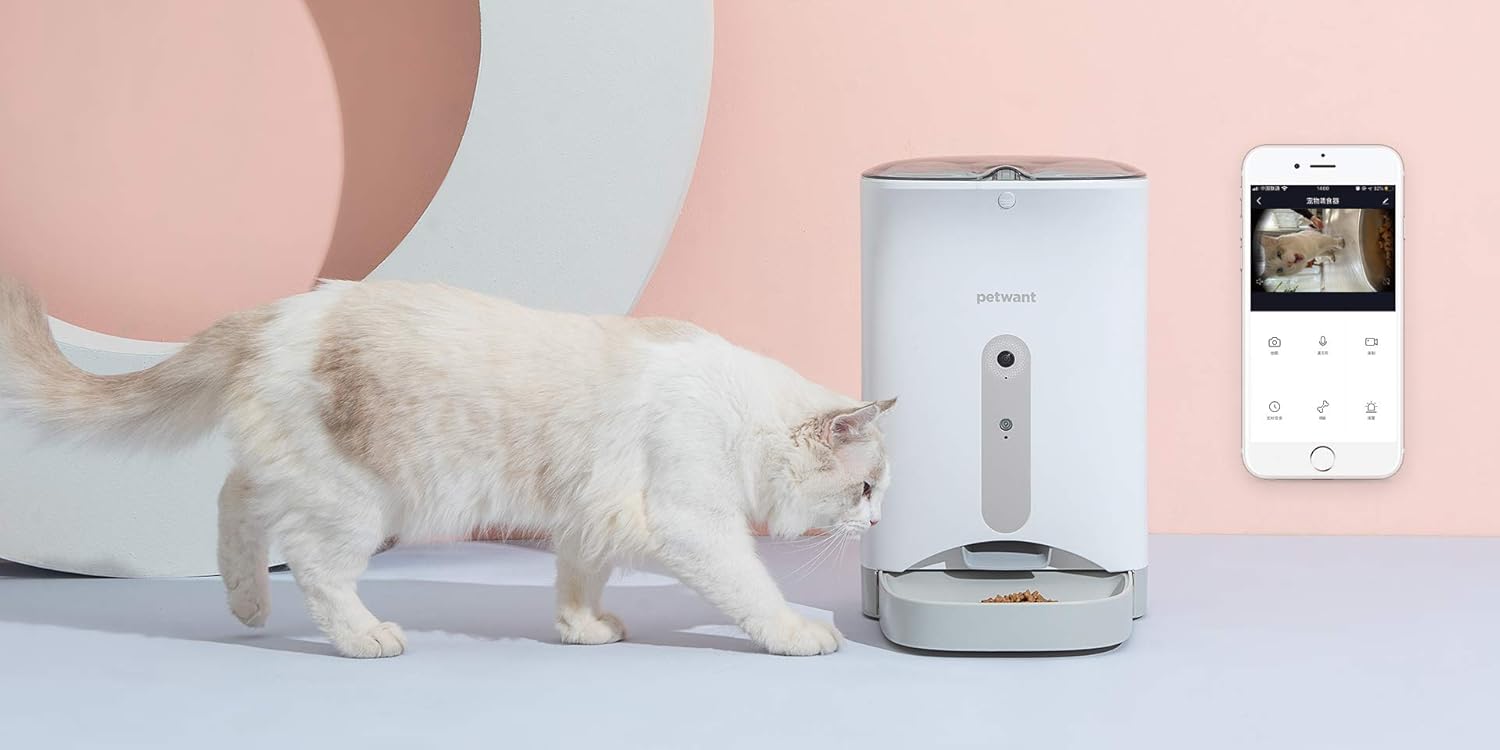


3. Setup Guide
- Unpack the Feeder: Carefully remove all components from the packaging.
- Place the Feeder: Position the feeder on a flat, stable surface in a location accessible to your pet and within Wi-Fi range.
- Connect Power: Plug the power adapter into the feeder's power port and then into a standard electrical outlet. Ensure the power switch on the bottom of the unit is in the 'ON' position.
- Fill the Food Reservoir: Open the lid and pour dry pet food into the reservoir. Ensure the food size is appropriate for the dispenser mechanism.
- Download the App: Search for the "PETWANT" app on your smartphone's app store (compatible with iOS and Android devices). Download and install the application.
- Connect to Wi-Fi: Follow the in-app instructions to connect your feeder to your home Wi-Fi network. This typically involves creating an account, adding the device, and entering your Wi-Fi credentials.
4. Operating Instructions
Using the Smartphone App:
- Scheduling Feeds: Access the "Schedule" function in the app to set specific feeding times and portion sizes for your pet. You can program multiple meals per day.
- Manual Feeding: Use the "Feed" button in the app to dispense a meal instantly, outside of the scheduled times.
- Live Video Monitoring: Tap on the camera icon to view a live video feed of your pet. The camera features night vision for clear viewing in low-light conditions.
- Two-Way Audio: Use the microphone icon to speak to your pet, and the speaker icon to hear sounds from the feeder's location.
- Recording & Screenshots: Capture video recordings or still images of your pet directly from the live view.
Manual Controls (on feeder):
- REC Button: Press to record a short voice message that will play during scheduled feeding times.
- PLAY Button: Press to play the recorded voice message.
- SET Button: Used for initial setup or resetting certain functions (refer to app for detailed instructions).
5. Maintenance
Regular cleaning of your PETWANT F1-C feeder is essential for hygiene and optimal performance.
- Food Tray: The food tray is detachable and should be hand washed regularly with mild soap and water. Rinse thoroughly and dry completely before reattaching.
- Food Reservoir: Periodically empty the food reservoir and wipe it clean with a dry or slightly damp cloth. Ensure no moisture remains before refilling with dry food.
- Exterior: Wipe the exterior of the feeder with a soft, dry cloth. Do not use abrasive cleaners or immerse the main unit in water.
- Camera Lens: Gently clean the camera lens with a soft, lint-free cloth to ensure clear video quality.
6. Troubleshooting
- Feeder not powering on: Ensure the power adapter is securely plugged into both the feeder and the wall outlet. Check that the power switch on the bottom of the unit is in the 'ON' position.
- Cannot connect to Wi-Fi: Ensure your Wi-Fi network is 2.4GHz (5GHz networks are not supported). Check your Wi-Fi password and network stability. Try restarting your router and the feeder.
- Food not dispensing: Check if the food reservoir is empty. Ensure the food is not clumped or jammed in the dispenser. Verify that the scheduled feeding times and portions are correctly set in the app.
- Poor camera quality/no image: Ensure the camera lens is clean. Check your internet connection speed. If the issue persists, try restarting the feeder.
- App not responding: Close and reopen the app. Ensure your smartphone's operating system is up to date. Check for app updates in your app store.
7. Specifications
| Feature | Specification |
|---|---|
| Brand | PETWANT |
| Model | F1-C |
| Product Category | Monitoring Camera / Pet Feeder |
| Targeted Species | Cat, Dog (Small to Medium Breeds) |
| Connectivity Technology | Wireless (Wi-Fi) |
| Power Source | Wired Electric (100 Watts) |
| Compatible Devices | Smartphone, Tablets |
| Special Features | Night Vision, Two-Way Audio |
| Camera Resolution | 1 Megapixel |
| Care Instructions | Hand wash only (detachable parts) |
| Item Weight | 2.96 Kilograms |
| Dimensions (Shipping) | 40 x 31.4 x 21.2 cm |
8. Safety Information
- This appliance is for indoor use only.
- Do not immerse the main unit in water or other liquids.
- Keep out of reach of children and pets when not in use or during cleaning.
- Use only the provided power adapter.
- Ensure the power cord is not chewed by pets.
- Do not use with wet food or treats. Only suitable for dry pet food.
- Unplug the feeder before cleaning or if it will not be used for an extended period.
9. Warranty and Support
For warranty information, please refer to the warranty card included with your product or contact the retailer where you purchased the PETWANT F1-C feeder. For technical support, troubleshooting assistance, or general inquiries, please visit the official PETWANT website or contact their customer service department. Contact details are typically available on the product packaging or the manufacturer's website.


