
Introduction
This manual provides comprehensive instructions for the ALLIMITY DR0337 replacement remote control. It is designed for use with various Sharp Aquos 3D TV models. Please read this manual carefully before using the remote control to ensure proper setup and operation.
1. Setup
1.1 Battery Installation
The remote control requires two AAA batteries (not included).
- Locate the battery compartment cover on the back of the remote control.
- Slide the cover downwards to open.
- Insert two AAA batteries, ensuring the correct polarity (+ and -) as indicated inside the compartment.
- Slide the cover back into place until it clicks securely.
Note: Always replace both batteries at the same time. Do not mix old and new batteries or different types of batteries.
1.2 Initial Pairing (First-Time Installation)
If the remote control does not function with your TV during first-time installation, it may need to be paired.
- Ensure your TV is powered on.
- On the remote control, press and hold the YELLOW and BLUE buttons simultaneously for a few seconds.
- The power light on the remote control will blink 5 times to confirm successful pairing.

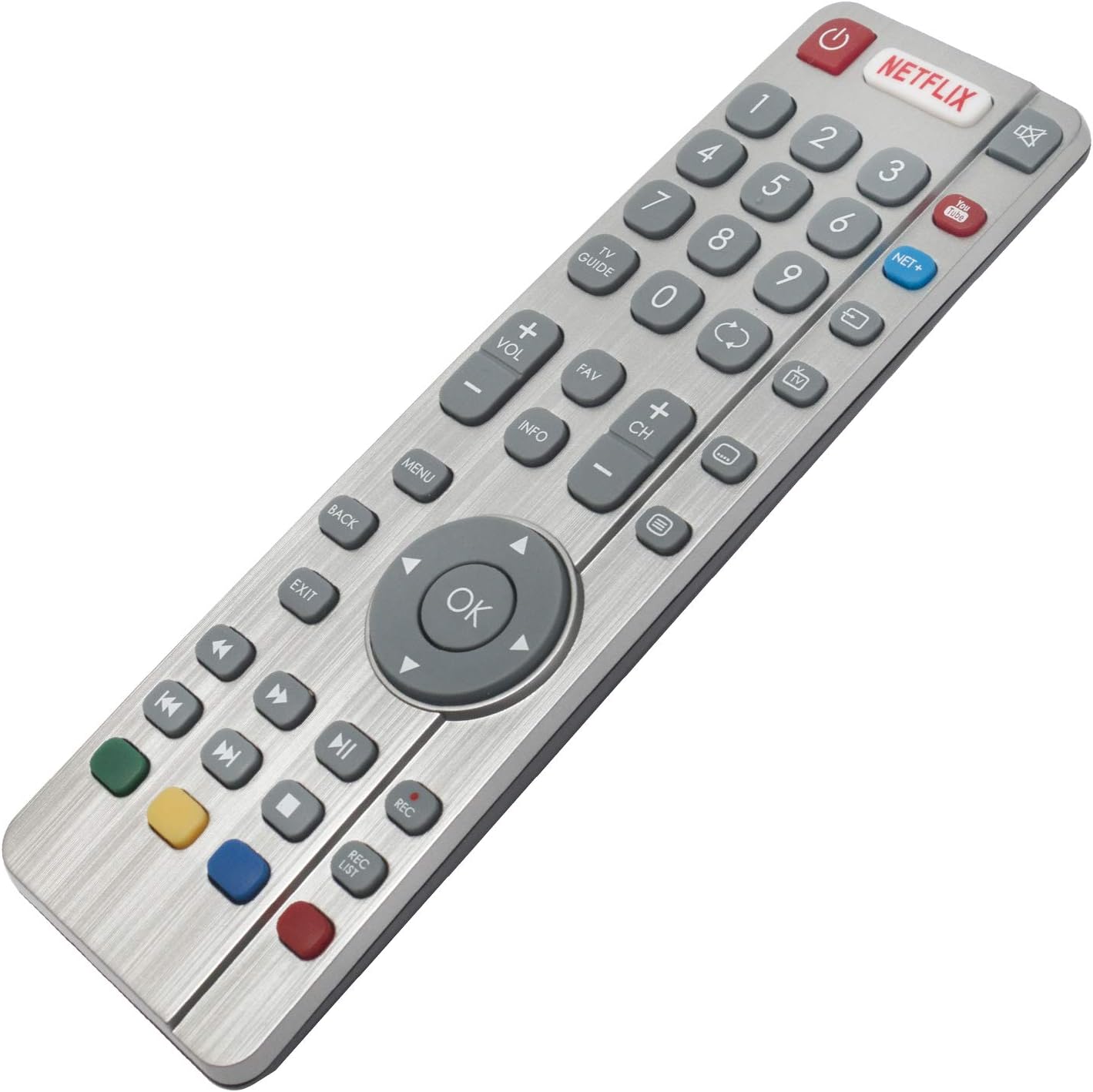
Image: ALLIMITY DR0337 Remote Control showing the location of the YELLOW and BLUE buttons for pairing. The image also contains text instructions for pairing and troubleshooting.
2. Operating Instructions
This remote control provides full functionality for your Sharp Aquos 3D TV. Point the remote control directly at the TV's infrared sensor.
2.1 Button Functions
- Power Button (
 ): Turns the TV on or off.
 - Number Buttons (0-9): Selects channels directly.
- NETFLIX: Direct access to the Netflix application.
- YouTube: Direct access to the YouTube application.
- NET+: Accesses additional network services.
- TV GUIDE: Displays the electronic program guide.
- TV: Switches to TV input.
- VOL +/-: Adjusts volume up or down.
- CH +/-: Changes channels up or down.
- FAV: Accesses favorite channels.
- INFO: Displays information about the current program.
- MENU: Opens the TV's main menu.
- BACK: Returns to the previous screen or menu.
- EXIT: Exits the current menu or application.
- OK / Navigation Buttons: Confirms selections and navigates through menus (Up, Down, Left, Right).
- Playback Controls (
 ): Rewind, Play/Pause, Fast Forward, Stop, Record (REC), Record List (REC LIST).
 - Colored Buttons (Red, Green, Yellow, Blue): Functionality varies depending on the TV menu or application.

Image: Front view of the ALLIMITY DR0337 Remote Control, highlighting all buttons and their layout.
3. Maintenance
3.1 Cleaning
To clean the remote control, gently wipe it with a soft, dry cloth. Do not use liquid cleaners, sprays, or abrasive materials, as these can damage the remote.
3.2 Battery Replacement
If the remote control's range decreases or it becomes unresponsive, the batteries may need to be replaced. Follow the battery installation steps in Section 1.1.
Warning: Dispose of used batteries according to local regulations. Do not expose batteries to excessive heat or fire.
4. Troubleshooting
4.1 Remote Control Not Working (First-Time Installation)
If the remote control does not function with the TV during initial setup, it may require pairing.
- Ensure the TV is on.
- Press and hold the YELLOW and BLUE buttons on the remote control for a few seconds.
- The power light will blink 5 times, indicating successful pairing.
4.2 Remote Control Not Powering On the TV
If the remote control fails to turn on the TV:
- Switch the TV on manually using the standby button on the TV set itself (not the remote control).
- Once the TV is on, press the standby button on the TV set again. This action should prompt a 'pairing menu' to appear on the screen.
- Scroll through the menu and highlight 'Pair your remote' by pressing the CH+ or CH- TV button (this is for navigating the TV's menu, not the remote's).
- Confirm your selection by pressing the TV set's standby button (which acts as an OK function in the menu).
- With the remote control, press and hold the YELLOW and BLUE buttons for a few seconds.
- The power light on the remote control will blink 5 times to confirm that the TV and remote control are paired.
4.3 General Troubleshooting Tips
- Check Batteries: Ensure batteries are inserted correctly and are not depleted. Replace them if necessary.
- Line of Sight: Make sure there are no obstructions between the remote control and the TV's infrared sensor.
- Remote Control Reset: Remove batteries, press all buttons a few times to discharge any residual power, then reinsert batteries.
5. Specifications
| Feature | Detail |
|---|---|
| Model Number | DR0337 (QH-SHW-RMC-0116-O) |
| Brand | ALLIMITY |
| Connectivity Technology | Infrared |
| Power Source | 2 x AAA Batteries (Alkaline recommended) |
| Maximum Range | 10 Meters |
| Special Feature | Lightweight |
| Compatible TV Models | LC-32CFG6022E, LC-32CFG6241K, LC-32CFG6451K, LC-32CHG6022K, LC-32CHG6451K, LC-40CFG6022E, LC-40CFG6352K, LC-43CFG6021K, LC-43CFG6352E, LC-43CUG8062K, LC-49CFG6021K, LC-49CFG6352E, LC-49CUG8062K, LC-55CFG6021E, LC-55CFG6351K, LC-32CFG6021E, LC-32CFG6352E, LC-32CHG6021K, LC-32CHG6352E, LC-40CFG6021E, LC-40CFG6351K, LC-40CUG8052K, LC-43CFG6242K, LC-43CFG6452K, LC-43CUG8462KS, LC-49CFG6242K, LC-49CFG6452K, LC-49CUG8462KS, LC-55CFG6241K, LC-55CFG6452E, LC-32CFG6032E, LC-32CFG6352K, LC-32CHG6022E, LC-32CHG6352K, LC-40CFG6021K, LC-40CFG6352E, LC-43CFG6021E, LC-43CFG6351K, LC-43CUG8052K, LC-49CFG6021E, LC-49CFG6351K, LC-49CUG8052K, LC-55CFG6022E, LC-55CFG6352K, LC-24DHG6131K, LC-32CFG6351K, LC-32CHG6021E, LC-32CHG6351K, LC-32DHG6021K, LC-40CFG6242K, LC-40CFG6452K, LC-43CFG6241K, LC-43CFG6452E, LC-43CUG8461KS, LC-49CFG6241K, LC-49CFG6452E, LC-49CUG8461KS, LC-55CFG6022K, LC-55CFG6451K, LC-32CFG6022K, LC-32CFG6452E, LC-32CHG6241K, LC-32CHG6452E, LC-40CFG6022K, LC-40CFG6451K, LC-43CFG6022E, LC-43CFG6352K, LC-43CUG8361KS, LC-49CFG6022E, LC-49CFG6352K, LC-49CUG8361KS, LC-55CFG6021K, LC-55CFG6352E, LC-32CFG6021K, LC-32CFG6242K, LC-32CFG6452K, LC-32CHG6242K, LC-32CHG6452K, LC-40CFG6241K, LC-40CFG6452E, LC-43CFG6022K, LC-43CFG6451K, LC-43CUG8362KS, LC-49CFG6022K, LC-49CFG6451K, LC-49CUG8362KS, LC-55CFG6242K |
6. Warranty Information
Specific warranty information for the ALLIMITY DR0337 remote control is not provided in the product details. Please refer to the seller's return policy or contact the seller directly for warranty details.
7. Customer Support
For further assistance or inquiries regarding your ALLIMITY DR0337 remote control, please contact the seller directly through the platform where the purchase was made.
Seller: MAXCONTROL INC (ID: A1WPNK9E5ZIVMG)
For general product information, you may visit the ALLIMITY brand page.
