
Phanteks PH-ES620PC_BK01
Phanteks Enthoo Pro 2 Full Tower Instruction Manual
Model: PH-ES620PC_BK01
Brand: Phanteks
1. Introduction
The Phanteks Enthoo Pro 2 is a high-performance full tower chassis engineered for demanding workstation and dual system configurations. It features a high-airflow fabric mesh front panel and a closed side panel, offering a balance of performance and a clean aesthetic. This manual provides essential information for the proper setup, operation, and maintenance of your Enthoo Pro 2 chassis, ensuring optimal performance and longevity.
2. Product Features
The Enthoo Pro 2 is designed with versatility and performance in mind, offering a range of features to accommodate complex builds:
- High Performance Full Tower: Capable of supporting extreme workstation and dual system setups.
- Spacious Interior: Supports up to SSI-EEB motherboards, dual 480mm and dual 360mm radiators simultaneously, dual vertical GPU support, and dual system/PSU configurations.
- Extensive Cooling Options: Up to 15 fan mounting locations for comprehensive airflow.
- Massive Storage Support: Accommodates up to 12 HDDs or 11 SSDs.
- Clean Cable Management: Features guided cable routes and covers, along with an integrated PSU cover for a tidy build.

Figure 2.1: Front-angle view of the Phanteks Enthoo Pro 2 Full Tower chassis, showcasing its fabric mesh front panel and solid side panel.

Figure 2.2: Dimensions of the Phanteks Enthoo Pro 2 chassis, measuring approximately 22.28 inches in height, 9.49 inches in width, and 22.01 inches in depth.
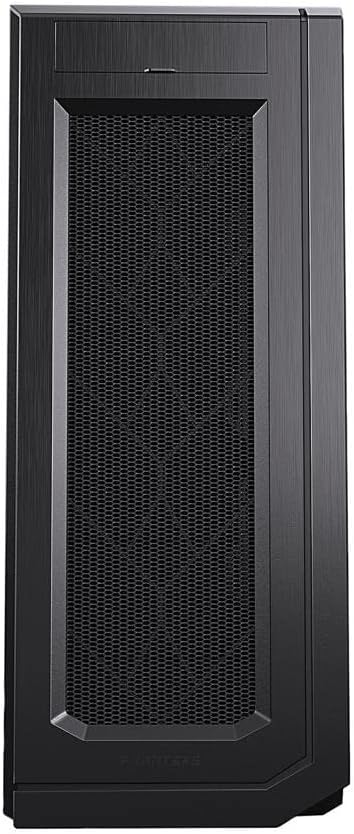
Figure 2.3: Direct front view of the Phanteks Enthoo Pro 2, highlighting the full fabric mesh panel for optimal airflow.

Figure 2.4: Internal view of the Phanteks Enthoo Pro 2 with example components installed, demonstrating the spacious layout and multiple mounting points for fans and radiators.

Figure 2.5: Empty internal view of the Phanteks Enthoo Pro 2, showing the vast space available for component installation and custom liquid cooling loops.
3. Setup
Follow these general steps for setting up your Phanteks Enthoo Pro 2 chassis:
- Unpacking: Carefully remove the chassis from its packaging. Inspect for any shipping damage.
- Accessing Interior: Remove the side panels. The Enthoo Pro 2 typically uses thumbscrews or a latch mechanism for easy access.
- Motherboard Installation: Install the necessary motherboard standoffs. Carefully place your motherboard (up to SSI-EEB size) into the chassis and secure it with screws.
- Power Supply Installation: Install your primary power supply unit (PSU) in the designated bottom mount area. For dual system configurations, refer to the specific instructions for installing a second PSU or a dual-system PSU.
- Storage Device Installation: Install your hard drives (HDDs) and solid-state drives (SSDs) into the available drive bays. The chassis supports up to 12 HDDs or 11 SSDs.
- Cooling System Installation: Install your chosen cooling solution, whether air coolers, all-in-one (AIO) liquid coolers, or custom liquid cooling loops. The case supports dual 480mm and dual 360mm radiators simultaneously.
- Graphics Card(s) Installation: Install your graphics card(s). The Enthoo Pro 2 supports dual vertical GPU mounting (requires optional riser cable).
- Cable Management: Utilize the integrated cable routes and covers to organize all power and data cables. Proper cable management improves airflow and aesthetics.
- Final Assembly: Once all components are installed and cables are managed, reattach the side panels.
4. Operating
The Phanteks Enthoo Pro 2 is designed for continuous operation once your system is built. Ensure the following for optimal performance:
- Power On: Connect your system to a power source and press the power button located on the front I/O panel.
- Airflow: The fabric mesh front panel is designed for high airflow. Ensure that intake and exhaust fans are configured correctly to maintain positive or neutral pressure within the case, preventing dust buildup and optimizing cooling.
- Front I/O Ports: Utilize the four USB 3.0 ports and audio jacks on the front panel for convenient connectivity.
5. Maintenance
Regular maintenance helps preserve the performance and appearance of your Enthoo Pro 2 chassis:
- Dust Filter Cleaning: The Enthoo Pro 2 features removable dust filters. Periodically remove and clean these filters to prevent dust accumulation inside the chassis, which can impede airflow and component cooling. Use compressed air or a soft brush.
- Exterior Cleaning: Wipe down the exterior surfaces with a soft, damp cloth. Avoid abrasive cleaners or solvents that could damage the finish.
- Internal Dust Removal: Every few months, open the side panels and use compressed air to gently remove any dust that has settled on components or internal surfaces. Ensure the system is powered off and unplugged before performing internal cleaning.
6. Troubleshooting
If you encounter issues with your Phanteks Enthoo Pro 2, consider the following common troubleshooting steps:
- System Not Powering On:
- Check all power connections, including the main power cable to the PSU and internal power cables to the motherboard and components.
- Ensure the front panel power switch cable is correctly connected to the motherboard's header.
- Poor Airflow/Overheating:
- Verify that all fans are spinning and oriented correctly (intake vs. exhaust).
- Clean all dust filters and internal components as described in the Maintenance section.
- Ensure no cables are obstructing airflow paths.
- Component Fit Issues:
- Double-check component dimensions against the case specifications (e.g., GPU length, CPU cooler height, radiator thickness).
- Ensure all standoffs are correctly installed for your motherboard size.
- Front I/O Ports Not Working:
- Verify that the USB 3.0 and audio cables from the front panel are securely connected to the corresponding headers on your motherboard.
7. Specifications
Detailed specifications for the Phanteks Enthoo Pro 2 Full Tower chassis:
| Feature | Specification |
|---|---|
| Model Name | Enthoo Pro 2 |
| Item Model Number | PH-ES620PC_BK01 |
| Brand | Phanteks |
| Case Type | Full Tower |
| Material | Fabric (front mesh) |
| Color | Black |
| Product Dimensions (LxWxH) | 22.28 x 9.49 x 22.01 inches |
| Item Weight | 26.5 pounds |
| Motherboard Compatibility | Extended ATX, SSI-EEB |
| Number of USB 3.0 Ports | 4 |
| Cooling Method | Air, Water (supports dual 480mm & dual 360mm radiators) |
| Power Supply Mounting Type | Bottom Mount (supports dual PSUs) |
8. Warranty and Support
For warranty information, technical support, or further assistance with your Phanteks Enthoo Pro 2 chassis, please visit the official Phanteks website or contact their customer support directly. Keep your proof of purchase for warranty claims.
Phanteks Official Website: www.phanteks.com
Related documentsPH-ES620PC_BK01


Ask a question about this manual
Ask about setup, troubleshooting, compatibility, parts, safety, or missing instructions. Manuals+ will review the question and use this page’s manual context to help answer it.