
1. Introduction
This manual provides detailed instructions for the installation, operation, and maintenance of your OKIN Wireless Remote Control system for electric adjustable bed frames. This system offers a reliable 2.4 GHz RF connection for controlling the head and leg elevation of your bed.
The remote control is designed as a perfect replacement for original 6-button wired hand controls from brands like OKIN and DEWERT, offering a simple and quick replacement process.
2. Product Overview
The OKIN wireless control system consists of a handheld remote control and a receiver unit. The receiver unit connects to your electric bed motor, allowing wireless operation.

Image 2.1: OKIN Wireless Remote Control and Receiver Unit. The image displays the black remote control on the left with six buttons and a black receiver unit on the right, connected by a cable with a round connector.

Image 2.2: OKIN Wireless Remote Control and Receiver connected to a motor. This image shows the remote and receiver unit positioned next to a larger black motor unit, illustrating how the components connect.
3. Setup and Installation
3.1. Connecting the Receiver
- Ensure your electric bed frame motor is unplugged from the power source before beginning installation.
- Locate the existing wired hand control connection on your bed motor.
- Disconnect the old wired hand control, if applicable.
- Connect the cable from the OKIN wireless receiver unit to the corresponding port on your bed motor. Ensure a secure connection.
- Plug your electric bed frame motor back into the power source.
3.2. Pairing the Remote Control
The remote control and receiver typically come pre-paired. If pairing is required or if the remote loses connection, follow these steps:
- Ensure the receiver unit is powered on (connected to the bed motor and the motor is plugged in).
- On the receiver unit, locate the pairing button. This is typically one of the two buttons visible on the receiver unit (refer to Image 2.1 or 2.2 for receiver appearance).
- Press and hold the pairing button on the receiver unit for approximately 3-5 seconds until an indicator light on the receiver begins to flash.
- Within 10 seconds of the receiver light flashing, press any button on the remote control.
- The indicator light on the receiver should stop flashing and remain solid, indicating successful pairing.
- Test the remote control by pressing the head and leg adjustment buttons.

Image 3.1: Excerpt from the original manual showing technical specifications and button functions. The manual indicates "Pairing (System 1)" and "Pairing (System 2)" are typically initiated via a button on the receiver unit.

Image 3.2: OKIN Wireless Remote Control and Receiver unit from a different angle. This view highlights the two buttons on the receiver unit, one of which serves as the pairing button.
4. Operating Instructions
The remote control features six buttons for adjusting your electric bed frame:

Image 4.1: Close-up view of the OKIN Wireless Remote Control, showing the six distinct buttons for bed adjustments.
- Head Up (Top Left Button): Press and hold to raise the head section of the bed.
- Head Down (Middle Left Button): Press and hold to lower the head section of the bed.
- Leg Up (Bottom Left Button): Press and hold to raise the leg section of the bed.
- Leg Down (Top Right Button): Press and hold to lower the leg section of the bed.
- Flat (Middle Right Button): Press to return both the head and leg sections to a flat position.
- Emergency Stop: The receiver unit includes an emergency stop button. In case of wireless control failure, this button allows for manual reset.
5. Maintenance
5.1. Battery Replacement
The remote control requires 2 x AAA batteries. When the remote's performance degrades or it stops responding, replace the batteries:
- Locate the battery compartment cover on the back of the remote control.
- Slide or unclip the cover to open it.
- Remove the old AAA batteries.
- Insert two new AAA batteries, ensuring correct polarity (+/-).
- Replace the battery compartment cover.
5.2. Cleaning
Wipe the remote control and receiver unit with a soft, dry cloth. Do not use liquid cleaners or abrasive materials, as these can damage the components.
6. Troubleshooting
- Remote not responding:
- Check and replace the batteries in the remote control.
- Ensure the receiver unit is properly connected to the bed motor and the motor is powered.
- Attempt to re-pair the remote control with the receiver (refer to Section 3.2).
- Bed motor not moving:
- Verify all power connections to the bed motor and receiver.
- Check if the emergency stop button on the receiver has been activated. Press it to reset if necessary.
- Ensure the remote is paired correctly.
- Intermittent operation:
- Ensure there are no obstructions between the remote and the receiver.
- Check for potential sources of 2.4 GHz interference in the vicinity.
- Replace remote batteries.
7. Specifications
| Dimensions | 132 x 44 x 16.5 mm |
| Frequency Range | 2.4 GHz |
| Battery Type | 2 x AAA |
| Operating Current | < 15 mA |
| Standby Current Consumption | < 1 µA |
| Operating Temperature | +10 to +40 °C |
| Dimensions | 119 x 50.5 x 30 mm |
| Frequency Range | 2.4 GHz |
| Input Voltage | 24 - 30 V DC |
| Operating Current | < 250 mA |
| Standby Current Consumption | < 1 mA |
| Operating Temperature | +10 to +40 °C |
| Connectivity Technology | Radio Frequency, Wireless |
| Max Range | 10 Meters |
8. Important Compatibility Information
Caveat: This wireless remote control system cannot be used with OKIMAT 2SL motor models that feature a specific plug type. Using it with incompatible models will prevent normal operation.
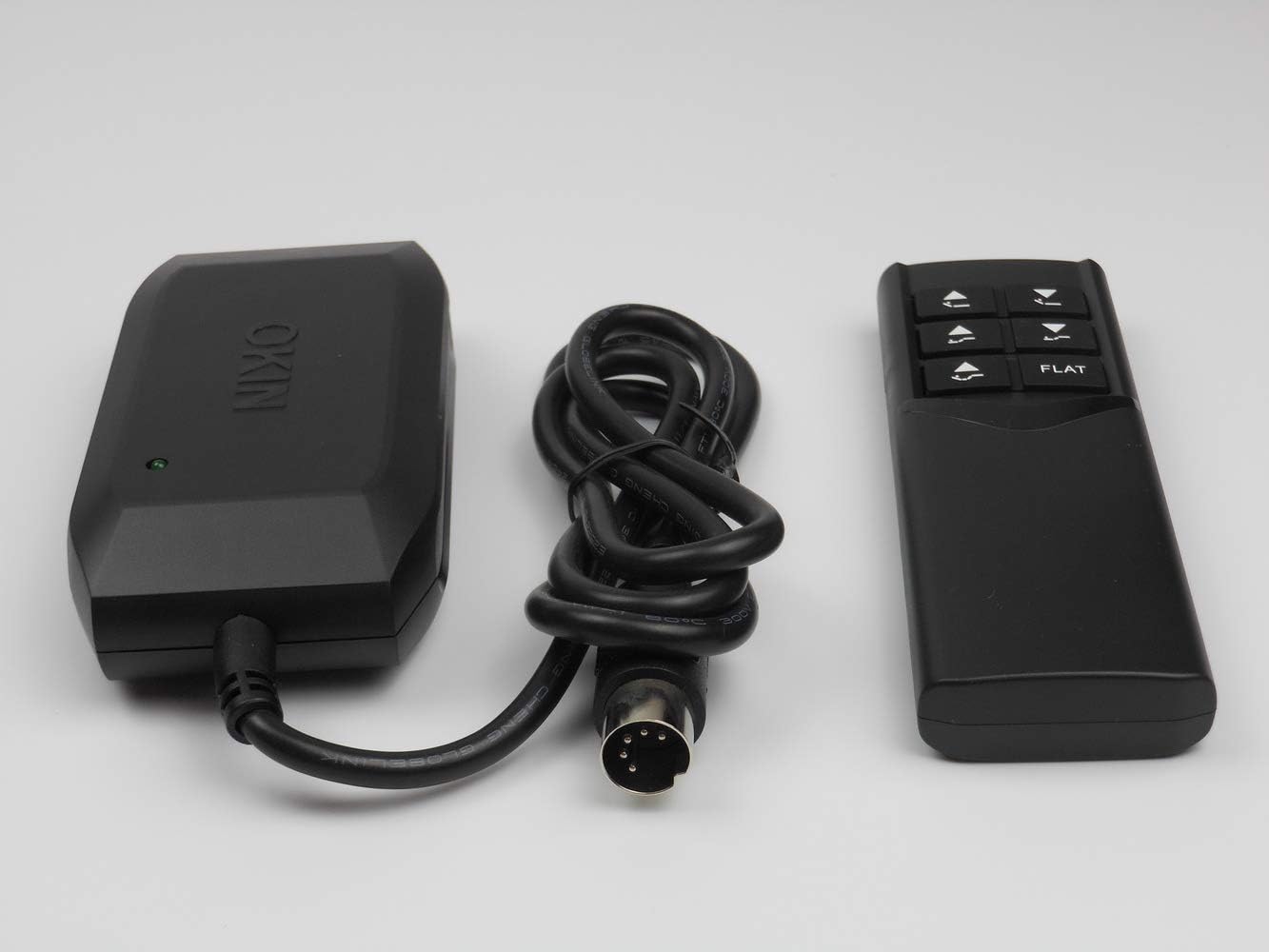
Image 8.1: Warning against using the remote with OKIMAT 2SL motors that have the depicted plug type (a round plug with a green button on top, crossed out with a red 'X').
9. Warranty and Support
Specific warranty information for this product is not provided in the available documentation. For warranty claims or technical support, please contact your retailer or the manufacturer, OKIN, directly. Ensure you have your product model number (753510672785) and proof of purchase available.


